Scoped MCP Tool Access Starts With the Task, Not the Connection
Scoped MCP tool access gives each task an exact external action set, checks it before execution, and gives blocked work a visible human handoff.
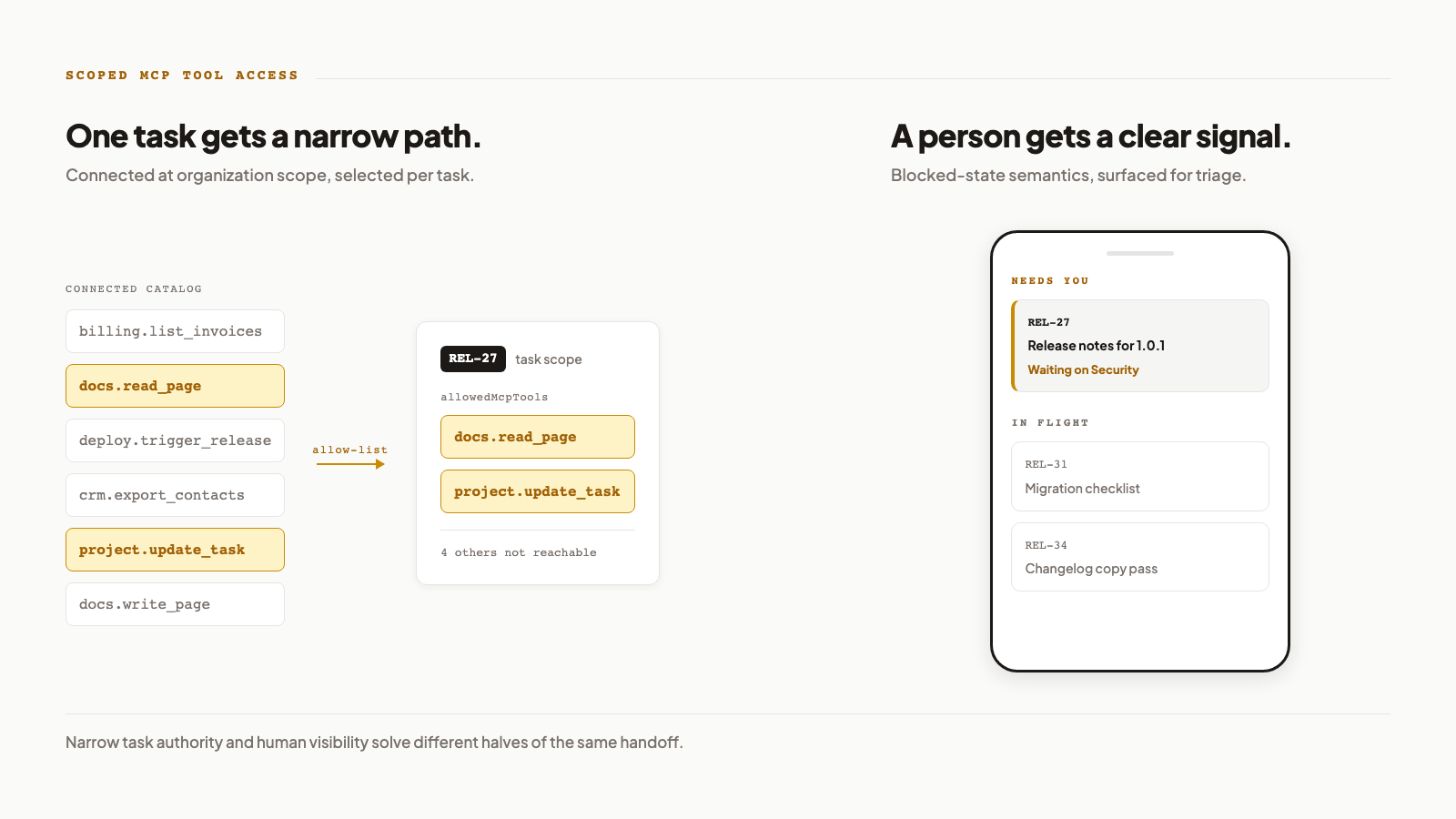
One task carries the allowed action set; blocked status carries the handoff to a person.
Scoped MCP tool access: how does it stop an AI assistant from calling every MCP tool?
Attach an explicit allow-list to the individual task. In Agiflow ChatGPT plugin v3, find_connected_tools discovers candidate actions, update_task writes an exact mcpTools replacement, get_task confirms allowedMcpTools, and task_exec rejects a server or tool outside that list. Pass [] to revoke all external access. A task-scoped session can execute its allow-list, but it cannot discover or widen its own permissions.
That is scoped MCP tool access in operational terms. The task, not the approved connection or a well-written prompt, carries the authority record.
Take REL-27, a release-notes task. It needs read_page on a documentation server and one project update. It does not need CRM records, billing actions, or deployment access. Agiflow's current MCP guide documents the discover, attach, verify, execute sequence. [6] The v3 endpoint is https://agiflow.io/api/v1/chatgpt-app/0.0.3.
| Decision snapshot | Checkable rule |
|---|---|
| Authority record | The task stores exact server IDs and tool names |
| Execution check | task_exec checks the server, then the tool, before upstream dispatch |
| Revocation | mcpTools: [] removes all external tool access |
| Task-scope restriction | The task can execute its list but cannot discover or widen it |
| Human handoff | A status with isBlockedState: true can surface in Needs You on iPhone |
1. Scoped MCP tool access is proven by refusal
OAuth, client controls, and task authority answer separate questions. The MCP Authorization specification requires tokens to be intended for the target MCP server and distinguishes invalid authorization from insufficient permissions. [1] ChatGPT developer mode lets users toggle tools and confirms write actions by default. [2] Both controls matter. Neither records what REL-27 may call. These are MCP tool permissions at the client and server boundaries, but they do not record task authority.
Agiflow checks that narrower decision inside task_exec, before it delegates to the upstream server. An unselected server returns:
External MCP server "{server}" is not enabled for this task. Enable it before calling task_exec.A tool missing from the selected server's list returns:
External MCP tool "{tool}" is not allowed for server "{serverName}" on this task.For REL-27, read_page may pass while a billing or deployment call stops inside Agiflow. This follows the fail-closed direction in OWASP's AI Agent Security Cheat Sheet, which recommends minimum tools, per-tool scope, independent validation, and explicit authorization for sensitive actions. [3]
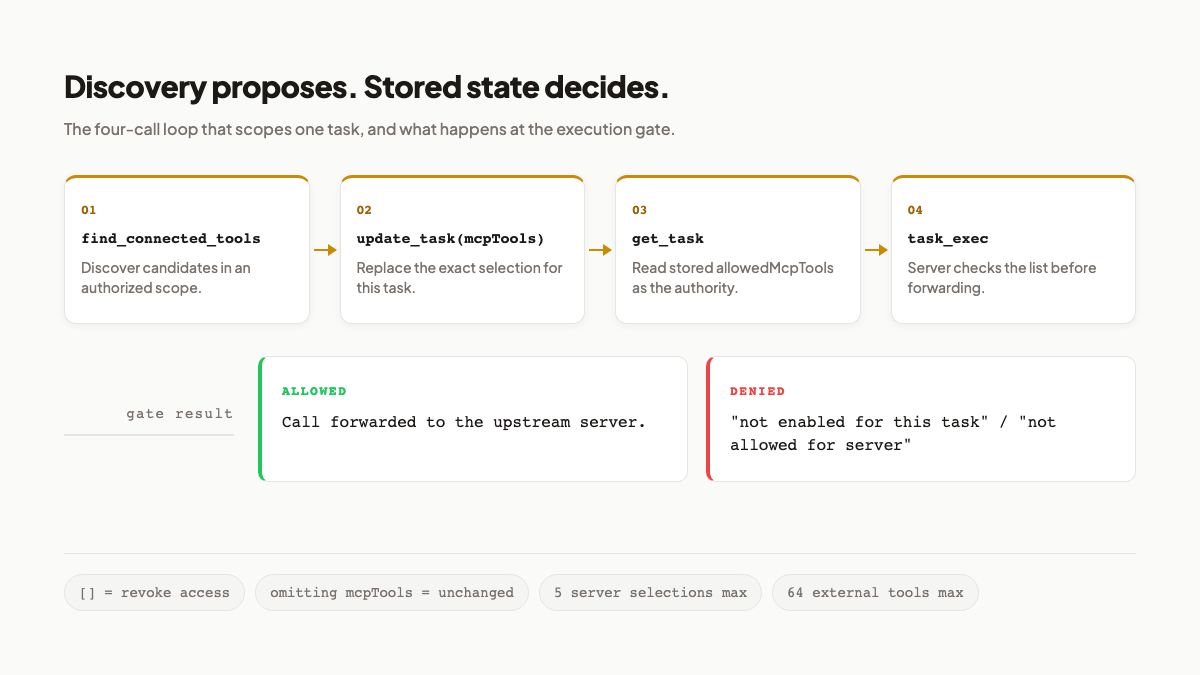
Discovery proposes the set. The stored task selection and execution gates decide what reaches the upstream server.
An allowed call can still meet another boundary. If the upstream server needs OAuth, the result carries authorizationRequired, an optional authorizationUrl, and guidance. Task selection does not replace resource authorization.
Client confirmation helps a person review a call. The task gate proves that an out-of-scope call cannot leave Agiflow through this path. That raises the harder test: can the task quietly change the record that constrains it?
2. A task-bound session cannot expand its own reach
A task-scoped session gets task_exec, not find_connected_tools. Its strict update_task schema also omits mcpTools. The session can use the list chosen for it, but it cannot browse the organisation's connected catalogue or add another tool to its own task.
The asymmetry is deliberate. Organisation, project, and work-unit scopes can discover candidate tools and write the task selection. Task scope can only execute the stored set. This control does not depend on the assistant remembering a prompt instruction.
The write semantics are precise:
- Omit
mcpToolsto preserve the current selection. - Pass an exact server and tool set to replace it.
- Pass
mcpTools: []to revoke every external tool. - Read
get_task.allowedMcpToolsto verify the stored result.
MCP security guidance recommends progressive least privilege, minimal initial scopes, and targeted elevation rather than omnibus access. [4] The exact task list is Agiflow behaviour, not a requirement of the MCP standard.
My acceptance test would be simple. Read allowedMcpTools, attempt one call that should be denied, and only then consider widening the set. If nobody tests the refusal, the team has verified configuration text rather than enforcement.
This boundary is stronger because the task cannot grant itself more reach. It also creates work for the person or wider-scope process that maintains the list.
3. The ceilings force an operating choice
One task can select at most 5 external servers and 64 external tools. Validation rejects duplicate server entries, duplicate tool names, servers that are disabled or awaiting authorization, and tools absent from the live catalogue. Discovery returns 10 matches by default and caps a page at 25.
Those figures are ceilings, not targets. REL-27 still gets two tools. If you need to restrict MCP tools per task, start with the smallest set that can complete the work.
| Control | Question it answers | Best use |
|---|---|---|
| OAuth and upstream ACLs | May this client or token reach the server or resource? | Resource authorization and upstream consent |
| ChatGPT toggles and confirmations | May this conversation use or confirm the tool? | Client-side selection and write review |
| Agiflow task allow-list | May this task call this exact server and tool? | Server-checked task authority |
| Human-only execution | Should automation perform this action at all? | Irreversible or untested work |
I would pay the setup cost for consequential or write-capable actions. Broad access may be reasonable for low-risk reads when the team accepts a wider audit surface. A stale catalogue can block legitimate work, and upstream OAuth still applies after the task gate passes. For a broader evaluation, audit an MCP integration beyond tool discovery and inspect its write verbs, state, evidence, and permission model.
Tool authority now has a bounded answer. The next problem belongs to the work record: how does a person recognise that REL-27 needs a decision?
4. Status names can change without losing their meaning
Agiflow project statuses carry behaviour flags as well as display names. For custom project statuses in ChatGPT, that keeps the team's display vocabulary separate from machine-readable behaviour. The public project-organization guide exposes those statuses through MCP with names, keys, and state flags. [8] The resolver checks a supplied value by ID, normalized key, then normalized name. In strict mode, an off-list value is rejected and the available names are returned. The assistant does not get to invent a new state because its wording sounded plausible.
Suppose a team renames Blocked to Waiting on client. The status can keep isBlockedState: true. Other flags describe started, completion, terminal, and agent-pickable behaviour, but the blocked flag is the one that matters for this handoff.
Supported legacy terms can map through those behaviours. That does not mean the resolver understands every phrase a team might create. Exact names remain the cleanest instruction, and strict rejection is better than silently putting work in the wrong state.
This is a status model, not a dependency graph. Waiting on client says the task currently needs attention. It does not identify a blocking task or prove who owes the next action.
The display name can belong to the team's vocabulary because the behaviour remains machine-readable. That same flag gives the phone something stable to look for. For an AI project management app on iPhone, this is the difference between finding blocked tasks by a label and finding them by their status behaviour.
5. The phone reads the flag, not the display name
The iPhone 1.0.0 launch and its human-authority argument established the mobile context. Agiflow for iPhone 1.0.1 narrows the Home screen around triage. Apple's listing says decisions waiting on an answer appear first, followed by work in flight, and that task and work-unit status changes can notify the user. [7]
Home has three sections: MACHINES, NEEDS YOU, and IN FLIGHT. Needs You collects tasks whose status has isBlockedState: true, sorts them newest first, and shows at most five. In Flight groups active work by project template and work unit.
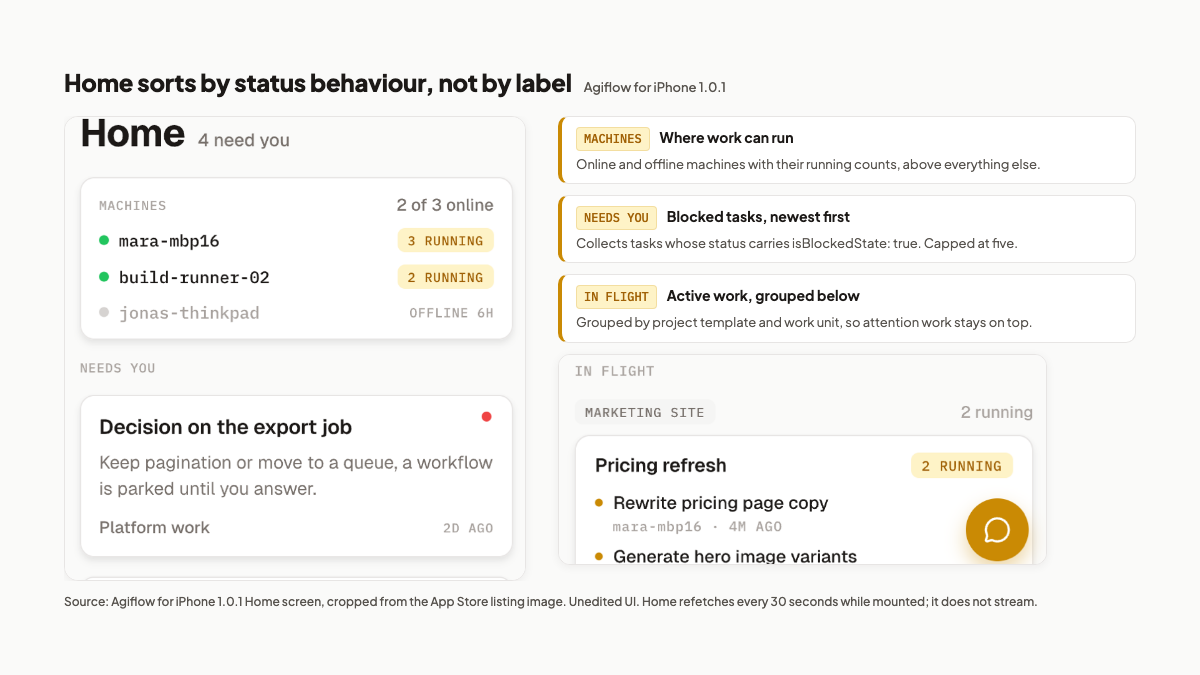
Home puts Needs You above In Flight; the list is status-driven, capped at five, and refreshed by polling.
Move REL-27 to Waiting on client. If it is among the five newest matching tasks, a subsequent Home poll puts it in Needs You even though the team changed the label. Tap the card to open task detail, then use Move to change status.
The timing deserves plain language. Home refetches every 30 seconds while mounted, and relative ages retick every 60 seconds. This is polling, not a live stream. Push is opt-in per device, and status-change messages use Moved to {statusName}. Version 1.0.1 is iPhone only.
That is enough for a small attention queue, not a command centre. Visibility helps a person intervene. It cannot prove that the permitted action produced the right result.
6. Where the model fits, and where it stops
The full REL-27 test takes four checks: verify allowedMcpTools, force one denied call, move the task to a status with blocked behaviour, and confirm a person can see and move it from the phone. Each check can fail in a way the team can observe.
This model fits technical teams that already use external MCP servers, select consequential or write-capable actions per task, and name one person to handle exceptions. It is a poor fit for solo users with no external servers, teams that need iPad or Android now, or organisations whose main requirement is enterprise portfolio and roadmap administration.
The alternatives are valid. ChatGPT tool toggles and confirmations provide client control. OAuth and upstream ACLs protect server resources. A mature project-management suite may be better for portfolio reporting and administration. Human-only execution remains the safer choice when an action is irreversible or the automation boundary has not been tested.
Agiflow's limits remain visible: 5 servers and 64 tools per task, catalogue maintenance, upstream OAuth, 30-second mobile polling, opt-in notifications, and status flags without dependency modelling. Most important, allowed access controls reachability. It does not certify result quality. The broader five layers of AI agent safety controls still apply around tools, networks, environments, monitoring, and escalation.
My recommendation is narrow. Treat scoped MCP tool access as a task-level test: give a real task the smallest permitted action set, verify the stored list, and test the denial path. Design the human handoff with equal care.
Connect Agiflow to ChatGPT and test one task's tool boundary. Prompt obedience is not evidence of enforcement. A refused out-of-scope call is.
References
- Model Context Protocol, "Authorization." https://modelcontextprotocol.io/specification/2025-06-18/basic/authorization . Specification captured 2026-08-15. Source for resource indicators, server-side token validation, and the distinction between invalid authorization and insufficient permissions.
- OpenAI, "ChatGPT Developer Mode." https://developers.openai.com/api/docs/guides/developer-mode . Captured 2026-08-15. Source for MCP tool toggles, read and write tool support, default write confirmation, and the documented risks of prompt injection, model mistakes, and malicious MCP servers.
- OWASP Cheat Sheet Series, "AI Agent Security Cheat Sheet." https://cheatsheetseries.owasp.org/cheatsheets/AI_Agent_Security_Cheat_Sheet.html . Captured 2026-08-15. Source for minimum-tool access, per-tool permissions, independent validation, explicit authorization, audit trails, and fail-closed behaviour.
- Model Context Protocol, "Security Best Practices." https://modelcontextprotocol.io/docs/tutorials/security/security_best_practices . Captured 2026-08-15. Source for progressive least privilege, targeted scope elevation, consent, and server-side authorization guidance.
- NIST, "AI RMF Core." https://airc.nist.gov/airmf-resources/airmf/5-sec-core/ . Captured 2026-08-15. Source for defining application scope, limitations, roles, and human oversight in context.
- Agiflow, "MCP 0.0.3 guide." https://agiflow.io/guides/mcp/0.0.3 . Captured 2026-08-15. First-party source for the discover, attach, verify, and execute loop and exact task tool selection.
- Apple App Store, "Agiflow: AI Project Board." https://apps.apple.com/au/app/agiflow-ai-project-board/id6775743277 . Captured 2026-08-15. Source for version 1.0.1 and its Home and status-change notification release notes.
- Agiflow, "How Your Agiflow Project Board Is Organized." https://agiflow.io/guides/project-organization . Captured 2026-08-15. First-party source for MCP project statuses, names, keys, and state flags.
More to read
Typed Decisions for AI Agent Workflows: Record Before Routing
A typed model answer is an inference result, not a workflow transition. Record it once, pin the policy that consumes it, and replay the same decision without silently asking again.
12 min readGPT-6 Astra Changes the Bottleneck: Five Controls Agents Still Need
GPT-6 Astra raises the operating stakes for computer-using agents. Use five controls to define authority, evidence, approval, and recovery beyond the model.
12 min readDeepSeek Harness vs Pi Coding Agent: Choose Where Runtime Complexity Lives
DeepSeek Harness puts policy inside a composable plugin runtime. Pi keeps the coding-agent core small. Compare the evidence, security boundaries, and operating burden before choosing.
12 min read