A ClickUp alternative for teams that want less setup and more done
Agiflow is a focused project board for small teams that want tasks, work units, files, and project context in one clear place. Connect the AI assistant your team already uses, such as ChatGPT, Claude, Cursor, or VS Code, so it can read and update real project work without buying a separate AI add-on.
Free for solo use. Team and Enterprise plans are available for hosted collaboration.

Is Agiflow a good ClickUp alternative?
Yes, if your team wants a simpler execution board and you already use an AI assistant for planning, updates, or task cleanup. Agiflow is not a full ClickUp replacement for docs, goals, whiteboards, dashboards, chat, time tracking, or advanced views. It is a better fit when your team wants a focused board that your own assistant can use without adding ClickUp Brain AI as a separate per-user purchase.
Choose Agiflow if
You want focused tasks, work units, artifacts, workflow coordination, and assistant-connected project context.
Choose ClickUp if
You want one broad workspace for tasks, docs, goals, whiteboards, dashboards, chat, time tracking, and many project views.
Why teams look for a ClickUp alternative
ClickUp is highly capable and well-liked by many teams. The same breadth that makes it useful can also create friction for small teams that want a lighter path to daily execution.
Setup can feel heavy
Review sources from 2026 consistently mention a steep learning curve and an overwhelming setup experience. ClickUp can take time to shape before a small team feels organized.
The AI bill is separate
ClickUp's work-management plans are separate from its AI plans. As of June 2026, ClickUp's official pricing page lists Brain AI at $9 per user per month and Everything AI at $28 per user per month, on top of the workspace plan.
More surface area means more decisions
ClickUp includes docs, goals, whiteboards, dashboards, chat, time tracking, automations, and multiple views. That breadth is useful for organizations that want a work operating system. It is extra decision load for teams that mostly need a shared execution board.
The difference in one line
ClickUp is an all-in-one work platform with a paid, credit-metered AI suite. Agiflow is a focused project board that the AI assistant you already use can read and update, with no Agiflow AI credits to meter.
ClickUp vs Agiflow at a glance
This comparison is intentionally narrow. ClickUp is broader. Agiflow is more focused. The right choice depends on whether your team wants a full work platform or a project board designed for human and AI-assisted execution.
| Need | ClickUp | Agiflow |
|---|---|---|
| Best fit | Teams that want a broad work platform across tasks, docs, goals, whiteboards, dashboards, chat, views, automations, and reporting | Small teams that want a focused project board their own AI assistant can use |
| Daily project execution | Tasks, spaces, folders, lists, many views, assignments, priorities, comments, and automations | Projects, work units, tasks, statuses, templates, comments, and kanban-style execution |
| Setup posture | Highly configurable, which can take time to shape | Useful defaults, project templates, and fallback status columns so blank projects still render a usable board |
| Docs, whiteboards, and goals | Native docs, whiteboards, goals, dashboards, and chat | Not offered. Agiflow centers on execution boards and project context |
| Views | Broad view set, including list, board, Gantt, calendar, timeline, table, workload, mind map, and more | Kanban-style board workflow, with work units and task statuses |
| Time tracking | Native time tracking on paid plans | Not offered |
| AI model | ClickUp Brain AI is a paid add-on. Brain AI is listed at $9 per user per month and Everything AI at $28 per user per month as of June 2026 | Bring your own assistant. Agiflow does not run or meter AI agents |
| AI assistant connection | Official MCP server available on all plans, with rate limits unless Everything AI is purchased | Assistant access is the core product model, with tools, on-demand skills, and widgets for clients such as ChatGPT, Claude Desktop, VS Code, and Cursor |
| Files and artifacts | Attachments and files inside the broader ClickUp workspace | Project artifacts with searchable metadata, labels, content type and status filters, linked to tasks or work units |
| Secrets and environments | Not positioned as a native project-board capability | Per-environment vault entries with AES encryption, per-entry IVs, masked responses, and role-aware access |
| Workflow coordination | In-product automations and integrations | Workflow locks scoped to project, work unit, and task, usable from CI |
| CLI | API available for custom integrations | agiflow-cli for task management, batch creation, and workflow locks |
| Pricing posture | Free plan, Unlimited at $7 per user per month annual, Business at $12 per user per month annual, Enterprise custom, as of June 2026. AI plans are separate | Free for solo use. Team and Enterprise plans for hosted collaboration |
Bottom line: Choose Agiflow if you want the smallest useful project board that your own assistant can operate. Keep ClickUp if you want one tool to cover docs, goals, whiteboards, dashboards, chat, time tracking, and many views.
Bring the assistant you already use
This is not a "ClickUp has no AI connection" argument. ClickUp has an official MCP server and supports popular clients. The difference is the buying model and product center of gravity.
ClickUp adds AI as a paid suite
ClickUp Brain AI is sold separately from the main workspace plans. The official pricing page lists Brain AI at $9 per user per month and Everything AI at $28 per user per month, with AI Super Credits used for agentic and automation features.
ClickUp MCP is real, but rate-limited without Everything AI
ClickUp's developer docs say its MCP server is available on all plans. Without the Everything AI add-on, Free Forever workspaces have 50 calls per 24 hours and Unlimited or higher workspaces have 300 calls per 24 hours. With Everything AI, MCP rate limits follow ClickUp's public API limits.
Agiflow is built around your assistant
Agiflow does not host AI agents or sell AI credits. It gives external assistants structured access to projects, tasks, artifacts, vault entries, workflow locks, skills, and widgets. The assistant remains the tool your team already chose.
A project board your team can understand on day one
Small teams do not always need a work operating system. They need a board that shows what matters, what is blocked, what is next, and what the assistant can help update.
Start from a blank board or a template
Agiflow supports blank projects and built-in project templates. Blank projects still resolve usable status columns through a fallback system, so the first screen is not an empty configuration chore.
Break work into work units and tasks
Use projects, work units, and task statuses to keep execution organized without adding goals, portfolios, dashboards, or multiple planning layers you do not need.
Keep context with the work
Files, labels, environment context, vault entries, and workflow state can live beside the task instead of across scattered notes and drive folders.
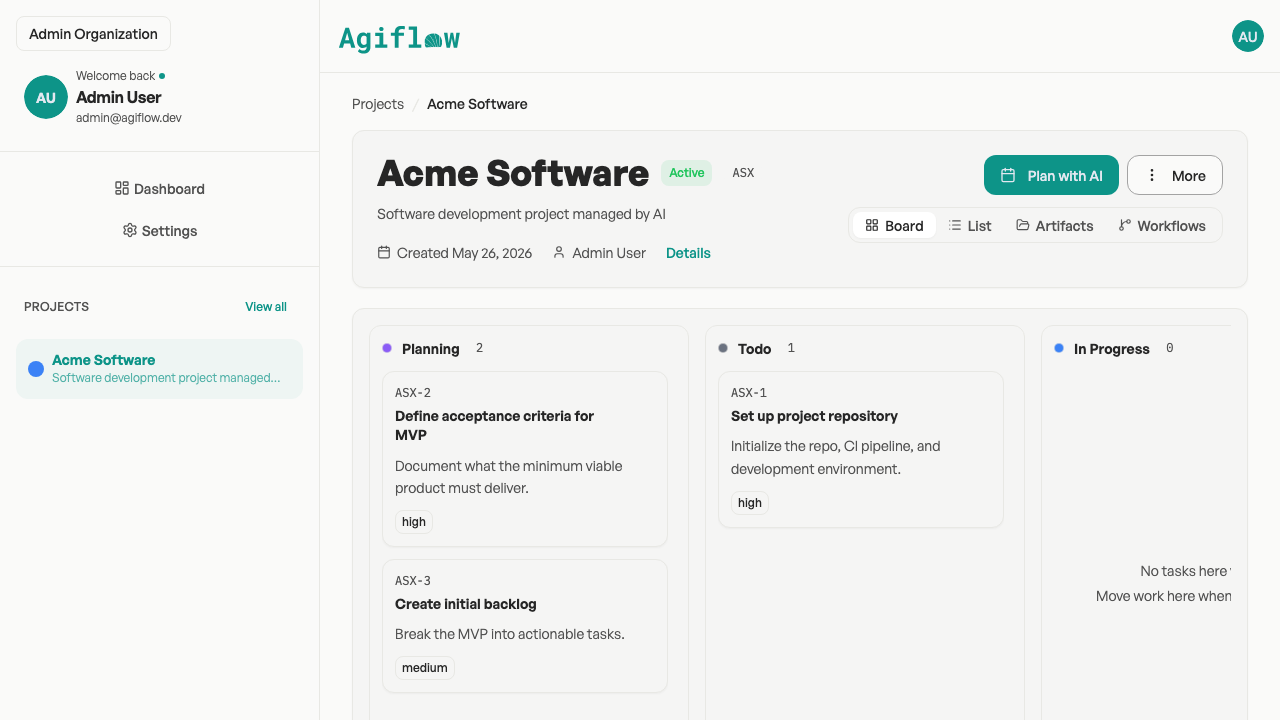
Agiflow's project board groups tasks into work units across kanban status columns.
Give your assistant the project context it needs
When an assistant helps with project work, it needs more than a task title. Agiflow keeps the working context attached to the project so updates, files, and automation state stay close to the task.
Searchable project artifacts
Agiflow stores project artifacts with searchable and filterable metadata, including name, labels, content type, and status. Artifacts can be linked to tasks or work units.
Environment vaults
Per-environment vault entries are AES-encrypted, masked in responses, and protected by role-aware access. This is useful when project work depends on deployment or environment-specific context.
Workflow locks
Workflow locks are scoped to project, work unit, and task combinations so automations and CI workflows can avoid duplicate runs.
CLI access
agiflow-cli supports task management, batch creation, and workflow locks for teams that manage project work from scripts or CI.
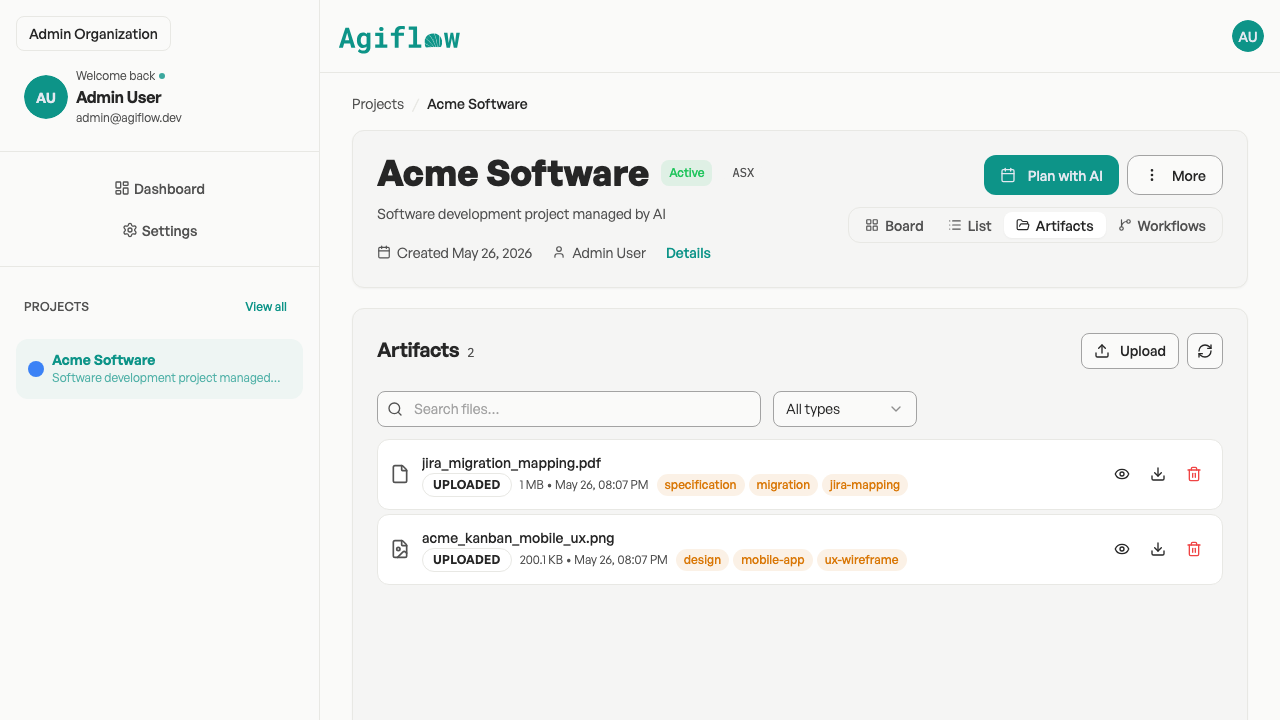
Searchable, filterable project artifacts linked to tasks and work units.
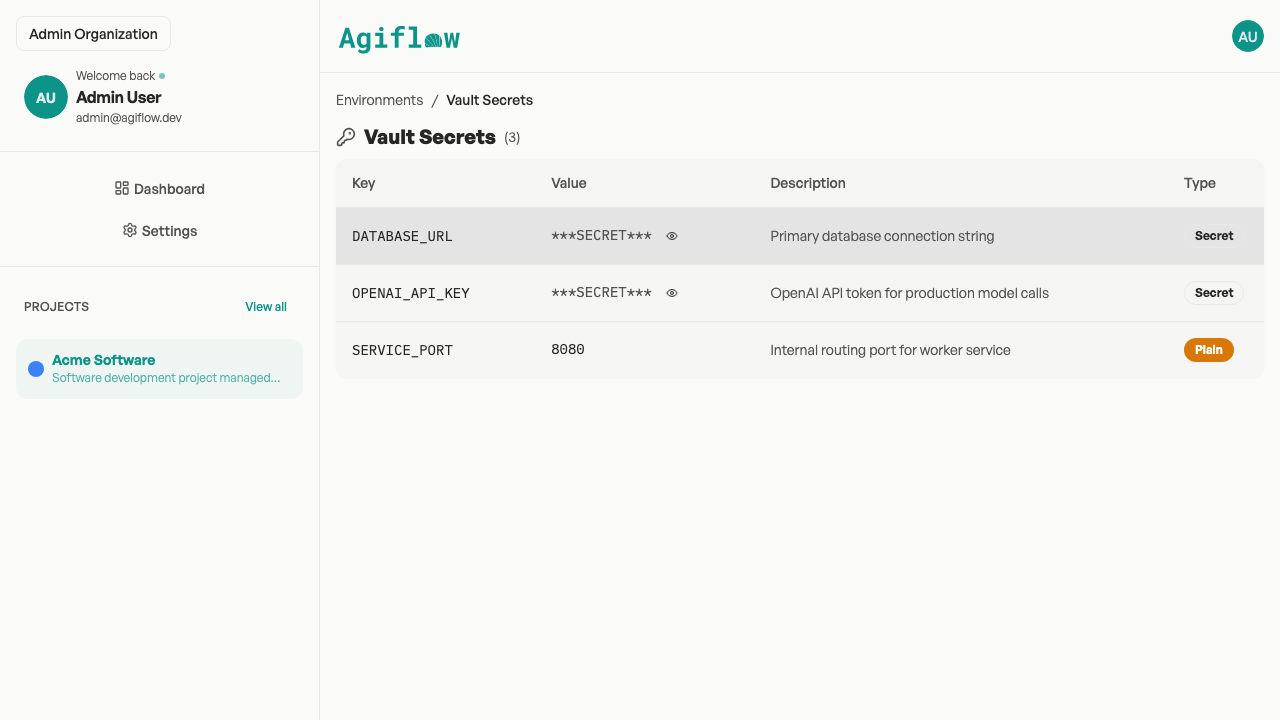
Per-environment vault entries with values masked in responses.
When ClickUp is the better choice
ClickUp is the stronger choice when your team needs breadth more than focus.
- A single workspace for docs, whiteboards, goals, dashboards, chat, time tracking, automations, and project views.
- Larger teams that want a highly configurable operating system for many departments.
- Teams that want ClickUp's own AI suite inside the work platform.
- Organizations that need mature enterprise governance, SAML SSO, SCIM provisioning, audit logs, high automation limits, managed services, or data residency.
- Teams that value ClickUp's large ecosystem and broad integration surface.
Agiflow is not a ClickUp clone. It is a focused execution board for teams that would rather execute than configure a broad workspace, especially when ChatGPT, Claude, Cursor, or VS Code is already part of the working rhythm.
Pricing and AI ownership
ClickUp's base work-management plans and AI plans are separate. The safe comparison is ownership: ClickUp sells a vendor AI layer, while Agiflow connects the assistant your team already uses.
| Pricing or ownership question | ClickUp | Agiflow |
|---|---|---|
| Is there a free plan? | Yes. Free Forever includes unlimited tasks, collaborative docs, kanban boards, calendar view, and 60MB storage | Yes. Free for solo use |
| What are the paid work-management plans? | Unlimited is $7 per user per month annual and Business is $12 per user per month annual as of June 2026 | Team and Enterprise plans are available for hosted collaboration |
| Is AI included in the base plan? | ClickUp lists AI as separate pricing. Brain AI is $9 per user per month and Everything AI is $28 per user per month | Agiflow does not sell or meter hosted AI agents |
| How does assistant access work? | Official MCP server on all plans, with rate limits unless Everything AI is purchased | External assistants connect to Agiflow as a core product path |
| What should buyers verify? | Current ClickUp plan limits, AI add-on requirements, and MCP rate limits | Current Agiflow team pricing and included collaboration limits |
Use Agiflow solo for free, then choose hosted collaboration when your team needs it.
Explore Agiflow
Want to see how Agiflow fits your current workflow? Start with the assistant integrations, then use a template to turn a project into a board.
ClickUp alternative FAQs
Is Agiflow a full ClickUp replacement?
No. Agiflow can replace ClickUp only when your team mainly needs projects, work units, tasks, statuses, project artifacts, workflow coordination, CLI access, and AI-assisted project updates. ClickUp is much broader, with docs, goals, whiteboards, dashboards, chat, time tracking, automations, and many views.
Who should choose Agiflow over ClickUp?
Choose Agiflow if your team wants a focused project board, useful defaults, and a direct way for ChatGPT, Claude, Cursor, or VS Code to work with live project context. It is best for small teams that would rather execute than configure a broad workspace.
Does ClickUp's AI cost extra?
Yes. As of June 2026, ClickUp's official pricing page lists Brain AI at $9 per user per month and Everything AI at $28 per user per month. Those are separate from ClickUp's work-management plans.
Does ClickUp have an MCP server too?
Yes. ClickUp has an official MCP server available on all plans. The difference is the model around it: ClickUp's MCP has plan and AI-add-on-based rate limits, while Agiflow makes assistant-connected project work the core product path.
Why do teams find ClickUp overwhelming?
ClickUp is broad and highly configurable. Current review sources mention steep learning curve, heavy setup, and feature overwhelm, especially for new users and small teams. That does not mean ClickUp is bad. It means some teams need a narrower tool.
What does Agiflow not have compared with ClickUp?
Agiflow does not offer native docs, goals, whiteboards, dashboards, chat, Gantt or timeline views, native time tracking, or ClickUp-style all-in-one breadth.
Can ChatGPT or Claude update my Agiflow board?
Yes. Agiflow gives external assistants structured access to project data, including projects, tasks, work units, artifacts, and workflow context, with scoped authorization and interactive widgets.
Does Agiflow run AI agents for me?
No. Agiflow is the project board. Your own AI assistant does the work by using the access you grant. Agiflow does not host AI agents or meter AI credits.
Is Agiflow free?
Agiflow is free for solo use. Team and Enterprise plans are available for hosted collaboration.
Give your team a focused board your AI assistant can use
If ClickUp feels bigger than the way your team actually works, start with Agiflow. Keep projects, tasks, files, and workflow context in one focused board, then let the assistant you already use help keep it current.
Free for solo use. No Agiflow AI credits to buy.