A Discourse alternative for AI-assisted project work
A Discourse alternative depends on the job: Discourse is built for communities and knowledge through conversation. Agiflow is a project board where supported assistants such as ChatGPT, Claude, Cursor, and Codex can create or update work within the access you approve. Choose Agiflow when the outcome is a current project board, not a public forum.
Free plan available. Agiflow uses the AI assistant you already have.
Short answer: what is the best Discourse alternative for AI-assisted project work?
Agiflow is a good Discourse alternative only when your main job is AI-assisted project work. Discourse is a community platform for discussion, moderation, and knowledge through conversation. Agiflow is a project board that supported external AI assistants can read and update within the access you approve.
If you need public or private member discussion, searchable Q&A, self-hosting, themes, plugins, or community moderation, choose Discourse or another community platform. If you need project tasks and progress to remain visible after an AI conversation ends, Agiflow is the more relevant fit.
Bottom line: keep Discourse for community conversation. Use Agiflow for project work. Use both when the conversation and the work need different homes.
Sources: What is Agiflow, AI project board, discourse.org, Discourse features.
Discourse vs Agiflow at a glance
Choose by decision point rather than by a feature count. Discourse details are first-party published claims checked on 15 August 2026.
| Decision point | Discourse | Agiflow |
|---|---|---|
| Core category | Community and discussion platform. | AI-assisted project board. |
| Best for | Public or private communities, persistent Q&A, moderation, member knowledge. | Solo builders and small teams turning AI-assisted plans into durable project work. |
| Durable record | Topics, replies, chat, and searchable community conversation. | Projects, tasks, statuses, comments, files, and board progress. |
| AI model | Built-in community AI features and provider options are published by Discourse. | Supported external assistants work with project data. Agiflow does not run its own AI. |
| Access model | Community roles, trust systems, administration, and integrations. | User-approved organization, project, work-unit, or task scope for assistant access. |
| Community moderation | A core product strength. | Not a community moderation product. |
| Themes, plugins, self-hosting | Published strengths, including GPL v2 self-hosting. | Not offered as a self-hosted open-source community app. |
| Mobile access | Mobile layouts and apps are published. | Board updates are available on web and mobile. |
| Pricing model | Hosted community plans plus an open-source self-hosting option. | Free and per-seat Team project-board plans, with bounded remote-run usage. |
| Better choice when | Member conversation is the work. | The assistant's plan needs to become trackable project work. |
Bottom line: Discourse is the stronger fit for community operations. Agiflow is the focused fit when supported AI assistants need a persistent project board. This is a category choice, not a claim that one product is universally better.
Choose the durable record your team needs
The useful question is not, “Which tool has more features?” It is, “What must still be clear next week?”
Use Discourse for community conversation
Choose Discourse when the durable record should be topics, replies, member questions, moderation history, and searchable knowledge created through conversation. Its published product is designed around community participation, administration, customization, and ownership. See the Discourse homepage, features, open-source, and AI pages.
Use Agiflow for AI-assisted project work
Choose Agiflow when the durable record should be a project with tasks, statuses, comments, files, and visible progress. A supported assistant can work with that board within the access you approve, so the plan does not have to remain trapped in one chat thread. See what Agiflow is, how the Agiflow AI project board works, and assistant access and project security.
How the Agiflow workflow works
Agiflow gives a supported external AI assistant approved access to project data, then keeps the resulting work visible on the board. The assistant remains the conversational interface. Agiflow supplies the durable project state.
1. Connect a supported assistant
Connect a supported tool such as ChatGPT, Claude, Cursor, or Codex. Client coverage can differ, so check the current integrations rather than assuming identical behavior everywhere.
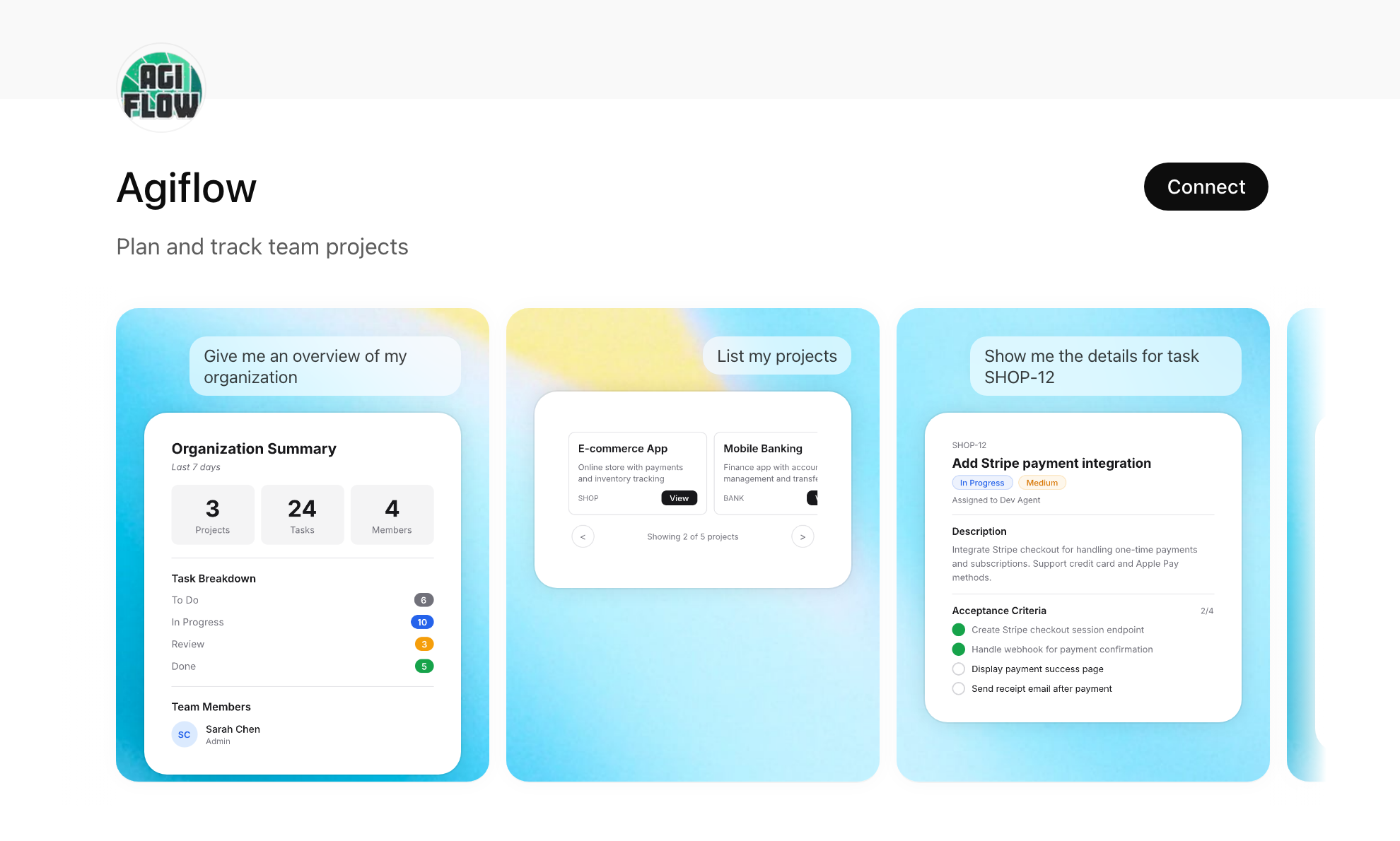
Agiflow’s listing offers a Connect action and shows the kind of project data an assistant can request. 2. Approve its scope
Choose the organization, project, work unit, or task the assistant can reach. Agiflow’s security documentation describes explicit authorization and project access checks.
3. Keep work visible on the board
Ask the assistant to create tasks, check progress, or update a plan. The team can return to the web or mobile board and see the current projects, statuses, comments, files, and progress.
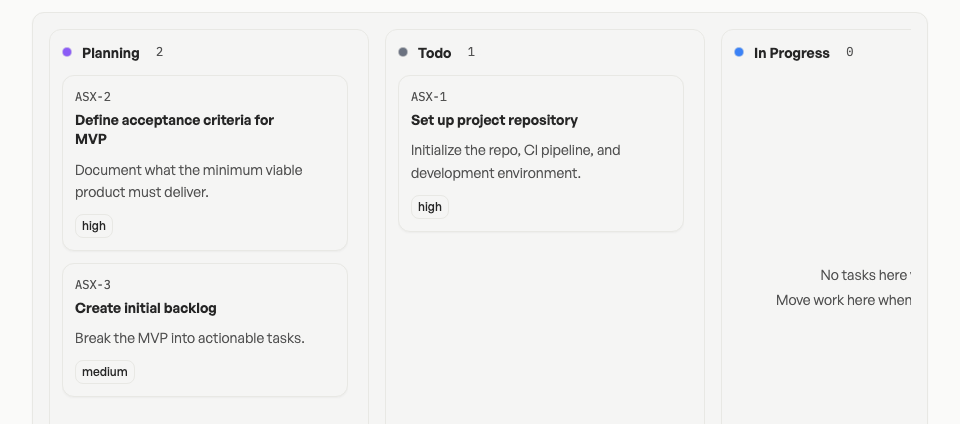
Tasks keep an ID, a status lane, and a priority on the board.
Agiflow does not run its own AI. Your external assistant does the talking and acts only within the access you grant.
Who each product is best for
Discourse is best for
- Public or private communities where discussion and member knowledge are the main output.
- Support, product-feedback, developer, technical, or interest-based communities that need persistent topics and replies.
- Organizations that need moderation, trust systems, themes, plugins, API access, data control, or GPL v2 self-hosting.
- Teams prepared to run community operations and, where needed, customize the platform.
Agiflow is best for
- Solo builders and small teams that plan work with a supported AI assistant.
- Marketing managers, freelancers, business owners, sales teams, team leads, and developers who need one visible project board between conversations.
- Teams that want tasks, statuses, comments, files, and progress to stay attached to the work.
- Teams that require explicit assistant authorization and scoped project access.
Agiflow is not best for
- Public forums, member discovery, searchable public Q&A, or community moderation.
- Buyers who require a GPL-licensed, self-hosted community application.
- Community migrations from Discourse, Khoros, Vanilla, Salesforce, or similar systems.
- Organizations seeking Discourse's themes, plugins, trust systems, community analytics, or community-scale hosting.
- Teams expecting Agiflow to provide an autonomous hosted AI without an external assistant.
What Agiflow replaces, and what it does not
Agiflow can replace the manual handoff
For the qualified workflow, Agiflow can replace:
- Copying a plan from an AI conversation into a separate task board by hand.
- A lightweight board that the team's supported assistant cannot read or update.
- A chat thread or document used as the temporary source of truth for project tasks.
These are workflow-fit recommendations, not measured migration outcomes.
Agiflow does not replace a community platform
Agiflow does not replace:
- Discourse topics, replies, chat, private messages, or member-generated knowledge.
- Community moderation, trust levels, badges, forum administration, or discovery.
- Themes, plugins, self-hosting, GPL licensing, migration services, or community hosting.
- A public support hub where members and search engines can find earlier conversations.
Bottom line: Agiflow can replace the task handoff after a conversation. It does not replace the community where that conversation happened.
Pricing fit for a small team
As checked on 15 August 2026, Discourse and Agiflow price different jobs. Discourse’s hosted plans cover community capacity, administration, customization, and support. Agiflow’s plans cover project-board seats, assistant connections, and bounded remote-run usage.
| Published offer | Price checked 15 August 2026 | Fit and important qualifier |
|---|---|---|
| Discourse Free | Free hosted plan shown | Community hosting with published capacity and staff limits. Separate from self-hosting the open-source software. |
| Discourse Pro | $100 per month | Hosted community features, including unlimited members and chat, with published staff and plugin limits. |
| Discourse Business | $500 per month | Hosted community plan with advanced reporting, automation, SSO, support, and published limits. |
| Discourse Enterprise | Custom | Contract terms and current guarantees must be confirmed with Discourse. |
| Agiflow Free | $0 forever | 2 seats, 3 projects, 2 API keys, 3 assistant connections, and 30 remote-run minutes per month, as published. |
| Agiflow Team monthly | $9 per seat per month | Unlimited seats, projects, API keys, and assistant connections, plus published usage limits. |
| Agiflow Team annual | $7 per seat per month, billed annually | $84 per seat per year, plus published usage limits. |
Agiflow publishes extra remote runs at $0.09 per hour through explicit credits, and says work stops at the balance floor instead of silently exceeding the configured balance.
Pricing caution: Agiflow is not universally cheaper. A forum hosting plan and a seat-based project board do not buy the same outcome. Discourse also publishes an open-source self-hosting option whose total cost depends on infrastructure and operations. Check Agiflow pricing and plan limits and Discourse pricing for current figures.
Should you use Agiflow alongside Discourse?
Use Discourse and Agiflow together when community conversation and internal project work both matter. Discourse can remain the home for member discussion, support questions, and shared knowledge. Agiflow can hold the projects and tasks that your team plans with a supported AI assistant.
A practical split looks like this:
- A customer or community conversation happens in Discourse.
- A team member decides that follow-up work belongs on an internal project board.
- The team or its supported assistant creates and updates that work in Agiflow.
- Discourse remains the community record. Agiflow becomes the project-work record.
No native Discourse-to-Agiflow connector was verified. This is a workflow recommendation, not an automated integration.
Other alternatives to consider
Choose the alternative category before choosing a vendor.
| If your main need is | Consider | Why |
|---|---|---|
| A community platform or forum | Discourse, Circle, Bettermode, Khoros, Vanilla, Reddit, or another researched community option | These products are closer to the community job. This page makes no unverified feature or price claims about them. |
| Real-time group chat | Discord or Slack | Chat-first collaboration is a different requirement from a forum or project board. Current product details need separate research. |
| Conventional project management | Jira, Trello, Asana, ClickUp, Monday, Linear, or Notion | These are adjacent board and work-management options. Their current capabilities are outside this page’s research scope. |
| An AI-readable project board | Agiflow | This is the qualified use case supported by Agiflow's current product pages and architecture. |
| No new system | AI chat, documents, or spreadsheets | This can work for temporary planning, but it leaves the team responsible for moving and maintaining project state. This is practical workflow inference, not a measured claim. |
Limitations and evidence gaps
- No independent benchmark or customer study comparing Agiflow with Discourse was found.
- No verified migration result from Discourse to Agiflow exists in the research.
- No native Discourse integration was verified.
- Agiflow testimonials were not approved as independent proof for this page.
- Discourse capabilities and plan details recorded here are first-party published claims unless explicitly labeled otherwise.
- Feature absence was not inferred from silence. Where the reviewed Discourse pages did not establish an Agiflow-like project workflow, this page describes it as outside the reviewed core job.
- Pricing can change. Both first-party pricing pages should be checked before relying on the figures above.
- No search-demand data supported this page during research. It is an editorial, category-boundary comparison, not a demand-backed forecast.
Frequently asked questions
Is Discourse a project-management tool or a community platform?
Discourse is primarily a community and discussion platform. Its published product centers on topics, replies, moderation, chat, searchable conversation, themes, plugins, APIs, and community ownership. It can support team discussion, but the reviewed pages do not position an external-assistant project board as its core job.
Can ChatGPT or Claude update a persistent project board without copying tasks out of chat?
Supported external assistants can create or update project work in Agiflow within the scope a user approves. Agiflow documents projects, tasks, statuses, comments, files, and progress that remain visible on the board between conversations. Current client support should be checked before promising an identical workflow in every assistant.
Should a team use Agiflow alongside Discourse instead of replacing it?
Yes, when the team needs both community conversation and internal project work. Keep Discourse as the community record and use Agiflow for project work planned with a supported AI assistant. This is a workflow recommendation, not a claim of a native integration.
How do Discourse hosted plans compare with Agiflow for a small team?
They use different pricing models for different outcomes. On 15 August 2026, Discourse listed hosted Free, $100 per month Pro, $500 per month Business, and custom Enterprise plans. Agiflow listed a $0 Free plan and a Team plan at $9 per seat per month or $7 per seat per month billed annually. Compare community hosting requirements with project-board seats and usage, not the headline prices alone.
What does Agiflow not replace when a team is moving away from a community platform?
Agiflow does not replace public discussion, searchable member Q&A, community moderation, themes, plugins, self-hosting, forum migration services, or member discovery. If those are requirements, keep Discourse or evaluate another community platform.
Keep comparing
Related Agiflow pages for teams deciding where project work should live.
Move project work out of the chat thread
Use Agiflow when the conversation should end with a project board your team and supported assistant can keep current.
Free plan available. Bring a supported AI assistant. Approve the scope it can reach.
How this comparison was prepared
This page compares the jobs each product publishes, not a raw count of features. Discourse claims were checked against its homepage, features, pricing, AI, open-source, and migration pages. Agiflow claims were checked against its public product, AI project board, pricing, and security pages.
Pricing and capabilities were checked on 15 August 2026. First-party product statements are treated as published claims. Practical recommendations are labeled as inference. Unsupported superiority, migration, integration, and customer-outcome claims were excluded.