A simpler Monday.com alternative for teams that bring their own AI
Agiflow is a focused project board for freelancers and small teams. Start free solo, add teammates at a flat $9 per seat, and let ChatGPT, Claude, Cursor, or VS Code work with your live board without buying into a metered vendor AI layer.
Free for solo use. No credit card required. No forced 3-seat minimum.

Is Agiflow a good Monday.com alternative?
Yes, if you want a lighter board for real project work and your own AI assistant. Agiflow is not a full Monday.com Work Management replacement for teams that need deep automations, dashboards, timelines, Gantt, or a multi-product suite. It is a better fit when a small team wants a simple board, predictable per-seat pricing, and AI assistance through the tools they already use.
- Choose Agiflow when you want a focused board that your AI assistant can read and update.
- Choose Agiflow when Monday’s 3-seat paid minimum makes a one or two person team pay for seats it does not need.
- Choose Agiflow when you do not want Monday AI credits layered on top of seat pricing.
- Stay with Monday.com when broad no-code automation, dashboards, Timeline, Gantt, CRM, Service, Dev, or enterprise governance are required.
Why small teams look for a Monday alternative
Monday.com is powerful, and that is the point. Many small teams do not need a full Work OS before they can plan work, assign tasks, and keep projects moving. They need less setup, less pricing complexity, and a board their AI assistant can actually help operate.
The $9 headline has a higher floor
Monday Basic is listed at $9 per seat on annual billing, but paid plans require a 3-seat minimum. For a solo operator or two-person team, that changes the real starting cost. Agiflow starts free for solo use, then adds teammates at $9 per seat with no forced 3-seat minimum.
Useful Monday features move up the tiers
Monday’s Standard and Pro plans unlock the capabilities many teams expect, including automations, integrations, Timeline, Gantt, advanced views, and larger automation limits. Agiflow does not try to match that breadth. It focuses on the core board, project context, and AI-assistant workflow.
Monday AI now has a seats-plus-credits layer
Monday’s AI portfolio uses seats plus credits for several AI capabilities, including agents, Vibe, AI workflows, AI Notetaker, and AI blocks. Monday Sidekick is part of the AI portfolio, but current support docs say Sidekick messages and image generation do not consume credits yet and will be monetized in the future. Agiflow does not run or host AI agents. It gives your existing assistant structured access to your project board, so there is no Agiflow AI credit meter to manage.
The difference in one line
Monday.com is a broad AI Work Platform with its own assistants and credit meter. Agiflow is a lean project board that lets you bring your own AI assistant, starting free for solo use.
Monday.com vs Agiflow at a glance
This comparison is intentionally narrow. Monday.com wins on breadth. Agiflow wins when a small team wants a focused board, predictable team pricing, and bring-your-own AI assistance. Monday details captured from public sources on 2026-06-14.
| Need | Monday.com | Agiflow |
|---|---|---|
| Best fit | Cross-functional teams that want a broad AI Work Platform with automations, dashboards, multiple products, and enterprise controls | Freelancers and small teams that want a focused project board their existing AI assistant can use |
| Starting point | Free up to 2 seats, then paid plans with a 3-seat minimum | Free for solo use, then $9 per seat with no forced 3-seat minimum |
| $9 plan | Basic, annual price, no automations, no integrations, no Timeline or Gantt, Basic AI credits | Team plan, every feature on, unlimited seats, projects, API keys, and AI assistant connections |
| AI model | Monday Sidekick plus metered AI capabilities such as Agents, Vibe, AI workflows, AI Notetaker, and AI blocks. Current support docs say Sidekick messages and image generation do not consume credits yet | Bring your own assistant; Agiflow provides board access and widgets but does not run or host AI agents |
| MCP access | Official hosted Monday MCP server available across plans | MCP tools plus on-demand skills and interactive widgets for scoped project work |
| Board style | Strong visual boards with many view options | Kanban-first board with projects, work units, tasks, statuses, and templates |
| Automations | Strong no-code automations and integrations, with tier-based caps | Not a no-code automation suite. Workflow locks and CLI support technical coordination |
| Dashboards and reporting | Strong, especially for larger teams and higher tiers | Not the focus |
| Timeline, Gantt, Calendar, Table | Strong view breadth, mostly beyond Basic | Kanban-focused |
| Templates | 200+ templates | Built-in marketing, development, and sales templates, plus org-owned templates |
| Artifacts and files | Attachments and integrations | Project artifacts with searchable, filterable metadata linked to tasks and work units |
| Secrets and environments | Not native project-board capability | Per-environment vault with encrypted, masked secrets |
| CLI and CI coordination | API and integration driven | agiflow-cli plus workflow locks scoped to project, work unit, and task |
| Enterprise governance | Strong Enterprise capabilities | Lighter team workspace controls, not an enterprise Work OS |
Bottom line: Choose Agiflow if you want a focused board that humans and your own AI assistants coordinate on. Keep Monday.com if you need its automations, dashboards, broad view types, and enterprise governance. Confirm current plan limits and credit terms on monday.com.
The honest pricing difference is the floor and the AI meter
Monday.com and Agiflow can both show a $9 per-seat headline. The difference is what the plan includes, how many seats you must buy, and whether AI usage is metered by the project-board vendor. Monday details captured from public sources on 2026-06-14.
| Pricing question | Monday.com | Agiflow |
|---|---|---|
| Free plan | Free up to 2 seats with limited boards and docs | Free forever for solo use |
| Paid floor | Paid plans require a 3-seat minimum | No forced seat minimum |
| $9 headline | Basic plan, annual price | Team plan monthly |
| Annual price | Basic $9 per seat per month, billed annually | $7 per seat per month, billed annually |
| Monthly price | Basic $12 per seat per month, billed monthly | $9 per seat per month |
| What $9 buys | Basic board features, no automations, no integrations, no Timeline or Gantt | Every Agiflow feature, unlimited seats, projects, API keys, and AI assistant connections |
| AI pricing | Monday AI credits by plan, with a seats-plus-credits model | Bring your own assistant. No Agiflow AI credits |
| Metered usage | AI credits for Monday AI features | Remote execution time only, with explicit top-ups and a balance floor |
Bottom line: If your team needs Monday’s automation and reporting depth, Monday can be worth the higher setup and tier complexity. If your team needs a clean board plus your own AI assistant, Agiflow keeps the model simpler.
Use the AI assistant you already trust
Monday has an official MCP server, so this is not a claim that Agiflow alone connects to AI assistants. The difference is the product model. Monday is building an AI Work Platform with its own assistants, agents, app builder, and credit meter. Agiflow is a board that gives your assistant structured access to project work.
Connect the assistants your team already uses
ChatGPT, Claude, Cursor, VS Code, and other compatible clients can read project and task context, create and update tasks, and work within a selected scope.
Tools, skills, and interactive widgets
Agiflow exposes board access plus on-demand skills and interactive widgets that render inside supported assistants, so work happens on the live board instead of a static plan in chat.
Agiflow does not run the AI; your assistant does
Your assistant is still ChatGPT, Claude, Cursor, VS Code, or another compatible client. Agiflow provides the board, the permissions, the project context, and the actions, with no Agiflow AI credit meter.
Keep the board simple, keep the context real
Agiflow centers on the daily execution loop, so a small team can start immediately without designing an enterprise workflow scheme first.
Projects, work units, and tasks
Plan work as projects, break larger efforts into work units, and move tasks through clear status columns. Blank projects still start with usable default columns.
Templates for common work
Start from built-in marketing, development, and sales templates, or use organization-owned templates when your team has a repeatable process.
Artifacts linked to the work
Store files as project artifacts with searchable labels and metadata, then link them to tasks or work units so your assistant and team have the right context.
Vault and workflow locks for technical teams
Use per-environment vault entries for masked secrets, and workflow locks when CI or automation needs to coordinate work without stepping on an active task.
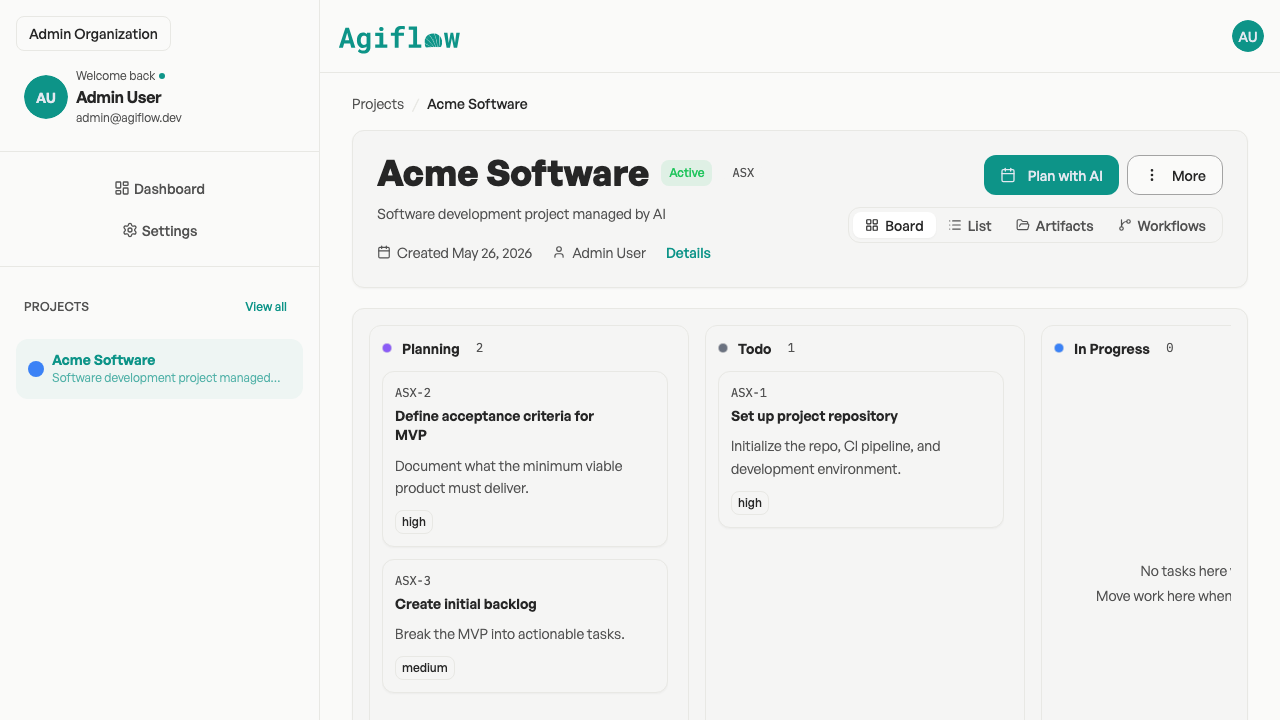
A focused kanban board: projects, work units, and task statuses.
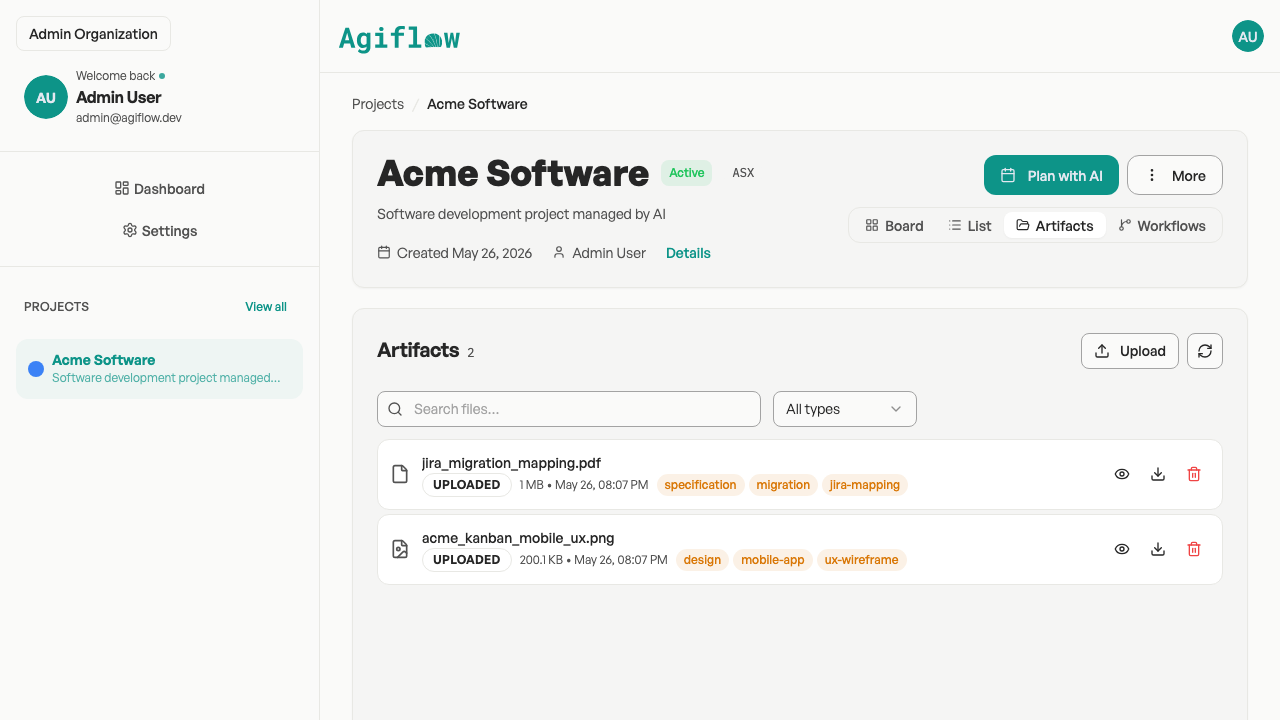
Project artifacts with searchable, filterable metadata, linked to tasks and work units.
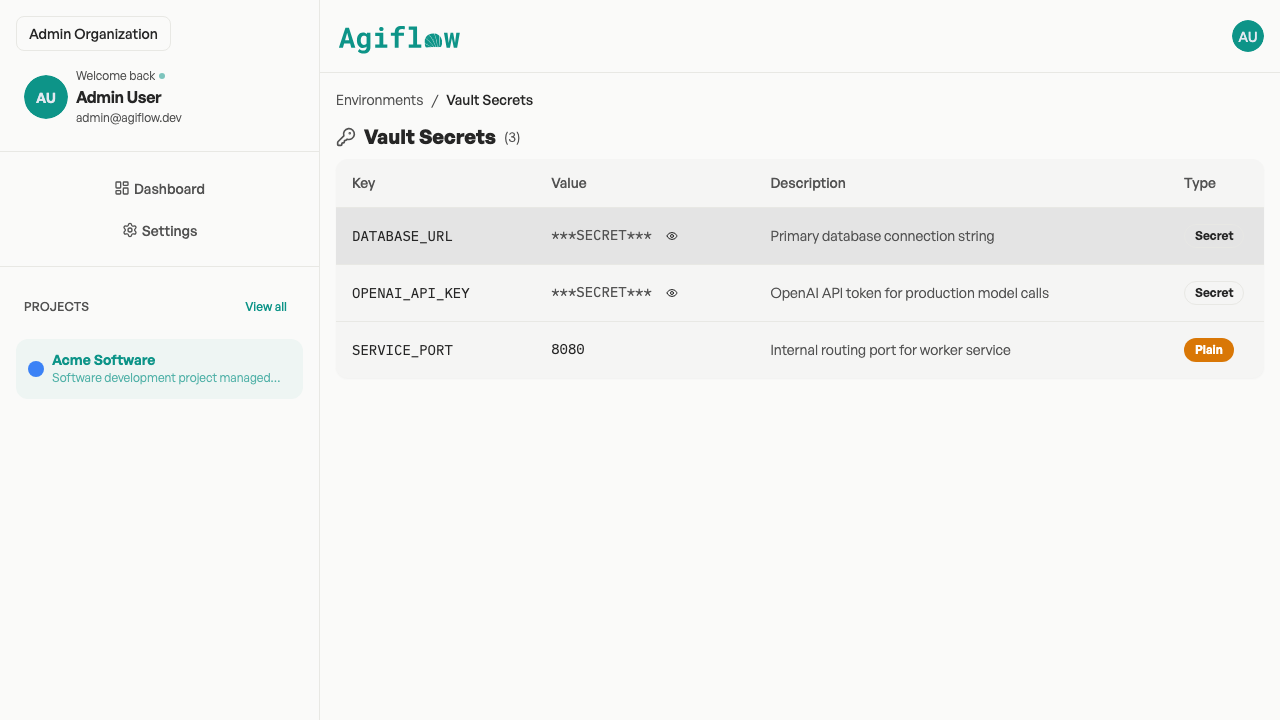
Per-environment vault: AES-encrypted entries, masked in responses.
When Monday.com is the better choice
Stay with Monday.com if the breadth is the reason you are buying. Agiflow is intentionally focused, and it does not replace every part of Monday’s Work Management suite.
- You need deep no-code automations and high-volume automation actions.
- You need dashboards, reporting, Timeline, Gantt, Calendar, Table, portfolio, or resource management views.
- You want CRM, Dev, Service, Marketing, and Operations products under the same vendor.
- You need mature enterprise governance such as SSO, SCIM, multi-level permissions, or procurement controls.
- Your team wants Monday’s built-in AI platform rather than an external assistant workflow.
Compare Agiflow with other project tools
Still weighing options? Explore Agiflow pricing and how it stacks up against other project tools.
Monday alternative FAQ
What is the best Monday alternative for small teams?
Agiflow is a strong Monday alternative for small teams that want a simpler project board, free solo use, flat $9 per-seat team pricing, and AI assistant access through tools they already use. Monday.com remains stronger when the team needs deep automation, dashboards, broad view types, and enterprise governance.
Is Agiflow cheaper than Monday.com?
Not at the headline per-seat number. Monday Basic and Agiflow Team can both show $9 per seat on annual pricing. The difference is the floor and the included product. Monday paid plans require a 3-seat minimum, while Agiflow has no forced 3-seat minimum. Agiflow’s team plan includes every feature, while Monday Basic excludes automations, integrations, Timeline, and Gantt.
Does Monday.com have MCP?
Yes. Monday.com ships an official hosted MCP server. Agiflow should not be positioned as the only MCP option. The Agiflow difference is that the product is designed around bring-your-own AI assistant access, with no proprietary Agiflow AI agent layer to meter.
How is Agiflow’s AI approach different from Monday AI?
Monday AI includes Sidekick, Agents, Vibe, AI workflows, AI Notetaker, and AI blocks, with monthly AI credits by plan for several capabilities. Current Monday support docs say Sidekick messages and image generation do not consume credits yet and will be monetized in the future. Agiflow does not run or host AI agents. It lets ChatGPT, Claude, Cursor, VS Code, or another compatible assistant work with your project board.
Can Agiflow replace Monday.com automations and dashboards?
No. Agiflow is not a no-code automation and dashboard suite. It is a focused project board with AI-assistant access, artifacts, templates, vault entries, workflow locks, and CLI support. If automations, dashboards, Timeline, Gantt, or reporting are central to your process, Monday.com is likely the better fit.
Who is Agiflow best for?
Agiflow is best for freelancers, founders, and small teams that want a project board they can use quickly, with their own AI assistant helping plan and update the work. It is especially useful when one or two people do not want to pay a 3-seat minimum just to get started.
Is Agiflow open source?
Agiflow is a commercial project board. The open-source component is aicode-toolkit, a separate developer toolkit from AgiFlow. The Agiflow app, API, and MCP app are not open source.
Run your next project on a board your AI assistant can use
Start with a simple board, invite teammates when you need them, and let your own AI assistant help keep the work moving. Free solo plan, flat $9 per seat for teams, and no forced 3-seat minimum.