A lightweight Asana alternative that runs on your own AI assistant
Agiflow is a focused, MCP-native project board with kanban boards, work units, artifacts, per-environment vaults, workflow locks, and a CLI. Connect the AI assistants your team already uses — ChatGPT, Claude, Cursor, Copilot, VS Code — instead of paying up for a proprietary, credit-metered AI suite.
Free for solo use. Open-source developer tooling is available through aicode-toolkit.

Why teams look for an Asana alternative
Asana is a capable enterprise work-management OS. It can be the wrong fit when a small or technical team mostly needs a clean board, shared project context, and AI tools that operate the workflow without per-seat AI cost.
Buyer-valued features sit behind higher tiers
As of May 2026, time tracking, goals, and portfolios start at Asana’s Advanced plan ($24.99/user/mo billed annually), with a two-seat paid minimum — a common switching trigger for small teams.
AI-assisted teams want their own assistant, not a metered one
Asana’s AI (AI Studio, AI Teammates) is proprietary, in-product, and credit-metered per tier. If your team already works in ChatGPT, Claude, or Cursor, project context should travel to those assistants.
Setup can feel heavy
Reviewers report Asana can feel overwhelming for new users, with a learning curve on subtasks and customization. Small teams often want a lower-admin path to first value.
The difference in one line
Asana is an enterprise work-management OS adding its own proprietary AI on top. Agiflow is a lean, MCP-native project board that lets you bring your own AI assistant — starting free for solo use.
Asana vs Agiflow at a glance
Agiflow is a focused, MCP-connected board for AI-forward teams. Asana is broad work-management infrastructure with its own proprietary AI layer and mature enterprise governance. The table below keeps both sides fair; Asana figures are as of May 2026.
| Need | Asana | Agiflow |
|---|---|---|
| Best fit | Cross-functional and enterprise teams wanting a broad work-management OS with built-in AI agents | Small-to-medium technical teams that drive a focused board from their own AI assistants |
| Project boards & views | Strong — list, board, timeline/Gantt, calendar | Kanban boards with templates, work units, task statuses, and default fallback columns |
| Timeline / Gantt | Available from the Starter plan | Not the focus; Agiflow centers on kanban-style execution |
| Goals & portfolios | Strong, at the Advanced plan | Not offered; Agiflow centers on projects, work units, and tasks |
| Native time tracking | Available at the Advanced plan | Not offered |
| AI model | Proprietary in-product AI (AI Studio, AI Teammates), credit-metered per tier | Bring-your-own assistant over MCP; Agiflow provides tools, skills, and widgets and does not run or host AI agents |
| AI assistant access (MCP) | Official MCP server (~42 tools, OAuth, free with any plan) | MCP tools + on-demand skills + interactive widgets, multi-scope (org/project/task/work unit), multi-transport (HTTP/SSE/WebSocket) |
| Project artifacts / files | Attachments on tasks; broader file management via integrations | Artifacts with searchable, filterable relational metadata, linked to tasks or work units |
| Secrets / environment context | Not a native capability | Per-environment vault with AES-encrypted entries, masked in responses |
| CLI | API-driven; no first-party task CLI emphasis | agiflow-cli for task management, batch creation, and workflow locks |
| Workflow coordination | Rules and automations inside Asana | Workflow locks scoped to project / work unit / task, usable from CI pipelines |
| Pricing posture | Free for up to 10 users; Starter $10.99 and Advanced $24.99 per user/mo (annual), two-seat paid minimum | Free for solo users; Team and Enterprise plans for hosted collaboration |
Bottom line: Choose Agiflow if you want a focused board that humans and your own AI assistants coordinate on via MCP. Keep Asana if you need its built-in AI agents, broad view types, and enterprise governance.
Open AI vs. proprietary AI: bring the assistant you already use
The biggest difference isn’t whether each tool connects to AI — both ship MCP. It’s who owns the AI. Asana’s value increasingly is its own AI Teammates and credit-metered AI Studio running inside Asana. Agiflow is architected so external assistants operate your project data directly.
Connect the assistants your team already uses
ChatGPT, Claude Desktop, Cursor, Copilot, VS Code, and other MCP-compatible clients work with your Agiflow project data.
Tools, skills, and interactive widgets — not just text
Agiflow exposes MCP tools plus on-demand skills (progressive disclosure) and interactive widgets that render inside assistants like ChatGPT.
Agiflow doesn’t run the AI — your assistant does
Agiflow provides scoped context to the assistant you choose and explicitly does not host or meter AI agents, so you’re not locked into a vendor AI or its credit pricing.
Asana also offers an official MCP server. The difference is the model around it: Agiflow is bring-your-own-assistant by design, with no proprietary AI layer to buy into.
Looking for Asana MCP?
If you searched for Asana MCP, you are most likely trying to connect an AI assistant to your Asana data. Asana ships an official MCP server for exactly that, and it is the right starting point if your team already runs on Asana and you want ChatGPT, Claude, or Cursor to read and update work there.
The honest framing is that Asana was not built MCP-first. It is a mature work-management suite that added an MCP server on top of an existing product, and the connector reflects that: it exposes the parts of Asana that map cleanly to tools. That is a reasonable design, and for a lot of teams it is enough.
Agiflow starts from the other end. The board was designed around assistant access, so scope, work units, artifacts, and workflow locks exist because external assistants need them, not because a connector was retrofitted later. If MCP access is a feature you want on your existing tool, use Asana’s server. If MCP access is the reason you are choosing a tool at all, that is the case for a board built for it.
Keep the work surface focused
Agiflow centers on the daily execution loop — projects, work units, templates, and statuses — so a technical team can start immediately without designing an enterprise workflow scheme.
Start from a blank project or a template
Built-in templates for marketing, development, and sales give useful defaults without enterprise setup.
Track work units and tasks on a kanban board
Break projects into work units and move tasks across status columns; blank projects still render usable default columns.
Role-aware controls without making everyone an admin
Project creation, editing, deletion, and team access follow role-aware controls.
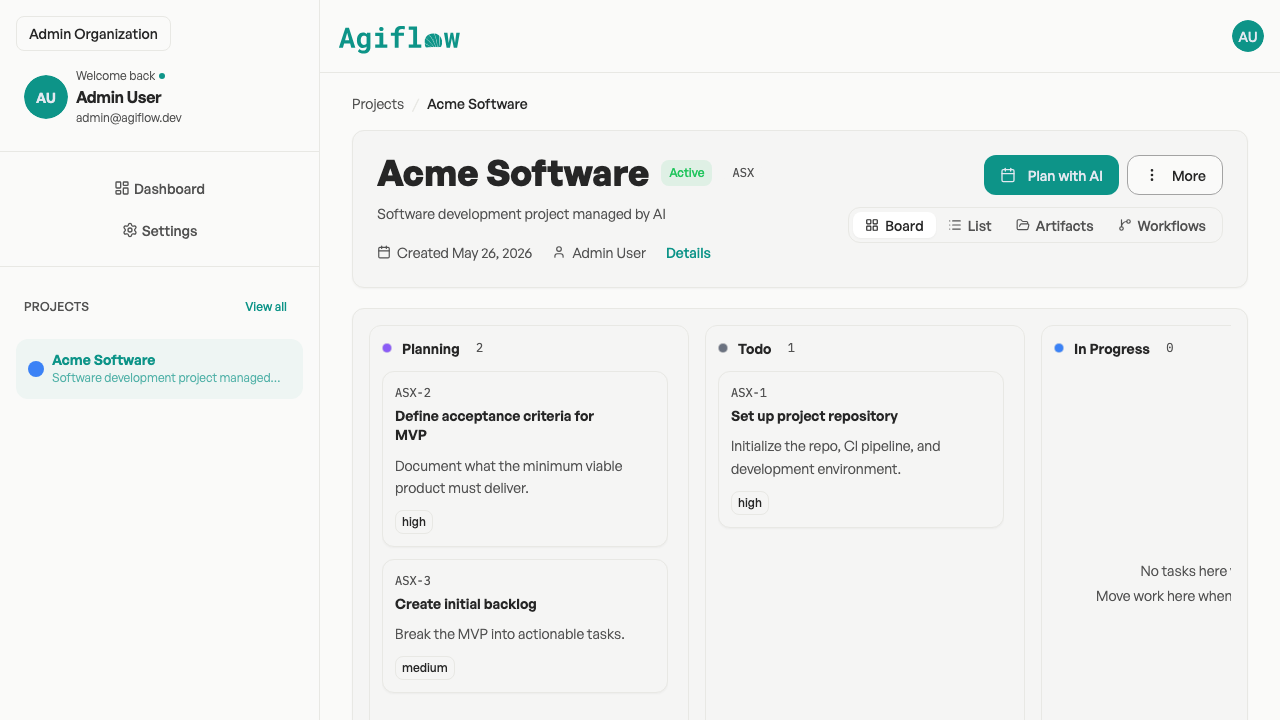
A focused kanban board — projects, work units, and task statuses.
Carry project context with the task
Agiflow keeps files, environment secrets, and workflow coordination beside the task, so teammates and connected assistants execute without searching multiple systems.
Artifacts stay attached to the project
Searchable, filterable artifacts linked to tasks or work units keep context out of scattered drive folders.
Vault entries belong to environments
Per-environment, AES-encrypted vault entries with masked responses and role-aware access.
Workflow locks prevent duplicate runs
Distributed locks scoped to project / work unit / task composition so an automation can coordinate before it runs.
Use the CLI when project work belongs in automation
agiflow-cli handles task management, batch creation, and workflow artifact flows from scripts and CI.
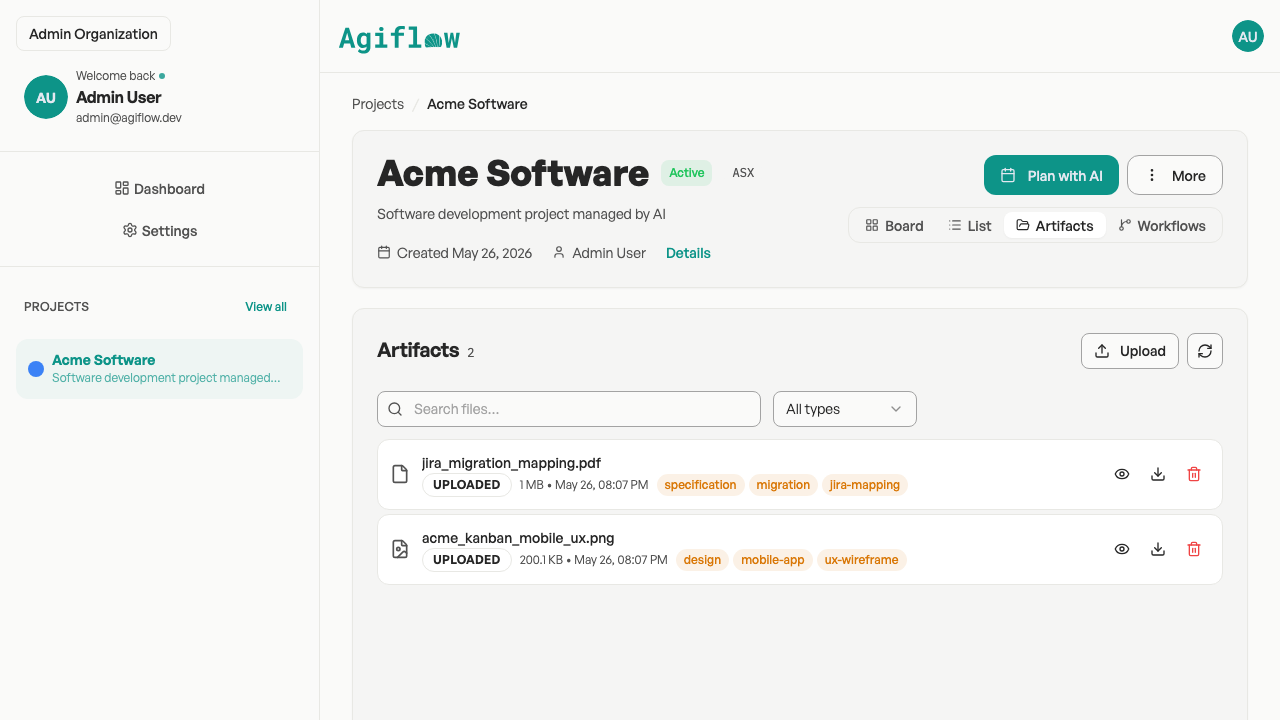
Project artifacts with searchable, filterable metadata, linked to tasks and work units.
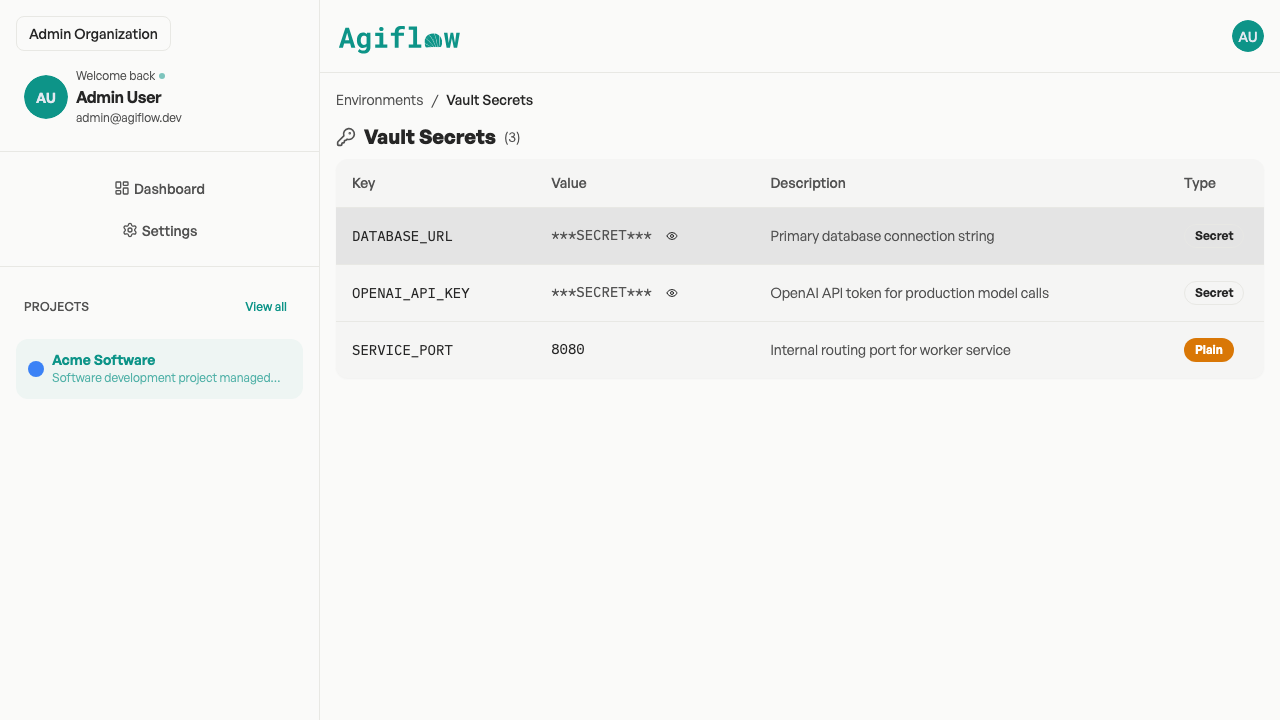
Per-environment vault — AES-encrypted entries, masked in responses.
When Asana is the better choice
Asana is the stronger pick for several real needs — and we say so plainly.
Asana is stronger for
- No-code AI agents (AI Studio / AI Teammates) for non-technical ops teams
- Goals, portfolios, workload management, and broad view types (timeline / Gantt / calendar)
- Enterprise governance — SSO, SCIM, capacity planning, service accounts
- A large, proven install base and mature mobile (Fortune 100 usage; 13,500+ reviews at 4.5/5 on Capterra, as of May 2026)
Agiflow is better positioned when
- The main need is focused project execution that your own AI assistants operate via MCP
- You want a lower-admin starting point with useful defaults
- Developer primitives matter — CLI, per-environment vault, workflow locks for CI
- You’d rather start free solo than pay per seat for features gated to higher tiers
Pricing and ownership comparison
As of May 2026, Asana’s free Personal plan is useful (up to 10 users), but buyer-valued features sit at Advanced and AI usage is credit-metered. Agiflow centers on a free solo path, a Team plan, and Enterprise options.
| Pricing / ownership question | Asana | Agiflow |
|---|---|---|
| Is there a free plan? | Yes, Personal plan for up to 10 users | Yes, free for solo users |
| Where do time tracking, goals, and portfolios start? | Advanced plan, $24.99/user/mo billed annually | Agiflow centers on boards, work units, artifacts, and MCP rather than these features |
| Entry price for a paid pair | Starter $10.99/user/mo annual with a two-seat minimum (≈$21.98/mo) | Free for solo; Team plan for hosted collaboration |
| How is AI priced? | Proprietary AI Studio is credit-metered per tier (50K / 75K / 200K credits) | Bring your own assistant; no Agiflow AI credits to meter |
| What open-source code is available? | Asana is a proprietary product | aicode-toolkit is open source; the Agiflow board itself is commercial |
Bottom line: Choose Agiflow for a focused, MCP-connected board with no proprietary AI to meter. Choose Asana if you want its built-in AI agents and enterprise work-management breadth.
Choose Agiflow if your project work now includes AI-assisted workflows
- You want ChatGPT, Claude, Cursor, or another MCP client to inspect and act on project context without copy/paste.
- You need projects, work units, tasks, artifacts, and workflow state in one focused workspace.
- You prefer kanban-style execution over goal/portfolio-heavy planning.
- You want CLI access and automation-friendly project operations.
- You value a per-environment encrypted vault and workflow locks for CI agents.
- You’d trade Asana’s built-in AI agents and enterprise breadth for a simpler, bring-your-own-AI workflow.
Frequently asked questions
Is Agiflow a full Asana replacement?
For some teams, yes. Agiflow can replace Asana when the team primarily needs projects, work units, tasks, kanban statuses, artifacts, workflow coordination, CLI access, and AI assistants connected over MCP. Asana remains stronger for built-in AI agents, goals and portfolios, broad view types, and enterprise governance.
Does Asana have an MCP server too?
Yes. Asana ships an official MCP server that connects assistants like Claude, ChatGPT, and Cursor to Asana data. Agiflow’s difference is the model around MCP: Agiflow is bring-your-own-assistant by design, provides on-demand skills and interactive widgets, and does not run a proprietary, metered AI layer.
Can ChatGPT or Claude use Agiflow project data?
Yes. Agiflow provides MCP-enabled access for external AI assistants, with scoped authorization, structured responses, and interactive widgets for clients such as ChatGPT, Claude Desktop, VS Code, and Cursor.
How is Agiflow’s AI approach different from Asana’s?
Asana’s AI (AI Studio and AI Teammates) is proprietary, runs inside Asana, and is credit-metered per plan. Agiflow does not run or host AI agents — it gives the assistant you already use scoped, structured access to live project context over MCP, so there’s no vendor AI to meter.
Does Agiflow have goals, portfolios, or timeline/Gantt views?
No. Agiflow centers on kanban-style execution with projects, work units, tasks, templates, and statuses. If goals, portfolios, workload management, or timeline/Gantt are core to your process, Asana is the better fit.
What does Agiflow add that a standard board doesn’t?
Beyond the board, Agiflow includes project artifacts with searchable metadata, a per-environment encrypted vault, workflow locks scoped to project/work-unit/task for CI coordination, and a CLI (agiflow-cli) for task management and automation.
Is the Agiflow toolkit open source?
Agiflow is a commercial project board. The open-source component is aicode-toolkit, which provides developer MCP tooling such as scaffold-mcp, architect/vibe-lint, and one-mcp. You can explore it at github.com/AgiFlow/aicode-toolkit.
Is Asana better for larger or non-technical teams?
Often, yes. Asana is a better fit for organizations that want no-code AI agents for non-technical ops teams, advanced roadmaps and portfolios, broad view types, and enterprise governance such as SSO and SCIM.
Start with one project
Create an Agiflow workspace, add your first project, and connect the AI assistant your team already uses. Keep Asana for built-in AI agents and enterprise governance when you need them — choose Agiflow when the daily job is moving project work forward with humans and your own AI in the loop.