A Todoist alternative for when solo work becomes project work
Todoist is fast, polished, and excellent for personal task capture. Agiflow is for the next stage: a structured project board with work units, searchable artifacts, environment vaults, workflow locks, a CLI, and AI-assistant access through MCP. Use it when your client work needs more context than one more to-do.
Free for solo use. Bring your own assistant: ChatGPT, Claude, Cursor, VS Code, or another MCP-compatible client.

Quick answer: should you switch from Todoist to Agiflow?
Choose Todoist if you mainly need a fast personal task list with natural-language dates, recurring tasks, mobile capture, and voice-to-task. Choose Agiflow if your work has become project-shaped: client deliverables, files, secrets, AI assistant handoffs, and task flows that need a real board above the list.
The honest difference is not "Todoist has no AI." Todoist has Assist, Ramble, Email Assist, board layout, and an official MCP server. The difference is what your assistant operates: Todoist exposes a personal task list. Agiflow exposes a structured project board.
Why freelancers and solo builders look past Todoist
Most people do not leave Todoist because it is bad. They leave because their work stops being just tasks. A freelancer starts with errands, follow-ups, and reminders. Then every client project grows briefs, assets, implementation steps, secrets, approvals, and follow-up work. At that point, the task list is still useful, but it is no longer the whole workspace.
Todoist is excellent for capture
Todoist deserves its reputation for quick add. Natural-language dates, recurring schedules, mobile entry, and Ramble make it easy to get a task out of your head before it disappears. If that is the main problem, stay with Todoist.
The ceiling is project structure
Todoist organizes work with projects, sections, tasks, sub-tasks, labels, filters, and board layout. That works well for personal planning. It gets harder when each task belongs to a larger client deliverable, needs files attached to the right work unit, and has to survive handoff to an assistant or script.
AI assistants need more than a flat task list
Todoist can connect to AI assistants through its official MCP server. Agiflow's difference is the surrounding model: projects, work units, tasks, artifacts, vault entries, workflow locks, and widgets are all part of the board your assistant can operate.
The difference in one line
Todoist helps you remember what to do. Agiflow helps you run the project those tasks belong to.
Todoist vs Agiflow at a glance
This table keeps both sides fair. Todoist is stronger for personal productivity and capture speed. Agiflow is stronger when the work needs a project board, assistant-readable context, files, secrets, and workflow coordination.
| Need | Todoist | Agiflow |
|---|---|---|
| Best fit | Personal and light-team task lists, fast capture, daily planning | Solo and freelance project execution that an AI assistant can operate |
| Personal task capture | Excellent quick add, natural-language dates, recurring tasks, mobile-first speed | Basic task creation; not trying to beat Todoist at personal capture |
| Voice-to-task | Ramble, with voice capture powered by AI | Not offered |
| AI features | Todoist Assist, Ramble, Email Assist, and official MCP | Bring-your-own assistant over MCP; Agiflow provides tools, skills, and widgets, and does not run or host AI agents |
| Board view | Board layout available for projects and views | Kanban boards with task statuses, templates, and fallback default columns |
| Structure model | Projects, sections, tasks, sub-tasks, labels, filters | Projects to work units to tasks, with statuses and templates |
| Files | Attachments on tasks and comments, with plan-based limits | Project artifacts with searchable and filterable metadata, linked to tasks or work units |
| Secrets and environment context | Not a native project-management capability | Per-environment vault with AES-encrypted entries and masked responses |
| Workflow coordination | Reminders, filters, task assignment, and integrations | Distributed workflow locks scoped to project, work unit, or task, usable from CLI and CI flows |
| CLI and automation | Official Todoist CLI and API for quick capture, terminal workflows, and local scripts around the Todoist task list | agiflow-cli for task management, batch creation, artifact flows, and workflow locks around the Agiflow project board |
| Collaboration posture | Personal projects can be shared; Business adds team workspace features | Free solo board, with Team and Enterprise plans for hosted collaboration |
| Pricing posture | Beginner free; Pro $7 monthly or $5 monthly billed yearly; Business $10 monthly or $8 monthly billed yearly as of June 2026 | Free for solo use; Team and Enterprise for hosted collaboration |
Bottom line: Pick Todoist for personal task capture. Pick Agiflow when the work has a project shape and your assistant needs the same board you use.
When Agiflow fits better
Agiflow is not trying to be a faster inbox for errands. It is built for freelancers and solo builders whose work has become a small operating system: projects, deliverables, context, files, and repeatable flows.
Group tasks into real deliverables
Work units give you a layer above tasks, so a client launch, feature build, or campaign can hold the tasks that belong together. Your board stops being a long list of siblings and starts showing the shape of the project.
Keep project files attached to the work
Agiflow artifacts carry searchable labels and can link to tasks or work units. A brief, screenshot, spec, or deliverable is not just an attachment buried in a comment thread. It stays tied to the work it supports.
Give your assistant structured context
Connect ChatGPT, Claude, Cursor, VS Code, or another compatible assistant to Agiflow so it can read and update project data from a live board. The assistant sees projects, tasks, work units, artifacts, and permissions instead of a pasted summary.
Coordinate scripts and CI from the board
For technical solo builders, Agiflow adds CLI flows and workflow locks. A script or CI process can coordinate around the same project state you use in the board, instead of creating a hidden second system.
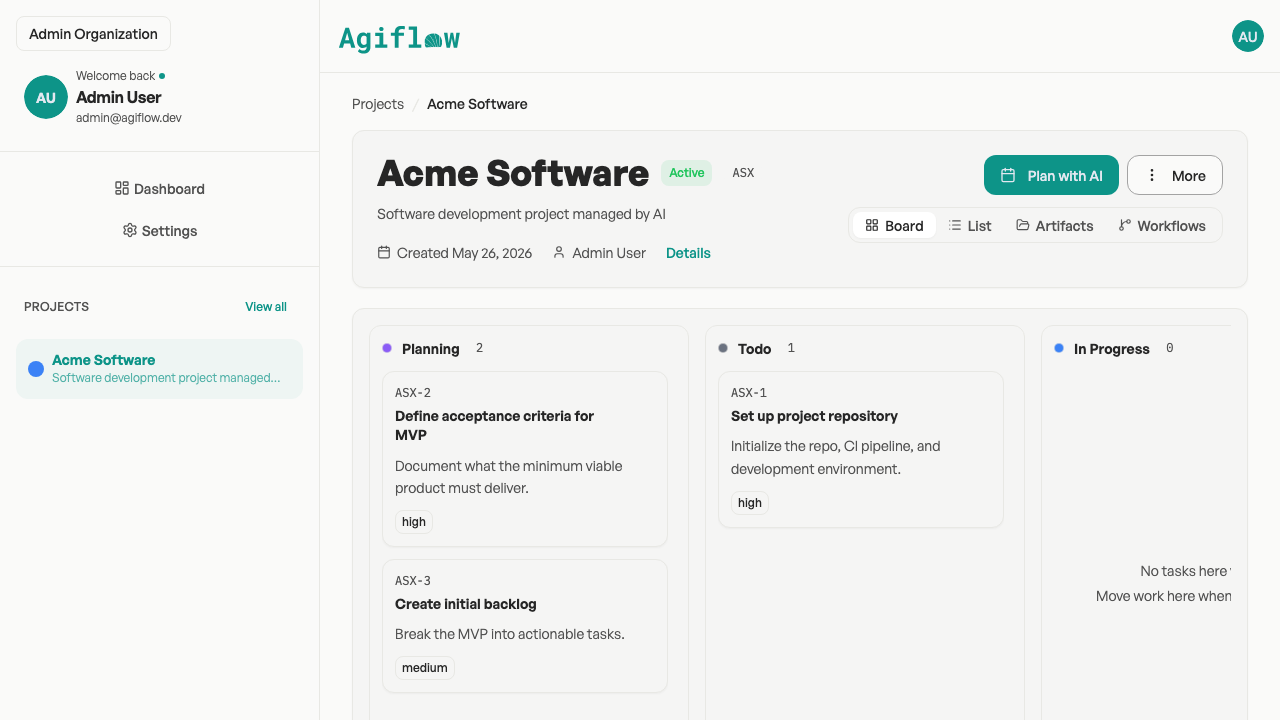
Agiflow's project board groups tasks into work units across kanban status columns.
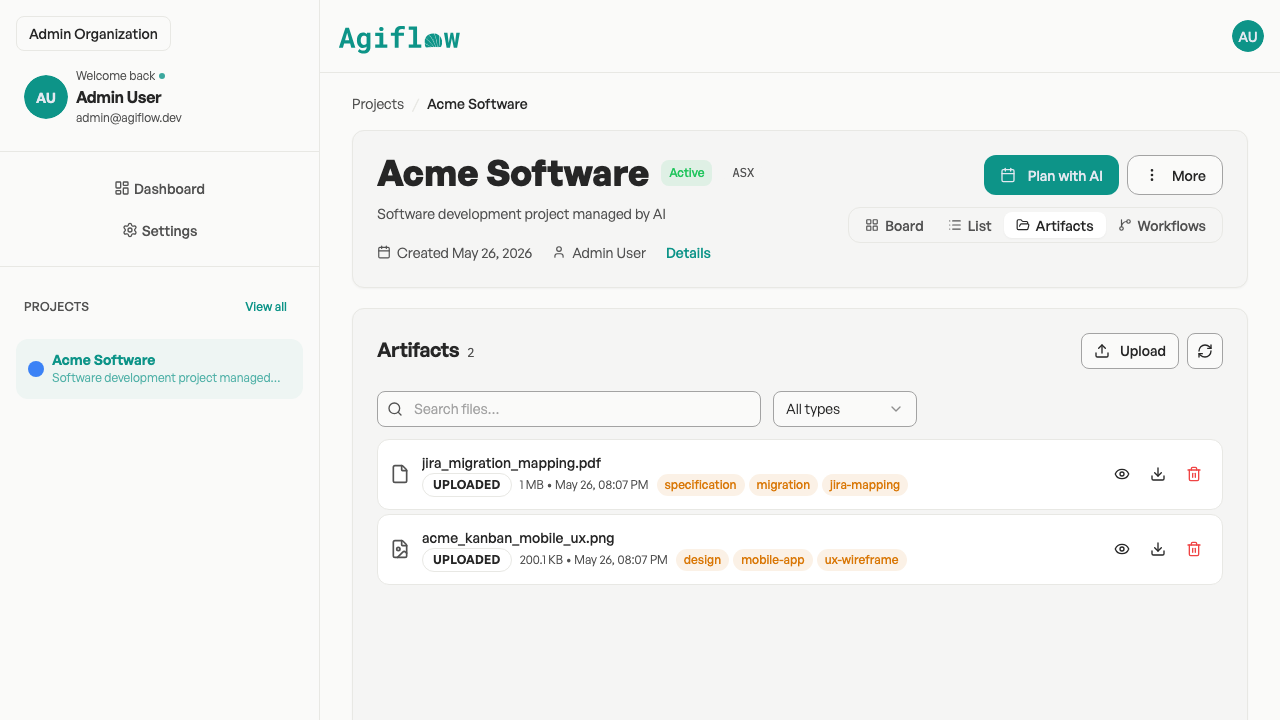
Searchable, filterable project artifacts linked to tasks and work units.
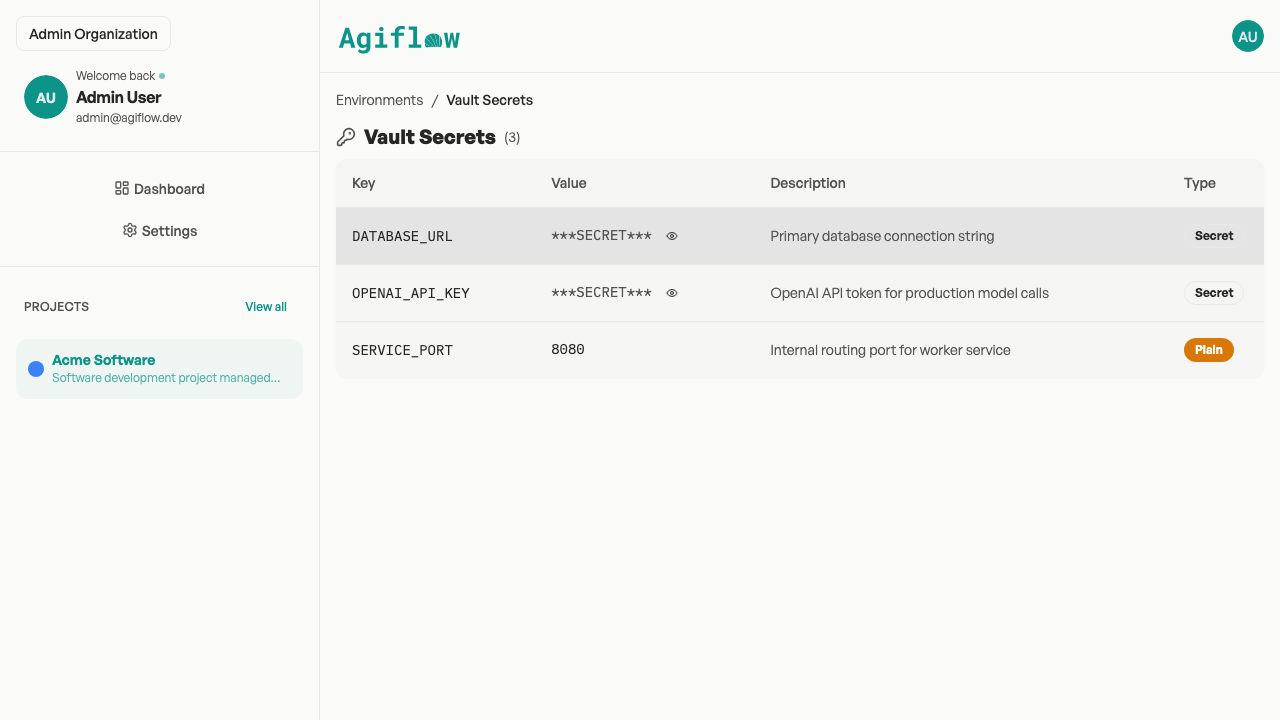
Per-environment vault entries with values masked in responses.
Where Todoist is still the better choice
The right alternative depends on the job. Todoist is still the better choice when the work is mostly personal capture and scheduling.
- Choose Todoist if you want the fastest personal task inbox.
- Choose Todoist if natural-language dates, recurring tasks, and mobile capture are the core workflow.
- Choose Todoist if Ramble voice capture or Email Assist is the main reason you want AI in your task manager.
- Choose Todoist if you do not need work units, project artifacts, environment secrets, or workflow locks.
Agiflow is not a Todoist clone. It is the next board for work that has outgrown a personal list.
Explore Agiflow
Want to see how Agiflow fits your current workflow? Start with the assistant integrations, then use a template to turn a client project into a board.
Todoist alternative FAQs
Is Agiflow a full Todoist replacement?
For some users, yes, but not for everyone. Agiflow can replace Todoist when your work is primarily project execution: client deliverables, work units, files, assistant handoffs, CLI flows, and workflow coordination. Todoist remains better for pure personal capture, natural-language dates, recurring tasks, and mobile speed.
Does Todoist have AI and MCP?
Yes. Todoist has Todoist Assist, Ramble, Email Assist, and an official MCP server from Doist. The fair comparison is not AI versus no AI. The difference is the work model: Todoist exposes a personal task list, while Agiflow exposes a structured project board with work units, artifacts, vault entries, workflow locks, and widgets.
What does Agiflow add that Todoist does not focus on?
Agiflow adds project structure above tasks, searchable project artifacts, per-environment vault secrets, workflow locks, and assistant-facing widgets. Its CLI works against that same project board. Those are useful when solo or freelance work starts looking like a project workspace, not just a task inbox.
Is Todoist better for natural-language task entry?
Yes. Todoist is the stronger choice for natural-language dates, recurring schedules, quick add, mobile capture, and voice-to-task. Agiflow does not try to beat Todoist at personal capture speed.
Can ChatGPT or Claude use Agiflow project data?
Yes. Agiflow lets external AI assistants such as ChatGPT, Claude Desktop, Cursor, and VS Code connect to project data through MCP, with scoped access and structured tools. Agiflow does not run or host the AI assistant.
Can Agiflow store project files?
Yes. Agiflow supports project artifacts with searchable and filterable metadata, plus links to tasks or work units. This is designed for project context such as briefs, screenshots, specs, handoffs, and deliverables.
Can Agiflow manage secrets or environment context?
Yes. Agiflow includes project environments and per-environment vault entries. Vault entries are AES-encrypted, masked in list and get responses, and protected by role-aware access checks.
How should freelancers decide between Todoist and Agiflow?
Use Todoist if your work is mostly personal planning. Use Agiflow when each task belongs to a client deliverable, needs files or environment context, or should be operated by your AI assistant from a shared board.
Move project-shaped work into Agiflow
Keep Todoist for fast personal capture if that is what you need. When your work becomes client projects, files, handoffs, and assistant-driven execution, move the board to Agiflow.
Free for solo use. No claim that Agiflow runs AI agents. Your assistant stays your assistant.