A focused Jira alternative for AI-assisted project work
Agiflow gives technical teams a focused project workspace with kanban boards, work units, artifacts, vault entries, workflow locks, CLI access, and MCP tools for assistants like ChatGPT, Claude, Cursor, Copilot, Windsurf, and Zed. Use it when Jira feels too heavy for the way your team actually ships.
Free for solo use. Open-source developer tooling is available through aicode-toolkit.

Why teams look beyond Jira
Jira is a strong choice for large organizations that need mature agile ceremonies, advanced reporting, roadmaps, and a deep marketplace. It can be the wrong fit when a small technical team mostly needs a clear board, shared project context, and AI tools that can participate in the workflow.
Setup can become work before the work
Templates, workflows, schemes, fields, and permissions are powerful, but small teams often need a lower-admin path to first value.
AI-assisted teams need machine-readable project context
If your team works in ChatGPT, Claude, Cursor, Copilot, Windsurf, or Zed, project management should be available to those assistants instead of living in a separate browser tab.
Ownership matters
Teams that care about developer workflows often need more than a closed browser tab. Agiflow pairs a commercial project board with open-source developer tooling for MCP workflows.
The difference in one line
Jira is enterprise agile infrastructure. Agiflow is project management infrastructure for teams that want humans and AI assistants operating from the same project context.
Jira vs Agiflow at a glance
Agiflow provides a focused, MCP-connected project workspace for teams that work in ChatGPT, Claude, and Cursor, while Jira remains comprehensive agile infrastructure for larger organizations with dedicated administration resources.
| Need | Jira | Agiflow |
|---|---|---|
| Best fit | Enterprise software teams with mature agile processes and admin capacity | Small-to-medium technical teams using AI assistants and wanting focused PM workflows |
| Project boards | Mature kanban and scrum boards | Kanban boards with templates, work units, task statuses, and fallback default columns |
| Sprints and scrum ceremonies | Strong | Not the focus; use Agiflow for kanban-style project execution |
| AI assistant access | Atlassian provides Rovo MCP Server access for Jira, Confluence, and Compass | Project-board MCP tools, scoped authorization, skills, and widgets for external AI assistants including ChatGPT, Claude, VS Code, and Cursor |
| Artifacts | Possible through Jira issues and marketplace apps | Project artifacts stored with searchable/filterable metadata and task/work-unit links |
| Secrets and environment context | Typically handled outside Jira or via apps | Per-environment vault entries with masked responses and role-aware MCP access |
| Workflow coordination | Jira workflow states and automations | Workflow lock tools available through project-scoped MCP and CLI-oriented workflows |
| CLI | Available through Atlassian CLI and API-driven workflows | agiflow-cli supports task and workflow artifact flows |
| Developer tooling | Atlassian Cloud product with Rovo and marketplace ecosystem | Commercial project board plus open-source aicode-toolkit developer tooling |
| Pricing posture | Free tier up to 10 users; paid Standard/Premium per user | Free for solo users; Team and Enterprise plans for hosted project-board collaboration |
Bottom line: Choose Agiflow if you need a focused project board that humans and AI assistants can coordinate on via MCP, and keep Jira if your organization requires formal sprint ceremonies and enterprise roadmaps.
Built for AI-assisted project work
Agiflow does not try to be another place your AI summaries go to die. It exposes structured project management capabilities through MCP so external AI assistants can inspect and act on project context.
Connect the assistants your team already uses
Connect Agiflow to tools like ChatGPT, Claude, Cursor, Copilot, Windsurf, Zed, and other MCP-compatible clients so project context can travel into the places your team already works.
Scope access to the right workspace, project, task, or work unit
Agiflow's MCP flow supports scoped authorization, so users choose the workspace, project, or task context an assistant can access instead of handing over an unbounded project database.
Return structured project data and widgets
Agiflow's MCP implementation returns structured content and widget metadata so AI clients can render useful project views, not just paragraphs of text.
Keep the work surface focused
Agiflow streamlines project tracking by focusing on the daily execution loop of projects, work units, templates, and statuses. This ensures a clean, low-admin workspace that technical teams can use immediately without complex workflow design.
Start from a blank project or a template
Create a project from a focused two-step flow: pick a blank project or built-in template, then add project details. Teams get useful defaults without designing an enterprise workflow scheme first.
Track work units and tasks on a kanban board
Break projects into work units, create tasks, and move work across status columns. Blank projects still render usable default columns so setup never blocks the first useful action.
Give admins controls without making every teammate an admin
Project creation, editing, deletion, and team access follow role-aware controls, so leads can manage structure while members work from the board.
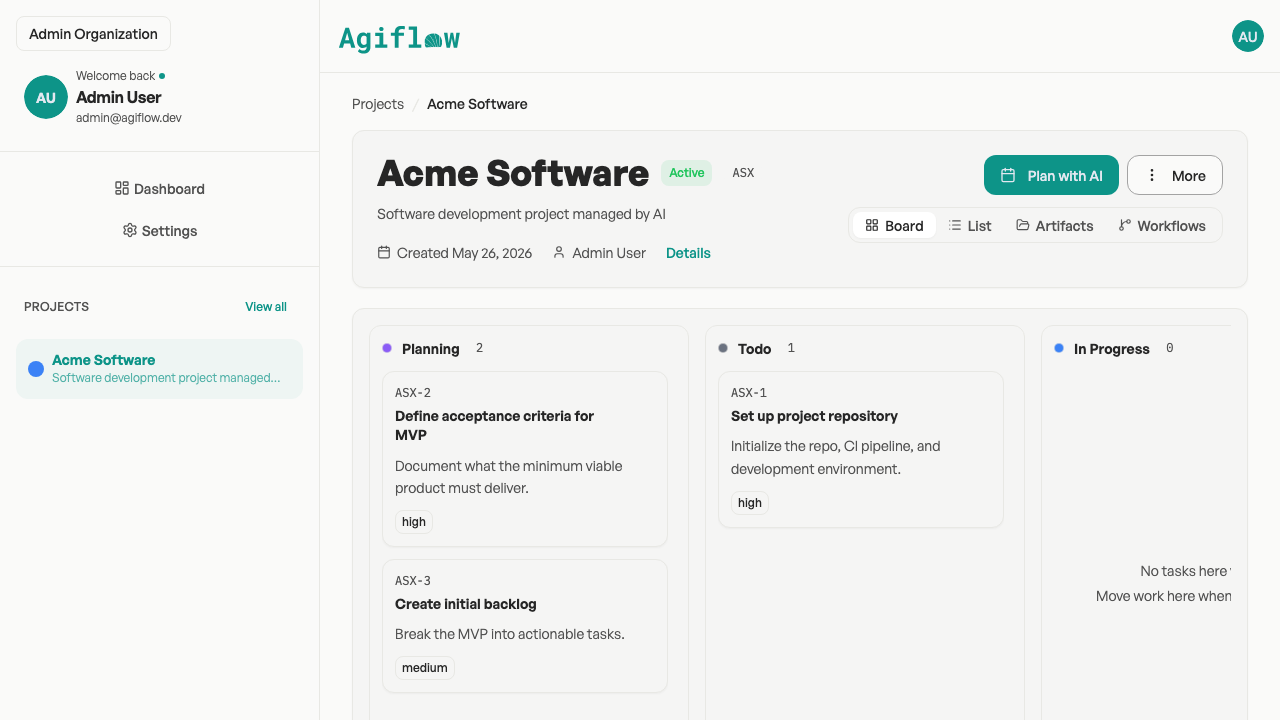
Agiflow's focused project board featuring kanban columns, work units, and task statuses.
Carry project context with the task
Agiflow consolidates operational context by storing project files, environment secrets, and workflow locks directly alongside tasks on the board. This unified context enables teammates and connected AI assistants to execute work without searching multiple external systems.
Artifacts stay attached to the project
Upload specs, designs, and documents as project artifacts, search and filter them, and link them to tasks or work units so context does not disappear into a drive folder.
Vault entries belong to environments
Store per-environment vault entries with masked responses and role-aware access, useful for teams coordinating deployment and development work.
Workflow locks prevent duplicate runs
Agiflow workflows act as distributed locks scoped to project, work unit, and task composition so an automation workflow can coordinate before it runs.
Use the CLI when project work belongs in automation
agiflow-cli supports task management and workflow artifact flows, giving developer teams a path to operate project state from scripts and CI-style workflows.
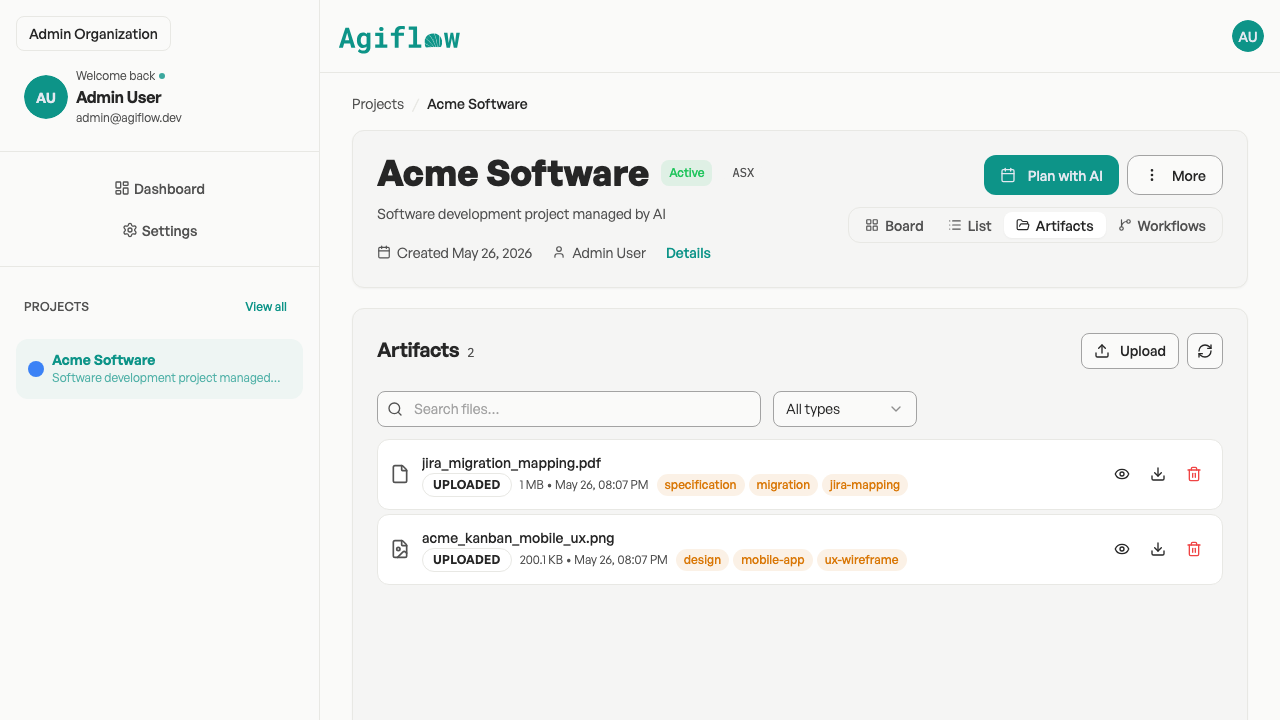
Populated project artifacts view displaying searchable, filterable specifications and assets.
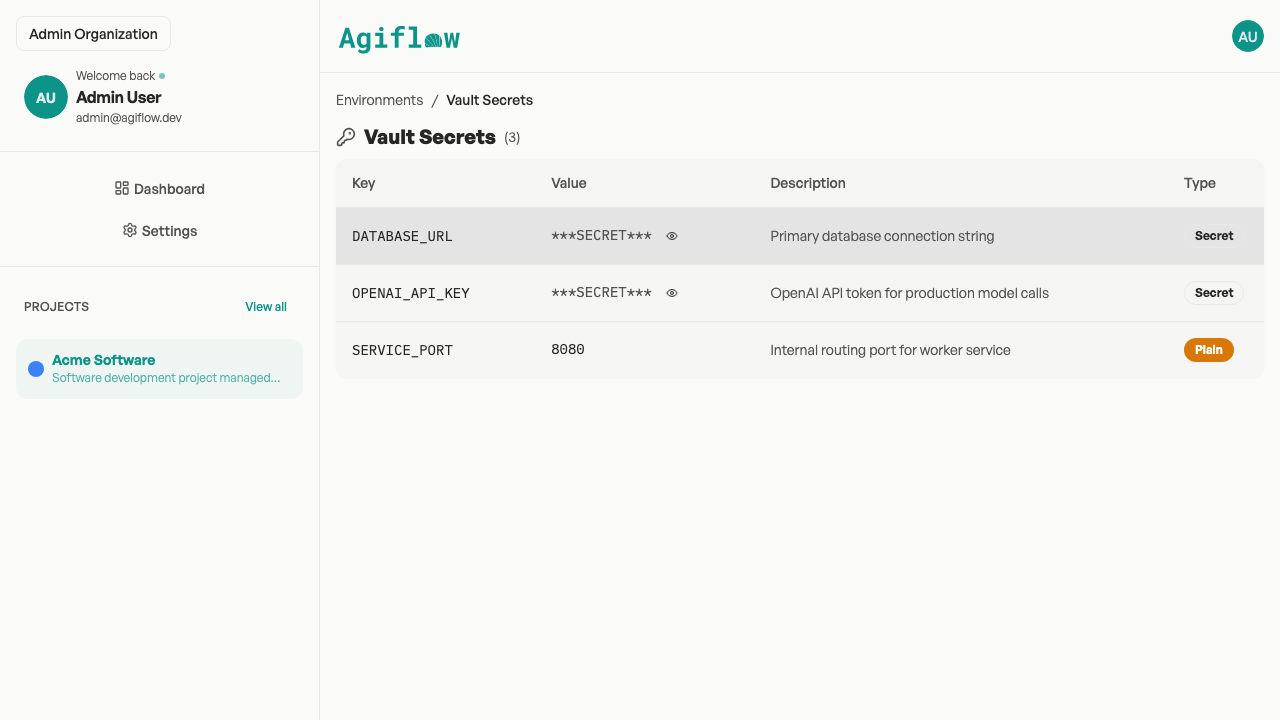
Secure project vault management showing masked secret keys and plaintext environment variables.
When Jira is still the better fit
Choose Jira if your organization requires mature sprint planning, advanced roadmap tracking, deep agile analytics, extensive marketplace extensions, or enterprise-wide standardized governance across multiple engineering departments.
Jira is stronger for
- Sprint planning, velocity tracking, burndown charts, and advanced reporting
- A mature marketplace for highly specific enterprise workflows
- Known procurement choice for large organizations with Atlassian administration capacity
Agiflow is better positioned when
- The main requirement is focused project execution that external AI assistants can access through MCP
- Teams want a lower-admin starting point with useful project defaults
- CLI workflows and open-source developer tooling matter
Pricing and ownership comparison
As of May 2026, Jira's free plan is useful for small teams, but it has a 10-user ceiling and paid tiers scale per user. Agiflow is designed around a free solo path, a team plan, enterprise options, and developer tooling for teams that want project work closer to their AI-assisted workflow.
| Pricing/ownership question | Jira | Agiflow |
|---|---|---|
| Is there a free plan? | Yes, up to 10 users | Yes, free for solo users |
| What happens as the team grows? | Paid Standard/Premium tiers scale per user | Team plan available; Enterprise for larger needs |
| What open-source code is available? | Jira is a proprietary Atlassian Cloud product | aicode-toolkit is open source; Agiflow itself is a commercial project board |
| Are marketplace add-ons required? | Often used for specialized workflows; cost impact varies | Core project-board features included; aicode-toolkit supports developer MCP tooling |
Bottom line: Choose Agiflow for a focused project board with MCP-connected assistant workflows; choose Jira if you already rely on a contracted Atlassian enterprise license and its broader agile governance stack.
Choose Agiflow if your project work now includes AI-assisted workflows
- You want ChatGPT, Claude, Cursor, or another MCP client to inspect project context without manual copy/paste.
- You need projects, work units, tasks, artifacts, and workflow state in one focused workspace.
- You prefer kanban-style execution over formal scrum ceremonies.
- You want CLI access and automation-friendly project operations.
- You care about CLI workflows and open-source developer tooling around your project process.
- You can trade Jira's mature enterprise reports and roadmaps for a simpler, MCP-connected workflow.
Frequently asked questions
Is Agiflow a full Jira replacement?
For some teams, yes. Agiflow can replace Jira when the team primarily needs projects, work units, tasks, kanban statuses, artifacts, workflow coordination, CLI access, and MCP-connected AI assistants. Jira remains stronger for mature scrum ceremonies, advanced roadmaps, deep reporting, and large enterprise governance.
Does Agiflow support sprints?
Agiflow is positioned around kanban-style project execution, work units, task statuses, templates, and workflow state rather than formal sprint planning.
Can ChatGPT or Claude use Agiflow project data?
Yes. Agiflow provides MCP-enabled access for external AI assistants, with scoped authorization, structured responses, and interactive widgets for clients such as ChatGPT, Claude Desktop, VS Code, and Cursor.
Is the Agiflow toolkit open source?
Agiflow is a commercial project board. The open-source component is aicode-toolkit, which includes developer MCP tooling such as scaffold-mcp, architect/vibe-lint, and one-mcp. You can explore it at github.com/AgiFlow/aicode-toolkit.
Is Jira better for enterprise agile teams?
Often, yes. Jira is a better fit for organizations that need advanced reporting, roadmaps, sprint ceremonies, standardized agile governance, and marketplace-heavy customization.
What is MCP, and why does it matter for project management?
MCP is the connection layer that lets external AI assistants work with structured tools and data. For project management, it means an assistant can operate from live project context instead of relying on pasted issue summaries.
Can Agiflow store project files?
Yes. Agiflow supports project artifacts stored with searchable, filterable relational metadata and links to tasks or work units.
Can Agiflow manage secrets?
Agiflow includes project environments and per-environment vault entries with encrypted storage and masked responses, useful for project environment context.
Start with one project
Create a focused Agiflow workspace, add your first project, and connect the AI assistant your team already uses. Keep Jira for enterprise agile governance when you need it. Choose Agiflow when the daily job is moving project work forward with humans and AI in the loop.