A Notion alternative for project boards your AI assistant can run
Notion is hard to beat for docs, wikis, and flexible databases. Agiflow is for the work that needs a real board: projects, work units, tasks, statuses, artifacts, and MCP tools that let ChatGPT, Claude, Cursor, and VS Code read and update project context.
Free for solo use. Bring your own AI assistant. No Agiflow AI credits to meter.
Notion features and plans verified July 20, 2026.

Is Agiflow a good Notion alternative?
Yes, when your Notion database board has become your project system and you want structure without rebuilding a workflow from scratch. Agiflow is not a docs, wiki, or flexible database replacement. It is a better fit when the job is project execution on a purpose-built board that your own AI assistant can read and update over MCP.
- Choose Agiflow when a Notion database board has outgrown a custom schema you have to maintain.
- Choose Agiflow when you want your own AI assistant working from live tasks instead of pasted summaries.
- Choose Agiflow when you do not want a proprietary Agiflow AI credit layer between your assistant and your board.
- Keep Notion when your main job is docs, wikis, notes, meeting notes, or flexible databases with multiple views.
Why teams look for a Notion alternative
Notion is often the first place a solo builder or small team creates a project board because the database is flexible and familiar. The pain starts when the board becomes the operating system: every status, relation, filter, and workflow rule is something you designed and now have to maintain.
Your task board is really a database you maintain
Notion board view is a database layout grouped by a property such as status, assignee, or priority. That flexibility is powerful, but it also means your project system depends on a custom schema instead of a native task workflow.
Full Notion AI sits on the Business plan
Notion presents AI as a limited trial on Free and Plus. Business and Enterprise include the main Notion AI features. Custom Agents use separately purchased credits, currently listed at $10 per 1,000 credits. Confirm local seat pricing and billing terms before buying.
Your AI work already happens outside Notion
If your planning and execution happen in ChatGPT, Claude, Cursor, or VS Code, the board should be something those assistants can operate directly. Agiflow is built around MCP access for external assistants rather than a proprietary AI layer inside the project tool.
The difference in one line
Notion lets you build the workspace. Agiflow gives you the project board, workflow structure, and MCP surface so the work can move.
Notion vs Agiflow at a glance
This is not a docs-versus-docs comparison. Notion is the stronger knowledge base. Agiflow is the more focused execution board for people who want their own AI assistant to work with live project data. Notion details were verified from official sources on July 20, 2026.
| Need | Notion | Agiflow |
|---|---|---|
| Best fit | All-in-one connected workspace for docs, wikis, databases, and projects | Purpose-built project board that your own AI assistant operates over MCP |
| Docs, wiki, knowledge base | Best-in-class; flexible pages, docs, and shared knowledge | Not offered; Agiflow is a task and project board |
| Task board | Kanban is a database in Board view that you configure | Native kanban with projects, work units, task statuses, and default fallback columns |
| Databases and multi-view work | Strong; the same data can be shown as table, board, calendar, gallery, timeline, and more | Not offered; Agiflow focuses on the execution board |
| AI model | Proprietary Notion AI; main AI features included with Business and Enterprise; Custom Agents use metered credits currently listed at $10 per 1,000 credits | Bring your own assistant over MCP; Agiflow does not run or host AI agents |
| MCP assistant access | Official hosted MCP server for clients such as Claude, ChatGPT, and Cursor; governance at Enterprise | MCP tools, on-demand skills, and interactive widgets; multi-scope and multi-transport |
| Project artifacts | Files attach to pages; Free upload limit is 5 MB, paid plans are unlimited | Artifacts with searchable, filterable relational metadata linked to tasks and work units |
| Secrets and environment context | Not a native project-management capability | Per-environment AES-encrypted vault with masked responses and role-aware access |
| CLI and CI coordination | API-driven; no first-party task CLI emphasis in Notion positioning | agiflow-cli plus workflow locks scoped to project, work unit, and task |
| Free plan | Yes, with 5 MB uploads, 7-day history, and 10 guests | Yes, free for solo use |
| Entry paid plan | Paid seat pricing varies by plan, billing term, and location; main AI features are included with Business and Enterprise | Team and Enterprise plans for hosted collaboration |
| Open source | Proprietary product | aicode-toolkit is open source; the Agiflow board is commercial |
Bottom line: Choose Notion when your main job is knowledge, notes, docs, or flexible databases. Choose Agiflow when your main job is moving project work through a board that humans and AI assistants can update together. Confirm current Notion plan and credit terms on notion.com.
Official Notion plan guideOfficial Notion AI overviewOfficial Notion MCP guide
Keep Notion for knowledge. Use Agiflow for execution.
The honest answer is not “replace Notion everywhere.” Many teams should keep Notion as their docs and wiki layer. Agiflow belongs where the work needs structure, status, ownership, artifacts, and AI-assisted updates.
Notion is better for docs, wikis, and flexible databases
Notion is better when you need pages, rich docs, team wikis, meeting notes, flexible databases, and multiple views over the same content. If your project process depends on custom databases and you like shaping every property yourself, Notion is still a strong fit.
Agiflow is better when work needs a real task system
Agiflow is better when the board is the system of work. It gives you projects, work units, tasks, status workflows, comments, artifacts, vault entries, workflow locks, and MCP access for the assistants you already use.
A task board your own AI assistant can update
Both Notion and Agiflow can connect to AI assistants through MCP. The difference is the operating model. Notion also sells a proprietary AI layer inside Notion. Agiflow is the board and MCP surface for the assistant you already chose.
Connect the assistants you already use
ChatGPT, Claude Desktop, Cursor, VS Code, and other MCP-compatible clients can work with Agiflow project data. Your assistant can read and update live tasks instead of relying on pasted summaries.
Scope access to the right work
Agiflow supports organization, project, task, and work-unit scopes, so assistants operate within the context you grant rather than a generic copy of your project plan.
No Agiflow AI credits to meter
Agiflow does not run or host AI agents. It provides structured tools, skills, and widgets through MCP, so there is no Agiflow AI credit system sitting between your assistant and your board.
From a Notion database board to an execution board
The value is not more fields. It is less board maintenance. Agiflow starts from project-management primitives, so a blank project still renders a usable board with default columns, and project context stays attached to the work.
Projects, work units, tasks, and statuses
Instead of turning pages into tasks through a database schema, Agiflow starts with project objects, work units, tasks, comments, and status categories. A blank project still renders a usable board without designing the workflow first.
Artifacts linked to the work
Attach project artifacts to tasks or work units with searchable, filterable metadata. Briefs, screenshots, specs, and outputs stay with the task they support instead of floating through a page tree.
Vault entries and workflow locks for technical projects
For technical work, Agiflow adds per-environment encrypted vault entries and workflow locks scoped to project, work unit, or task. That gives assistants and CI workflows a safer way to coordinate around live project state.
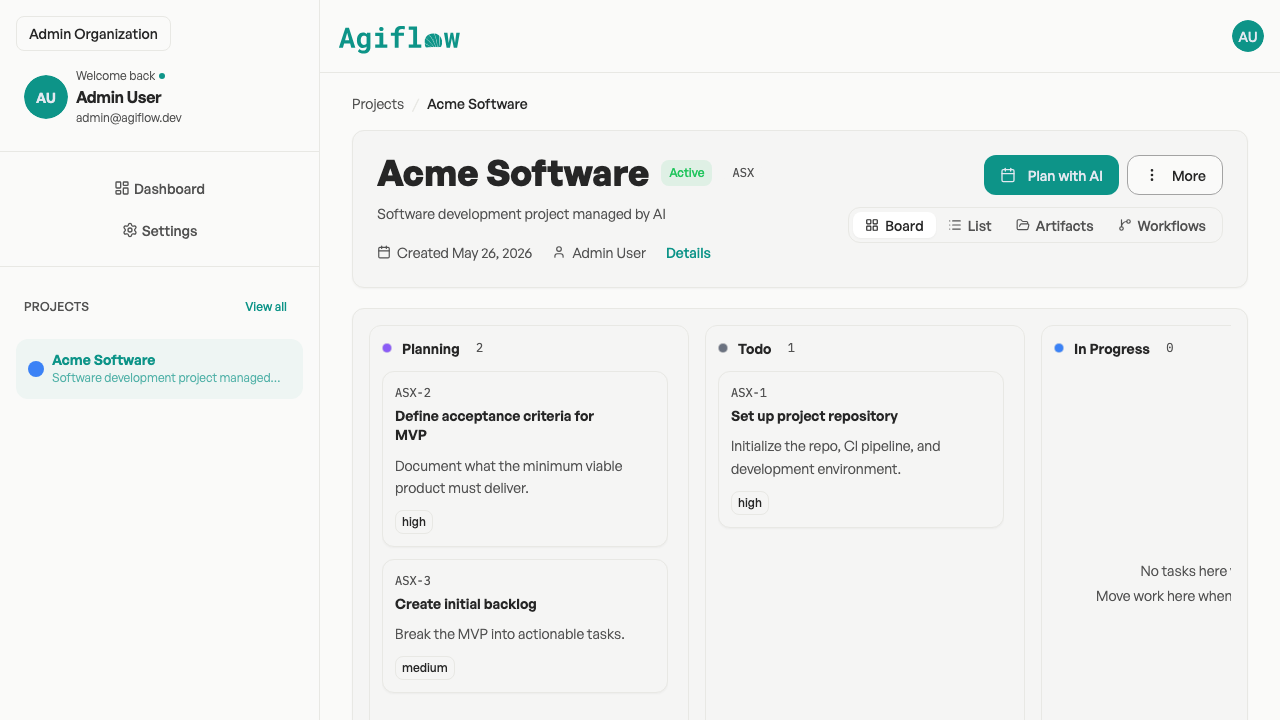
A focused kanban board: projects, work units, and task statuses.
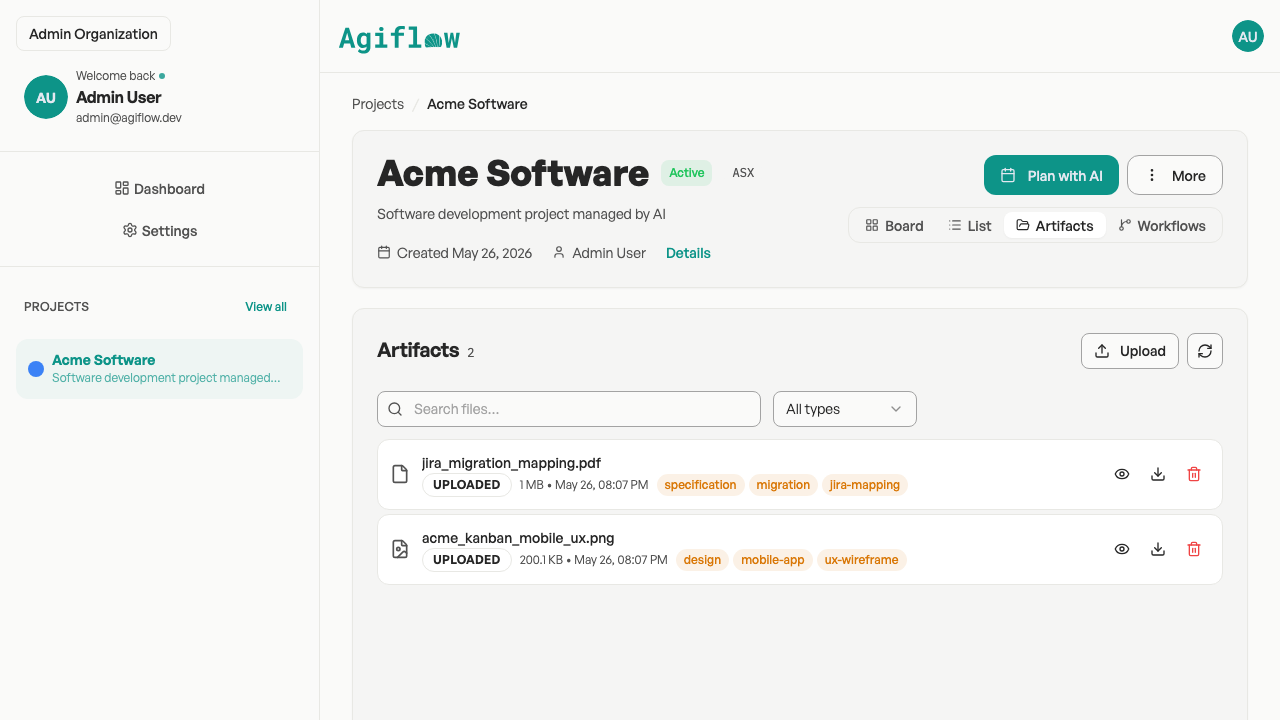
Project artifacts with searchable, filterable metadata, linked to tasks and work units.
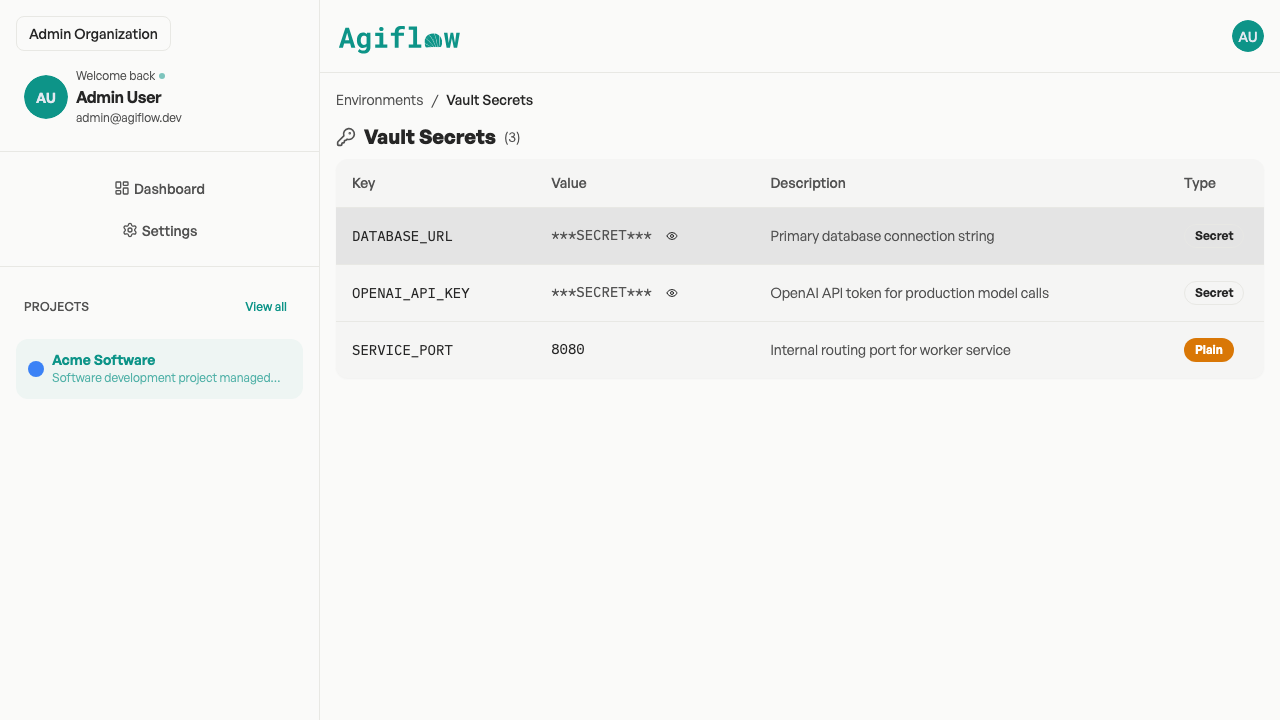
Per-environment vault: AES-encrypted entries, masked in responses.
When Notion is still the better choice
Agiflow is intentionally focused, and it does not replace every part of a Notion workspace. Notion is still the better choice when:
- Your primary need is docs, wikis, notes, and shared knowledge.
- You want one flexible database that can become a table, board, calendar, gallery, or timeline.
- Your team wants meeting notes, AI search, and knowledge workflows inside one workspace.
- You prefer designing custom properties and views for each process.
- Your project tracking is light and does not need a separate execution board.
How to choose
Agiflow is the better fit when the board itself is the daily operating surface and you want an external AI assistant to help move work forward. Use this quick guide.
| If you need... | Choose | Why |
|---|---|---|
| A team wiki, docs hub, or flexible knowledge database | Notion | That is Notion’s core strength |
| A lightweight project board with status flow | Agiflow | Agiflow starts from projects, work units, tasks, and kanban statuses |
| Your own AI assistant working from live tasks | Agiflow | MCP tools, skills, and widgets expose project data to external assistants |
| A single workspace for notes and light task tracking | Notion | One workspace may be simpler than adding a dedicated board |
| Technical project context with artifacts, vault entries, and workflow locks | Agiflow | These are native Agiflow project-management capabilities |
| Full Notion Agent and AI search inside Notion | Notion Business | Official pricing places full AI capabilities on Business |
More Agiflow alternatives
Comparing other tools too? Agiflow is also positioned for teams looking beyond heavyweight project management suites, flat task lists, and simple kanban boards.
Notion alternative FAQs
Is Agiflow a full Notion replacement?
No. Agiflow is not a docs app, wiki, note-taking tool, or flexible database workspace. It can replace the project-board part of a Notion setup when you need projects, work units, tasks, statuses, artifacts, workflow locks, and MCP-connected AI assistants.
When is Notion better than Agiflow?
Notion is better when your main job is documentation, knowledge management, notes, meeting notes, flexible databases, or one workspace that can be shaped into many workflows. Agiflow is better when the main job is project execution on a purpose-built board.
Why use Agiflow instead of a Notion database board?
A Notion board is a database view you configure. Agiflow starts with project-management primitives: projects, work units, tasks, task statuses, comments, artifacts, and workflow locks. That reduces the amount of schema design needed before work can move.
Does Notion have MCP too?
Yes. Notion has an official hosted MCP server that lets compatible assistants read from and write to Notion pages while respecting existing permissions. Agiflow’s difference is not “MCP versus no MCP.” The difference is a purpose-built project board and a bring-your-own-assistant model without a proprietary Agiflow AI layer.
How is Agiflow’s AI approach different from Notion AI?
Notion AI is a proprietary AI layer inside Notion, with full Notion Agent and AI search on Business and Custom Agents priced with Notion credits. Agiflow does not run or host AI agents. It gives the assistant you already use structured access to project data over MCP.
Can ChatGPT, Claude, Cursor, or VS Code update Agiflow tasks?
Yes. Agiflow’s MCP integration is designed for external AI assistants including ChatGPT, Claude Desktop, Cursor, and VS Code, with tools, on-demand skills, and interactive widgets.
Can Agiflow manage project files?
Yes. Agiflow supports project artifacts with searchable, filterable relational metadata, linked to tasks and work units.
Can Agiflow manage secrets or environment context?
Yes. Agiflow includes project environments and per-environment vault entries with AES-encrypted values and masked responses, with role-aware access controls.
Is Agiflow free?
Agiflow has a free solo path, with Team and Enterprise plans for hosted collaboration. Confirm current plan details on the Agiflow pricing page before committing to specific paid pricing.
Is the Agiflow toolkit open source?
Agiflow is a commercial project board. The open-source component is aicode-toolkit, which provides developer MCP tooling such as scaffold-mcp, architect/vibe-lint, and one-mcp.
Move project work out of a custom database board
Keep Notion for the knowledge layer. Use Agiflow when you need a real board with projects, work units, tasks, artifacts, and MCP tools your own AI assistant can operate.
Free for solo use. Bring your own AI assistant. No Agiflow AI credits to meter.