Akiflow alternative for AI-readable project boards
Akiflow helps you plan your day around tasks, calendars, inboxes, and its built-in Aki assistant. Agiflow gives your team one project board that the AI assistant you already use can work from.
Free forever plan. No credit card required.
Akiflow features and pricing verified July 20, 2026.
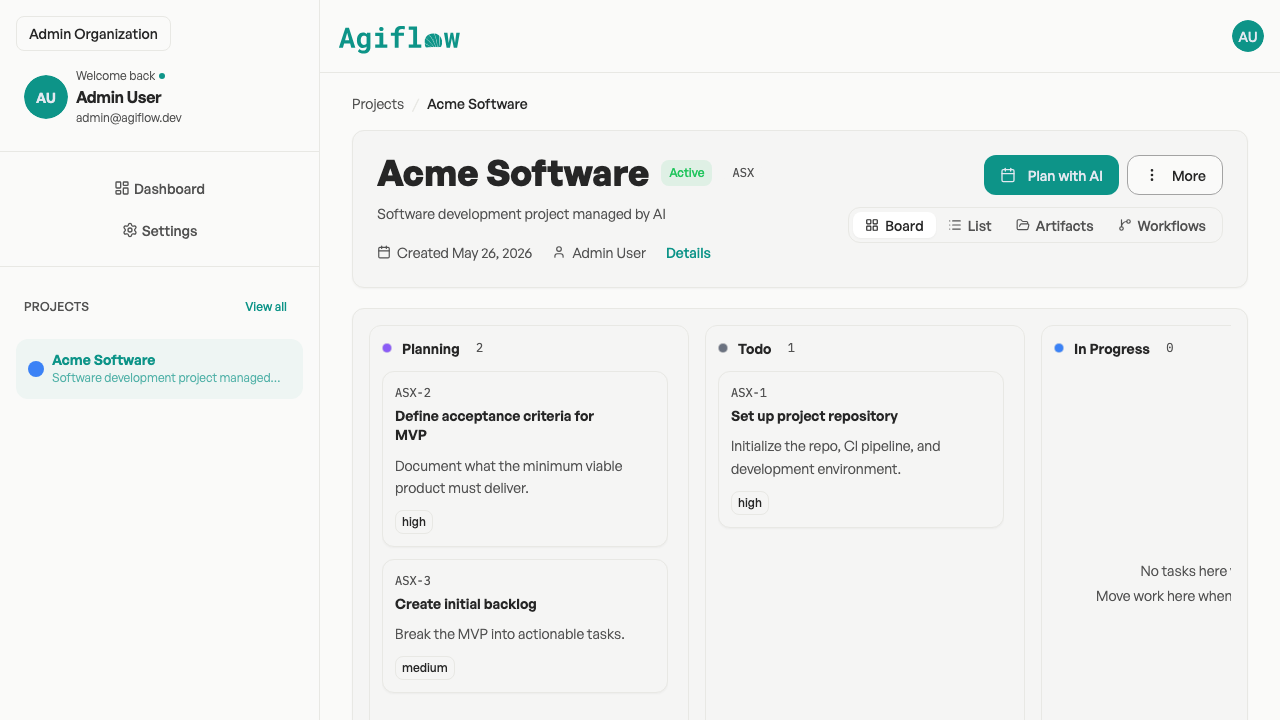
Short answer: choose Akiflow if your main problem is daily planning, time blocking, and bringing personal tasks into one calendar. Choose Agiflow if your main problem is keeping project work, task status, artifacts, and AI-assisted updates visible on one shared board.
Akiflow vs Agiflow at a glance
Both tools can help organize work. The practical difference is where the work lives. Akiflow starts from the calendar and personal productivity flow. Agiflow starts from the shared project board.
| Decision point | Choose Akiflow when... | Choose Agiflow when... |
|---|---|---|
| Main job | You want tasks, calendars, inboxes, scheduling, and planning in one productivity suite. | You want projects, work units, tasks, statuses, comments, artifacts, and project context in one shared board. |
| AI approach | You want Akiflow's built-in Aki assistant to help plan and prioritize. | You want ChatGPT, Claude, Cursor, VS Code, Codex, or another connected assistant to work from your project board. |
| Daily planning | Time blocking, meeting links, availability, and calendar flow are central. | Calendar planning is secondary to project visibility and task progress. |
| Team system | Team productivity and availability are the key workflow. | A shared project board is the team's source of truth. |
| Integrations | You want broad productivity app integrations and 2-way sync across task and calendar tools. | You want assistant-focused connections and project tools exposed to the AI tools you already use. |
| Pricing posture | You are comfortable with a 7-day trial and a paid Pro subscription. | You want a permanent free plan with 2 seats, 3 projects, and 3 AI assistant connections. |
The real difference is calendar-first planning vs project-board work
Akiflow starts with the day
Akiflow is strongest when the day itself is the main problem. Its public pages focus on tasks, calendars, inbox capture, scheduling, time blocking, and Aki, its built-in AI assistant.
Agiflow starts with the board
Agiflow is built for a different moment: when work has moved beyond a personal plan and needs a shared place to live. Projects, tasks, comments, artifacts, and vault entries give your team and your connected assistant the same working context.
For a deeper product overview, see What is Agiflow?
Choose Akiflow if your day is the workflow
Akiflow is the clearer fit when your main pain is personal productivity.
- Calendar-centered planning and time blocking.
- Meeting links, availability slots, and scheduling workflows.
- Inbox capture from many productivity apps.
- A built-in assistant designed around daily planning.
- A personal productivity suite before a shared project system.
Choose Agiflow if your projects need a board your AI can use
Agiflow is for teams and solo builders who already ask AI assistants to help with real work, then lose track of what changed, what is blocked, and where the latest project files live.
- One visible board for projects, work units, tasks, and statuses.
- A place for project artifacts and task files to stay connected to the work.
- Real-time project updates for people using the board.
- Assistant connections for ChatGPT, Claude, Cursor, VS Code, Codex, and other compatible clients.
- Control over what workspace, project, or task context a connected assistant can access.
- A free plan that does not expire.
2 seats, 3 projects, and 3 AI assistant connections on the Free plan.
Detailed comparison
| Area | Akiflow | Agiflow |
|---|---|---|
| Primary category | Calendar, task, inbox, scheduling, and AI productivity suite. | Shared project board for AI-assisted project work. |
| Best for | People who want one place to plan the day, block time, and manage personal productivity. | People and small teams who want project work visible to humans and connected assistants. |
| AI model | Built-in Aki assistant, publicly positioned around planning, prioritizing, reminders, and daily briefings. | Connects external assistants such as ChatGPT, Claude, Cursor, VS Code, Codex, and compatible clients to project tools. |
| Calendar and scheduling | Public pages emphasize calendars, time blocking, meeting links, availability, and team scheduling. | Not positioned as a calendar-first scheduling suite. |
| Project structure | Public pages mention projects, folders, task management, and team productivity. | Projects, work units, tasks, statuses, comments, artifacts, vault entries, and workflow locks are core product objects. |
| Integrations | Public integrations page lists many productivity apps including Slack, Gmail, Notion, Asana, ClickUp, Zoom, Google Calendar, Trello, Todoist, Jira, GitHub, Microsoft Teams, Outlook, Zapier, IFTTT, Linear, and Microsoft To Do. | Focuses on assistant connections and project-management tools available to connected AI clients. |
| Team use | Public teams page promotes shared productivity, availability, and safe collaboration. | Team project board with statuses, role-based project management, artifacts, and real-time updates. |
| Pricing | Akiflow lists Pro Monthly at $34 and Pro Yearly at $19 per month billed yearly, with a 7-day trial. | Free forever plan at $0, Team at $9 per seat per month or $7 per seat per month billed annually. |
| Better question | How do I plan my day? | Where should project work live when AI is helping? |
Pricing: trial productivity suite vs free project board
Akiflow's official pricing page lists Pro Monthly at $34 and Pro Yearly at $19 per month billed yearly, with a 7-day trial. The yearly plan includes Aki and MCP access. These details were verified July 20, 2026. Agiflow offers a Free plan that does not expire.
Check the official Akiflow pricing page before purchasing because pricing and promotions can change.
Agiflow Free
$0 forever, 2 seats, 3 projects, 2 API keys, 3 AI assistant connections, and 30 minutes remote execution per month.
Agiflow Team
$9 per seat per month, or $7 per seat per month billed annually. Team includes unlimited seats, projects, API keys, and assistant connections.
Extra remote execution is $0.09 per hour from prepaid credits, and work stops rather than over-billing when credits run out.
See Agiflow pricingWhat changes if you move project work to Agiflow?
Your calendar may stay where it is
Agiflow is not a calendar replacement. Keep calendar planning in the tool that fits your day.
The project board becomes the source of truth
Instead of asking an assistant to remember a project from scattered chats, give the work a structured place.
Your assistant works from approved context
Agiflow lets users choose the workspace, project, or task context available to a connected assistant.
Akiflow alternative FAQ
Is Agiflow the same as Akiflow?
No. Akiflow is a calendar, task, inbox, scheduling, and AI productivity suite. Agiflow is a shared project board that works with external AI assistants.
Does Agiflow replace Akiflow?
Not for everyone. Agiflow is not a calendar-first planner. If your main need is time blocking, meeting scheduling, and daily planning, Akiflow may be the better fit. If your main need is project visibility for people and AI assistants, Agiflow is the better fit to evaluate.
Does Agiflow include a calendar?
No. Agiflow is not a calendar suite. It focuses on projects, work units, tasks, statuses, artifacts, and assistant-connected project work.
Does Agiflow run AI agents?
No. Agiflow does not run or host AI agents. It provides project tools and context to external AI assistants such as ChatGPT, Claude, Cursor, VS Code, Codex, and compatible clients.
Which is better for teams?
It depends on the team workflow. Akiflow publicly promotes team productivity, availability, and collaboration. Agiflow is more directly a shared project board for teams that want project status, files, and AI-assisted work in one place.
Which has a free plan?
Agiflow has a Free plan at $0 forever with 2 seats, 3 projects, 2 API keys, 3 AI assistant connections, and 30 minutes remote execution per month. Akiflow offers a 7-day trial, a $34 monthly Pro plan, and a yearly Pro plan listed at $19 per month billed yearly as of July 20, 2026.
Can I use Agiflow with ChatGPT or Claude?
Yes. Agiflow supports external AI assistants including ChatGPT, Claude Desktop, VS Code, Cursor, Codex, and other compatible assistant clients.
When should I choose an Akiflow alternative?
Choose an Akiflow alternative when your main pain is not calendar planning, but keeping shared project work organized, visible, and available to the AI assistant helping you.
Give your AI a project board, not another scattered chat
Start with a free Agiflow board for your next project. Invite one teammate, connect the assistant you already use, and keep the work visible as it moves.
No credit card required. Free forever plan.