The Trello alternative your AI assistant can actually use
Agiflow keeps the simple kanban board you like about Trello — boards, cards, columns — and adds projects, work units, and templates when you need them. Best part: ChatGPT, Claude, and Cursor can read and update your real board, not a pasted summary.
Free forever for solo use. $9 per seat for teams — no per-view paywall.

Why people look past Trello
Trello is loved for one reason: it's simple. Teams usually look for an alternative when that simplicity starts to cost them — flat cards stop holding the whole picture, or their work has moved into AI tools the board can't reach.
Flat cards hit a ceiling
Past a point, every card is a sibling and there's no native way to group work into bigger pieces. A growing project needs more than one long list.
Your work moved into ChatGPT and Claude
If you plan and write in AI assistants, your board should be something they can actually open and update — not a screenshot you paste into the chat.
Useful views sit behind a paywall
Timeline, Calendar, and Table arrive on Trello's Premium tier. That's a fair pricing choice — but it means you pay more to unlock a view you may have expected by default.
The difference in one line
Trello is the simplest place to make a board. Agiflow is the simplest board your AI assistant can run with you.
Trello vs Agiflow at a glance
Agiflow keeps Trello's simple board feel and adds structure plus a board your AI assistant can use. Trello keeps the edge on integrations, advanced views, and automation breadth. Here's the honest side-by-side.
| Need | Trello | Agiflow |
|---|---|---|
| Best fit | Teams that want the simplest possible visual board with a big integration marketplace | Teams that want a simple board with more structure and a board their AI assistant can use |
| Visual kanban board | Strong — the original kanban brand | Kanban boards with cards, columns, and statuses |
| Structure above cards | Flat cards and lists | Projects, work units, and tasks with status columns |
| Connect ChatGPT, Claude, or Cursor to the board | Not a built-in capability | Connect external AI assistants to read and update the live board |
| See the board inside ChatGPT | Not available | Board shows up as an interactive view inside ChatGPT |
| Templates | Large template gallery (broad) | Built-in marketing, development, and sales templates |
| Files | Attachments per card | Project files with searchable labels, linked to tasks and work units |
| Environment secrets | Handled outside Trello | Per-environment secrets, encrypted and masked |
| Integrations marketplace | 200+ Power-Ups (Slack, Google Drive, GitHub, Salesforce…) | Focused on AI-assistant access and command-line workflows |
| Advanced views (Timeline / Calendar / Table) | On Premium tier | Kanban-focused; every available view included in the plan |
| Automation | Butler — mature no-code automation | Command-line and AI-assistant-driven workflows |
| Command-line access | Via API-driven workflows | Built-in CLI for tasks and projects |
| Mobile app | Mature, polished | Native app: board, inbox, and projects |
| Pricing posture | Free tier; paid tiers add views and AI per user | Free for solo; flat $9 per seat for teams; no per-view paywall |
Trello details as of May 2026 from public sources; confirm current details on trello.com.
Bottom line: Choose Agiflow if you want a simple board your AI assistant can read and update; stay with Trello if a large integration marketplace and mature automation are your priority.
A board your AI assistant can use
Connect ChatGPT, Claude, Cursor, or VS Code straight to your Agiflow board. Your assistant reads and updates real tasks — not a screenshot you pasted in.
Connect the assistants you already use
ChatGPT, Claude, Cursor, and VS Code all connect to your board, so project work travels into the places your team already works.
It works on your real board
Assistants create, move, and update real tasks, and changes show up for the whole team in real time — no copy/paste round trip.
See your board inside ChatGPT
Your board shows up as an interactive view inside ChatGPT, not a wall of text — so you can scan and act on it where you're already chatting.
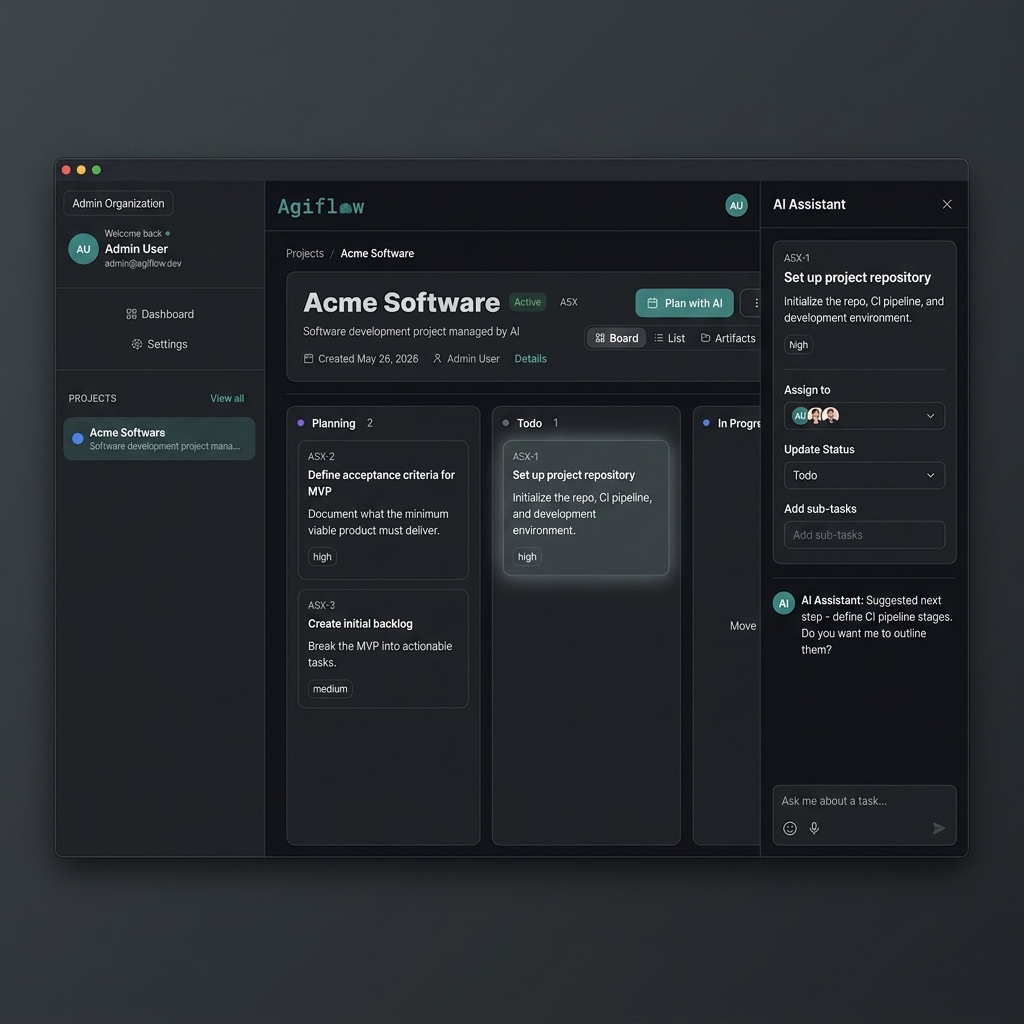
Connect ChatGPT, Claude, or Cursor — your assistant works from the live board.
Keep the simple board, add structure when you need it
You don't have to choose between simple and structured. Start with a board; when cards aren't enough, group them into projects, work units, and tasks — all in the same place.
Start from a template or a blank board
Pick a marketing, development, or sales template — or start blank. Blank boards still get useful default columns, so setup never blocks the first real task.
Go beyond flat cards
Group work into projects, work units, and tasks with status columns, so big work doesn't get lost in a single long list of cards.
Roles without the admin overhead
Leads manage structure and access while everyone else just works the board, with shared project context for the whole team.
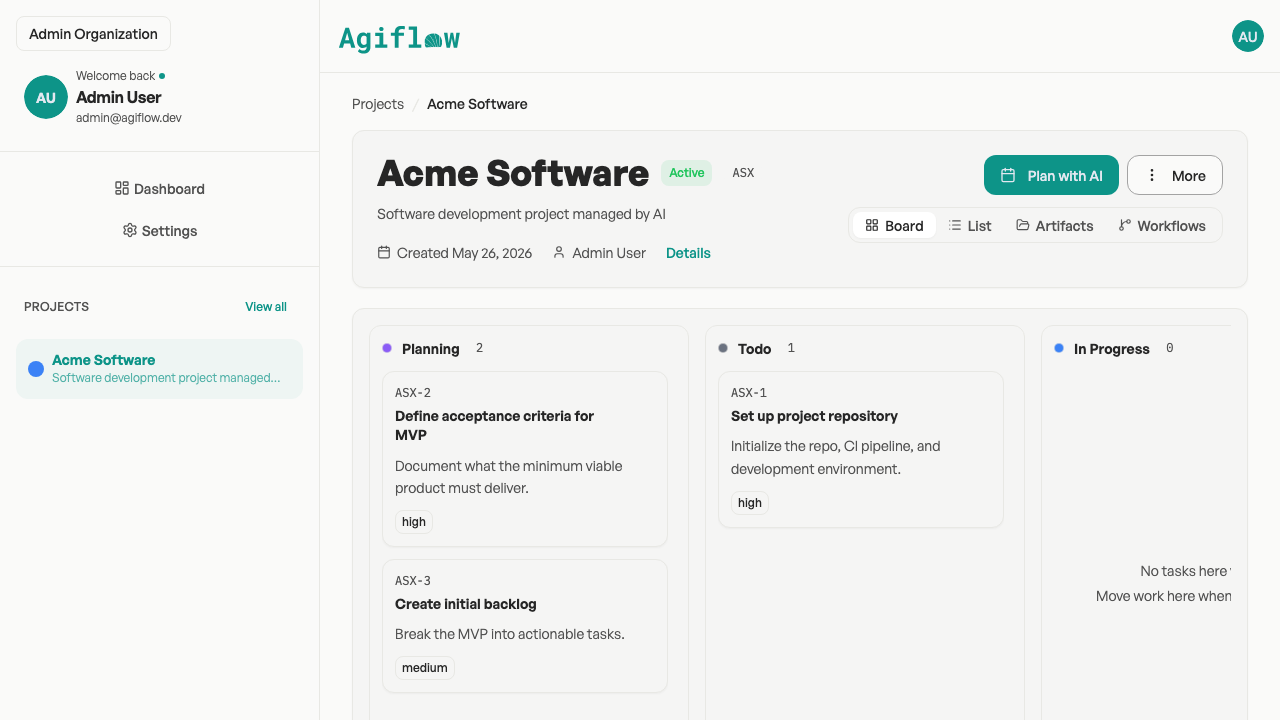
Start with a simple board; add projects, work units, and statuses when you need them.
Keep project context on the board
Files, labels, and environment secrets live with the work, so you and your AI assistant aren't hunting across five tools to find the right detail.
Files with searchable labels
Keep specs and assets attached to the right tasks with searchable labels, so the file you need is easy to find later instead of buried in a chat thread.
Environment secrets, safely stored
Store per-environment secrets that are encrypted and masked, so sensitive values stay with the project without sitting in plain sight.
Run it from the command line
Manage tasks from your terminal or scripts with a built-in command line, handy for teams that automate the repetitive parts of project work.
Use it from your phone
A native mobile app brings your board, inbox, and projects with you, so you can check and update work away from your desk.
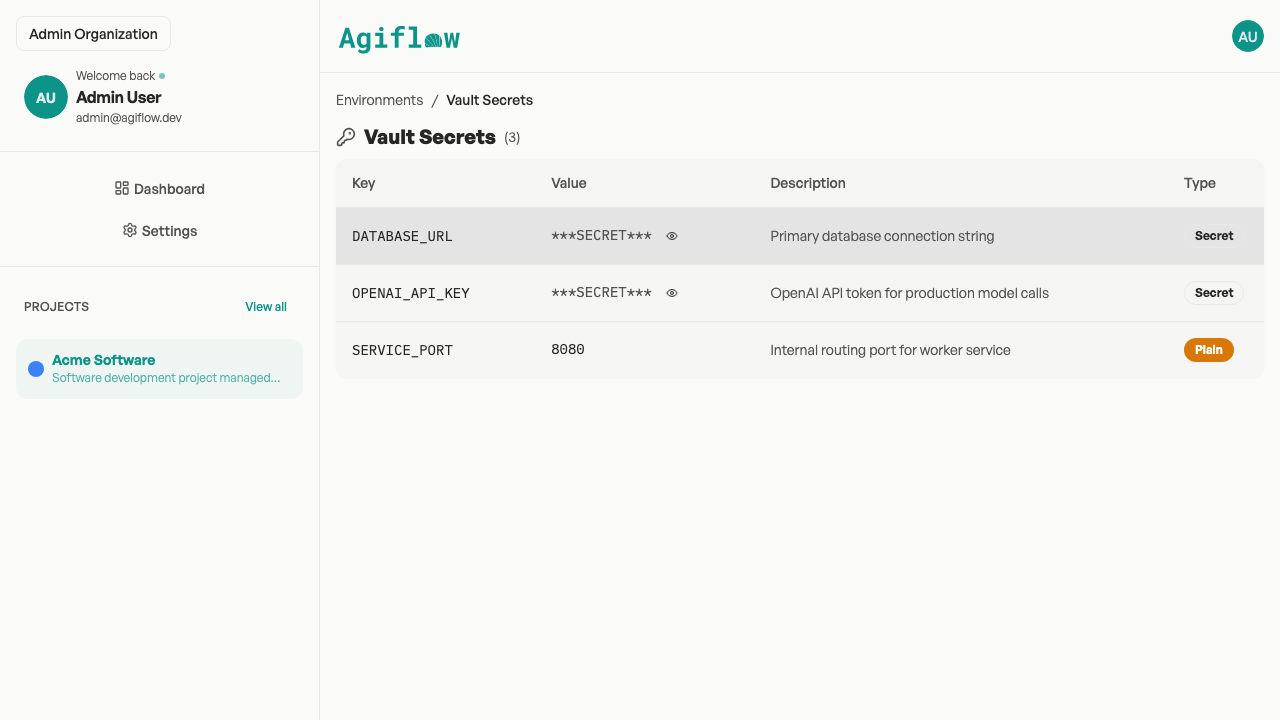
Per-environment secrets, encrypted and masked.
Where Trello still wins
Trello has a decade head start in places that matter. If these are your priority, Trello may be the better pick — and that's a fair reason to stay.
Trello is stronger for
- 200+ Power-Up integrations (Slack, Google Drive, GitHub, Salesforce)
- Advanced views on Premium (Timeline, Calendar, Table, Dashboard, Map)
- Mature no-code automation (Butler), a large template gallery, and a very polished mobile app
Agiflow is the better fit when
- You want a board your AI assistant can read and update
- You want structure above flat cards without enterprise setup
- You want flat per-seat pricing with no per-view paywall, plus command-line access
Need to compare against heavier enterprise agile instead? See our Jira alternative page.
Pricing compared
Agiflow is free forever for solo use and a flat $9 per seat for teams, with no features hidden behind a per-view paywall. Trello's free tier is genuinely generous; its advanced views and AI sit on paid tiers. Trello pricing is shown as of May 2026 — confirm current pricing on trello.com/pricing.
| Pricing question | Trello (as of May 2026) | Agiflow |
|---|---|---|
| Is there a free plan? | Yes — generous: unlimited users, up to 10 boards per workspace | Yes — free forever for solo use |
| Entry paid tier | Standard, $5 / user / mo (annual) | Team, $9 / seat / mo |
| Where do advanced views live? | Timeline, Calendar, Table on Premium ($10 / user / mo annual) | Included — no per-view paywall |
| AI features | On Premium and above | AI-assistant access included on every plan, including Free |
| Enterprise | From $17.50 / user / mo (50-seat floor, annual) | Custom — SSO/SAML, SLA, dedicated support |
Trello prices are publicly listed figures captured 2026-05-30 and may change — verify on trello.com/pricing. Agiflow pricing from agiflow.io.
Bottom line: Choose Agiflow for flat, predictable per-seat pricing with every view included; Trello's free tier remains a strong start if you don't need AI-assistant access or advanced views.
Choose Agiflow if your simple board needs a bit more
- You want ChatGPT, Claude, or Cursor to read and update your board without manual copy/paste.
- You want projects, work units, and tasks in one simple place.
- You prefer kanban over heavy process and setup.
- You want flat $9 per seat with every view included.
- You want command-line and mobile access to your project work.
- You're happy to trade Trello's bigger integration marketplace for an AI-connected board.
Frequently asked questions
Is Agiflow a good Trello alternative?
Yes — if you like Trello's simple board but want a little more. Agiflow keeps the kanban board and adds projects, work units, and templates, plus a board your AI assistant can read and update. Trello is still a great pick if you mainly need its large integration marketplace and advanced views.
Can ChatGPT or Claude use my Agiflow board?
Yes. You can connect ChatGPT, Claude, Cursor, and VS Code to your Agiflow board so they read and update real tasks instead of working from a pasted summary. Your board can even show up inside ChatGPT as an interactive view.
How much does Agiflow cost compared to Trello?
Agiflow is free forever for solo use and a flat $9 per seat for teams, with every available view included. As of May 2026, Trello offers a generous free plan, with Standard at $5/user/mo and Premium (which adds Timeline, Calendar, Table, and AI features) at $10/user/mo on annual billing. Confirm current Trello pricing on trello.com/pricing.
Will I lose Trello's simplicity?
No. Agiflow keeps the same simple board feel — cards, columns, and drag-and-drop. The extra structure (work units, templates, files) is there when you want it and out of the way when you don't.
Does Agiflow have as many integrations and automations as Trello?
No, and we're honest about it. Trello's Butler automation and 200+ Power-Ups are broader and more mature. Agiflow focuses on AI-assistant access and command-line workflows instead. If a big integration marketplace is your priority, Trello is the stronger choice.
Does Agiflow run AI agents for me?
No. Agiflow is the board. Your own AI assistant — ChatGPT, Claude, or Cursor — does the work by reading and updating your board. You stay in control of what it can see and change.
Can Agiflow store project files and secrets?
Yes. You can keep project files with searchable labels linked to the right tasks, and store per-environment secrets that are encrypted and masked.
Can I use Agiflow from my phone or the command line?
Yes. There's a native mobile app with your board, inbox, and projects, plus a command line for managing tasks from your terminal or scripts.
Keep your board. Add your AI.
Start a free Agiflow board, bring your first project over, and connect the AI assistant your team already uses.
Free forever for solo use. $9 per seat for teams. No per-view paywall.