Prompt library for planning, task breakdowns, meetings, risks, and updates
ChatGPT Project Management Prompts That Become Real Tasks
To use ChatGPT for project management, give it three things in the prompt: the project goal and context, the constraints it cannot change, and the exact fields you want back, such as task name, owner, status, priority, due date, and blocker. Then review the answer for guessed owners or invented dates before you move the approved items onto a board.
Good ChatGPT project management prompts ask for a concrete work output: a project brief, task breakdown, risk review, status update, meeting follow-up, or next-week priority list.
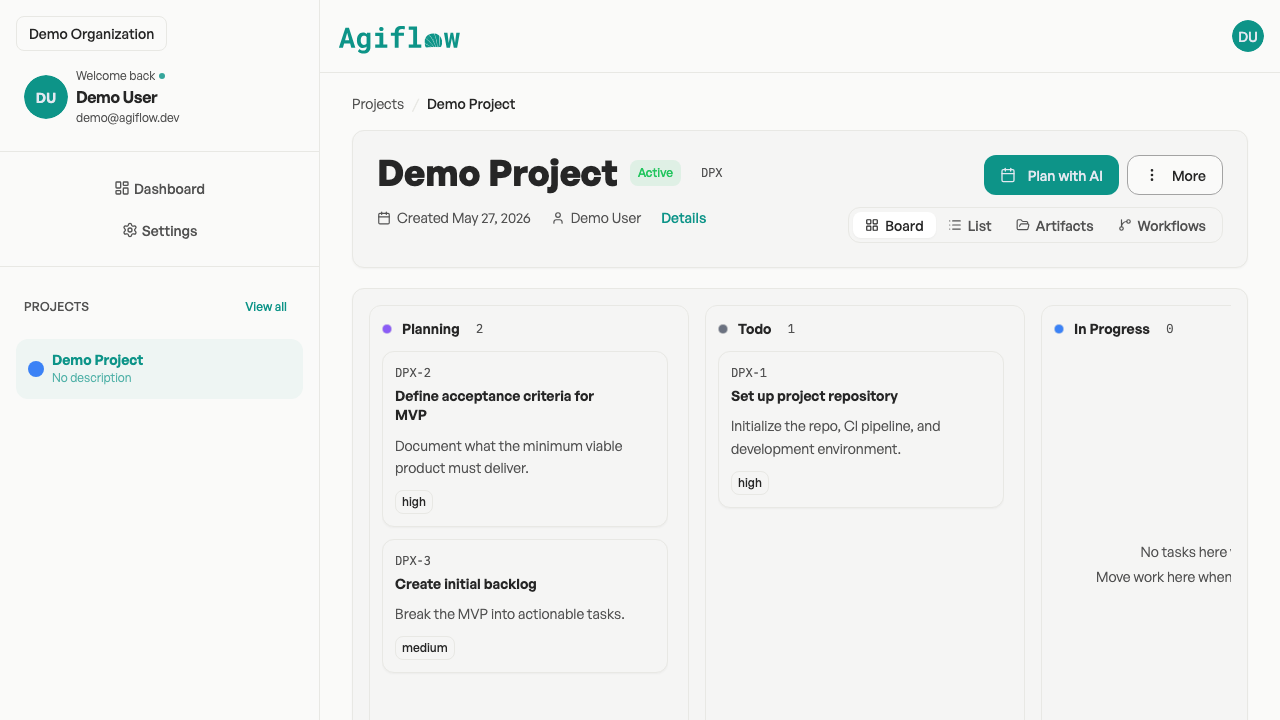
Use the prompts below when you need ChatGPT to organize messy project context. When the output is ready for your team, Agiflow gives it somewhere useful to live: a shared project board with tasks, statuses, comments, work phases, and artifacts that ChatGPT can help inspect after you approve the connection.
You choose what ChatGPT can use. Agiflow stays the shared board.
Turn these meeting notes into tasks with owner, priority, due date, blocker, and notes. Mark missing details as needs clarification.
Copy These First
Five Project Management Prompts For ChatGPT
Start with one of these prompts, then replace the bracketed context with your project details.
Project Plan Prompt
Create a project plan for [project goal]. Include phases, milestones, task owners, risks, dependencies, and a first-week action list. Format the output as a table with task name, owner, status, priority, due date, notes, and blocker.
Meeting Notes To Tasks Prompt
Turn these meeting notes into tracked project work. Extract decisions, open questions, follow-up tasks, owners, due dates, blockers, and comments. Flag any task that needs clarification before it can be assigned.
Risk Review Prompt
Review this project plan for missing owners, unclear next steps, dependency risks, timeline risks, and decisions that could block delivery. Return a risk table with severity, owner, recommended next action, and the task it affects.
Stakeholder Update Prompt
Write a project status update for [audience]. Summarize progress, decisions made, blockers, risks, next actions, and where stakeholder input is needed. Keep it concise and separate facts from recommendations.
Daily Priority Prompt
Review this task list and recommend today's priorities. Group the work into must-do, should-do, waiting, and blocked. Explain why each must-do task matters and what information is missing.
Prompt Anatomy
The Prompt Pattern That Gets Better Project Output
Most weak prompts ask ChatGPT to "make a project plan" with no context. Better prompts tell ChatGPT what the project is, what success looks like, what constraints matter, and exactly how the answer should be structured.
1. Name The Outcome
Tell ChatGPT whether you need a plan, task list, risk review, summary, decision log, or update. One outcome keeps the answer usable.
2. Add Project Context
Include the project goal, audience, timeline, team roles, current notes, and anything already decided.
3. Set Constraints
Give ChatGPT the delivery date, budget limits, approval process, dependencies, tools, and anything the team cannot change.
4. Ask For A Board-Ready Format
Use fields that can become tracked work: task name, owner, status, priority, due date, work phase, notes, and blocker.
5. Ask For Follow-Through
Ask ChatGPT to flag missing context, unclear owners, risky dependencies, and next actions before you move the work into your project board.
Prompt Library
ChatGPT Prompts By Project Management Workflow
Each workflow includes a primary prompt and a board-ready variation so the output can move from chat into tracked work.
Project Planning Prompts
Use when you are turning a goal, campaign, client brief, or internal initiative into a plan.Open
Primary Prompt
Act as a practical project manager. Create a project plan for [goal] for [team or client]. Include scope, assumptions, phases, milestones, dependencies, risks, and the first 10 tasks. Format tasks with owner, priority, due date, status, and notes.
Make It Board-Ready
Convert the plan into task cards grouped by phase. Each task card should include a clear title, one-sentence description, owner, priority, due date, blocker, and acceptance criteria.
Task Breakdown Prompts
Use when ChatGPT gives a plan that is still too broad to assign.Open
Primary Prompt
Break this project phase into tasks small enough for one person to own. For each task, include owner role, expected output, dependencies, priority, estimated effort, and a definition of done.
Make It Board-Ready
Rewrite these tasks for a project board. Use action-first titles, one owner per task, clear due dates where possible, and comments for context that should stay attached to the task.
Meeting Notes To Tasks Prompts
Use when meeting notes need to become follow-up work instead of a long summary.Open
Primary Prompt
Extract project work from these meeting notes. Separate decisions, tasks, blockers, risks, and open questions. For each task, include owner, due date, priority, and the source note that explains why it matters.
Make It Board-Ready
Create task cards from these notes. If an owner or due date is missing, mark it as needs clarification instead of guessing.
Risk And Dependency Prompts
Use when the project looks planned, but you need a second pass for weak spots.Open
Primary Prompt
Review this project for delivery risks. Look for missing owners, unclear scope, hidden dependencies, approval delays, timeline pressure, and tasks that cannot start yet. Return a risk register with severity, owner, mitigation, and next action.
Make It Board-Ready
Turn each high or medium risk into a follow-up task with an owner, priority, due date, and comment explaining the risk.
Stakeholder Update Prompts
Use when you need a crisp update from board notes, task status, or messy progress comments.Open
Primary Prompt
Write a stakeholder update for [audience] using this project context. Include what changed, what is on track, what is blocked, what decision is needed, and what happens next. Keep the tone direct and calm.
Make It Board-Ready
After the update, list any new tasks, blockers, or decisions that should be added back to the project board.
Retrospective Prompts
Use when a project or sprint ended and the team needs useful lessons.Open
Primary Prompt
Run a project retrospective from this context. Identify what worked, what slowed us down, what decisions came too late, what should change next time, and which follow-up tasks should be created.
Make It Board-Ready
Convert the retrospective follow-ups into tasks grouped by process, communication, tooling, and ownership.
Client Or Campaign Kickoff Prompts
Use when a brief needs to become a kickoff agenda and project starter list.Open
Primary Prompt
Create a kickoff plan for [client/campaign/project]. Include agenda, decisions needed, assumptions to confirm, first milestone, follow-up tasks, and questions for stakeholders.
Make It Board-Ready
Turn the kickoff plan into starter tasks for a project board, grouped by planning, creative, approvals, launch, and reporting.
Daily Priority Prompts
Use when there are too many tasks and the next step is unclear.Open
Primary Prompt
Prioritize this project task list for today. Group tasks into must-do, should-do, waiting, and blocked. Explain the reasoning and flag any dependency that changes the order.
Make It Board-Ready
Recommend task status changes based on this priority review, but do not mark anything complete unless the evidence is clear.
Prompt To Board
How To Turn A ChatGPT Prompt Into Tracked Project Work
A useful ChatGPT answer is not the same as a managed project. The handoff matters. Once ChatGPT gives you a task list or update, the work needs owners, statuses, comments, and a place where the team can see what changed.
Open Agiflow in ChatGPTPlan in chat. Keep the work on a board your team can trust.
Ask For Structured Output
Prompt ChatGPT for fields that can move into a project board: task name, owner, phase, priority, due date, status, notes, and blockers.
Review Before You Create Work
Check whether ChatGPT guessed an owner, invented a date, or missed a dependency. Keep the project manager in control of the final decision.
Move The Useful Output Into Agiflow
Agiflow is the shared board for the project. It keeps tasks, statuses, comments, phases, and artifacts visible after the chat moves on.
Let ChatGPT Work From The Approved Board
After you connect Agiflow, ChatGPT can inspect the project context you approve and help with follow-up questions, updates, and task views.
Category Boundary
ChatGPT Projects Organize Chats. Agiflow Organizes Team Work.
ChatGPT Projects are useful for grouping related chats, files, instructions, memory, and tools inside ChatGPT. That helps keep the AI workspace organized. It does not replace the shared project state your team needs when work has owners, statuses, comments, tasks, and artifacts.
| Use Case | ChatGPT Projects | Agiflow |
|---|---|---|
| Keep related chats and files together | Good fit | Not the main job |
| Ask ChatGPT to draft plans and updates | Good fit | Works with that output |
| Track tasks, statuses, comments, and project phases | Limited fit | Core job |
| Give the team a shared board | Limited fit | Core job |
| Let ChatGPT inspect approved project context | Depends on setup | Supported after connection and approval |
Use ChatGPT Projects to organize the conversation. Use Agiflow when the conversation turns into project work other people need to see, update, and finish.
Safe Prompting
Safe Prompting For Real Projects
Use AI help without turning project governance into guesswork. Keep sensitive context policy-aware, review generated work, and make changes visible to the team.
Do Not Paste Sensitive Context Without Approval
If the project includes customer data, contracts, internal financials, credentials, or private people data, follow your team's policy before putting it into a prompt.
Ask ChatGPT To Flag Uncertainty
Add instructions such as do not guess owners or dates and mark missing information as needs clarification. This keeps generated tasks from looking more certain than they are.
Keep Changes Visible
The safest AI-assisted project workflow is one where the assistant helps organize the work, and the team can still see the board, comments, and status changes.
Keep Reading
These pages cover the broader ChatGPT project management workflow, Agiflow setup, board concepts, pricing, and integrations.
FAQ
Frequently Asked Questions
Short answers for project managers using ChatGPT prompts for plans, tasks, updates, and follow-through.
What are the best ChatGPT prompts for project management?
The best prompts ask for a concrete project output, not a vague opinion. Tell ChatGPT the goal, context, constraints, and output format. For project work, ask for fields such as task name, owner, status, priority, due date, notes, and blocker so the answer can become tracked work.
Can ChatGPT make a project plan?
Yes. ChatGPT can draft a project plan, milestones, task lists, risks, and status updates from the context you provide. A person should still review the plan before assigning work, especially when owners, deadlines, dependencies, or sensitive details are involved.
Can ChatGPT turn meeting notes into tasks?
Yes. Paste the meeting notes you are allowed to share, then ask ChatGPT to separate decisions, tasks, blockers, risks, and open questions. Tell it to mark missing owners or due dates as needs clarification instead of guessing.
What should I include in a ChatGPT project plan prompt?
Include the project goal, audience, timeline, team roles, known constraints, decisions already made, and the format you want back. If the plan will move into a project board, ask for task name, owner, priority, due date, status, phase, notes, and blocker.
Can ChatGPT track project progress?
ChatGPT can summarize progress and help reason about what changed when it has current project context. It is not a shared project board by itself. For team work, keep tasks, statuses, comments, and artifacts in a system of record such as Agiflow.
Are ChatGPT Projects the same as project management software?
No. ChatGPT Projects help organize related chats, files, instructions, memory, and tools inside ChatGPT. Project management software keeps shared team work visible through tasks, owners, statuses, comments, artifacts, and project views.
How do I turn ChatGPT output into project tasks?
Ask ChatGPT for structured output, review it for guesses or missing context, then move approved items into your project board. In Agiflow, those items can live as tasks with statuses, comments, phases, and artifacts instead of staying buried in a chat.
Is it safe to use ChatGPT for project management prompts?
It can be safe when you follow your organization's data policy, avoid sharing sensitive information without approval, and review generated output before assigning work. Do not paste credentials, private customer data, or confidential business details unless your team has approved that use.
Turn Good ChatGPT Output Into Work Your Team Can Track
Prompts help you shape the plan. Agiflow gives the plan a shared board, so tasks, comments, statuses, and project context stay visible after the chat is over.
You approve what ChatGPT can use. Your team keeps the board.