How to Keep One Project Board Across ChatGPT, Claude, Cursor, and Codex
Use MCP to connect ChatGPT, Claude, Cursor, and Codex to the same project board, then keep the board as the narrow source of truth for scope, status, evidence, and next action.
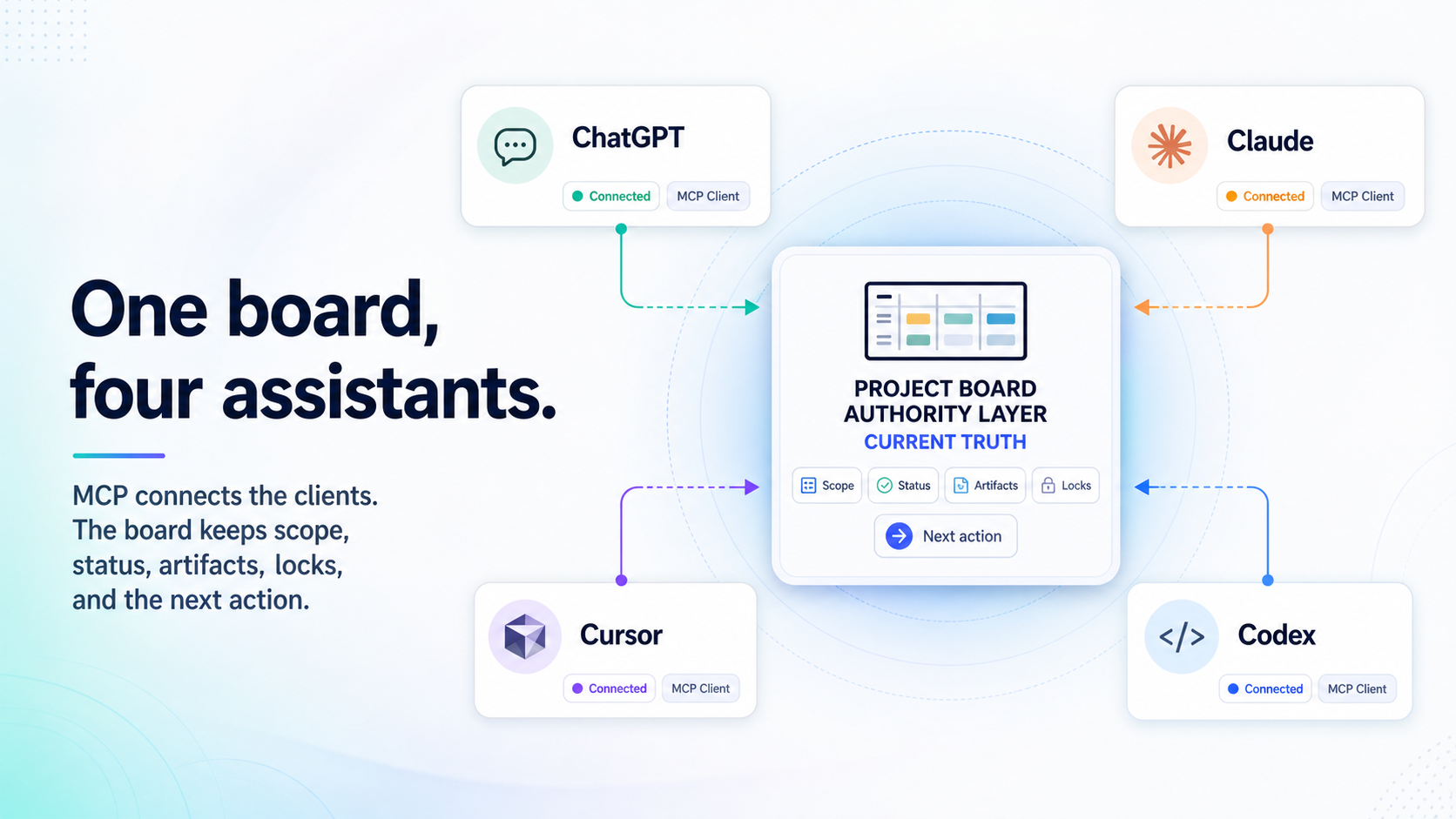
One project board across ChatGPT, Claude, Cursor, and Codex is not a memory problem.
It is an authority problem. Teams want ChatGPT, Claude, Cursor, and Codex to remember the same plan. That is understandable. It is also the wrong place to put the weight. MCP can connect AI applications to external systems, including tools, data sources, and workflows [1]. It does not decide which record is authoritative after the assistant leaves the turn.
Use MCP to connect each assistant to the same project board, but do not treat the board as shared memory. Treat it as the authority layer for current work state: objective, scope, status, owner, acceptance criteria, comments, artifacts, locks, blocker, and next action. Each client keeps its own setup path and permission model. The board keeps the handoff record.
That distinction is the whole operating model. The assistant can change. The work record should not.
How to Keep One Project Board Across ChatGPT, Claude, Cursor, and Codex
To keep one project board across ChatGPT, Claude, Cursor, and Codex, connect each client to the same MCP-connected project board, then make the board the narrow source of truth for the work. Store current scope, status, acceptance criteria, artifacts, comments, locks, blocker, owner, and next action. Do not store every transcript.
The official MCP introduction gives the connection layer: MCP is an open-source standard for connecting AI applications to external systems [1]. The client docs make the next point visible. ChatGPT Apps use MCP through an MCP server and connector setup [2]. Codex supports MCP servers in the CLI and IDE extension [3]. Claude Code documents local and remote MCP server support, scopes, OAuth, resources, prompts, and approval behavior [4]. Cursor documents MCP tools, prompts, resources, Apps, and project or global configuration [5].
For the Claude side of that setup, the Claude Code internals guide explains how MCP differs from local memory, skills, hooks, plugins, and subagents.
That proves compatibility. It does not prove continuity.
Continuity is what happens when a fresh assistant can answer these questions without replaying a chat:
| Board field | Question it answers |
|---|---|
| Objective | What outcome governs the work? |
| Scope | What is explicitly in and out? |
| Acceptance criteria | What must be true before this is done? |
| Status and owner | Who or what owns the next move? |
| Comments | What decisions or handoff notes still matter? |
| Artifacts | What evidence can be inspected? |
| Locks | Is anyone else acting on this work? |
| Blocker | What prevents progress right now? |
| Next action | What should the next assistant do first? |
Once the board owns authority, "add MCP server" stops being a generic instruction. Each client still enters through a different door.
Why Connection Is Possible, But Setup Is Not Identical
"MCP-compatible" sounds like one setup recipe. It is not.
ChatGPT, Claude Code, Cursor, and Codex can fit the same operating pattern, but the setup surface changes by client. For Claude, this article uses Claude Code as the concrete setup surface because the official MCP configuration evidence is strongest there. If you use another Claude surface, verify its current MCP path before copying the pattern.
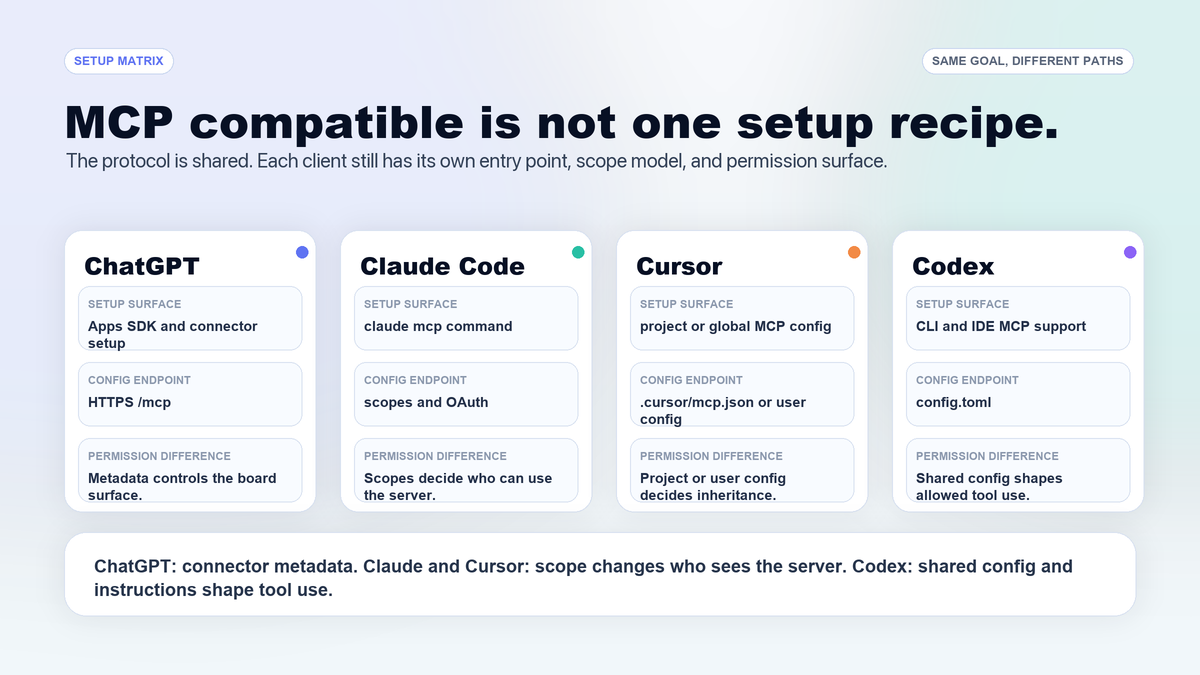
| Client | Setup surface to verify | Difference to account for |
|---|---|---|
| ChatGPT | Apps SDK and connector setup with a reachable HTTPS /mcp endpoint | Connector metadata, app permissions, and conversation-level tool selection matter [2]. |
| Claude Code | claude mcp, local and remote servers, scopes, and OAuth for remote servers | Local, project, and user scopes change who sees the server [4]. |
| Cursor | Project .cursor/mcp.json and global ~/.cursor/mcp.json | Project versus global config changes whether the board follows the repo or the user [5]. |
| Codex | CLI and IDE MCP support through config.toml | CLI and IDE share MCP configuration, and server instructions can shape tool use [3]. |
Agiflow is one example of the board side of this pattern. Its public integrations page and capability reference position it narrowly: a project board that connects external AI assistants over MCP, while the assistant remains the agent [9]. That boundary matters. The board should expose scoped project state. It should not pretend to host ChatGPT, Claude, Cursor, or Codex.
After setup, the next failure is role confusion. Every assistant gets access, and every assistant starts acting like it owns the whole project.
Give Each Assistant A Job, Not A Copy Of The Whole Plan
The common workaround is to paste the same brief everywhere.
It works for a day. Then ChatGPT has one summary, Cursor has another, Codex has a terminal transcript, and Claude Code is reviewing against a stale plan. The work did not fail because the assistants were weak. It failed because the prompt became the project record.
Use a concrete task. Say the team is shipping an OAuth session-refresh fix. The work has a tight goal: refresh sessions correctly without changing token storage format, preserve existing expiry behavior, run the relevant auth tests, and leave review evidence.
| Client | Good default job in this example | What it should not own alone |
|---|---|---|
| ChatGPT | Turn the request into scope, acceptance criteria, and stakeholder-facing questions | The only project record |
| Claude or Claude Code | Decomposition, risk review, security questions, and evidence review | Unbounded plan changes without board updates |
| Cursor | Editor-local implementation and visible diff review | Cross-client handoff state |
| Codex | Bounded terminal work, test runs, log capture, and implementation evidence | Product authority or hidden scope expansion |
| Board | Current project state and handoff evidence | The assistant's private reasoning transcript |
If your team is still choosing tools by where control lives, pair this with AI coding tools chosen by control surface. For this article, the control choice is already made: several assistants are in the loop, so the state surface has to be explicit.
Role separation only works if the board stores the right things. Too little state causes re-explaining. Too much state turns the board into another transcript.
The Board State Contract: Store Current Truth, Not Every Transcript
A shared board fails when it tries to become a chat archive.
The board should hold the smallest state contract the next assistant is allowed to trust. It should not preserve every hypothesis, dead end, model response, or private reasoning trace. Those belong in the current session, a review artifact, or nowhere at all.
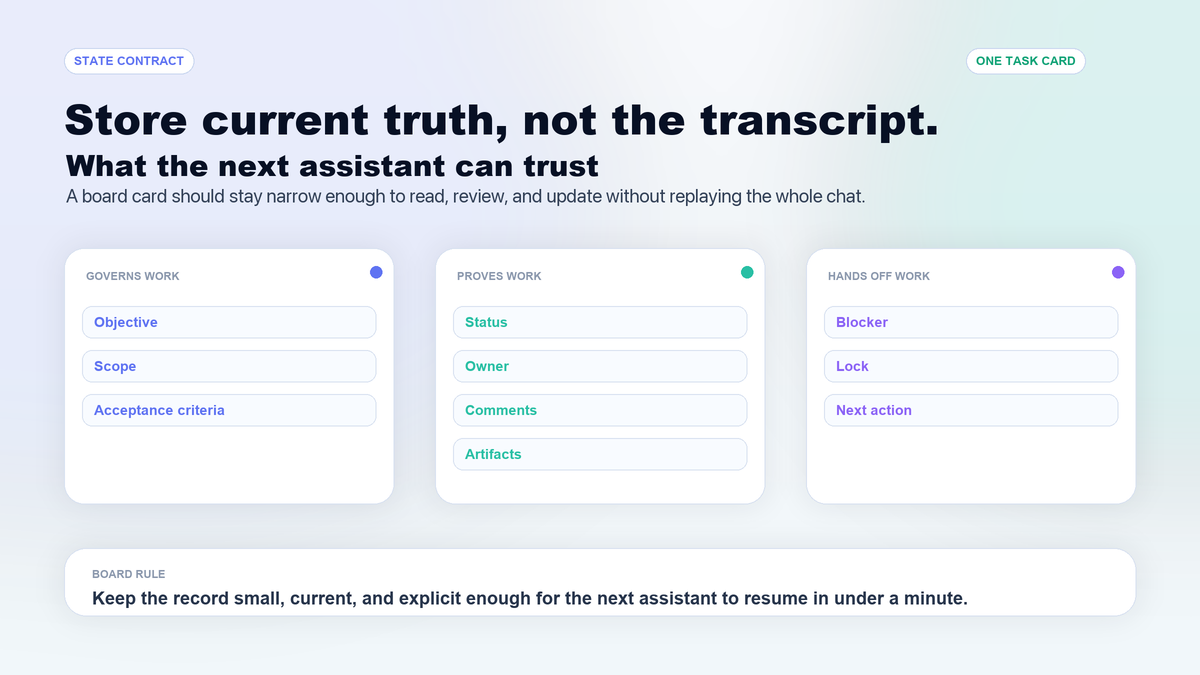
| State item | Why it belongs on the board | Do not store as board truth |
|---|---|---|
| Objective | Tells the next assistant what outcome governs the work | Brainstorming that no longer applies |
| Scope | Stops adjacent work from sneaking in | "While here" ideas |
| Acceptance criteria | Makes completion checkable | Vague quality hopes |
| Status and owner | Shows who or what is responsible now | Old status summaries |
| Comments | Carries decisions and handoff notes | Full chat transcripts |
| Artifacts | Preserves inspectable evidence | Unsourced screenshots or logs |
| Locks | Reduces silent collisions | Informal "I think I own this" notes |
| Next action | Lets another client resume without guessing | A long recap with no first step |
{
  "objective": "Refresh OAuth sessions without changing token storage format",
  "scope": "Auth session refresh path and related tests only",
  "status": "review-ready",
  "owner": "Codex run",
  "acceptanceCriteria": [
    "Existing token storage format is unchanged",
    "Expired sessions refresh through the existing path",
    "Auth session tests are attached as evidence"
  ],
  "artifact": "test-output-auth-session.txt",
  "blocker": "Mobile expiry policy needs human decision",
  "nextAction": "Claude Code review of diff and blocker"
}
That is enough for the next assistant to continue. It is not enough to reconstruct every thought that led to the diff. Good. The board is a state filter.
This is where Agiflow's category framing fits, without turning the article into a pitch. Agiflow's documented product boundary is a project board for external AI assistants, with scoped board tools, shared state, artifacts, vault entries, and workflow locks [9]. That is useful only if the state stays narrow. A noisy board is just a slower transcript.
Once the contract exists, the risky part becomes write access. Reading the board and changing the board should not have the same trust boundary.
Scope And Permissions Decide Whether Write Access Is Worth It
A shared board is useful because assistants can update it. That is also where trust fails.
OpenAI's Apps SDK security guidance says builders should request only necessary scopes, use explicit consent, validate inputs server-side, require confirmation for irreversible actions, and keep audit logs [6]. MCP's security guidance names risks such as confused deputy problems, token handling mistakes, SSRF, session hijacking, and local server compromise, then points back to scope minimization and accountable access [7].
That is not a reason to avoid MCP. It is a reason to make the permission model part of the board design.
Use a read-first progression:
- Start with read-only project or task access.
- Allow comments and artifact uploads before status changes.
- Gate status changes, locks, vault access, and destructive actions behind narrower scope or human approval.
- Disable unused servers while debugging. Cursor's docs explicitly note project and global MCP configuration, and disabled servers are a practical way to reduce tool clutter during troubleshooting [5].
The tool catalog itself has a cost. Anthropic Engineering has argued that large MCP tool sets can load many tool definitions into context, slow agents, increase cost, and make wrong-tool selection more likely. Treat that as a vendor engineering claim, not a universal benchmark, but the operating lesson is sound: expose fewer tools by default and load more only when the task needs them [8].
For the OAuth task, that means ChatGPT may only need read access to the task and write access to a planning comment. Cursor may need task comments and artifact upload. Codex may need to attach test output and update status to review-ready. Claude Code may need read access to the task, comments, and artifacts before leaving a review comment.
That is more work than "connect everything." It is also the difference between a board the team can trust and a board that silently accepts whatever the latest assistant wrote.
With roles, state, and permissions in place, the workflow can cross clients without pretending the handoff is automatic.
A Four-Assistant Workflow That Keeps One Board Current
Here is the loop I would use before adding a fourth assistant to a serious task.
| Step | Client | Action | Board update |
|---|---|---|---|
| 1 | ChatGPT | Turns the request into scope, acceptance criteria, and open questions | Creates or comments on objective, criteria, and unresolved decisions |
| 2 | Cursor | Implements visible editor changes | Adds changed-file notes and local review comments |
| 3 | Codex | Runs bounded checks or completes terminal work | Attaches command output, artifact, and review-ready status |
| 4 | Claude Code | Reviews evidence and tradeoffs | Adds review comment, blocker, or approval note |
| 5 | Human | Accepts, revises, or splits the task | Updates owner, status, and next action |
The board update after Step 3 might be:
Status: review-ready
Owner: Claude Code review
Artifact: test-output-auth-session.txt
Changed files: src/auth/session.ts, src/auth/session.test.ts
Blocker: mobile expiry policy unresolved
Next action: review diff against acceptance criteria and decide whether to split mobile behavior
That record is short enough for another assistant to read and specific enough for a human to audit. It also gives the next client a clear refusal path. If Claude Code cannot inspect the artifact, it should not approve the task. If the scope is unclear, it should ask to split the work instead of revising the plan silently.
For a deeper two-agent version of this same discipline, read handoff contracts for Claude Code and Codex. The four-client version is the same rule under more pressure: no boundary crossing without evidence.
This pattern is useful, but it is not free. Sometimes the repo is the better source of truth.
When The Repo Is Enough, And When A Board Earns Its Place
The strongest counterargument is right often enough to respect: for a solo developer, the repo may be enough.
Git commits, issue files, tests, PR comments, AGENTS.md, CLAUDE.md, Cursor rules, and local notes are real state surfaces. Use them. A board earns its place only when the state needs to outlive one assistant, one person, or one code-only workflow.
| Situation | Prefer repo-first state | Prefer shared board state |
|---|---|---|
| One developer, one assistant, one repo | Yes | Usually no |
| Multiple assistants touch the same task | Maybe | Yes |
| Work includes non-code artifacts or stakeholder review | Maybe | Yes |
| Secrets or broad tool access are involved | Use repo rules for stable policy | Use scoped board access only if reviewable |
| The team cannot keep board fields current | Yes | No |
The decision line I use is simple:
Put stable rules in the repo. Put live work state in the board. Put current reasoning in the prompt.
For one person, one assistant, and one short task, the repo can carry the work. For ChatGPT planning, Cursor editing, Codex running checks, Claude Code reviewing, and a human making the final decision, the project record needs to sit somewhere no single assistant owns.
The goal is not ceremony. The goal is to make the next assistant answer four questions without guessing: what is the task, what is allowed, what evidence exists, and what happens next.
Checklist: Before You Connect The Fourth Assistant
Before you connect another MCP client to the same project board, check the board rather than the integration page.
| Check | Pass condition |
|---|---|
| Current objective | Every assistant can read the outcome in one field. |
| Scope boundary | The board says what is out of bounds. |
| Acceptance criteria | Completion can be checked without interpreting a summary. |
| Owner or next actor | One person or client owns the next move. |
| Artifacts | Evidence is attached where proof is needed. |
| Comments | Decisions are captured, not whole transcripts. |
| Read and write access | Write access is narrower than read access. |
| Risky actions | Human confirmation exists for irreversible or sensitive actions. |
| Tool clutter | Unused MCP servers are disabled or out of scope. |
| Resume test | A fresh assistant can identify the next action in under a minute. |
The board should not remember everything. It should preserve the few things the next assistant is allowed to trust.
References
[1] Model Context Protocol, "What is MCP?" Captured 2026-07-06. https://modelcontextprotocol.io/docs/getting-started/intro
[2] OpenAI Apps SDK, "Quickstart" and "Connect from ChatGPT." Captured 2026-07-06. https://developers.openai.com/apps-sdk/quickstart and https://developers.openai.com/apps-sdk/deploy/connect-chatgpt
[3] OpenAI Codex, "Model Context Protocol." Captured 2026-07-06. https://developers.openai.com/codex/mcp
[4] Anthropic Claude Code docs, "Connect Claude Code to tools via MCP." Captured 2026-07-06. https://code.claude.com/docs/en/mcp
[5] Cursor Docs, "Model Context Protocol." Captured 2026-07-06. https://cursor.com/docs/mcp.md
[6] OpenAI Apps SDK, "Security & Privacy." Captured 2026-07-06. https://developers.openai.com/apps-sdk/guides/security-privacy
[7] Model Context Protocol, "Security Best Practices." Captured 2026-07-06. https://modelcontextprotocol.io/docs/tutorials/security/security_best_practices
[8] Anthropic Engineering, "Code execution with MCP: Building more efficient agents." Published 2025-11-04. Captured 2026-07-06. https://www.anthropic.com/engineering/code-execution-with-mcp
[9] Agiflow, "Integrations" and "Capability Reference." First-party product positioning and capability reference for external AI assistant connections, scoped project-board tools, artifacts, vault entries, and workflow coordination state. Captured 2026-07-06. https://agiflow.io/integrations/ and https://agiflow.io/docs/features/ai-skills
More to read
Project Board for Claude Code: When Local Memory Stops Scaling
A Claude Code project board is a shared MCP-readable system of record for scope, decisions, tasks, artifacts, and workflow locks. Here is when local memory is enough, when it stops scaling, and how Agiflow keeps state durable across sessions.
12 min readMCP Project Management Tools Need Durable Project State
MCP project management tools are forming around durable project state for external AI assistants. Here is the launch evidence, safety checklist, and where Agiflow fits.
16 min readAI Coding Team Shared State: The Work-State Gap Better Models Expose
Better AI coding models expose the coordination layer your team never assigned: active task state, blockers, approvals, artifacts, and handoffs that survive Cursor, Claude Code, Codex, and closed sessions.
12 min read