Why AI Coding Agents Lose Context: The Durable State Fix
AI coding agents lose context when the prompt becomes both working memory and system of record. The durable fix is task state: scope, criteria, tests, status, artifacts, and handoff notes.
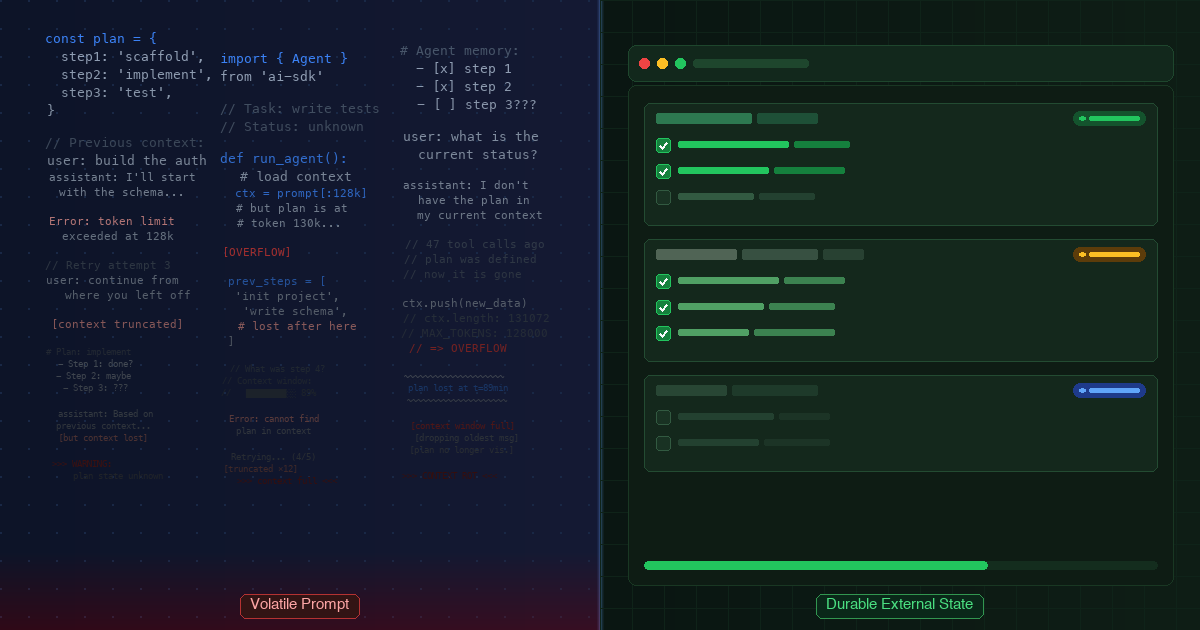
AI coding agents do not need a perfect transcript. They need durable task state they can re-read when the session gets crowded.
AI coding agents lose context because the prompt is being asked to do two jobs at once. It has to hold the current turn, and it has to act like the system of record for the work. That holds for a while. Then the session fills with plans, file reads, terminal output, dead ends, partial fixes, and old decisions. The agent may still have the text available, but it has more competing material to rank before it can act.
The durable fix is not a larger pasted plan. It is to move the work contract into structured state the agent can re-read: objective, scope, acceptance criteria, test cases, status, artifacts, blockers, open decisions, and handoff notes. Bigger context windows help at the margin, but they do not turn a long prompt into reliable project memory [1] [2] [3].
This is still the same argument as the original post: AI coding agents usually lose the plan because of memory architecture, not because the model suddenly became stupid. The sharper version is this: context carries text, memory can persist information, but task state defines what must be true.
| Evidence type | What it supports in this article | How to read it |
|---|---|---|
| Research-backed | Long-context position sensitivity and context reliability problems | Strong signal for the memory pattern, not coding-agent-specific proof |
| Vendor-guided | External notes, memory, handoffs, and context management | Design guidance from model and agent providers |
| Product-backed | Agiflow task state, scoped assistant access, artifacts, and locks | First-party capability evidence, not a productivity benchmark |
| Community-sourced | Re-explaining, stale memory, state files, and tool-switching language | Practitioner language, not prevalence data |
| Practical inference | Acceptance criteria survive pressure better than prose plans | A reasoned operating rule based on the sources above |
Quick Answer: Why AI Coding Agents Lose Context
AI coding agents lose context when the prompt becomes crowded working memory. The session may contain the right instruction somewhere, but the model has to recover it from a long mix of current facts, stale facts, tool output, and old assumptions. Research on long-context behavior found that models can perform worse when the relevant information sits in the middle of a long context, and Chroma's 2025 technical report found that reliability can vary as input length grows [1] [2].
For coding work, that turns into a recognizable failure pattern:
| Symptom | Likely cause | State fix |
|---|---|---|
| The agent re-implements a helper | Done work is buried in transcript history | Store status, changed files, and artifacts |
| The agent ignores a constraint | Scope lives in prose, not state | Store an explicit scope boundary |
| The agent claims done too early | Completion is subjective | Store acceptance criteria and test cases |
| Tool switching requires a full recap | Each tool has its own memory surface | Store handoff notes in shared task state |
| Old instructions keep resurfacing | The prompt preserves too much stale material | Keep the board as a filter, not a transcript |

The Hour-Two Drift Engineers Actually Notice
The failure rarely announces itself as "context loss." It feels more mundane.
The agent edits the wrong file. It repeats a change from 40 minutes ago. It says tests passed when it only ran the narrow check from an earlier attempt. It preserves a stale assumption because that assumption appeared near the end of the prompt, while the correction sits hundreds of lines above it.
Community threads around Claude Code, Cursor, Codex, and other tools use the same practical vocabulary: "re-explaining context every session," "switching between tools," "state file," "current goal," "done," "next," "blockers," "files changed," and "old memories become wrong" [9] [10] [11] [12]. Treat that as language evidence, not a survey. The important point is the shape of the pain: engineers do not want a prettier transcript. They want the current work state.
A GitHub issue in the Claude Code repository makes the desired shape plain. The user asked for a saved session summary with what was diagnosed, what changed, what remains, and key commands or configuration changes [13]. That is not nostalgia for chat history. It is a request for a handoff record.
Once you see the pattern, "the model forgot" becomes too vague. A better diagnosis is: the work contract was trapped in volatile prompt memory.
Bigger Context Windows Help, But They Are Not Memory
Bigger context windows are useful. A short window forces early summarization and re-reading. A larger one gives the agent more room to carry files, plans, traces, and tool output. There is no reason to pretend that does not help.
The problem is the word "memory." A larger context window gives the model more available text. It does not guarantee the model will select the right text at the right moment. The "Lost in the Middle" paper is not about coding agents, but it is directly relevant to the architecture problem: relevant information can be harder to use when it is buried in the middle of a long context [1]. Chroma's context-rot report adds a current technical lens: across simple experiments, model performance varied as input grew, and the authors explicitly cautioned that the work was not an exhaustive real-world benchmark [2].
Claude Code's own docs are a useful concrete example. They say sessions begin with a fresh context window, and that CLAUDE.md files and auto memory can carry knowledge into context rather than enforce configuration [7]. The context-window docs also describe what can be loaded, summarized, compacted, or recovered only after matching files are read again [8].
So the practical rule is not "avoid long context." Long context is part of the job. The rule is: do not store the contract only in long context.
Prose Plans Break First Because They Mix Three Jobs
Prose plans feel safe because they explain the work in human language. They are often the weakest place to store the contract.
A prose plan usually blends three different jobs:
| Job | What prose tends to do | What state should do |
|---|---|---|
| Objective | Describes the general direction | Names the outcome in one stable field |
| Completion criteria | Implies what "done" means | Lists checkable acceptance criteria |
| Progress state | Narrates what happened | Records status, blockers, artifacts, and next step |
MAST, a 2025 paper on multi-agent LLM system failures, is adjacent rather than direct coding-agent proof. Still, its taxonomy is useful here. The authors analyzed more than 1,600 annotated traces and grouped failures into system design issues, inter-agent misalignment, and task verification problems [4]. Weak contracts and weak verification are not side issues. They are recurring failure classes in agent systems.
OpenAI's agents documentation points in the same direction from the implementation side. It recommends narrow specialist jobs, concrete handoff descriptions, structured metadata, and filtered history when designing handoffs [6]. A handoff that says "continue from the chat above" is weak. A handoff that names owner, scope, input, output, and completion checks gives the next agent something it can actually use.
That is the real problem with prose plans. They explain too much and decide too little.
What To Store Outside The Prompt
The board should be a memory filter, not a transcript. It should preserve the parts of the work that are still binding and let the rest expire.
| Store outside the prompt | Why it belongs in durable state | Do not preserve as durable state |
|---|---|---|
| Objective | Keeps the work pointed after a reset | Brainstorming notes that no longer govern the task |
| Scope boundary | Stops adjacent work from sneaking in | Old "while I am here" ideas |
| Acceptance criteria | Makes completion checkable | Vague quality hopes |
| Test cases | Gives the agent a repeatable verification path | One-off commands that were already replaced |
| Status | Tells the next session what is still active | Narrated history with no current decision |
| Artifacts | Preserves evidence and files outside chat | Screenshots or logs with no source or owner |
| Blockers | Separates waiting from forgetting | Stale warnings that no longer apply |
| Open decisions | Prevents the agent from silently choosing | Dead-end hypotheses |
| Handoff notes | Lets another tool continue without a full recap | Full transcripts dumped as "memory" |
That distinction matters when a coding session crosses from "current thought" into "project record." A prompt is good at the current turn. A repo file is good at stable project conventions. A task board is better for changing work state: what is active, what is blocked, what was decided, and what evidence proves it.

Why Acceptance Criteria Survive Context Pressure
Acceptance criteria are not magic memory. They survive pressure because they are small, explicit, and checkable.
That is a practical inference, not a published benchmark. The evidence base is indirect but coherent: long contexts can make retrieval less reliable, context engineering guidance recommends persisted notes, agent-system research flags verification as a failure category, and handoff guidance favors structured metadata over raw history [1] [3] [4] [6].
Here is the shape that matters:
{
  "objective": "Refresh the existing post in place",
  "scope": "Do not change the slug, route, author, or original publish date",
  "status": "active",
  "acceptanceCriteria": [
    "Every factual claim maps to the research artifact",
    "The draft preserves the existing frontmatter identity",
    "The weak MCP adoption statistic is removed"
  ],
  "testCases": [
    "Open the draft after a fresh session and verify the scope without reading the whole chat",
    "Check that every reference supports the claim attached to it"
  ],
  "handoffNotes": [
    "Copy review should check voice, claim support, and asset alignment",
    "Assets review should verify whether existing images still match the refreshed framing"
  ]
}
The value is not the JSON. The value is the compression. A prose plan says, "Here is what I meant." A criterion says, "This must be true." The second form is easier for an agent to re-read after the session has aged.
That also changes review. A human reviewer does not have to reconstruct intent from a chat transcript. They can ask whether the task state still names the right outcome, criteria, tests, and evidence.
What This Looks Like In Agiflow
Agiflow should be understood as the board and state layer, not the coding agent. Claude Code, Cursor, Codex, ChatGPT, or another assistant still does the coding work. Agiflow stores the task contract and exposes scoped state that assistants can read through the right connection.
Keep that claim narrow. The useful promise is a compact state surface an assistant can re-open without replaying the whole chat.
The public connection docs describe scopes at the organization, project, work-unit, and task levels [14]. That matters because a tool should not always see the entire workspace. A task-scoped assistant needs the task and its comments. A project-scoped assistant may need tasks, work units, artifacts, vault entries, and workflows. Scope is part of memory hygiene.
Agiflow also documents workflow locks for project, work-unit, and task scopes [15]. A lock is not a guarantee that an agent will make the right decision. It is a guardrail that helps keep duplicate runs from acting against the same work at the same time.
Artifacts are the other half of the pattern. Agiflow's project files guide describes uploaded files, verification status, search, filters, preview, and task-level artifact views [16]. That gives the agent and reviewer a place to find evidence without treating a chat transcript as the only record.

Keep the claim narrow. Agiflow does not prevent every context failure. MCP does not make memory correct on its own. The stronger pattern is more boring and more useful: put the changing work contract where the assistant can re-read it, update it, and hand it off.
When Repo Files Are Enough, And When A Board Helps
Engineers already have repo-level memory surfaces: AGENTS.md, CLAUDE.md, Cursor rules, local notes, scratch files, issue comments, and docs. Use them. The mistake is expecting one surface to do every job.
| Use this surface | Best for | Watch out for |
|---|---|---|
| Prompt | The current turn, immediate reasoning, short-lived exploration | It ages quickly and preserves too much noise |
| Repo instruction files | Stable conventions, commands, architecture rules | They drift when tool-specific rules or commands change |
| Scratch state file | Solo work that lasts a few sessions | It becomes stale unless someone owns updates |
| Living spec | Product or technical decisions that should survive implementation | It can be too slow for live task status |
| Shared board | Active task state, handoffs, artifacts, locks, review, team visibility | It must stay concise or it becomes another transcript |
My operating rule is simple. Put stable rules in the repo. Put live work state in the board. Put only the current reasoning in the prompt.
For the team version of this pattern, read AI Coding Team Shared State: The Work-State Gap Better Models Expose. For the MCP-specific version, read MCP Project Management Tools Need Durable Project State. For the token-budget version, read Token Efficiency in AI-Assisted Development.
The Practical Takeaway
Do not ask a long prompt to be a database.
If an AI coding agent keeps losing the plan, do not start by pasting a longer plan. First decide what should be remembered as state. The live prompt needs the current turn. The task needs the contract: objective, scope, criteria, tests, status, artifacts, blockers, decisions, and handoff notes.
Use the agent handoff checklist before a long session crosses tools or days:
| Handoff field | Question it answers |
|---|---|
| Objective | What are we trying to finish? |
| Scope | What is explicitly out of bounds? |
| Criteria | What must be true for this to count as done? |
| Tests | How should the next agent verify it? |
| Status | What is done, active, blocked, or waiting? |
| Artifacts | What files, screenshots, logs, or reports prove the work? |
| Decisions | What was decided, and what is still open? |
| Next step | What should the next session do first? |
References
[1] Lost in the Middle: How Language Models Use Long Contexts - https://arxiv.org/abs/2307.03172 - Relevant because it reports that long-context models can perform worse when relevant information is in the middle of the context.
[2] Chroma, Context Rot: How Increasing Input Tokens Impacts LLM Performance - https://www.trychroma.com/research/context-rot - Relevant because it reports reliability changes as input length grows across simple experiments with 18 models. It is not a coding-agent benchmark.
[3] Anthropic Engineering, Effective Context Engineering for AI Agents - https://www.anthropic.com/engineering/effective-context-engineering-for-ai-agents - Relevant because it describes persisted notes or agentic memory outside the context window for tracking progress and dependencies.
[4] Why Do Multi-Agent LLM Systems Fail? - https://arxiv.org/abs/2503.13657 - Relevant because it identifies system design, misalignment, and task verification failures across annotated multi-agent traces.
[5] Model Context Protocol Specification, 2025-06-18 - https://modelcontextprotocol.io/specification/2025-06-18 - Relevant because it defines MCP as an open protocol for connecting LLM applications with external data sources, tools, context, and workflows.
[6] OpenAI Agents docs, Orchestration and Handoffs - https://developers.openai.com/api/docs/guides/agents/orchestration - Relevant because it distinguishes handoffs from agents-as-tools and recommends narrow jobs, concrete handoff descriptions, structured metadata, and filtered history.
[7] Claude Code docs, How Claude remembers your project - https://code.claude.com/docs/en/memory - Relevant because it says each Claude Code session starts with a fresh context window and describes memory files as context.
[8] Claude Code docs, Explore the context window - https://code.claude.com/docs/en/context-window - Relevant because it describes what loads into context, what compaction can preserve, and what may require reading files again.
[9] Cursor Forum, cross-tool context discussion - https://forum.cursor.com/t/how-are-people-handling-context-across-different-ai-coding-tools/159891 - Relevant as practitioner language around cross-tool context, stale commands, stale rules, and re-explaining work.
[10] Reddit, r/ClaudeCode context loss between sessions - https://www.reddit.com/r/ClaudeCode/comments/1qn5tfc/how_do_you_handle_context_loss_between_claude/ - Relevant as community language around re-explaining, transcripts, CLAUDE.md, hooks, memory, RAG, and statelessness concerns.
[11] Reddit, r/ClaudeCode context switching across branches and tasks - https://www.reddit.com/r/ClaudeCode/comments/1ravaw5/how_do_you_manage_context_switching_when_using/ - Relevant as community language around state files, current goal, completed step, and open decisions.
[12] Reddit, r/cursor context loss switching between Cursor and other tools - https://www.reddit.com/r/cursor/comments/1rp9emv/how_do_you_handle_context_loss_when_switching/ - Relevant as community language around checkpoints, done items, next steps, blockers, and files changed.
[13] GitHub issue, anthropics/claude-code #39663 - https://github.com/anthropics/claude-code/issues/39663 - Relevant as an example request for saved session summaries covering diagnosis, changes, remaining work, commands, and configuration.
[14] Agiflow documentation, Connect Assistants - /docs/connecting-ai-tools - Relevant because it documents organization, project, work-unit, and task assistant connection scopes.
[15] Agiflow guide, Manage workflow locks - /guides/workflow-locks/manage-workflow-locks - Relevant because it documents workflow locks for project, work-unit, and task scopes.
[16] Agiflow guide, Manage project files - /guides/project-artifacts/manage-files - Relevant because it documents project artifacts, upload verification, search, filters, preview, and task-level artifact views.
More to read
AI Coding Team Shared State: The Work-State Gap Better Models Expose
Better AI coding models expose the coordination layer your team never assigned: active task state, blockers, approvals, artifacts, and handoffs that survive Cursor, Claude Code, Codex, and closed sessions.
12 min readToken Efficiency in AI-Assisted Development: A Tool Architecture Guide
Token efficiency is a tool-architecture problem, not just prompt hygiene. Use Agiflow benchmark data, MCP guidance, and production measurement rules to reduce AI coding token use without hiding reliability costs.
25 min readProject Board for Claude Code: When Local Memory Stops Scaling
A Claude Code project board is a shared MCP-readable system of record for scope, decisions, tasks, artifacts, and workflow locks. Here is when local memory is enough, when it stops scaling, and how Agiflow keeps state durable across sessions.
12 min read