MCP Project Management Tools Need Durable Project State
MCP project management tools are forming around durable project state for external AI assistants. Here is the launch evidence, safety checklist, and where Agiflow fits.
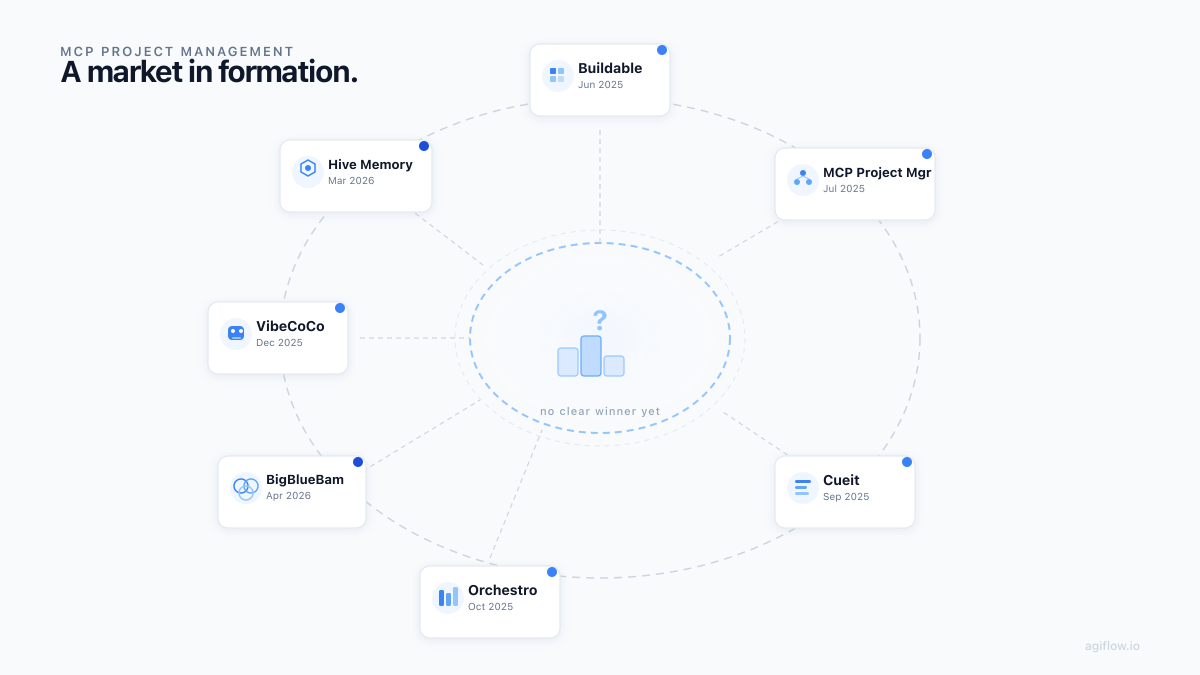
MCP project management is useful when the assistant can read and update durable project state, not only remember the latest chat.
MCP project management tools are project boards, task systems, or MCP servers that expose durable project state to AI assistants through approved Model Context Protocol tools. Teams need them because chat transcripts do not reliably preserve scope, status, ownership, artifacts, permissions, or handoff state across sessions.
That is the category in one sentence. The harder question is where the boundary belongs.
Model Context Protocol, or MCP, gives AI applications a standard way to connect to external systems, tools, data sources, and workflows [1]. Anthropic introduced it on November 25, 2024 as an open standard for connecting assistants to the systems where data lives [2]. Once that connection became common enough to build around, independent builders started packaging the same missing layer in different forms: task trees, local boards, memory stores, and work suites.
This article treats those launches as evidence, not as a ranking. The useful question is not which repo won Hacker News for a day. It is why so many builders reached for the same design choice: make project state readable and writable by an external assistant without turning chat history into the system of record.
TL;DR
| Signal | Evidence | Read |
|---|---|---|
| MCP project management tools expose project state to assistants | MCP defines hosts, clients, servers, tools, resources, prompts, and consent-oriented security principles [3] | The protocol gives the board-to-assistant connection a common shape |
| The category is forming, not settled | Seven Show HN launch records appeared between 2025-06-20 and 2026-04-22 [7] | Launch evidence is real, but it is not adoption evidence |
| The recurring job is durable state | Launches cluster around task trees, boards, memory, and work suites [7] | The pain is state that survives turns, tools, sessions, and machines |
| Write access needs discipline | MCP security guidance, OpenAI developer mode docs, and VS Code docs all flag risk around powerful or local tool access [4] [5] [6] | Scope, consent, revocation, auditability, and trusted execution matter before mutation |
| Agiflow fits as a focused board layer | Agiflow documents scoped MCP access, project and work-unit tools, artifacts, vault entries, and workflow locks [15] [16] [17] [18] | It is not the assistant or an agent runtime. It is durable project state for external assistants |
What Are MCP Project Management Tools?
MCP project management tools connect project state to AI assistants through Model Context Protocol. In practice, that can mean a project management MCP server, a task-management server, a local Kanban board, a memory layer, or an MCP-native project board built so assistants can inspect and update work through approved tools.
The protocol vocabulary is simple enough for this article. An MCP host is the AI application a user interacts with. A client maintains the connection. A server exposes capabilities such as tools, resources, and prompts. The 2025-06-18 MCP specification defines those pieces, plus JSON-RPC message flow and security principles around user consent and control [3].
That architecture changes the project-management question. A normal project board with AI features keeps the assistant experience inside the product. A project management MCP server exposes project-management data or actions to an external MCP client. Merge describes project management MCP servers in that integration-provider sense: servers that expose project-management platform data or functionality to MCP clients [13]. An MCP-native project board goes one step narrower and designs the board itself around external assistant access.
| Shape | Where the AI runs | What the assistant can usually do | Good fit |
|---|---|---|---|
| Normal PM tool with AI features | Inside the PM product | Summarize, classify, draft, or automate inside that product | Teams that want AI help but keep the PM tool as the only interaction surface |
| Project management MCP server | In an external host such as Claude, ChatGPT, VS Code, Cursor, or another MCP client | Read or update exposed project-management records through server tools | Teams that want assistants to use an existing PM system from outside the PM UI |
| MCP-native project board | External assistant plus board layer designed for MCP | Read and update scoped project, work-unit, task, artifact, vault, and lock state | AI coding teams that need durable assistant-readable state across sessions |
Why The Category Is Appearing Now
The timing has three causes: protocol standardization, client support, and a project-state problem that became harder to ignore as assistants got more useful.
MCP lowered the integration tax. Before a common protocol, every assistant-to-tool connection needed its own bridge. After MCP, a builder could expose a server and expect compatible clients to understand the basic pattern. The official MCP introduction describes the standard as a way for AI applications to connect to external systems and names ecosystem clients including Claude, ChatGPT, VS Code, Cursor, and others as supported participants [1].
The client side matters because project work does not happen in one app anymore. As of July 5, 2026, OpenAI's ChatGPT developer mode documentation describes full MCP client support for read and write tools, while warning that the mode is powerful and dangerous for developers who understand the risks [5]. VS Code documents MCP servers that provide tools, resources, prompts, and apps, and it warns that local MCP servers can run arbitrary code and should come from trusted sources [6].
The third cause is more mundane. AI coding teams keep splitting project state across chats, repos, issue trackers, local memory files, generated artifacts, and logs. A human can carry that state for a while. An assistant cannot reliably infer the current truth from yesterday's transcript and a half-updated task list.
Community listening in the research surfaced the same language from builders: missing project context, copy-paste between Slack, email, Discord, Notion, boards, and Claude, stale memories, and anxiety about losing control when a tool turns a PRD into tasks. Treat that as practitioner language, not market measurement. It still explains why builders keep trying to give assistants a real state surface.
The Launch Evidence Shows A Forming Category
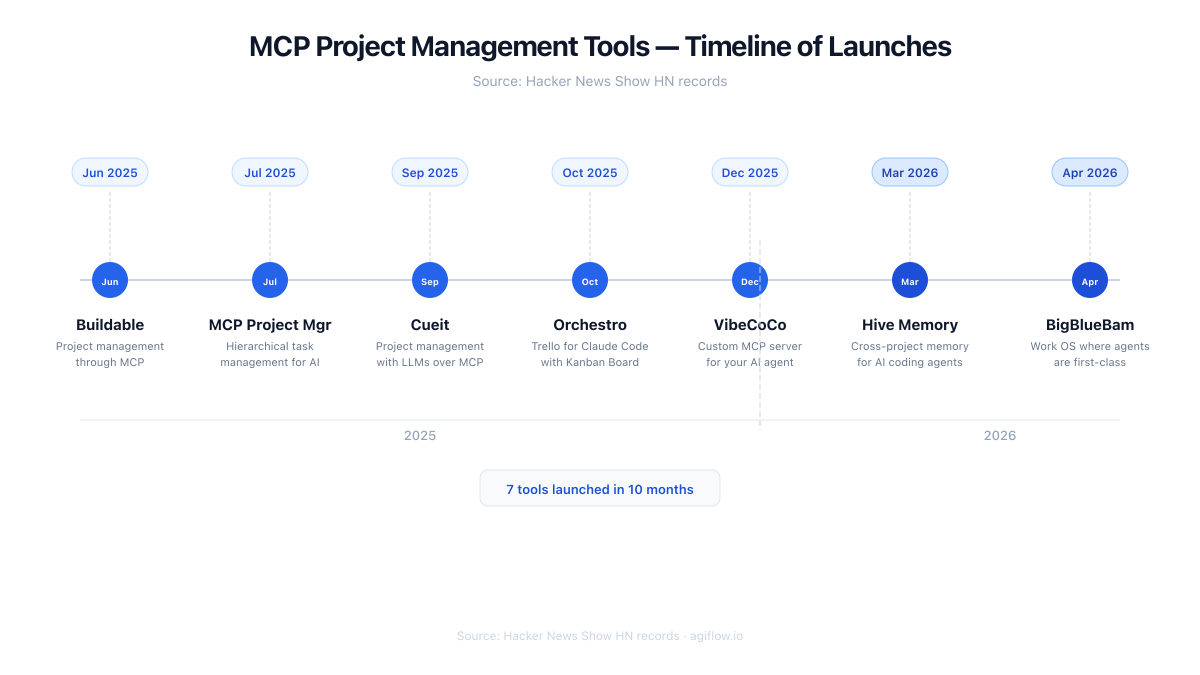
The Show HN trail is useful because it shows independent attempts, over time, to solve adjacent project-state problems. It does not prove adoption, revenue, retention, or product quality.
| Date | Tool | Launch framing | How to read it |
|---|---|---|---|
| 2025-06-20 | Buildable | Project management through MCP | Early launch evidence that project work could be packaged around MCP [7] |
| 2025-07-16 | MCP Project Manager | Hierarchical task management for AI assistants | Task-tree framing for assistant-readable work [7] [9] |
| 2025-09-29 | Cueit | Project management with LLMs over MCP | Local board and task-management shape [7] [11] |
| 2025-10-12 | Orchestro | Trello for Claude Code with Kanban Board | Claude Code specific board framing [7] [12] |
| 2025-12-15 | VibeCoCo | Plan your project, get a custom MCP server for your AI agent | Treats the generated MCP server as part of the project-management product surface [7] |
| 2026-03-01 | Hive Memory | Cross-project memory for AI coding agents | Pulls the category toward memory and continuity [7] [10] |
| 2026-04-22 | BigBlueBam | MIT-licensed work OS where agents are first-class coworkers | Pushes toward a broader human-AI work suite [7] [8] |
The repository claims should stay in their lane. BigBlueBam's repository describes a work suite for human-AI teams with a broad MCP tool surface and multiple work apps [8]. MCP Project Manager's repository describes hierarchical project and task management through MCP for compatible assistants [9]. Hive Memory describes cross-project memory for AI coding agents [10]. Cueit describes a lightweight Kanban board that lets LLMs manage and update tasks through MCP with local SQLite storage [11]. Orchestro describes task decomposition, dependency tracking, pattern learning, progress visualization, and MCP tools for Claude Code [12].
Those are self-descriptions unless independently tested. Still, the family resemblance is hard to ignore. Independent builders converged on task trees, boards, memory, and work suites because chat history is a weak place to store project truth.
The Real Job Is Durable Assistant-Readable Project State
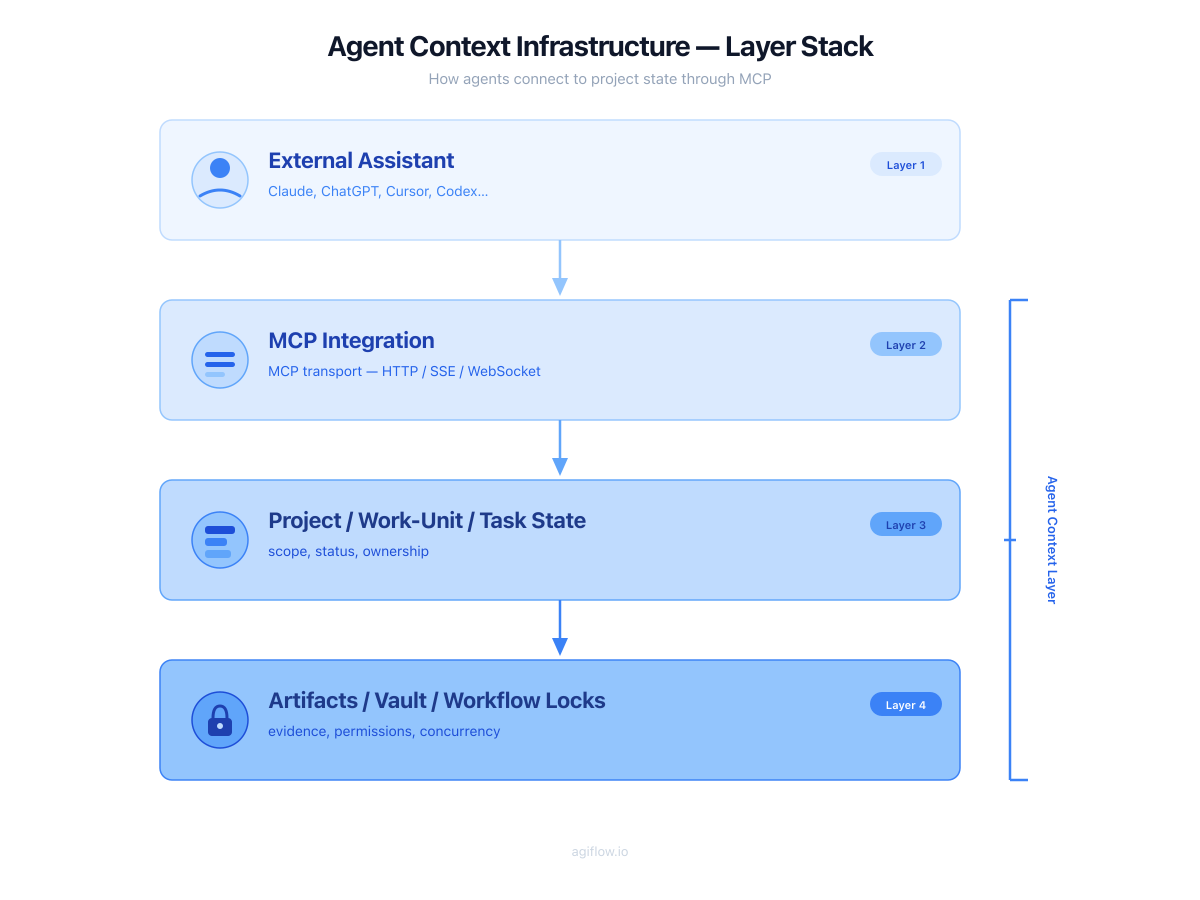
Assistant-readable project state is the record an external assistant can inspect and update without depending on a pasted prompt. It should include the active work, its owner, its status, the scope boundary, acceptance criteria, comments, artifacts, handoff notes, and any lock that prevents two runs from colliding.
This is the deeper category boundary. A prettier Kanban board is not enough. A long memory file is not enough. A task CRUD server is useful, but it is still incomplete if it cannot preserve evidence or coordinate ownership.
| State layer | What it stores | Why the assistant needs it |
|---|---|---|
| Task tree | Parent and child work breakdown | Understand scope, dependencies, and what remains |
| Project board | Status, owner, priority, blocker, approval | Know what is active and who is responsible |
| Work unit | A bounded slice between project and task | Carry feature-level context without flattening everything into one card |
| Artifact record | Screenshots, diffs, logs, docs, generated outputs | Prove what happened and give reviewers something inspectable |
| Vault entry | Sensitive or persistent project knowledge | Keep secrets and durable notes separated from chat text |
| Workflow lock | Exclusive claim on a scope | Prevent two assistants from making conflicting changes |
For the single-session version of the same problem, read Why AI Coding Agents Lose Context. For the operational version across machines, Introducing the Agiflow CLI: Scaling AI Agents Across Machines shows why locks and artifacts become more important when the work moves beyond one laptop.
My read is that durable assistant-readable state will matter more than the first UI label. A tool can call itself a board, a server, a memory layer, or a work OS. If it cannot preserve scope, evidence, permissions, and handoff state, it will not carry serious AI coding work for long.
What To Check Before Giving An Assistant Write Access
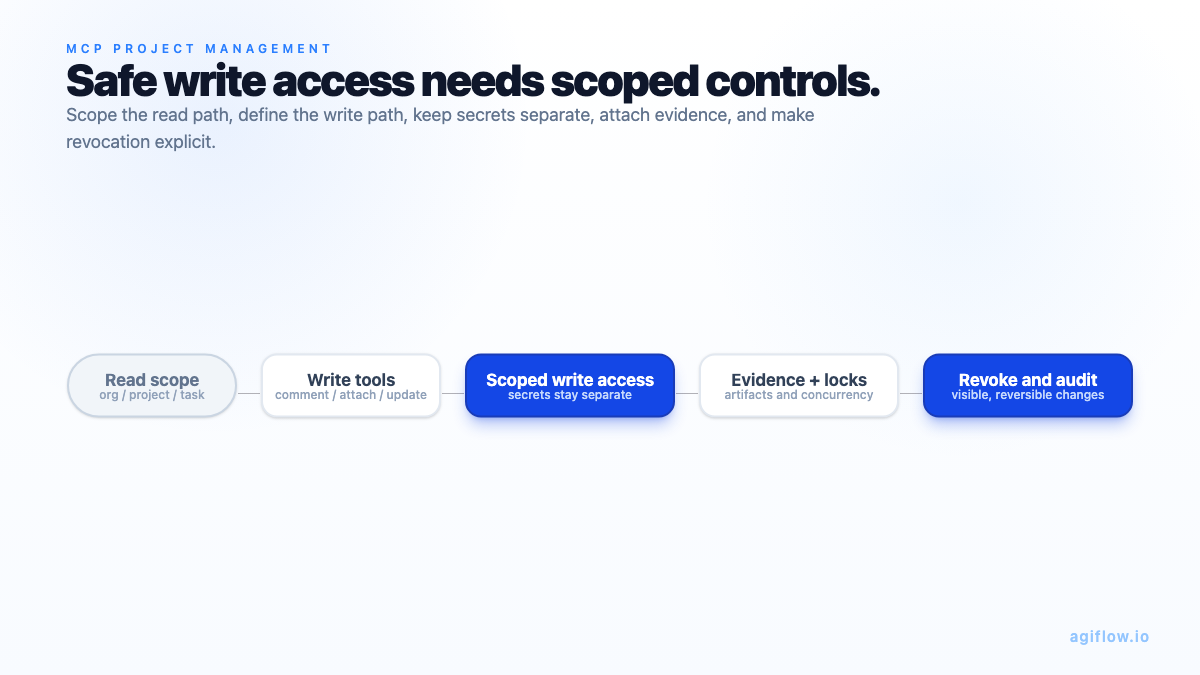
Write access is the trust gap in MCP project management. Read access lets an assistant understand the work. Write access lets it change the system of record.
That can be exactly what a team wants. It is also where sloppy setup becomes expensive. MCP security guidance names risks around local servers, including arbitrary code execution, data exfiltration, and data loss when servers are not sandboxed, trusted, or consented appropriately [4]. OpenAI and VS Code make the same point from the client side: powerful MCP access and local server execution deserve care [5] [6].
Use this checklist before you let an assistant update project tasks.
| Question | Good answer | Warning sign |
|---|---|---|
| What can the assistant read? | Scope is limited to the relevant organization, project, work unit, or task | One broad token exposes unrelated projects |
| What can it write? | Create, update, comment, attach, and lock actions are explicit and reviewable | Write tools are broad, unclear, or hidden behind vague "AI automation" language |
| Is consent visible? | The user can see what server and scope are being approved | Connection setup hides the tool surface or permission boundary |
| Can access be revoked? | Disconnect and scope changes are documented | A token lives forever unless someone remembers to rotate it |
| Are secrets separated? | Secrets live in a vault or separate store with layered access checks | Secrets are pasted into prompts, tasks, or comments |
| Are artifacts attached to work? | Evidence travels with the task or work unit | The assistant says "done" but leaves no inspectable proof |
| Are locks available? | A run can claim a scope so concurrent work does not collide | Two assistants can edit the same work with no ownership signal |
| Can humans review changes on the same board? | Status, comments, artifacts, and handoff notes are visible to the team | Changes disappear into one user's chat history |
| Is local execution trusted? | Local servers come from trusted sources and are sandboxed where needed | The setup runs arbitrary local commands from an unreviewed package |
For a deeper audit pattern, see MCP Integration Audit: How to Spot an Agent-Ready Server.
Should This Replace Jira, Linear, Trello, Or Asana?
Most teams should not replace their whole project-management system just because MCP exists.
That answer is intentionally conservative. MCP changes the connection path between assistants and tools. It does not automatically make a young board better than a mature system that already holds human process, reporting, compliance, and cross-functional work.
The better decision rule is narrower: expose the state an assistant actually needs, then keep source-of-truth decisions explicit.
For some teams, that means connecting an assistant to an existing project system through a project management MCP server. Merge frames the category this way, as servers that expose project-management platform data or actions to MCP clients [13]. For other teams, especially AI coding teams working across Claude Code, ChatGPT, Cursor, Codex, VS Code, and local automation, the useful layer may be an MCP-native project board that sits beside the broader PM system.
Quire's landscape article argues that MCP is relevant to project management because project state lives in PM tools, and it proposes read and write coverage, hierarchy preservation, scope authorization, and first-party ownership as evaluation criteria [14]. Treat that as a third-party vendor lens, not protocol authority. The useful part is the shape of the criteria. A tool that exposes flat tasks with broad access is very different from a tool that preserves hierarchy, scope, evidence, and review.
So the replacement question becomes a workflow question:
| If your need is... | Prefer... |
|---|---|
| Company-wide planning, reporting, and human governance | Keep the mature PM system as the broader source of truth |
| Assistant-readable task state for a coding workflow | Add or connect an MCP project-management layer |
| Safe autonomous updates inside a bounded feature or work unit | Use scoped MCP access with artifacts, comments, and locks |
| Long-lived organizational process across many departments | Do not make a narrow assistant board carry the whole company |
Where Agiflow Fits Honestly
Agiflow belongs in the MCP project management category. It does not prove the category is solved, and it should not be described as the agent runtime.
The narrower claim is stronger. Agiflow is a commercial project board for external AI assistants. Its first-party MCP project-management page defines the category as connecting a project board to AI assistants through MCP so assistants can read and update project state through approved tools [15]. Its connection docs describe organization, project, work-unit, and task scopes for assistant access [16]. Its assistant-capabilities docs describe progressive discovery, project and work-unit tools, task tools, artifacts, vault entries, workflow locks, and prompt skills [17]. Its security docs describe layered access checks, scoped assistant connections, encrypted vault storage, signed artifact access, and plan limits [18].
That is a board-layer position:
| Agiflow primitive | What it gives an assistant | Why it matters |
|---|---|---|
| Project | Top-level scope and shared board state | The assistant knows which workspace it is operating inside |
| Work unit | Bounded execution scope | Feature-level work can survive across sessions |
| Task and comment | Status, assignment, blockers, and handoff notes | Humans can review what changed |
| Artifact | Evidence attached to work | Claims can point to logs, screenshots, docs, or generated outputs |
| Vault entry | Durable sensitive or project knowledge | Secrets and persistent notes are not mixed into chat text |
| Workflow lock | Exclusive claim on a scope | Parallel assistants do not silently collide |
| Progressive discovery | Tooling that reveals relevant capabilities gradually | Assistants can use the board without loading every possible tool at once |
Use the Agiflow connection guide to scope assistant access before you give any assistant write permissions. If you want the broader category framing first, start with MCP project management, then compare the landscape on best MCP project management tools, project management MCP server, and AI project board.
FAQ For MCP Project Management
What are MCP project management tools?
MCP project management tools are project boards, task systems, or MCP servers that expose durable project state to AI assistants through approved MCP tools. They help assistants inspect and update work state without relying on pasted chat context.
What is a project management MCP server?
A project management MCP server is a server that exposes project-management data or actions to an MCP client. Depending on the server, that can include reading projects and tasks, creating or updating tasks, adding comments, attaching evidence, or managing scoped workflow state [13].
How is MCP project management different from a normal project board with AI features?
A normal project board with AI features keeps the assistant experience inside the board. MCP project management exposes controlled project state to external assistants such as Claude, ChatGPT, VS Code, Cursor, or other MCP clients, so those assistants can use the board while working elsewhere [1].
What project state should an AI assistant be allowed to read or update?
Start with tasks, status, acceptance criteria, work-unit scope, comments, artifacts, blockers, and handoff notes. Keep secrets separated in a vault or controlled store. Give write access only inside a clear project, work-unit, or task scope.
Is it safe to let an AI assistant update project tasks?
It can be safe when access is scoped, consented, revocable, auditable, and tied to trusted servers. It is risky when local servers are untrusted, tokens are broad, secrets are pasted into work items, or assistant changes cannot be reviewed by humans [4] [5] [6].
Should I replace Jira, Linear, Trello, or Asana?
Usually, no. Keep the broader PM system if it already carries human governance, reporting, and cross-functional process. Add an MCP project-management layer when the assistant needs durable state, scoped write access, artifacts, handoff notes, and workflow locks.
Which MCP project management tools exist today?
The verified Show HN launch set in the research includes Buildable, MCP Project Manager, Cueit, Orchestro, VibeCoCo, Hive Memory, and BigBlueBam between 2025-06-20 and 2026-04-22 [7]. Treat that as examples of a forming category, not a ranked list.
Where does Agiflow fit?
Agiflow fits as a focused project-board layer for external AI assistants. It documents scoped MCP access, project and work-unit tools, tasks, comments, artifacts, vault entries, workflow locks, and security controls [15] [16] [17] [18].
The Category Is Still Open
MCP project management is real, but the default product has not been crowned.
That is not a weakness in the thesis. It is the thesis. Independent builders are circling the same problem from different angles because assistants are now capable enough to need a real project-state layer. The assistant can write code, summarize blockers, update a task, or attach an artifact. The missing question is where that work becomes durable, reviewable, and safe for the next person or assistant to continue.
The product that wins this category will not be the broadest board by default. It will be the one that makes scope, evidence, permissions, and handoff state reliable enough that humans stop using chat history as the operating record.
Use the Agiflow connection guide to scope assistant access before you test write tools. Then evaluate every MCP project management tool with the same standard: can the assistant read the right state, update only the right state, prove what changed, and leave the work ready for the next session?
References
[1] Model Context Protocol - Introduction - https://modelcontextprotocol.io/docs/getting-started/intro- Official MCP introduction used for the protocol definition and ecosystem-client framing.
[2] Anthropic - Introducing the Model Context Protocol - https://www.anthropic.com/news/model-context-protocol - Primary announcement for MCP origin and the "systems where data lives" framing.
[3] Model Context Protocol - Specification 2025-06-18 - https://modelcontextprotocol.io/specification/2025-06-18 - Official specification for host, client, server, tools, resources, prompts, JSON-RPC, and consent-oriented security principles.
[4] Model Context Protocol - Security best practices - https://modelcontextprotocol.io/docs/tutorials/security/security_best_practices - Official security guidance for local-server risks, consent, sandboxing, and data-protection concerns.
[5] OpenAI - ChatGPT developer mode docs - https://developers.openai.com/api/docs/guides/developer-mode - Source for ChatGPT developer mode MCP client read and write support and risk warning.
[6] Visual Studio Code - MCP servers - https://code.visualstudio.com/docs/agent-customization/mcp-servers - Source for VS Code MCP support and local-server trust warning.
[7] Hacker News Algolia API - MCP project-management Show HN launches - https://hn.algolia.com/api/v1/search?query=MCP+project+management&tags=story&numericFilters=created_at_i%3E1748822400 - Verified launch records for Buildable, MCP Project Manager, Cueit, Orchestro, VibeCoCo, Hive Memory, and BigBlueBam.
[8] BigBlueBam repository - https://github.com/eoffermann/BigBlueBam - Repository self-description for the work-suite example.
[9] MCP Project Manager repository - https://github.com/croffasia/mcp-project-manager - Repository self-description for hierarchical task management through MCP.
[10] Hive Memory repository - https://github.com/moonx010/hive-memory - Repository self-description for cross-project memory for AI coding agents.
[11] Cueit repository - https://github.com/billyjones75/cueit - Repository self-description for a lightweight Kanban board and MCP task management with local SQLite storage.
[12] Orchestro repository - https://github.com/khaoss85/mcp-orchestro - Repository self-description for task decomposition, dependency tracking, progress visualization, and Claude Code MCP tools.
[13] Merge - Project management MCP servers: overview, examples, and use cases - https://www.merge.dev/blog/project-management-mcp-servers - Third-party explainer used for integration-provider framing.
[14] Quire - Project Management Tools That Speak MCP: The 2026 Landscape - https://quire.io/blog/p/project-management-tools-with-mcp.html - Third-party vendor landscape used only for evaluation criteria and buyer framing.
[15] Agiflow - MCP project management - https://agiflow.io/mcp-project-management - First-party product page for Agiflow's category definition and board-layer positioning.
[16] Agiflow docs - Connecting AI tools - https://agiflow.io/docs/connecting-ai-tools - First-party documentation for organization, project, work-unit, and task MCP scopes.
[17] Agiflow docs - Assistant capabilities - https://agiflow.io/docs/features/ai-skills - First-party documentation for progressive discovery, project tools, work-unit tools, task tools, artifacts, vault entries, workflow locks, and prompt skills.
[18] Agiflow docs - Security - https://agiflow.io/docs/features/security - First-party documentation for layered access checks, scoped assistant connections, encrypted vault storage, signed artifact access, and plan limits.
More to read
MCP Integration Audit: How to Spot an Agent-Ready Server
An MCP badge does not prove an integration is agent-ready. Use this audit to separate read-only wrappers from servers that let assistants update durable, team-visible project state.
12 min readMCP Project Management: Work Units for AI Coding Agents
AI coding agents do not need a longer chat transcript to finish multi-task features. They need a durable work unit that keeps scope, tasks, acceptance criteria, artifacts, decisions, and locks outside the model context window and available through scoped MCP access.
15 min readHow to Keep One Project Board Across ChatGPT, Claude, Cursor, and Codex
Use MCP to connect ChatGPT, Claude, Cursor, and Codex to the same project board, then keep the board as the narrow source of truth for scope, status, evidence, and next action.
13 min read