MCP Integration Audit: How to Spot an Agent-Ready Server
An MCP badge does not prove an integration is agent-ready. Use this audit to separate read-only wrappers from servers that let assistants update durable, team-visible project state.
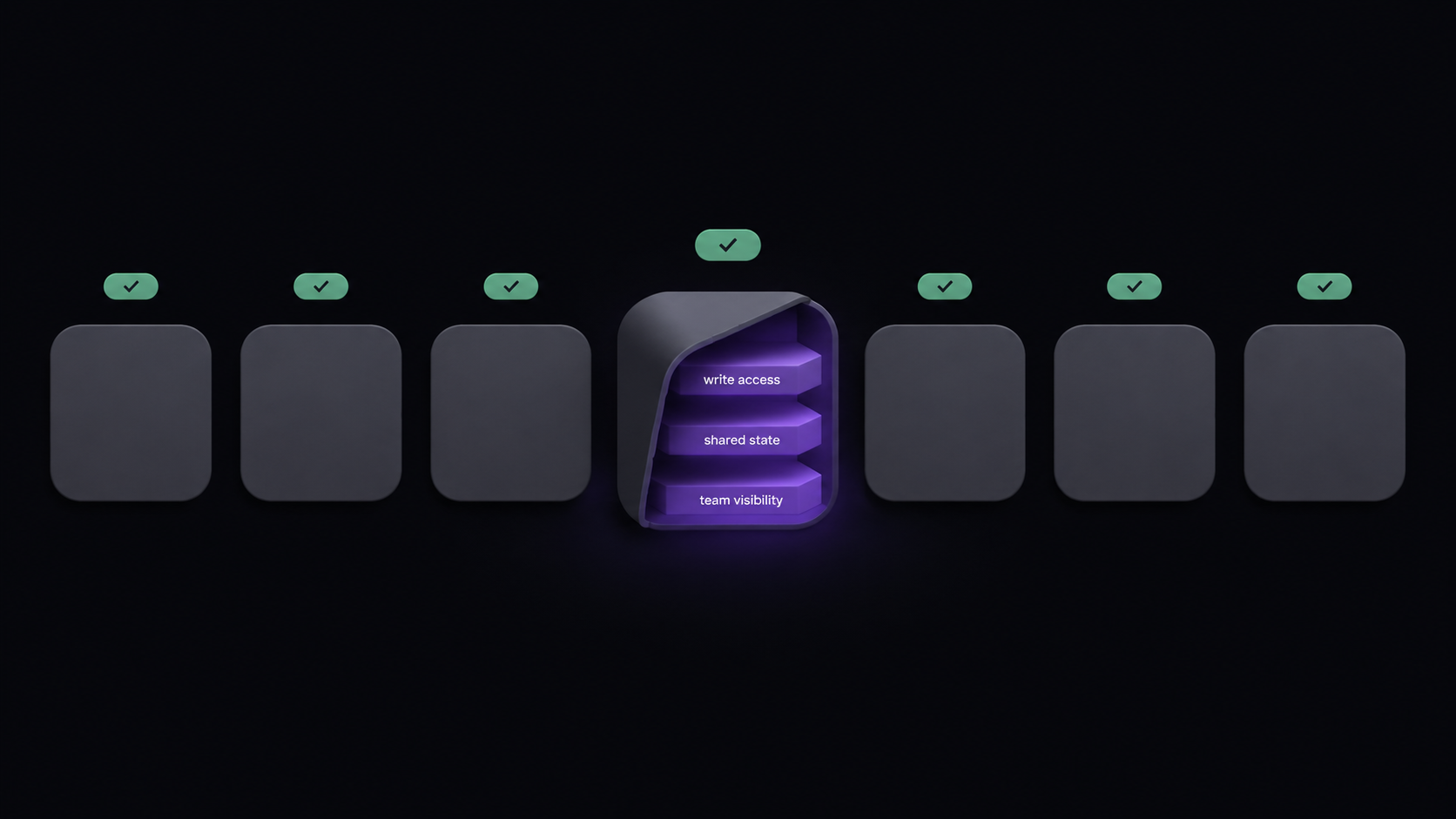
An MCP badge proves that an assistant can connect. It does not prove that the assistant can move work.
That distinction matters now because Model Context Protocol has become a normal way to connect AI applications to external systems, tools, and data sources [2]. Anthropic introduced MCP as an open standard for connecting assistants to the systems where data lives [1]. The protocol solves the connection problem. It does not, by itself, solve permissions, write access, durable state, or team review.
The Claude Code internals guide shows where MCP sits beside skills, hooks, plugins, and subagents when Claude Code is the client.
Short answer: an agent-ready MCP integration gives assistants scoped read and write access to durable project state, lets that state survive across sessions, and exposes changes, evidence, and permissions to the team. A read-only wrapper can answer questions. It cannot reliably carry a project workflow.
Use the audit below when you inspect a project management MCP server, a task-tracking connector, or a vendor demo. The useful question is no longer "does this product have an MCP server?" It is "what can the server safely change, and who can see the result?"
TL;DR scorecard
| Check | Pass signal | Warning sign | Evidence to inspect |
|---|---|---|---|
| Tool scope | Tools cover projects, tasks, comments, artifacts, and admin boundaries | The server mostly exposes list, get, and search | Official tools reference |
| Write access | The assistant can create, update, comment, attach, assign, or lock | The assistant can summarize but cannot update the board | Tool names and auth rules |
| Transport | The docs support team-usable network connection where needed | The setup is only a local subprocess | MCP config block and transport docs |
| Durable state | Project, task, comment, artifact, and handoff state survive a fresh session | The user must paste context back into every new chat | Reconnect test on a real project |
| Scoped permissions | Scope can be limited to an organization, project, work unit, or task | One broad token exposes too much of the workspace | Consent screen, endpoint, and access docs |
| Team visibility | Teammates can review changed tasks, comments, artifacts, and ownership | Agent actions disappear into one user's chat history | Shared board, comments, artifacts, and governance docs |
| Evidence trail | The assistant can link work to artifacts, comments, vault entries, or locks | The board shows status without proof | Artifact, vault, and workflow-lock tools |
Dimension 1: Tool scope and verb mix
Tool count is less important than verb mix. A server with many read tools can still be a read-only wrapper if the verbs stop at list, get, and search.
Start by classifying every tool in the vendor's MCP docs:
| Verb class | Examples | What it proves |
|---|---|---|
| Read | list_tasks, get_project, search_comments | The assistant can inspect state |
| Write | create_task, update_task, add_comment, delete_task | The assistant can change state |
| Evidence | link_artifact, update_artifact, attach_file | The assistant can connect work to proof |
| Coordination | acquire_lock, release_lock, set_assignee | The assistant can avoid collisions and clarify ownership |
| Admin or scope | member, organization, project, permission, or token tools | The vendor thought about boundaries |
For Agiflow, the first-party public reference describes scoped project-board tools and core tool families across projects, work units, tasks, task comments, members, organizations, artifacts, vault entries, and workflow locks [7]. That does not make Agiflow broader than Asana or ClickUp as a project management suite. It means the MCP surface is built around a narrower job: let external assistants and humans work from the same board.
The practical audit is quick. If the tools mostly retrieve records, the integration can brief the assistant. If the tools create and update records with scoped permission, the integration can change the project system of record. If the tools also attach evidence or coordinate locks, the integration is closer to real team workflow.
This is where granularity matters. A task-only server can help an assistant move cards. A project, work-unit, task, comment, and artifact model gives the assistant somewhere to put decisions, proof, blockers, and handoff notes without turning one task into a messy transcript.
Dimension 2: Transport and team readiness
Transport is not a cosmetic setup detail. It tells you whether the server was designed for one local user or for a shared team workflow.
The current MCP transport spec names two standard transports: stdio and Streamable HTTP [3]. stdio runs the server as a local subprocess. Streamable HTTP is a network transport, and the spec allows servers to use Server-Sent Events for server-to-client messages [3]. That is the precise terminology to use. Do not treat WebSocket as a current standard MCP transport unless the vendor separately documents it.
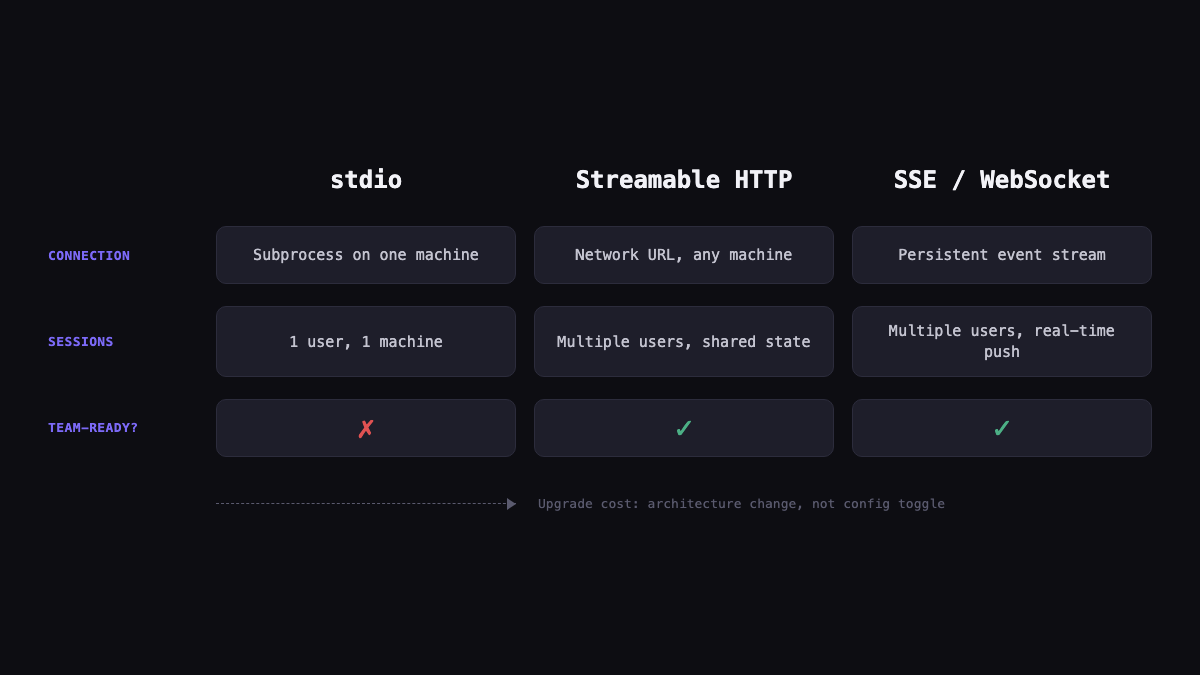
You can usually spot the transport from the config block:
| Config clue | Likely transport | Buyer interpretation |
|---|---|---|
command plus args | Local stdio | Good for an individual assistant on one machine |
url endpoint | Network HTTP | Better fit for hosted or team-connected workflows |
| Hosted endpoint plus consent flow | Streamable HTTP or vendor-managed connection | Inspect scopes, permissions, and disconnect controls |
The caution is simple: local stdio can be enough for a personal automation. It is usually not enough evidence for a team workflow. If the vendor's docs show only a local command, ask how multiple approved users, scopes, and sessions are handled before you rely on it for shared project work.
Dimension 3: Write access and safe mutation
Read access helps an assistant understand work. Write access lets the assistant move work.
That sounds obvious until you watch a demo. A read-only integration can still feel impressive: the assistant summarizes blockers, finds stale tasks, lists owners, and explains what changed since yesterday. Useful, yes. Workflow-changing, no. The human still has to update the board after the assistant answers.
In an agent-ready project management MCP server, the create-update-comment loop should work through MCP alone:
- Create or refine a task.
- Update status or owner.
- Add a comment explaining what changed.
- Attach or link evidence.
- Leave the board in a state another teammate can inspect.
Official vendor docs can show whether that loop exists. Asana documents write operations in its tools reference, including task creation, updates, deletion, and comments [5]. ClickUp documents MCP task management, task comments, and create/update style task actions [6]. Agiflow's first-party reference describes tasks, task comments, artifacts, vault entries, and workflow locks as MCP-exposed tool families [7].
The safe mutation question is more important than the raw write checkbox. Can the assistant write inside a limited project or task scope? Can it update a task without seeing unrelated projects? Can it link an artifact without exposing a vault entry? Can the team revoke access or narrow the scope later?
For an MCP integration audit, ask four yes-or-no questions:
| Audit question | Pass | Caution | Fail |
|---|---|---|---|
| Can the assistant create a task? | Documented create tool | Only available through UI or API outside MCP | No create path |
| Can it update status or fields? | Documented update tool with auth boundary | Partial update only | Read-only |
| Can it leave reviewable evidence? | Comment, artifact, or file-link path | Text summary only | No evidence path |
| Can scope limit the mutation? | Organization, project, work unit, or task scope | Broad workspace token | No clear scope model |
Dimension 4: Durable state across sessions
Durable state is the difference between an assistant that resumes work and an assistant that starts over.
The social listening around AI task managers keeps returning to the same pain: local task files get hard to manage as projects grow, context disappears between tasks and threads, and builders want shared workspaces with tasks, documents, status fields, blockers, comments, priorities, and human steering [9] [10] [11] [12]. Hacker News discussion around an AI-agent task manager also centered on persistence, restart behavior, guardrails, and team visibility [8].
Treat those community sources as qualitative language, not market sizing. Their value is the pattern: teams do not want another place for an assistant to chat. They want a durable place for work state to live.
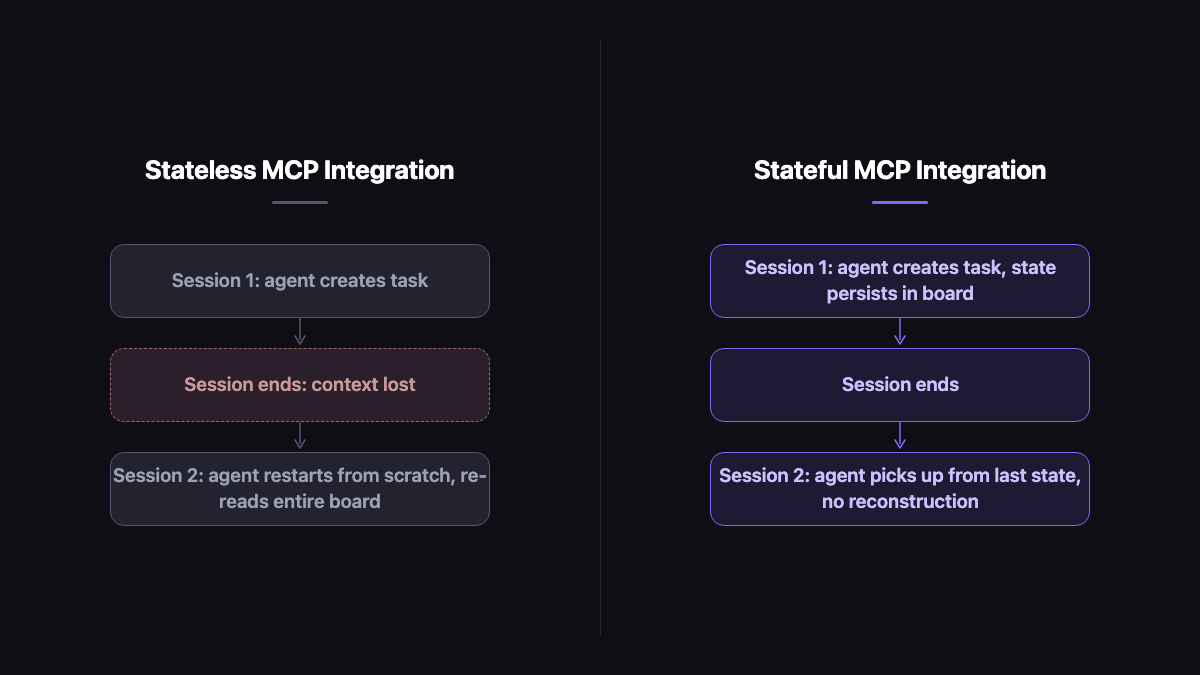
Run this test on any project management MCP server:
- Create a small real task through the assistant.
- Ask the assistant to add a comment with the next step and link or attach one piece of evidence if supported.
- Close the assistant session.
- Reconnect with the approved scope.
- Ask the assistant what it should do next.
- Check whether the answer comes from the durable board state or from your re-prompted context.
If the assistant cannot orient itself without you pasting the old task description, the integration is not carrying durable project state. It may still be useful. It is just not enough for sustained team work.
Agiflow's first-party docs describe a shared project board with projects, work units, tasks, comments, artifacts, vault entries, and workflow locks, with the project board remaining the source of truth [7]. For the broader team-state problem, AI coding team shared state explains why chat memory is the wrong place to store ownership, blockers, and handoff context.
Dimension 5: Team visibility, permissions, and evidence
An agent-ready integration must make assistant work visible to the team that owns the project.
Visibility means more than a log line. It is the ability for a teammate to open the board and see the changed task, the comment explaining why it changed, the artifact that proves the work, the owner, the status, and any boundary that shaped the assistant's access. Without that, the assistant's work lives inside one user's chat session.
Permissions need the same treatment. A useful MCP integration should let a team answer:
| Permission question | What to inspect |
|---|---|
| What scope did the assistant receive? | Organization, project, work unit, task, or broad workspace |
| Who approved the connection? | Consent and auth flow |
| What can the assistant write? | Tool list and role checks |
| What sensitive material is masked or bounded? | Vault and artifact handling |
| How does the team disconnect or reduce scope? | Settings, token, or OAuth controls |
This is also where legacy project management suites deserve a fair reading. Jira, Asana, ClickUp, and similar tools often have deeper enterprise project-management and governance features than a simpler MCP-native board. If your primary requirement is portfolio planning, sprint reporting, enterprise admin policy, or complex roadmap management, those suites may be the right system of record.
The narrower Agiflow argument is different: if your team already works with external assistants and needs a shared board those assistants can read and update through approved scope, the board should expose tasks, comments, artifacts, vault boundaries, and workflow locks directly to the assistant [7]. That is first-party product positioning, and buyers should test it against a real task before switching tools.
Vendor comparison with evidence labels
Use this table as a model for your own audit. The labels matter more than the cells because they keep verified facts, vendor claims, first-party product claims, and practical inference separate.
| Dimension | Asana | ClickUp | Agiflow |
|---|---|---|---|
| MCP availability | Vendor claim: Asana documents a generally available V2 MCP server and MCP client server URL [4] | Vendor claim: ClickUp publishes official MCP tools docs [6] | First-party claim: Agiflow describes MCP as a primary assistant connection surface [7] |
| Write access | Vendor claim: tools reference includes task create, update, delete, and comments [5] | Vendor claim: tools page includes task management, task comments, and create/update style task actions [6] | First-party claim: tool families include tasks, task comments, artifacts, vault entries, and workflow locks [7] |
| Transport evidence | Vendor claim: V2 MCP server URL and OAuth resource flow [4] | Not classified from the research base beyond official MCP tools page | First-party claim: documented organization, project, work-unit, task, and OAuth/default resource endpoint paths [7] |
| Durable project state | Practical inference: state persists in Asana's own task model, not an MCP-specific claim in this draft | Practical inference: state persists in ClickUp's own task model, not an MCP-specific claim in this draft | First-party claim: shared project board with projects, work units, tasks, comments, artifacts, vault entries, and locks [7] |
| Best-fit tradeoff | Inference: stronger enterprise PM depth, inspect MCP scope before depending on assistant workflow | Inference: stronger general PM breadth, inspect exact MCP write and permission behavior | First-party positioning: narrower board for external assistants and shared project state [7] |
First, avoid exact tool-count claims unless you can verify them on the current official page. A stale count is worse than no count because it suggests precision the audit does not have.
Second, do not compare vendors on features you have not opened in official docs. Linear, Jira, Notion, Todoist, and community task servers may all belong in a broader market comparison, but they are outside this refreshed article's verified comparison base.
The 30-minute MCP integration audit
You can run the audit before a procurement call, before adopting an internal connector, or before building workflow on top of a community MCP server.
- Open the official MCP docs, not a directory listing.
- Classify every tool as read, write, evidence, coordination, or admin.
- Inspect the transport config.
commandandargsusually point to localstdio;urlpoints to a network endpoint. - Run one create-update-comment test through MCP alone.
- End the assistant session, reconnect, and ask the assistant to resume from board state.
- Review scopes, permission boundaries, artifact behavior, vault handling, and disconnect controls.
- Ask who on the team can see the assistant's changes after the session closes.
Score the result:
| Result | Meaning | Decision |
|---|---|---|
| Pass | Scoped writes, durable state, team-visible evidence, and clear permission controls | Safe enough for a real pilot |
| Caution | Some write access exists, but state, scope, or evidence is weak | Use for assisted planning or reporting, not autonomous workflow |
| Fail | Read-only, local-only, broad-token, or invisible to teammates | Treat as a search wrapper |
For Agiflow, the test case should be concrete: create a project board, connect an approved assistant scope, ask it to create or update one task, add a comment, link evidence if relevant, close the session, and reconnect. If the next session can resume from the board instead of your pasted transcript, the board is doing the job it claims to do [7].
Where Agiflow fits
Agiflow is not trying to replace every enterprise project management system. The public docs position it as a commercial project board that connects to external assistants such as ChatGPT, Claude, Cursor, Codex, and other MCP-compatible tools, while the assistant remains the agent [7].
That boundary is important. Agiflow does not need to be the model, the IDE, the code runner, or the enterprise portfolio suite. Its job is to give humans and external assistants a shared board with approved scope, durable state, artifacts, vault entries, comments, work units, and workflow locks [7].
If your team already has a mature Jira, Asana, or ClickUp setup, the right answer may be to audit that existing MCP surface first. If your current failure mode is that AI-planned work dies in chat, local markdown files are getting too hard to manage, and teammates cannot see what an assistant changed, then a narrower MCP-connected board may be the cleaner test.
Run the audit on a real Agiflow project board. Create one assistant task, update it through MCP, close the session, and check whether the evidence survives.
References
[1] Anthropic - Introducing the Model Context Protocol - https://www.anthropic.com/news/model-context-protocol - Source for MCP being introduced as an open standard for connecting AI assistants to systems where data lives.
[2] Model Context Protocol - Introduction - https://modelcontextprotocol.io/docs/getting-started/intro- Source for MCP as an open protocol that lets AI applications connect to external systems, tools, and data sources.
[3] Model Context Protocol specification - Transports -
https://modelcontextprotocol.io/specification/2025-11-25/basic/transports - Source for stdio and Streamable HTTP as
current standard transports, and for Streamable HTTP being able to use SSE for server-to-client messages.
[4] Asana Developers - Integrating with Asana's MCP Server - https://developers.asana.com/docs/integrating-with-asanas-mcp-server - Official vendor documentation for Asana's V2 MCP server, OAuth authorization flow, and MCP client server URL.
[5] Asana Developers - MCP tools reference - https://developers.asana.com/docs/mcp-tools-reference - Official vendor tools reference used for task create, update, delete, and comment-style operation claims.
[6] ClickUp Developer Docs - MCP tools - https://developer.clickup.com/docs/mcp-tools - Official vendor tools page used for ClickUp task management, task comments, and create/update style task action claims.
[7] Agiflow first-party documentation index - https://agiflow.io/llms.txt - Local source:
apps/agiflow-app/public/llms.txt. Source for Agiflow positioning, scoped MCP endpoint paths, project-board tool
families, artifacts, vault entries, workflow locks, work units, and security and governance boundaries.
[8] Hacker News - Show HN: Task Manager for AI Agents (MCP, Opensource) - https://news.ycombinator.com/item?id=47958608 - Community discussion used only for qualitative practitioner concerns about persistence, restart behavior, autonomy guardrails, and team visibility.
[9] Reddit - How do you manage tasks in Claude Code - https://www.reddit.com/r/ClaudeAI/comments/1l8341h/how_do_you_manage_tasks_in_claude_code/ - Community source used only for qualitative language around markdown task files and MCP friction.
[10] Reddit - Open-sourced Claude Code project management tool - https://www.reddit.com/r/ClaudeAI/comments/1mvan49/weve_opensourced_our_claude_code_project/ - Community source used only for qualitative language around disappearing context across tasks, agents, and threads.
[11] Reddit - Project management application for Claude - https://www.reddit.com/r/ClaudeCode/comments/1tw93dw/it_is_a_complete_waste_of_time_trying_to_improve/ - Community source used only for qualitative language around tasks, blockers, comments, priorities, and web UI steering.
[12] Reddit - Pad project management system for Claude - https://www.reddit.com/r/ClaudeCode/comments/1twpsce/i_created_a_project_management_system_that_claude/ - Community source used only for qualitative language around an agent-controllable workspace, handoff between sessions, and human steering.
More to read
GPT-6 Astra Changes the Bottleneck: Five Controls Agents Still Need
GPT-6 Astra raises the operating stakes for computer-using agents. Use five controls to define authority, evidence, approval, and recovery beyond the model.
12 min readDeepSeek Harness vs Pi Coding Agent: Choose Where Runtime Complexity Lives
DeepSeek Harness puts policy inside a composable plugin runtime. Pi keeps the coding-agent core small. Compare the evidence, security boundaries, and operating burden before choosing.
12 min readScoped MCP Tool Access Starts With the Task, Not the Connection
Scoped MCP tool access gives each task an exact external action set, checks it before execution, and gives blocked work a visible human handoff.
9 min read