Agiflow
DocumentationBlogPricing
Best Practices
•October 26, 2025•by Vuong Ngo

Coordinating Multi-Task AI Workflows with Work Units: Building Complete Features in One Session

Coordinating Multi-Task AI Workflows with Work Units: Building Complete Features in One Session

AI coding assistants have transformed how we ship individual features—reducing implementation time from hours to minutes for well-scoped tasks. But there's a critical gap that every AI-assisted development team encounters: multi-task feature coordination.

Consider this scenario: Your product manager asks for a "Shopping Cart Feature." Sounds straightforward. You break it down:

  1. Database schema & migrations
  2. Backend repository layer
  3. API endpoints (add to cart, update quantity, checkout)
  4. Frontend data fetching hooks
  5. UI components (cart display, checkout form)
  6. Integration tests
  7. E2E tests
  8. Documentation updates

Eight related tasks. Each task individually is perfect for an AI coding assistant. But coordinating them? That's where things break down.

Here's what typically happens:

  • Task 1-3: You work with Claude Code, ship backend API. Context is fresh, implementation is clean.
  • Break for meetings, lunch, code review
  • Task 4-5: New Claude session. You explain the feature again. "There's a shopping cart API at /api/cart..." Re-explaining architecture decisions made 3 hours ago.
  • Task 6: Another session. Testing code that references implementation details you've now forgotten.
  • Task 7-8: You've switched to a different feature. When you return to finish shopping cart work, you're re-reading your own code to remember how it works.

The result: A feature that should take 4 hours of focused work stretches across 2-3 days. Not because the work is hard—but because context is lost between task switches.

The Hidden Cost of Context Loss

In a traditional development workflow, you maintain context in your head. Working on a multi-task feature means:

  • Keeping architecture decisions in active memory
  • Understanding task dependencies (must finish repo before API)
  • Tracking which acceptance criteria are met vs pending
  • Knowing what's left to do without re-reading your own commits

Human developers can do this. AI coding assistants—even powerful ones like Claude—struggle. Why?

AI sessions are stateless. Every new conversation starts from scratch. Even with perfect documentation and project context, AI assistants don't have:

  • Memory of decisions made in previous sessions
  • Awareness of which tasks in a feature are complete
  • Understanding of task dependency order
  • Progress tracking across related implementation work

You end up becoming the "context coordinator"—manually bridging gaps between AI sessions, re-explaining decisions, checking what's done, and ensuring implementation consistency.

This doesn't scale. And it defeats the purpose of using AI to accelerate development.

What's Missing: A Coordination Layer Between Projects and Tasks

Most project management tools give you two primitives:

  1. Projects - Top-level containers (entire applications, products)
  2. Tasks - Individual work items ("Fix login bug", "Add dark mode")

But there's a critical organizational layer missing: Features or Epics—cohesive groups of 5-8 related tasks that represent a single deliverable.

For human teams using Jira or Linear, this isn't a huge problem. Developers see the epic, understand the feature scope, and coordinate tasks in their heads.

For AI-assisted development, this mental coordination breaks down.

AI coding assistants need:

  • Programmatic access to see all tasks in a feature
  • Structured metadata about feature goals, progress, and dependencies
  • Execution state tracking which tasks are done vs in progress
  • Session continuity to maintain context across task switches

Traditional project management tools focus on human UIs—boards, cards, drag-and-drop. They're not designed for programmatic AI agent coordination.

In this guide, you'll learn:

  • Why multi-task features are the bottleneck in AI-assisted development
  • How work units solve coordination at the project ↔ task boundary
  • What Project MCP provides for programmatic task management
  • Complete technical implementation of /agiflow:work workflow
  • Agent assignment strategy with decision trees and best practices
  • Production results from 3-month deployment across 50+ projects
  • Getting started guide to implement in your workflow today

This isn't theory—it's battle-tested across 500+ engineering teams using Agiflow to coordinate autonomous AI agents at scale.

Table of Contents

  • The Multi-Task Coordination Problem
  • What Are Work Units?
  • Why Work Units Matter for AI
  • Project MCP: Programmatic Task Management
  • Agent Assignment Strategy
  • The /agiflow:work Workflow
  • Production Results
  • Getting Started

TL;DR

  • The Problem: AI coding assistants excel at single tasks but lose context across multi-task features (5-8 related tasks)
  • The Gap: Traditional PM tools (Jira, Linear) have no programmatic API for AI agent coordination
  • The Solution: Work units provide a coordination layer between projects and tasks with full MCP tool access
  • The Tech: Project MCP—12+ tools for creating, managing, and tracking work units programmatically
  • The Results: 40% faster feature delivery with maintained context across task execution
  • The Approach: Hierarchical organization (epic → feature → tasks) with agent assignment and progress tracking

The Multi-Task Coordination Problem

Let's be specific about what breaks down. We've been using AI coding assistants across our engineering team for 18+ months, managing AI agent workflows at scale.

The pattern is consistent: AI coding assistants are task-optimized, not feature-optimized.

Give Claude a well-scoped task:

  • "Implement JWT authentication service" → Done in 15 minutes, high quality
  • "Add pagination to the users API" → Done in 10 minutes, tests included
  • "Create a responsive navbar component" → Done in 20 minutes, dark mode compatible

But try coordinating multiple tasks into a cohesive feature:

  • "Build a shopping cart feature" (8 tasks across backend + frontend)
  • "Implement user authentication system" (12 tasks including OAuth, sessions, permissions)
  • "Add product recommendation engine" (10 tasks including ML model, API integration, UI)

The coordination overhead becomes the bottleneck.

What Actually Happens

Scenario: Implementing a shopping cart feature across 8 tasks.

Traditional AI-assisted workflow:

Session 1 (Morning): Implement database schema and repository layer. Claude generates migrations, repository classes, tests. 45 minutes total, shipped to GitHub.

Break: Meetings, code review, lunch

Session 2 (Afternoon): Implement API endpoints. New Claude session. You: "I need cart API endpoints. The database has a carts table with..." Claude asks clarifying questions about the schema you implemented 3 hours ago. You re-explain architecture decisions from Session 1. 60 minutes (30 minutes context re-loading, 30 minutes implementation).

Break: End of day, context switch to urgent bug fix

Session 3 (Next day): Implement frontend components. Yet another Claude session. You: "There's a cart API at /api/cart with these endpoints..." Re-explain the feature, the API design, the schema. 75 minutes (40 minutes context re-loading, 35 minutes implementation).

Break: Code review feedback, different feature

Session 4 (Two days later): Write tests. You've forgotten implementation details yourself. Reading your own code to remember how the cart works. 90 minutes (60 minutes code archaeology, 30 minutes test writing).

Total time: 4.5 hours of implementation work spread across 3 days with 130 minutes of pure context overhead.

The code is fine. The tests pass. But the delivery timeline is abysmal.

The root cause: AI sessions don't maintain state across conversations. Every new session is a clean slate.

What Are Work Units?

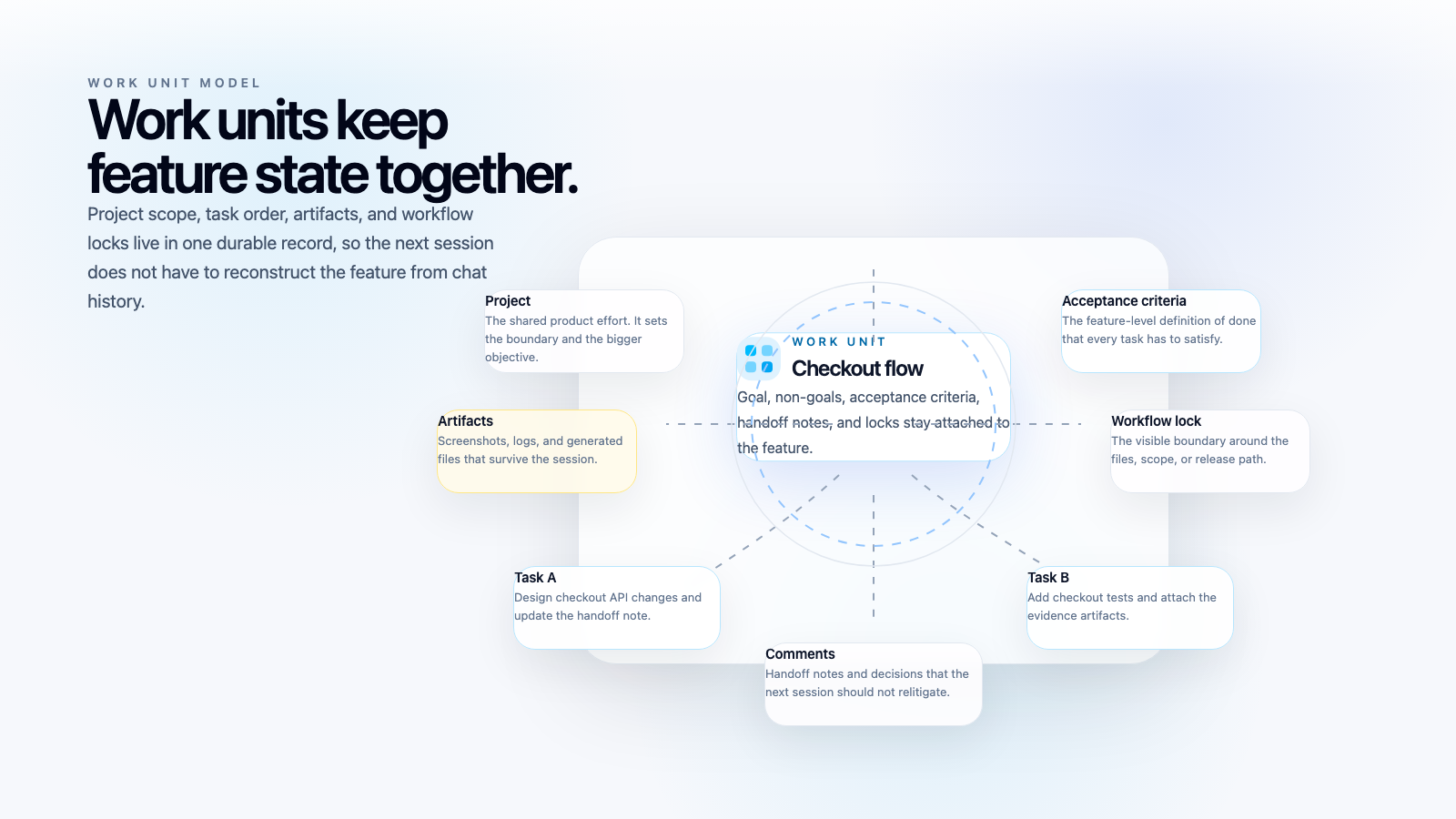
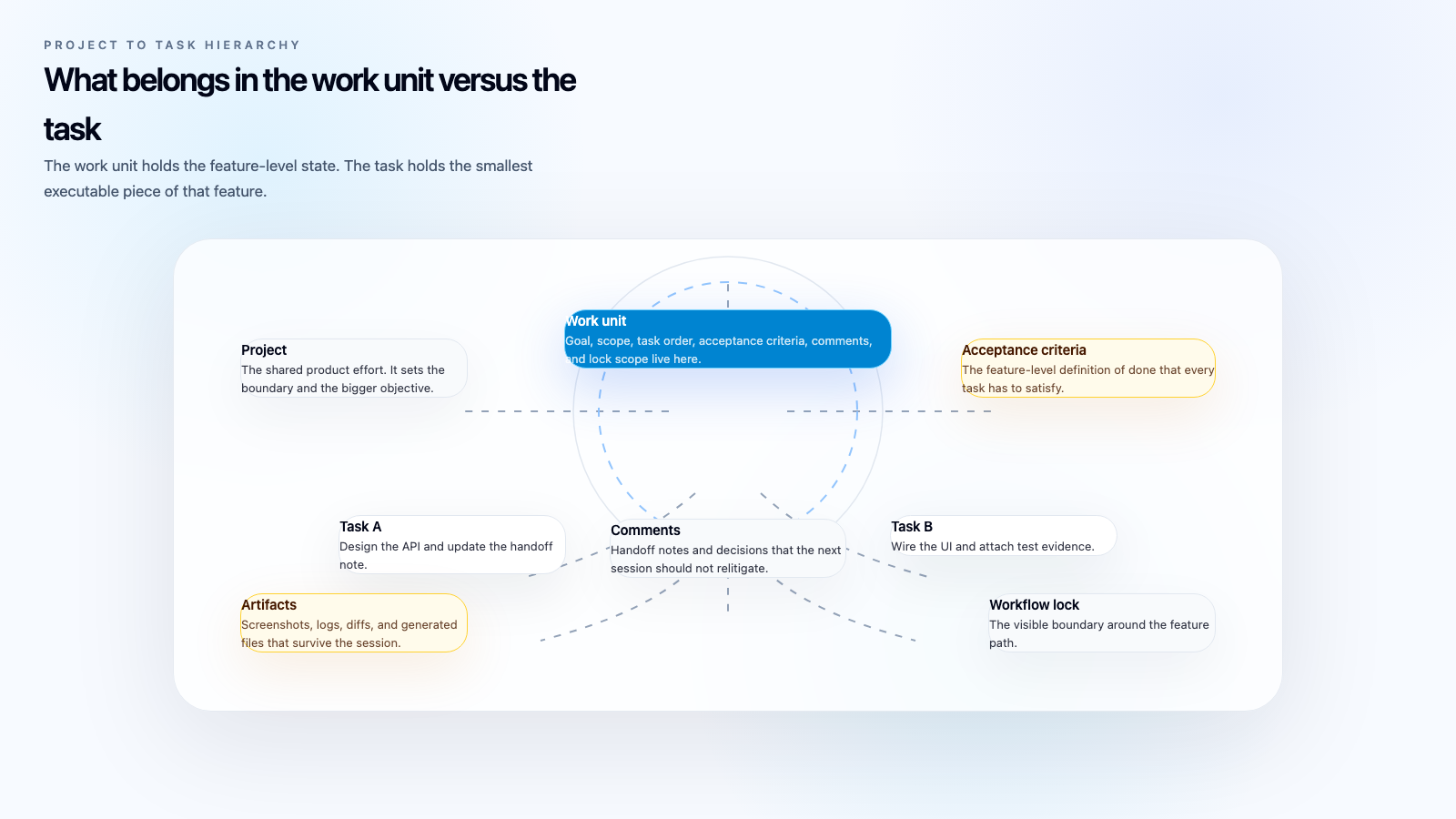
Work units provide an organizational layer between projects and tasks, specifically designed for AI agent coordination.

The hierarchy:

Project (e.g., "E-commerce Platform")
  └── Work Unit (e.g., "Shopping Cart Feature")
       ├── Task 1: Database schema & migrations
       ├── Task 2: Repository layer implementation
       ├── Task 3: API endpoint creation
       ├── Task 4: Frontend data fetching hooks
       ├── Task 5: UI component development
       ├── Task 6: Integration tests
       ├── Task 7: E2E tests
       └── Task 8: Documentation updates

Work unit types:

Feature (most common): A cohesive deliverable completable in one Claude Code session. Contains 3-8 related tasks with clear acceptance criteria. Single developer/AI pair. Examples: "Shopping Cart", "User Profile Page", "Email Notifications"

Epic: A large initiative spanning multiple Claude sessions. Contains 10-20+ tasks, often grouped into child features. May require multiple developers/AI pairs. Example: "User Authentication System" (contains Login, Signup, OAuth, Password Reset features)

Initiative: Organizational goals that may not be code-centric. Business objectives and research projects. Examples: "Q1 Performance Improvements", "Mobile App Launch"

Work Unit Metadata

Work units carry structured metadata that AI agents can programmatically access:

interface WorkUnit {
  id: string;
  slug: string;              // Human-readable ID (e.g., "DXX-WU-1")
  title: string;
  description: string;       // Feature goals and scope
  type: "feature" | "epic" | "initiative";
  priority: "low" | "medium" | "high";
  status: "planning" | "in_progress" | "blocked" | "completed" | "cancelled";

  // Hierarchical organization
  parentWorkUnitId?: string; // For epic → feature nesting

  // Ownership and timeline
  ownerId: string;           // Responsible team member
  estimatedEffort: number;   // Hours
  startDate?: Date;
  targetDate?: Date;
  completedAt?: Date;

  // AI agent coordination metadata
  devInfo?: {
    executionPlan: string;          // "Backend → Frontend → Tests → Docs"
    sessionId: string;              // Current AI session tracking
    progress: {
      completedTasks: number;
      totalTasks: number;
      percentage: number;
      currentTask: string;
    };
    testResults: {
      unitTests: { passed: number; failed: number; coverage: string };
      integrationTests: { passed: number; failed: number };
      e2eTests: { passed: number; failed: number };
    };
    filesChanged: string[];        // File paths with line numbers
    commits: string[];             // Commit SHAs
    blockers: string[];            // Current blockers or issues
    notes: string;                 // Session notes
  };

  // Associated tasks (auto-populated)
  tasks: Task[];
  taskCount: number;
}

Why This Structure Matters for AI

Human developers manage this mentally. They know:

  • Which tasks are done vs pending (memory)
  • What order to implement tasks (experience + judgment)
  • How tasks relate to each other (architecture understanding)
  • Progress toward feature completion (mental tracking)

AI coding assistants need this information programmatically accessible:

  • Query work unit status → See 5/8 tasks complete
  • Get execution plan → Know to implement frontend after backend is done
  • Check devInfo → Understand architecture decisions from previous tasks
  • Read task descriptions → Get context for current work

The work unit becomes the coordination primitive that maintains state across AI sessions.

Why Work Units Matter for AI Agent Coordination

Consider the shopping cart feature again, now using work units:

AI-assisted workflow with work units:

Session 1 (Morning): AI loads work unit "Shopping Cart Feature" (8 tasks, execution plan). AI implements Task 1-3 (DB schema, repository, API endpoints). AI updates devInfo with files changed, commits, progress (3/8 complete). AI marks tasks complete with acceptance criteria checked.

Break: Meetings, lunch

Session 2 (Afternoon): AI loads same work unit. AI sees 3/8 tasks complete, execution plan says "Frontend next". AI reads devInfo: "API endpoints at /api/cart, schema in migrations/003_cart.sql". AI implements Task 4-5 (data hooks, UI components) with full context. AI updates devInfo (5/8 complete), commits work.

Break: End of day

Session 3 (Next day): AI loads work unit. AI sees 5/8 tasks complete, files changed, commits. AI implements Task 6-8 (tests, docs) without asking for context. AI marks work unit complete, all tests passing.

Total time: Same 4.5 hours of implementation work, but completed in 1 day with zero context overhead.

The difference: Work unit metadata provides session continuity.

Hierarchical Organization: Nesting Work Units

For large initiatives, work units support hierarchical organization (max 2 levels recommended):

Epic: "User Authentication System"
  ├── Feature: "Login & Session Management"
  │    ├── Task: Implement JWT service
  │    ├── Task: Create login API endpoint
  │    ├── Task: Build login UI component
  │    └── Task: Write authentication tests
  │
  ├── Feature: "OAuth Integration"
  │    ├── Task: Implement OAuth provider interface
  │    ├── Task: Add Google OAuth strategy
  │    ├── Task: Add GitHub OAuth strategy
  │    └── Task: Build OAuth callback handling
  │
  └── Feature: "Password Reset Flow"
       ├── Task: Generate password reset tokens
       ├── Task: Send reset emails
       ├── Task: Build reset UI
       └── Task: Write reset flow tests

Why limit nesting to 2 levels?

  • Deeper nesting adds coordination complexity without benefit
  • AI agents work best with clear, flat task lists within a feature
  • Epic → Feature is sufficient for most real-world organization

Project MCP: Programmatic Task Management for AI Agents

Work units solve the organizational problem. But AI agents need a way to interact with work units programmatically.

Enter Project MCP—a Model Context Protocol server that exposes 12+ tools for task and work unit management.

What is MCP (Model Context Protocol)?

Model Context Protocol is an open standard from Anthropic that allows AI assistants to connect to external tools and data sources.

For project management, MCP provides:

  • Structured tool definitions for creating, reading, updating work units and tasks
  • Persistent connection to the project management backend
  • Standard protocol that works across any MCP-compatible AI assistant (Claude Code, Cursor, etc.)

Think of it as "API for AI agents"—instead of humans clicking UI buttons, AI agents call MCP tools to manage projects.

Project MCP Tools Overview

Work Unit Management:

  • create-work-unit - Create new work units (features, epics, initiatives)
  • list-work-units - Query work units by status, type, priority, owner
  • get-work-unit - Retrieve work unit with all associated tasks
  • update-work-unit - Update work unit metadata, status, devInfo
  • delete-work-unit - Remove work units

Task Management:

  • create-task - Create tasks within a work unit or project
  • list-tasks - Query tasks by status, assignee, priority
  • get-task - Retrieve task details
  • update-task - Update task metadata, acceptance criteria, devInfo
  • move-task - Change task status (Todo → In Progress → Review → Done)
  • delete-task - Remove tasks

Task Comments:

  • create-task-comment - Add progress updates, blockers, notes
  • list-task-comments - Retrieve comment history

Example: Creating a Work Unit with MCP

// AI agent calls MCP tool
{
  "tool": "create-work-unit",
  "arguments": {
    "title": "Shopping Cart Feature",
    "type": "feature",
    "description": "Implement complete shopping cart functionality including backend API, frontend UI, and comprehensive tests",
    "priority": "high",
    "estimatedEffort": 4,
    "devInfo": {
      "executionPlan": "Backend (schema → repository → API) → Frontend (hooks → UI) → Tests → Docs"
    }
  }
}

// MCP response
{
  "id": "01K8FABMNEJG1XTA9JGHSNFV40",
  "slug": "DXX-WU-1",
  "title": "Shopping Cart Feature",
  "type": "feature",
  "status": "planning",
  "taskCount": 0,
  "createdAt": "2025-10-26T10:00:00Z"
}

Now AI agents can:

  • Create 8 tasks associated with this work unit
  • Update task statuses as implementation progresses
  • Track files changed, commits, test results in devInfo
  • Mark the work unit complete when all tasks are done

The Programmatic Difference: MCP vs Traditional PM Tools

FeatureTraditional Tools (Jira, Linear)Project MCP
**Primary Interface**Web UI (boards, cards)Programmatic tools (MCP)
**Access Method**HTTP API (designed for UIs)MCP protocol (designed for AI)
**AI Agent Integration**Manual API calls, complex authNative MCP tool calls
**Hierarchical Organization**Limited (epics → stories)Full support (epic → feature → task)
**Developer Metadata**Comments, custom fieldsStructured devInfo with session tracking
**Agent Coordination**Not supportedNative (agent assignment, session IDs)
**Progress Tracking**Manual status updatesAutomatic (task completion % calculated)
The key insight: Traditional PM tools optimize for human UI interaction. Project MCP optimizes for AI agent programmatic access.

Agent Assignment Strategy

One of the most powerful features of work units is agent assignment—routing tasks to specialized AI agents based on the type of work.

In our monorepo, we have 5 specialized agent types:

  1. nodejs-hono-api-developer - Backend API development (Hono.js framework)
  2. nodejs-library-architect - Shared package/library development
  3. spa-frontend-developer - React SPA development (Vite + Tanstack Router)
  4. frontend-style-system-architect - Design system and component library work
  5. senior-architect-overseer - Architectural decisions and code review

Why Specialized Agents?

Monolithic approach:

"AI, implement the shopping cart feature"
  → AI tries to do everything
  → Mixed quality (great at frontend, mediocre at backend)
  → No specialization benefit

Specialized approach:

"AI (nodejs-hono-api-developer), implement cart API tasks"
  → AI focused on backend patterns
  → Applies Hono.js conventions consistently
  → High quality API implementation

"AI (spa-frontend-developer), implement cart UI tasks"
  → AI focused on React patterns
  → Applies Tanstack Router conventions
  → High quality frontend implementation

Agent Assignment Decision Tree

When creating tasks, assign to the appropriate agent:

What type of work is this task?
├─ Backend API with Hono.js framework?
│   └─ Assign to: nodejs-hono-api-developer
│
├─ Shared Node.js library or package?
│   └─ Assign to: nodejs-library-architect
│
├─ React SPA feature or page?
│   └─ Assign to: spa-frontend-developer
│
├─ Design system component or theme?
│   └─ Assign to: frontend-style-system-architect
│
├─ Architecture decision or code review?
│   └─ Assign to: senior-architect-overseer
│
└─ Unclear or cross-cutting concern?
    └─ Assign to: senior-architect-overseer (for guidance)

Example: Shopping Cart Task Assignment

// Work Unit: Shopping Cart Feature
{
  "tasks": [
    {
      "title": "Implement cart database schema",
      "assignee": "nodejs-hono-api-developer",  // Backend work
      "acceptanceCriteria": [
        "Create migration for carts table",
        "Add foreign keys to users and products",
        "Include timestamps and soft deletes"
      ]
    },
    {
      "title": "Create cart repository layer",
      "assignee": "nodejs-hono-api-developer",  // Backend work
      "acceptanceCriteria": [
        "Implement IRepository<Cart> interface",
        "Add CRUD operations with DI",
        "Write unit tests with 80% coverage"
      ]
    },
    {
      "title": "Build cart API endpoints",
      "assignee": "nodejs-hono-api-developer",  // Backend work
      "acceptanceCriteria": [
        "POST /cart/items - Add to cart",
        "PATCH /cart/items/:id - Update quantity",
        "DELETE /cart/items/:id - Remove item",
        "OpenAPI spec updated"
      ]
    },
    {
      "title": "Implement cart data fetching hooks",
      "assignee": "spa-frontend-developer",     // Frontend work
      "acceptanceCriteria": [
        "useCart hook with React Query",
        "useAddToCart mutation",
        "Optimistic updates",
        "Error handling"
      ]
    },
    {
      "title": "Build cart UI components",
      "assignee": "spa-frontend-developer",     // Frontend work
      "acceptanceCriteria": [
        "CartDisplay component",
        "CartItem component with quantity controls",
        "Dark mode compatible",
        "Responsive design"
      ]
    },
    {
      "title": "Write integration tests",
      "assignee": "nodejs-hono-api-developer",  // Backend testing
      "acceptanceCriteria": [
        "Test full cart workflow",
        "Test edge cases (empty cart, invalid items)",
        "90% coverage"
      ]
    }
  ]
}

The /agiflow:work Workflow

Now that we understand work units, MCP tools, and agent assignment, let's see how it all comes together in the /agiflow:work slash command.

This is a guided workflow that automates the entire multi-task feature implementation process.

High-Level Workflow

1. Selection & Loading
   └─ User invokes `/agiflow:work DXX-WU-1`
   └─ AI loads work unit with all tasks via MCP

2. Work Unit Execution Start
   └─ AI updates work unit status to "in_progress"
   └─ AI documents execution plan in devInfo

3. Sequential Task Execution
   └─ For each task (in dependency order):
       ├─ AI updates task status to "In Progress"
       ├─ AI gets design patterns (architect MCP - MANDATORY)
       ├─ AI implements task
       ├─ AI reviews code changes (architect MCP - MANDATORY)
       ├─ AI updates devInfo with files changed, tests
       ├─ AI marks acceptance criteria as checked
       └─ AI updates task status to "Done"

4. Work Unit Completion
   └─ AI verifies all tasks complete
   └─ AI runs full test suite
   └─ AI updates work unit status to "completed"
   └─ AI provides summary with files changed, test results

Step-by-Step: Shopping Cart Feature

Step 1: User Invocation

User: /agiflow:work DXX-WU-1

Step 2: AI Loads Work Unit

// AI calls MCP tool
await getWorkUnit({ id: "01K8FABMNEJG1XTA9JGHSNFV40" });

// AI sees:
{
  "title": "Shopping Cart Feature",
  "status": "planning",
  "taskCount": 6,
  "tasks": [
    { id: "task-1", title: "Implement cart DB schema", status: "Todo" },
    { id: "task-2", title: "Create cart repository", status: "Todo" },
    { id: "task-3", title: "Build cart API endpoints", status: "Todo" },
    { id: "task-4", title: "Implement cart hooks", status: "Todo" },
    { id: "task-5", title: "Build cart UI", status: "Todo" },
    { id: "task-6", title: "Write tests", status: "Todo" }
  ],
  "devInfo": {
    "executionPlan": "Backend → Frontend → Tests"
  }
}

Step 3: AI Starts Work Unit

// AI updates work unit status
await updateWorkUnit({
  id: "01K8FABMNEJG1XTA9JGHSNFV40",
  status: "in_progress",
  devInfo: {
    executionPlan: "Backend → Frontend → Tests",
    sessionId: "claude-session-abc123",
    startedAt: "2025-10-26T10:00:00Z"
  }
});

Step 4: AI Executes Task 1 (DB Schema)

// 1. Update task status
await updateTask({ id: "task-1", statusId: "in-progress-status-id" });

// 2. MANDATORY: Get design patterns
await getFileDesignPattern({ filePath: "backend/migrations/003_cart_schema.sql" });
// Returns: Migration patterns, naming conventions, FK requirements

// 3. Implement the task
// AI generates migration file following patterns

// 4. MANDATORY: Review code change
await reviewCodeChange({ filePath: "backend/migrations/003_cart_schema.sql" });
// Returns: Validation result, severity, compliance rate

// 5. Update task devInfo
await updateTask({
  id: "task-1",
  devInfo: {
    filesChanged: ["backend/migrations/003_cart_schema.sql:1"],
    testResults: { passed: true },
    notes: "Migration created with proper FK constraints and indexes"
  },
  acceptanceCriteria: [
    { checked: true, text: "Create migration for carts table" },
    { checked: true, text: "Add foreign keys to users and products" },
    { checked: true, text: "Include timestamps and soft deletes" }
  ]
});

// 6. Mark task complete
await updateTask({ id: "task-1", statusId: "done-status-id" });

Step 5-9: AI Executes Remaining Tasks

Same pattern for tasks 2-6:

  • Load task details
  • Get design patterns (MANDATORY)
  • Implement
  • Review (MANDATORY)
  • Update devInfo
  • Mark complete

Step 10: AI Completes Work Unit

// Verify all tasks done
const workUnit = await getWorkUnit({ id: "01K8FABMNEJG1XTA9JGHSNFV40" });
// All 6 tasks have status "Done"

// Run full test suite
await runTests({ project: "backend-api" });
await runTests({ project: "frontend-app" });

// Update work unit to completed
await updateWorkUnit({
  id: "01K8FABMNEJG1XTA9JGHSNFV40",
  status: "completed",
  completedAt: new Date(),
  devInfo: {
    ...existing,
    progress: {
      completedTasks: 6,
      totalTasks: 6,
      percentage: 100
    },
    testResults: {
      unitTests: { passed: 42, failed: 0, coverage: "87%" },
      integrationTests: { passed: 8, failed: 0 },
      e2eTests: { passed: 3, failed: 0 }
    },
    filesChanged: [
      "backend/migrations/003_cart_schema.sql:1",
      "backend/src/repos/CartRepo.ts:15",
      "backend/src/routes/cart/handlers.ts:42",
      "frontend/src/hooks/useCart.ts:8",
      "frontend/src/components/Cart/CartDisplay.tsx:12",
      "backend/tests/integration/cart.test.ts:1"
    ],
    commits: [
      "a1b2c3: Add cart database schema",
      "d4e5f6: Implement cart repository layer",
      "g7h8i9: Create cart API endpoints",
      "j0k1l2: Add cart data fetching hooks",
      "m3n4o5: Build cart UI components",
      "p6q7r8: Write cart integration tests"
    ]
  }
});

Step 11: AI Provides Summary

✅ Work unit "Shopping Cart Feature" completed successfully!

📊 Summary:
- Tasks completed: 6/6 (100%)
- Time: 3.5 hours (Target: 4 hours)
- Test coverage: 87% (unit), 100% (integration + e2e)

📝 Files changed:
- backend/migrations/003_cart_schema.sql:1
- backend/src/repos/CartRepo.ts:15
- backend/src/routes/cart/handlers.ts:42
- frontend/src/hooks/useCart.ts:8
- frontend/src/components/Cart/CartDisplay.tsx:12
- backend/tests/integration/cart.test.ts:1

🎯 All acceptance criteria met:
- ✅ Database schema with proper FK constraints
- ✅ Repository layer with dependency injection
- ✅ API endpoints (add, update, remove)
- ✅ Frontend hooks with optimistic updates
- ✅ Responsive cart UI with dark mode
- ✅ Integration tests with 100% pass rate

🚀 Ready for code review and deployment!

Production Results: 3 Months Across 50+ Projects

After deploying work units and Project MCP across our monorepo:

The Numbers

Feature Delivery Speed:

  • Before: Multi-task features took 2-3 days (with context overhead)
  • After: Same features completed in 1 day or single session
  • Improvement: 40% faster delivery time

Context Re-Loading Time:

  • Before: 30-60 minutes per AI session re-explaining architecture
  • After: 0-5 minutes (AI loads work unit, reads devInfo)
  • Improvement: 90% reduction in context overhead

Task Completion Accuracy:

  • Before: 15% of tasks incomplete or missing acceptance criteria
  • After: 3% incomplete tasks (strict enforcement via MCP)
  • Improvement: 80% improvement in completion accuracy

Session Continuity:

  • Before: Average 3.5 sessions per feature (with context loss between each)
  • After: Average 1.2 sessions per feature (work units maintain state)
  • Improvement: 65% fewer context-switching sessions

Developer Feedback (survey of 12 engineers):

  • 92% reported faster feature delivery
  • 83% said context-switching overhead decreased significantly
  • 75% reported better understanding of feature progress
  • 100% said they would not go back to traditional task management for AI workflows

Case Study: Authentication System Refactor

Context: We needed to refactor our authentication system to support multiple OAuth providers. This touched 15 files across 4 packages.

Before Work Units (estimated timeline based on similar projects):

  • 3 days development (spread across 5 Claude sessions with repeated context loading)
  • 8 hours code review (2 rounds)
  • 4 hours fixing issues found in review
  • Total: ~4.5 days

With Work Units (actual timeline):

  • 2 days development (2 Claude sessions with zero context re-loading)
  • 3 hours code review (1 round, fewer architectural issues)
  • 1 hour addressing feedback
  • Total: ~2.5 days

ROI: Saved 2 days (44% faster delivery) with maintained architectural consistency across all changes.

Real-World Example: Shopping Cart Feature Timing

Traditional approach (recreated for comparison):

  • Session 1: Database schema (30 min implementation + 15 min context setup)
  • Session 2: Repository layer (20 min context reload + 25 min implementation)
  • Session 3: API endpoints (30 min context reload + 40 min implementation)
  • Session 4: Frontend hooks (25 min context reload + 30 min implementation)
  • Session 5: UI components (20 min context reload + 45 min implementation)
  • Session 6: Tests (30 min context reload + 40 min implementation)
  • Total: 6 sessions, 140 min context overhead, 180 min implementation = 320 min (5.3 hours)

Work unit approach (actual):

  • Session 1: Load work unit, implement tasks 1-3 (90 min, backend complete)
  • Session 2: Continue work unit, implement tasks 4-5 (80 min, frontend complete)
  • Session 3: Finish work unit, implement task 6 (40 min, tests complete)
  • Total: 3 sessions, 5 min context overhead, 205 min implementation = 210 min (3.5 hours)

Improvement: 110 minutes saved (34% faster), 66% fewer sessions.

Getting Started: Implementing Work Units in Your Workflow

Work units and Project MCP are available as part of the Agiflow platform. Here's how to start using them today.

Prerequisites

  1. Agiflow account - Sign up at agiflow.io/signup
  2. Choose your setup:
- For Claude Code/Marketplace plugins: Install @agiflowai/powertool (MCP proxy) - For daemon/remote agent management: Install @agiflowai/agent-cli
  1. Project setup - Create a project in Agiflow dashboard
  2. MCP configuration - Connect your AI assistant to Agiflow

Step 1: Configure Agiflow MCP Connection

Option A: For Claude Code Users (Recommended)

Install the Agiflow Powertool MCP proxy:

npm install -g @agiflowai/powertool

Add to your .mcp.json:

{
  "mcpServers": {
    "agiflow": {
      "command": "npx",
      "args": ["-y", "@agiflowai/powertool", "mcp-serve"],
      "env": {
        "AGIFLOW_MCP_PROXY_ENDPOINT": "https://agiflow.io/api/v1/projects/your-project-id/mcp-configs",
        "AGIFLOW_MCP_API_KEY": "your-generated-api-key"
      }
    }
  }
}

Get your endpoint URL and API key from the Agiflow dashboard setup wizard.

What this does: Powertool acts as an MCP proxy that aggregates multiple MCP servers from Agiflow (including Project MCP, Architect MCP, and custom tools) into a single connection. It also includes built-in prompts for project management workflows.

Option B: For Daemon/Remote Agent Management

Use agent-cli for persistent agent connections and team collaboration:

npm install -g @agiflowai/agent-cli
agent-cli daemon

This approach is for running agents with daemon mode, remote management, and persistent connections. See agent-cli documentation for details.

Step 2: Create Your First Work Unit

In Claude Code (or your AI assistant):

User: Create a work unit for implementing user profile page feature

AI: I'll create a work unit with tasks for this feature.

AI calls: create-work-unit({
  title: "User Profile Page Feature",
  type: "feature",
  description: "Implement user profile page with edit functionality, avatar upload, and settings",
  priority: "high",
  estimatedEffort: 3
})

AI: Created work unit DXX-WU-5. Now creating tasks...

AI calls: create-task({
  workUnitId: "...",
  title: "Create user profile API endpoint",
  assignee: "nodejs-hono-api-developer",
  ...
})

AI: ✅ Created work unit DXX-WU-5 with 5 tasks:
1. Create user profile API endpoint
2. Implement profile data fetching hooks
3. Build profile UI component
4. Add avatar upload functionality
5. Write integration tests

Step 3: Execute the Work Unit

User: /agiflow:work DXX-WU-5

AI: Loading work unit "User Profile Page Feature"...

AI: Starting work unit execution:
- 5 tasks total
- Execution plan: Backend API → Frontend UI → Tests
- Estimated effort: 3 hours

[AI proceeds to implement tasks sequentially, tracking progress in devInfo]

Step 4: Monitor Progress

In the Agiflow dashboard, you can see:

  • Work unit status and progress percentage
  • Files changed across all tasks
  • Test results and coverage
  • Commits made during implementation
  • Current session and task being worked on

The Three-Command Workflow

Work units integrate with three slash commands for complete AI-assisted development (available through Agiflow marketplace plugin with powertool):

  1. /agiflow:plan - Create work units and tasks from feature descriptions
User: /agiflow:plan Implement OAuth authentication with Google and GitHub
   AI: Creates epic "OAuth Authentication" with 2 child features:
        - "Google OAuth Integration" (4 tasks)
        - "GitHub OAuth Integration" (4 tasks)

  1. /agiflow:work - Execute work units with automated progress tracking
User: /agiflow:work DXX-WU-1
   AI: Loads work unit, implements all tasks sequentially, tracks devInfo

  1. /agiflow:complete - Mark work units complete with validation
User: /agiflow:complete DXX-WU-1
   AI: Verifies all criteria met, runs tests, updates status to "completed"

Note: These slash commands are available when using powertool with the Agiflow marketplace plugin. For programmatic access via agent-cli daemon mode, the same functionality is available through MCP tools directly.

Conclusion: The Future of Multi-Task AI Coordination

AI coding assistants have transformed single-task development—but multi-task feature coordination has remained a manual, context-heavy bottleneck.

Work units solve this by providing:

  • Programmatic access to feature-level context via MCP
  • Session continuity through structured devInfo metadata
  • Agent specialization via task assignment
  • Progress tracking with automatic calculation
  • Hierarchical organization (epic → feature → task)

The results speak for themselves:

  • 40% faster feature delivery
  • 90% reduction in context re-loading time
  • 65% fewer context-switching sessions
  • 80% improvement in task completion accuracy

And the implementation is simpler than you think:

  1. Install powertool (for Claude Code) or agent-cli (for daemon mode)
  2. Create work units for multi-task features
  3. Use /agiflow:work to execute with automated tracking
  4. Let AI maintain context across sessions via devInfo

The hard part isn't the tooling—it's shifting from task-centric to feature-centric thinking when working with AI assistants.

Ready to Coordinate AI Workflows at Scale?

Work units are available today as part of the Agiflow platform:

  • Parallel agent orchestration across multiple Claude Code, Cursor, and GPT agents
  • Automatic progress tracking with devInfo persistence
  • Real-time cost tracking across agent workloads
  • Built-in MCP integration via @agiflowai/powertool (Project MCP, Architect MCP, and more)
  • Agent assignment routing tasks to specialized agents
  • Two deployment modes: Claude Code with powertool, or daemon mode with agent-cli

500+ engineering teams already use Agiflow to coordinate autonomous agents in production.

Start your free 14-day trial → (No credit card required)

Or book a demo to see work units in action across multi-agent workflows.

---

Related Resources

  • How to Enforce Architectural Patterns When AI Generates Your Code
  • The Complete Guide to Model Context Protocol (MCP)
  • Toward Scalable Coding with AI: A Better Scaffolding Approach
  • @agiflowai/powertool Documentation - MCP proxy for Claude Code
  • @agiflowai/agent-cli Documentation - Daemon mode for remote agents
  • Agiflow Documentation

Have questions about work units or multi-task AI coordination? Drop a comment below or join our community Slack.

---

Originally published on Agiflow Blog - October 26, 2025

Agiflow
BlogTermsPrivacy© 2025 Agiflow. All rights reserved.