A Linear alternative for teams that want AI assistants closer to the work
Linear is one of the fastest and most polished issue trackers for product teams. Agiflow is different: a focused project board where your own assistant, such as Claude Code, Cursor, Codex, or ChatGPT, can work from scoped project context, artifacts, vault entries, CLI workflows, and workflow locks.
Free for solo use. Bring the assistant you already use. Open-source developer tooling is available through aicode-toolkit.

Is Agiflow a good Linear alternative?
Yes, if your team wants a low-admin project board that your own AI assistant can use through scoped project tools.
No, if your team mainly wants the most polished issue tracker, cycles, triage, insights, roadmaps, and product operations experience.
Linear is excellent at product issue tracking and has its own agent platform plus an official MCP server. Agiflow is a better fit when the daily job is not managing an issue tracker better, but giving the assistant you already use enough live project context to move work forward safely.
Why teams look for a Linear alternative
Linear is a best-in-class product development system. Teams still compare alternatives when their daily work is closer to the assistant and CLI than to a polished issue tracker.
The free plan can become tight as you grow
Linear's Free plan is useful, but it caps active issues and teams. Small teams that are growing past that point often start comparing alternatives.
The workflow is intentionally opinionated
Linear's cycles, triage, projects, initiatives, and product operations model are strengths. Some small teams want a smaller execution board with fewer process decisions.
AI assistant work needs more than issue CRUD
Linear's MCP server exposes issue-tracker objects. Agiflow focuses on scoped project-board context plus artifacts, vault entries, workflow locks, and CLI operations.
The difference in one line
Linear is a best-in-class product development system. Agiflow is a focused project board for teams that want their own AI assistant working from live, scoped project context.
Linear vs Agiflow at a glance
Both tools can support AI-assisted work. The difference is the center of gravity: Linear starts from a polished issue tracker and product system, while Agiflow starts from a scoped, assistant-readable project board with developer primitives.
| Need | Linear | Agiflow |
|---|---|---|
| Best fit | Product teams that want fast issue tracking, cycles, triage, roadmaps, insights, and a polished product operations system | Developers and small technical teams that want a focused project board their own assistant can use |
| Board model | Issues, projects, cycles, initiatives, milestones, triage, and product operations workflows | Projects, work units, tasks, task statuses, comments, templates, and kanban boards |
| AI and agents | Official MCP server, Linear Agent beta, agent platform, coding sessions, Triage Intelligence, and Code Intelligence beta | MCP tools, skills, and widgets for external assistants such as ChatGPT, Claude Desktop, VS Code, and Cursor |
| External assistant access | Official hosted MCP server for clients including Claude, Claude Code, Codex, Cursor, VS Code, Windsurf, Zed, v0, and others | Multi-scope MCP access at organization, project, task, and work-unit levels |
| Project artifacts | File uploads and issue/project context inside Linear | Project artifacts stored with searchable and filterable metadata, linkable to tasks and work units |
| Secrets and environment context | Usually handled outside the issue tracker, or through integrations and team process | Per-environment vault entries with encrypted storage, masked responses, and role-aware access |
| Workflow coordination | Workflow states, automations, agent workflows, cycles, and triage | Workflow locks scoped to project, work unit, and task composition, available through MCP and CLI-oriented flows |
| CLI and automation | API and webhook access, plus MCP setup for assistant clients | agiflow-cli for task batch creation, task moves, status listing, workflow locks, and artifact upload, linking, and seeding |
| Open-source developer tooling | Linear is a proprietary hosted product | Agiflow is commercial; aicode-toolkit is open source and covers developer MCP tooling such as scaffold-mcp, architect/vibe-lint, and one-mcp |
| Pricing posture | Free plan, then per-user paid tiers | Free solo path, with Team and Enterprise plans for hosted collaboration |
Bottom line: Choose Linear if issue-tracking polish and product operations are the main job. Choose Agiflow if the main job is giving your existing AI assistant scoped, useful project context plus developer workflow primitives.
Built around your assistant, not a separate agent runtime
Agiflow does not run or host AI agents. It gives the assistant you already use a structured project surface to work with.
Bring Claude Code, Cursor, Codex, or ChatGPT
Connect the assistant your team already uses instead of adopting a new project-management bot.
Scope access to the right project context
Agiflow supports organization, project, task, and work-unit scopes, so assistant access can match the job.
Return structured project data
Agiflow's MCP tools return structured content and widget metadata, which helps assistant clients work with project state instead of reading pasted summaries.
Keep the project surface small
Agiflow focuses on the execution loop: projects, work units, tasks, statuses, artifacts, vault entries, and workflow locks. That makes it a better fit when you want the board to stay usable by humans and assistants.
Start from blank or a template
Create a project through a focused two-step flow: choose Blank or a named template, then add project details.
Use a board that works before setup is perfect
Blank projects resolve usable status columns through project, organization, or global defaults, so first value is not blocked by configuration.
Track tasks and work units without ceremony
Break work into work units and tasks, then move it across statuses on a focused kanban board.
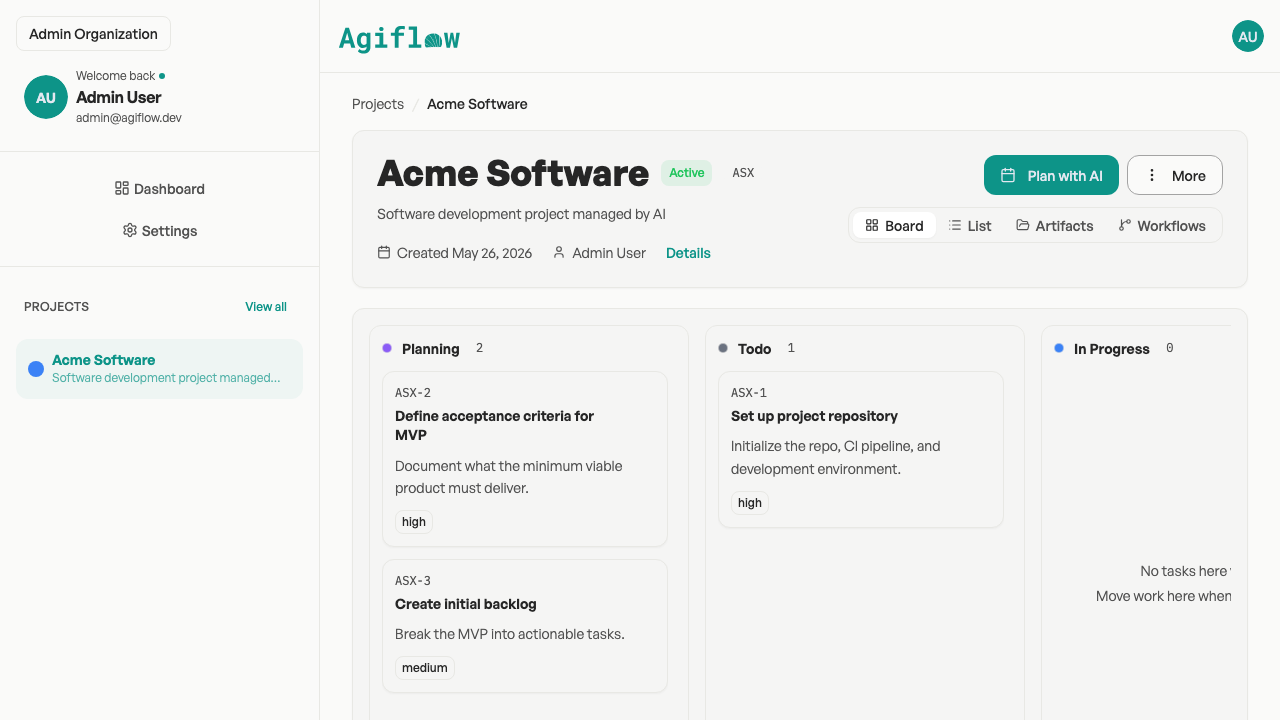
Agiflow's focused project board featuring kanban columns, work units, and task statuses.
Carry developer context with the work
Developer teams lose time when the task is in one place, files are in another, secrets are somewhere else, and automation runs coordinate in chat. Agiflow puts more of that operational context beside the work item.
Artifacts stay attached to projects, tasks, and work units
Upload specs, designs, and documents as artifacts, search and filter them, then link them to tasks or work units.
Vault entries belong to environments
Store per-environment key/value entries with encrypted storage and masked responses.
Workflow locks reduce duplicate automation runs
Agiflow workflows act as distributed locks scoped to project, work unit, and task composition, returning a conflict when the same composition is already running.
CLI workflows keep project state scriptable
agiflow-cli supports task batch creation, task moves, task status lists, workflow lock acquire and release, and artifact upload, link, and seed flows.
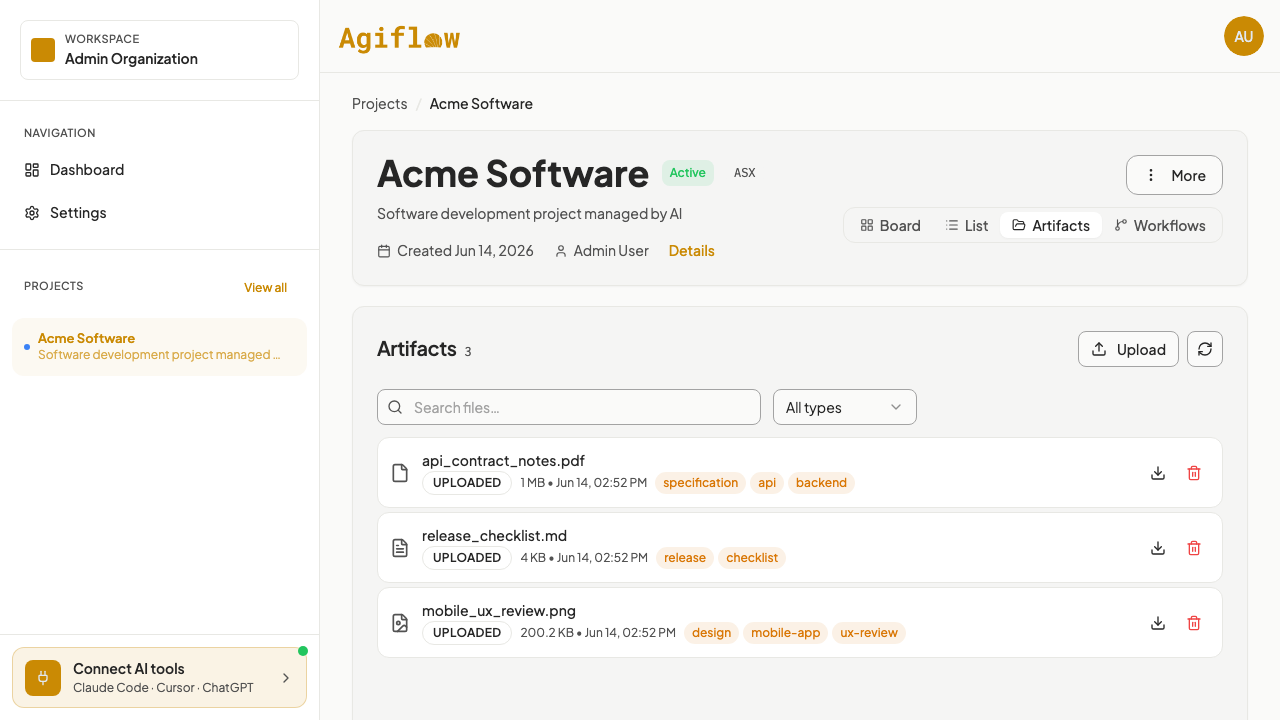
Populated project artifacts view displaying searchable, filterable files with labels.
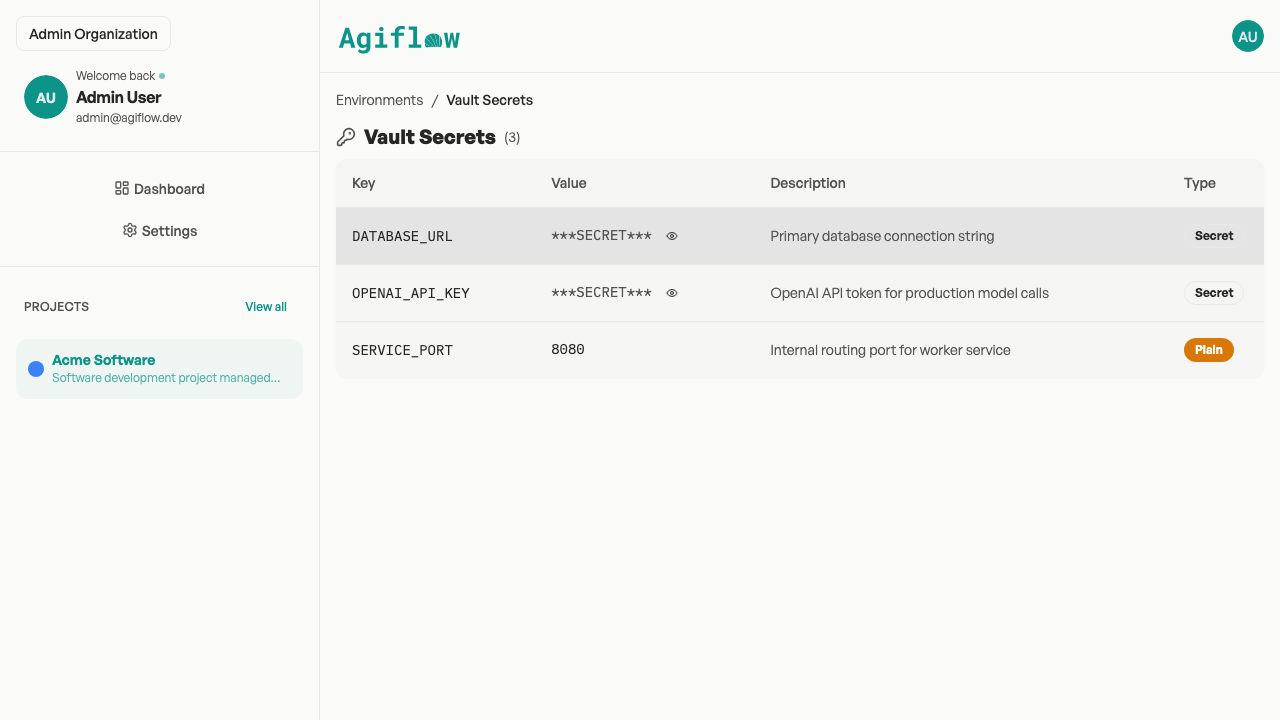
Per-environment vault management showing masked secret keys and plaintext environment variables.
When Linear is still the better fit
Linear is not the wrong choice. It is often the right choice when issue tracking itself is the product team's operating system.
Linear is stronger for
- Fast, polished issue tracking
- Cycles, triage, roadmaps, initiatives, milestones, and insights
- Linear Agent, agent workflows, coding sessions, and integrated product operations
- Larger product orgs that want a mature, opinionated product development system
Agiflow is better positioned when
- You want a focused project board your existing assistant can use
- You want lower-admin project execution with work units, tasks, and statuses
- You want scoped project context, artifacts, vault entries, workflow locks, and CLI operations
- You are a developer or small team that wants a smaller board tied to your assistant workflow
Pricing and ownership comparison
As of June 2026, Linear's pricing page listed Free, Basic at $10 per user per month billed yearly, Business at $16 per user per month billed yearly, and Enterprise with custom annual billing. Agiflow is positioned around a free solo path, Team and Enterprise plans, and open-source developer tooling through aicode-toolkit.
| Pricing or ownership question | Linear | Agiflow |
|---|---|---|
| Is there a free plan? | Yes. Linear Free lists unlimited members, 2 teams, and 250 issues. | Yes. Agiflow has a free solo path. |
| What happens when issue volume grows? | Linear's paid tiers unlock unlimited issues, with per-user pricing. | Team and Enterprise plans support hosted collaboration with plan quotas. |
| Is AI included? | Linear's Free plan lists Agent platform and Linear Agent beta. Paid plans add more AI and automation capabilities. | Agiflow exposes project-board capabilities to external assistants through MCP. The assistant is the user's own tool. |
| What developer tooling is open source? | Linear is proprietary hosted software. | Agiflow is commercial. aicode-toolkit is open source. |
Bottom line: Choose Agiflow for a focused project board your existing assistant can read and update; keep Linear when you need the most polished issue tracker and product operations stack. Linear pricing is shown as of June 2026 and may change.
Compare Agiflow with other project tools
See how Agiflow fits alongside the tools your team already evaluates, then connect the assistant you use every day.
Linear alternative FAQs
Is Agiflow a good Linear alternative?
Yes, if your team wants a focused project board that your own AI assistant can use through scoped project tools. Linear remains the stronger fit when the main requirement is polished issue tracking, cycles, triage, insights, roadmaps, and product operations.
Does Linear support MCP?
Yes. Linear has an official hosted MCP server at https://mcp.linear.app/mcp and documents setup for clients including Claude, Claude Code, Codex, Cursor, VS Code, Windsurf, Zed, v0, Jules, and other MCP-compatible tools. Agiflow does not claim otherwise.
How is Agiflow different from Linear's MCP server?
Linear's MCP server gives assistants access to Linear objects such as issues, projects, comments, initiatives, milestones, and project updates. Agiflow focuses on scoped project-board operations across organization, project, task, and work-unit contexts, plus artifacts, vault entries, workflow locks, and CLI-oriented flows.
Does Agiflow run AI agents?
No. Agiflow does not run or host AI agents. It provides structured project-management capabilities that external assistants such as ChatGPT, Claude Desktop, VS Code, and Cursor can consume through MCP.
When should I choose Linear instead of Agiflow?
Choose Linear when you want the most polished issue tracker, fast keyboard-first workflows, cycles, triage, roadmaps, insights, agent workflows, and a mature product operations system.
When should I choose Agiflow instead of Linear?
Choose Agiflow when your small technical team wants a focused project board with scoped assistant access, task and work-unit context, project artifacts, per-environment vault entries, workflow locks, and CLI operations.
Is Agiflow open source?
Agiflow is a commercial project board. The open-source component is aicode-toolkit, which includes developer MCP tooling such as scaffold-mcp, architect/vibe-lint, and one-mcp. You can explore it at github.com/AgiFlow/aicode-toolkit.
Can I start for free?
Agiflow has a free solo path. Linear also has a free plan, which Linear listed as of June 2026 as unlimited members with 2 teams and 250 issues.
Start with one assistant-readable project
Create a focused Agiflow project, add a few tasks, and connect the assistant your team already uses. Keep Linear when you need the most polished product issue tracker. Choose Agiflow when your daily work needs scoped project context, artifacts, vault entries, workflow locks, and CLI operations close to the board.