Token Efficiency in AI-Assisted Development: A Tool Architecture Guide
Token efficiency is a tool-architecture problem, not just prompt hygiene. Use Agiflow benchmark data, MCP guidance, and production measurement rules to reduce AI coding token use without hiding reliability costs.
Updated July 2026: Refreshed with current MCP, tool-search, prompt-caching, context-engineering, and AI search guidance. The original publish date and route are preserved.
AI coding teams do not only pay for final answers. They pay for tool definitions, repeated project context, raw data copied into tool calls, noisy command output, repair loops, and the slow context drift that starts when an assistant carries too much state in chat.
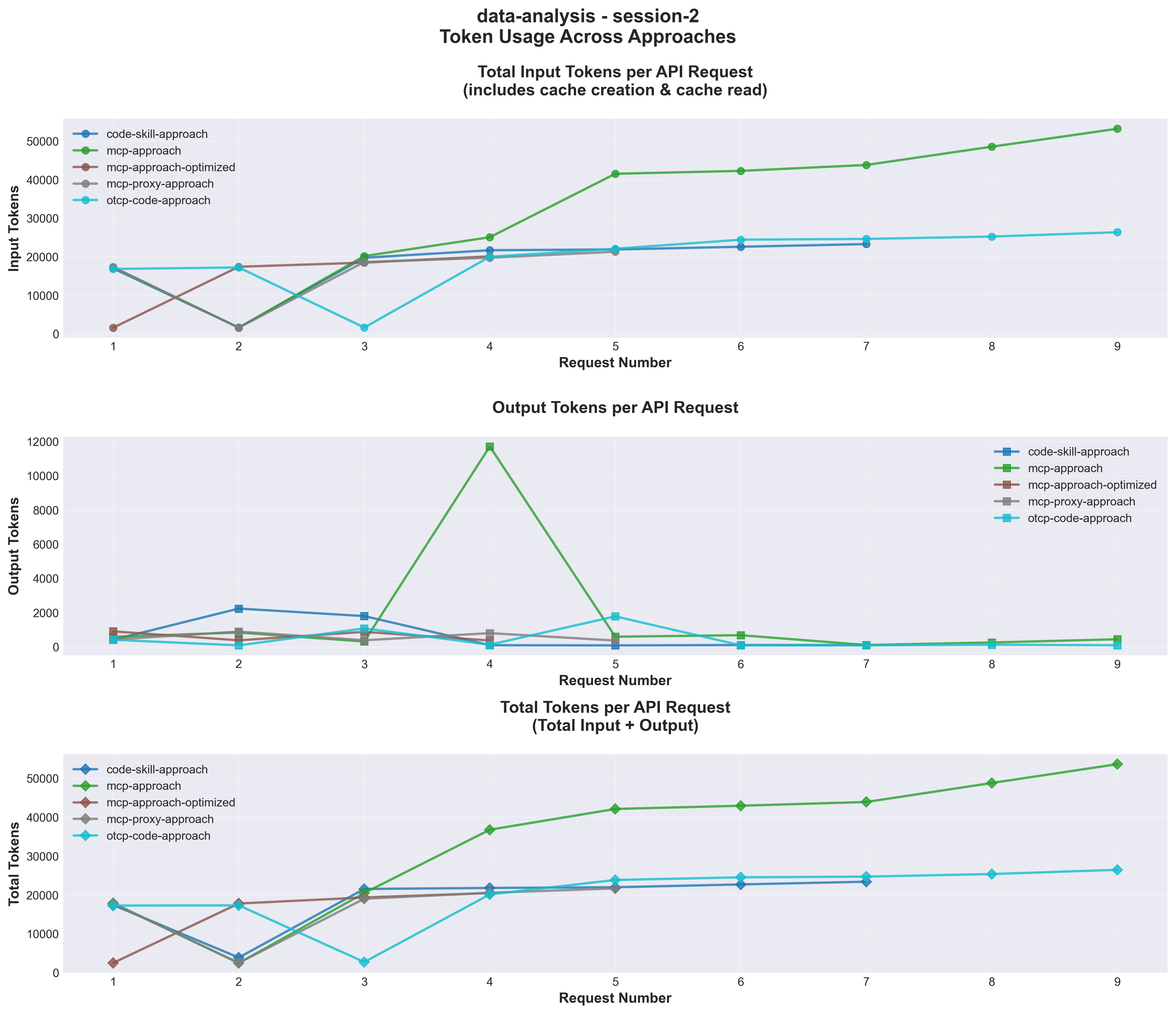
That is the real problem behind token efficiency in AI-assisted development. In Agiflow's first-party benchmark, the optimized file-path MCP approach used about 60K tokens for the same 500-row analysis task where vanilla data-passing MCP ranged from 204K to 309K tokens. The benchmark ran three sessions per approach and tracked input, output, cache creation, cache read, API calls, and latency. The recorded environment was Claude Sonnet 4.5 through Claude Code CLI v2.0.42, so treat the model setup as historical methodology rather than a current model recommendation. [1] [11]
The useful lesson is durable: architecture decides whether the model sees bulky data or a compact reference to it. That is the core answer for token efficiency, AEO, and GEO readiness.
If your agents keep losing context, the fix is usually not a longer prompt. It is a better boundary between reasoning, tools, files, and durable state. Agiflow's role in that boundary is specific: it is a commercial project board for external AI assistants, with scoped project-board tools, shared state, artifacts, vault entries, workflow coordination, and progressive-discovery meta-tools. The assistant remains the agent. Agiflow supplies the durable state boundary. [22]
For the state side of the same problem, see why AI coding agents lose context when project state is not durable. This article focuses on the token side.
Quick answer: how should teams design AI-assisted development tools to reduce token usage?
Teams reduce token usage without making agents less reliable by moving bulky data, repeated project memory, and noisy intermediate output out of model context. Pass references such as file paths, artifact ids, task ids, stored queries, and links. Load large tool catalogs on demand. Filter tool output near the tool. Measure cost per successful task, not raw token count alone. [1] [7] [8] [21]
That turns token efficiency into five practical design rules:
- Pass references, not bulky payloads.
- Return filtered summaries with source pointers, not full logs or raw datasets by default.
- Load tools on demand when the catalog is larger than the task.
- Keep durable project state outside the prompt in files, artifacts, task records, or a scoped board such as Agiflow.
- Track schema tokens, response tokens, cache-read tokens, cache-write tokens, retries, latency, variance, human repair, and successful completion separately.
The point is not that MCP is always efficient. MCP is a connection protocol for exposing external systems and tools to AI applications. It becomes token-efficient only when the tool catalog, data flow, output shape, and state boundary respect the context window. [3] [4]
What token efficiency means in AI-assisted development
Token efficiency in AI-assisted development means completing the same development task with fewer total tokens while preserving task success, reliability, latency, and agent capability.
Lower token usage is not automatically better. If an optimization saves tokens but increases failures, retries, or human repair work, it has moved cost from the model bill into the engineering team. Claude Code's cost docs make this practical: costs vary by model, codebase size, usage pattern, automation, and context size. [10]
Use this measurement frame before comparing architectures:
| Dimension | What to measure | Why it matters |
|---|---|---|
| Total token load | input, output, cache-write, cache-read, tool-definition, and tool-result tokens | Shows the full model cost of one successful task |
| Context pressure | how much useful context is consumed before reasoning begins | Predicts context loss, truncation, and irrelevant tool selection |
| Variance | spread across repeated sessions | Shows whether cost and latency are forecastable |
| Success | completed task, required artifacts, rework, and human repair | Prevents "cheap but unreliable" tooling from winning |
That is why a useful benchmark has to compare the same task. A tool that solves a smaller task with fewer tokens has not proven efficiency. Agiflow's benchmark kept the task, data, and expected outputs fixed, then changed the integration architecture. [1]
Schema bloat, response bloat, cache misses, and state bloat are different problems
Developers often say "MCP token bloat" as if it names one bug. It usually hides four different costs.
| Cost type | What causes it | Common symptom | Better pattern |
|---|---|---|---|
| Schema bloat | too many tool definitions, overlapping tool descriptions, or large input schemas loaded upfront | context is large before work begins | tool search, progressive discovery, narrower servers, distinct tool names |
| Response bloat | large inputs, raw outputs, logs, CSV rows, JSON payloads, or repeated objects entering context after a tool call | context spikes after a tool call | file paths, artifact ids, pagination, filtering, code execution near data |
| Cache misses | unstable prefixes, changing tool sets, isolated sessions, or subagents with separate context | repeated workflows do not get the expected cost or latency benefit | stable prefixes, stable tools, measured cache-read and cache-write tokens |
| State bloat | acceptance criteria, project memory, decisions, and handoffs pasted into every prompt | long chats become the project database | task ids, comments, artifacts, board records, vault entries, workflow locks |
StackOne uses the schema-bloat and response-bloat distinction in its MCP token optimization taxonomy. Atlassian also describes MCP tool-description overhead in its compression post. Treat both as vendor framing, not as standards, but the diagnostic split is useful. Anthropic's tool-search guidance addresses large tool catalogs, while its context-engineering and code-execution posts focus more on loading or filtering data only when needed. [6] [8] [9] [17] [18]
Community complaints make sense once you separate those costs. Some developers mean "every schema is a tax." Some mean "raw tool responses are massive." Some are seeing prompt-cache misses. Others are moving MCP calls into subagents so the main context looks cleaner, while total token use may still increase. Those forum threads are useful for practitioner language, not performance proof.
The first-party benchmark: same task, same data, different architecture
Agiflow designed the benchmark to isolate architecture.
The task was a data-analysis workflow over a 500-row employee dataset. The assistant had to complete the same statistical analysis and visualization outputs in every run. The benchmark ran three sessions per approach and tracked token categories, API calls, and latency. [1]
The five approaches were:
- Code generation baseline, where the assistant wrote and ran analysis scripts.
- Vanilla MCP, where tools passed data directly through tool parameters.
- Optimized MCP, where tools accepted file paths and processed data server-side.
- Progressive discovery through One-MCP, where the assistant discovered tools through meta-tools.
- UTCP code-mode, where generated TypeScript called tools through a code bridge.
What this benchmark proves:
- Passing file references instead of bulky data can change total token use by multiples on the same task.
- Variance matters because session-to-session spread changes capacity planning.
- Progressive discovery can improve after warm-up when the same tool patterns repeat.
What it does not prove:
- It does not prove MCP is always cheaper than code generation, CLI, or code execution.
- It does not prove UTCP is inefficient across all tasks.
- It does not prove old dollar examples match current pricing.
- It does not replace measuring your own task success rate.
Figure 1: First-party benchmark token consumption per API request. The optimized file-path MCP approach stayed consistently lower because the model received references instead of repeated dataset payloads.
Results: file references changed the economics
The benchmark ranking was clear for this task.
| Rank | Approach | Total tokens across sessions | Avg calls | Main token driver | Read |
|---|---|---|---|---|---|
| 1 | Optimized MCP | about 60K in each session | 4 | file paths instead of data payloads | best fit for repeated data tasks |
| 2 | MCP proxy through One-MCP | about 81K after warm-up, 155K initially | 5 to 8 | discovery cost, then cached tool pattern | useful when catalogs are large |
| 3 | Code generation baseline | 108K to 158K | 6 to 8 | generated code and repair loops | good for one-off exploration |
| 4 | UTCP code-mode | 182K to 240K | 9 to 11 | generated TypeScript and repair overhead | not proven for this task |
| 5 | Vanilla MCP | 204K to 309K | 7 to 9 | repeated data passing | poor fit beyond small datasets |
UTCP is a good example of why the boundary matters. UTCP describes itself as a lightweight standard for direct native-protocol tool calls without wrapper servers. That may be valuable in other workflows. In this benchmark's data-analysis task, the code-mode path added enough generated-code and repair overhead that it underperformed the baseline. That is a task-specific finding, not a universal verdict. [16]
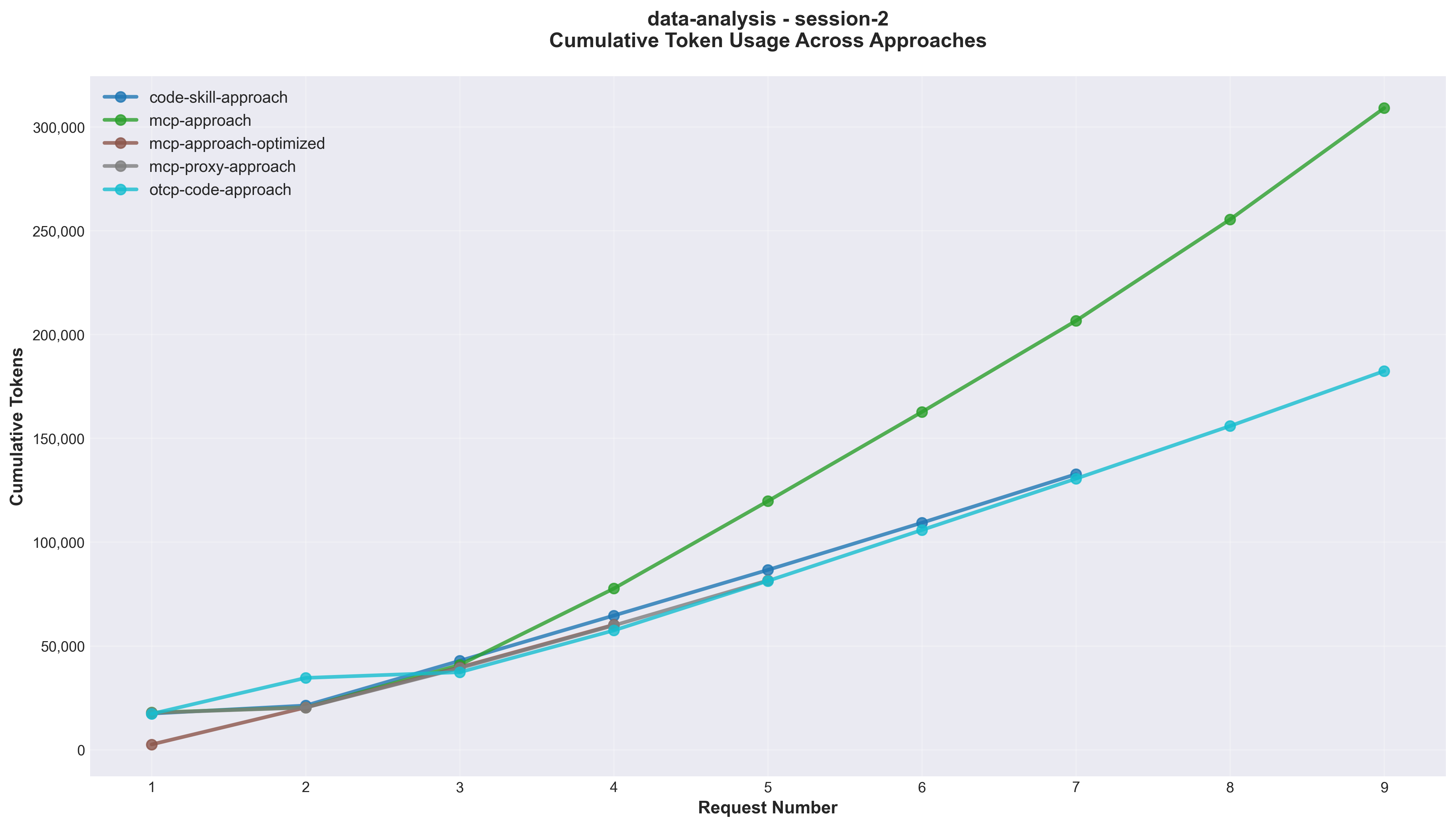
Figure 2: Cumulative token consumption across API requests. The optimized file-path approach grew slowly, while data-passing and code-heavy approaches accumulated more tokens.
When file paths, artifact ids, task ids, and stored queries beat payloads
References beat payloads when the data is larger than the decision the model needs to make.
In the benchmark, direct data passing became expensive as the 500-row dataset moved through model-facing calls. The file-path design kept bulky data near the tool and let the model reason over a compact handle. [1]
The same pattern applies outside CSV work:
- Use artifact ids instead of pasting generated reports back into chat.
- Use task ids instead of repeating acceptance criteria every turn.
- Use stored query ids instead of pasting query results repeatedly.
- Use file paths or links when the assistant only needs to decide what to inspect next.
- Return a short summary plus a pointer to the full output.
Anthropic describes this as just-in-time context: lightweight identifiers such as file paths, stored queries, and links let agents load data when needed. Agiflow applies the same state-boundary idea to project work. A task can hold acceptance criteria. An artifact can hold bulky output. A vault entry can hold reusable context. A workflow lock can mark a boundary. The assistant can fetch the slice it needs instead of carrying the whole project narrative in the prompt. [8] [22]
For teams already using MCP project-management tools, this is the practical test: does the board act as durable state, or does it simply mirror every detail back into the model?
Tool catalogs, progressive discovery, and tool search
Progressive discovery helps when the tool catalog is larger than the task.
One-MCP used this idea in the benchmark through meta-tools. The assistant first discovered relevant tools, then called the specific tools it needed. The first session paid discovery overhead. Later sessions improved once the tool pattern warmed up. [1] [2]
Anthropic's Tool Search Tool follows a similar direction for large catalogs: include a search tool, mark other tools for deferred loading, and let the agent find relevant definitions on demand. Anthropic's docs say a typical multi-server setup can use about 55K tokens in tool definitions, and that tool search typically reduces this by more than 85 percent when 3 to 5 tools are needed. Treat those as Anthropic-reported results, not as a guarantee for every MCP system. [5] [6]
Solo.io reports a progressive-disclosure example that reduced prompt tokens from 10,877 to 970 in an agentgateway setup. That is useful as a pattern signal, but it is not directly comparable with the Agiflow benchmark because the task, tools, data, and measurement setup differ. [20]
There are limits. If every session is isolated, discovery repeats. If subagents have separate contexts, they may reload tools even when the main thread looks clean. If tool names are vague, the assistant may spend extra calls rediscovering what each tool does. The system can still be better than loading every definition upfront, but the transcript alone will not tell you. Measure billable tokens, discovery calls, cache behavior, retries, and successful completion.
CLI, MCP, code execution, and project boards solve different loops
The strongest practitioner objection is fair: why use MCP when an agent with shell access can run a CLI and inspect --help?
Sometimes that is the right move. A CLI can be more context-efficient for local inner-loop work because the assistant can pipe, grep, tail, or truncate noisy output before bringing a few useful lines back into context. CircleCI makes a similar argument when it frames CLI workflows as strong for fast local execution and MCP as useful for shared, structured, authenticated workflows. [19]
That does not make CLI the universal winner. MCP is useful when the assistant needs a structured contract, authenticated access to a remote system, scoped permissions, typed inputs, consistent tool results, or shared state that survives beyond one terminal session. The official MCP docs frame it as a standard connection layer, not as a guarantee that every exposed tool is well designed. [3] [4]
Code execution with MCP is a third option. Anthropic describes a pattern where the model writes code that loads and filters data near execution, then returns a compact result. Its post gives an attributed example where filtering before context reduced one workflow from 150K tokens to 2K tokens. That is a vendor-reported example, not a universal benchmark, but the design rule matches the Agiflow benchmark: keep bulky data near computation and return the smallest useful result. [9]
For project state, a board is the right surface when the problem is handoff, scope, acceptance criteria, artifacts, comments, and workflow coordination. Agiflow is positioned for that shared outer loop, where external assistants need scoped project state without treating a chat transcript as the database. [22]
The better question is not MCP versus CLI. It is which layer should hold the data while the model reasons about the next step. The answer changes by loop.
Prompt caching changes the math, not the architecture
Prompt caching helps, but it does not excuse sloppy context design.
Anthropic's prompt caching docs separate cache-write and cache-read token accounting. OpenAI's prompt caching docs describe cache behavior around stable prompt prefixes and note that tools must remain consistent for tool schemas to benefit from cached prefixes. OpenAI's pricing page also separates input, cached input, output, and tool-related billing categories. [13] [14] [15]
That leads to three practical rules.
First, caching changes cost and latency. It does not make bad context design good. A cached giant tool list can be cheaper than an uncached one, but it can still crowd useful context and still influence tool selection.
Second, cache assumptions must be tested in the real assistant topology. One long session, many subagents, separate terminals, CI jobs, and human handoffs can produce different cache behavior.
Third, price pages are moving inputs. Do not preserve old per-execution dollar examples unless you recheck pricing at edit time and timestamp the calculation. The benchmark's token rankings are the durable evidence. Dollar numbers are a current-pricing exercise. [12] [14]
A decision framework for AI coding tool architecture
Choose by task shape, trust boundary, and measurement target.
| Task shape | Best fit | Main token risk | Reliability risk | State boundary | Measurement needed |
|---|---|---|---|---|---|
| Local inner loop | CLI or code generation | verbose command output and repair loops | shell misuse, nondeterministic scripts | local files and terminal session | successful output, truncated output size, rework count |
| Repeated data task | file-path MCP tools or code execution near data | returning too much intermediate data | stale files, missing validation | files and artifacts | response tokens, variance, success rate |
| Large tool catalog | tool search or progressive discovery | upfront schema bloat or repeated discovery | vague tool names, wrong tool selection | deferred tool definitions | schema tokens, discovery calls, cache behavior |
| Noisy log or result filtering | CLI, code execution with MCP, or server-side filters | raw logs flooding context | lossy filters hiding needed evidence | full log path plus compact result | returned tokens versus full output size |
| Shared outer loop | MCP plus scoped project board | re-pasting project memory into chat | stale state, broad permissions | task ids, board records, artifacts, locks | task state reads, handoff quality, successful completion |
What Agiflow would measure before optimizing tokens
The cheapest workflow is not the one with the lowest token count in a single lucky run. It is the one with the lowest cost per successful task at acceptable latency and rework.
Before redesigning AI coding tools, measure:
- input tokens.
- output tokens.
- cache-write tokens.
- cache-read tokens.
- estimated tool-definition tokens.
- response tokens returned by each tool.
- tool-call count.
- discovery-call count.
- retry and error-repair calls.
- variance across repeated sessions.
- latency per successful task.
- successful completion rate.
- human repair time.
- cost per successful task.
Then classify each cost. Schema tokens point to tool-catalog design. Response tokens point to filtering and data flow. Retries point to tool reliability, validation, or unclear task state. Cache misses point to prompt stability and session topology. Repeated explanation points to missing durable state.
Agiflow's first-party value is not that it makes an assistant think harder. It gives external assistants a scoped, shared place to read and update project state. A task can carry acceptance criteria. A workflow can lock a boundary. An artifact can hold bulky output. A board can show what is done without asking the next assistant to trust a long transcript. [22]
That matters most in multi-task workflows where workflow boundaries and work units prevent agents from reinterpreting scope. Durable state is a token-efficiency feature because it reduces repeated explanation and keeps the next assistant anchored to the current task.
Use the token-efficiency measurement checklist before redesigning your AI coding tools. If you cannot separate schema tokens, response tokens, cache-read tokens, retries, and successful completions, you are not optimizing yet. You are guessing.
Implementation patterns that preserve context
The core pattern is simple: keep data near the tool, keep state in durable systems, and return only what the model needs to decide the next step.
Use references instead of payloads
Avoid sending large data structures through model-facing tool parameters.
// Anti-pattern: data-passing tool call
await callTool('analyze_data', {
  data: [
    { name: 'Alice', department: 'Engineering', salary: 95000 },
    { name: 'Bob', department: 'Marketing', salary: 75000 },
    // hundreds more rows
  ],
});
Prefer a stable reference.
// Pattern: reference-based tool call
await callTool('analyze_csv_file', {
  filePath: '/data/employees.csv',
  analysis: 'salary_by_department',
});
The model can still reason about the analysis. It does not need to carry every row to request it. That is the same design principle behind the file-path benchmark result and Anthropic's just-in-time context guidance. [1] [8]
Return summaries plus artifact paths
Tool results should make the next decision easy without dumping the whole intermediate state.
return {
  summary: 'Salary is highest in Engineering and lowest in Support.',
  rowCount: 500,
  chartPath: '/artifacts/salary-by-department.png',
  dataProfilePath: '/artifacts/employee-data-profile.json',
  warnings: [],
};
This gives the assistant enough information to continue, with paths available when more inspection is needed.
Split discovery tools from execution tools
Large servers need a way to discover capabilities without loading every detailed schema upfront. A small discovery tool can return the narrow set of execution tools relevant to the current task.
const discoveryTool = {
  name: 'find_tools',
  description: 'Find tools by task, entity, or capability.',
  inputSchema: {
    type: 'object',
    properties: {
      query: { type: 'string' },
      entity: { type: 'string' },
    },
    required: ['query'],
  },
};
The execution tools still need clear schemas. The difference is that the assistant only loads the detailed definitions it is likely to use.
Filter noisy output before returning it
Logs, search results, and command output should be filtered before they hit context.
return {
  exitCode,
  matchedLines: errors.slice(0, 20),
  fullLogPath: '/artifacts/test-run-2026-07-06.log',
  suggestedNextStep: 'Open the first TypeScript error and inspect the changed file.',
};
If the model needs the full log, it has a reference. Most of the time, it needs the first failing line, the file path, and the next decision.
Keep board state scoped
A project board should not dump the whole organization into context. Scope the assistant to the organization, project, work unit, or task it needs.
await callTool('get_task_context', {
  taskId: 'AXX3-83',
  include: ['acceptanceCriteria', 'latestArtifacts', 'openBlockers'],
});
That gives the assistant enough project memory to act, while leaving unrelated work out of the prompt. For Agiflow, this is the practical reason scoped project-board tools and workflow locks matter. [22]
Make tool names distinct
Anthropic's tool-design guidance says tool names, descriptions, response shape, and intermediate output matter for agent reliability and context use. Do not expose get_task, fetch_task, read_task, and load_task if they do nearly the same thing. Use fewer tools with names that match the assistant's intent. [7]
Avoid these anti-patterns
- Passing CSV rows as JSON arrays through repeated tool calls.
- Returning full logs when only failing lines matter.
- Loading every tool description for every task.
- Treating cache hits as free context.
- Hiding state in chat transcripts instead of artifacts, files, tasks, or board records.
- Building broad write tools without scoped project boundaries.
- Summarizing tool output so aggressively that the next tool call loses required details.
The goal is not minimal context at all costs. The goal is enough context, at the right time, in the right place.
FAQ: token efficiency in AI-assisted development
Does MCP always waste tokens?
No. MCP can waste tokens when servers expose large schemas upfront or return oversized results, but the protocol itself is just the connection layer. Tool search, progressive discovery, narrow servers, filtered results, and reference-based tool calls can reduce the cost. [3] [4] [6]
Is CLI more token-efficient than MCP?
CLI can be more token-efficient for local filtering when the useful answer is a few lines inside noisy output. MCP is often a better fit for structured access, authentication, remote systems, shared state, and scoped project workflows. Choose by task shape, not protocol preference. [19]
Do prompt caches solve MCP context bloat?
No. Prompt caching can reduce cost or latency when prefixes and tool definitions remain stable, but cached input still needs measurement and can still occupy useful context. It also does not fix oversized tool responses or missing durable state. [13] [15]
What should teams measure before claiming token efficiency?
Measure input tokens, output tokens, cache-write tokens, cache-read tokens, tool-definition tokens, response tokens per tool, tool-call count, retries, variance, latency, successful completion, human repair, and cost per successful task. OpenTelemetry's GenAI semantic conventions give teams a trace vocabulary for this kind of measurement. [21]
Key takeaways
Token efficiency in AI-assisted development is a data-flow and state-boundary problem before it is a prompt-writing problem.
Architecture beats protocol labels. The benchmark's 60K versus 204K to 309K result came from how data moved, not from MCP branding alone. [1]
References beat repeated context. File paths, artifact ids, task ids, stored queries, and links let tools work near bulky data while the assistant reasons over a compact handle.
Response bloat can matter as much as schema bloat. Tool search helps large catalogs. Filtering, file paths, code execution, and artifacts help large outputs. Diagnose before optimizing.
Caching changes the math, not the design principle. Cache-read tokens, exact prefixes, identical tools, and session topology still need measurement. [13] [15]
Durable task state is part of token efficiency. When Agiflow holds board state, artifacts, workflow locks, and task boundaries, the assistant does not need every prior decision pasted into the next prompt. [22]
Use the measurement checklist before redesigning AI tools. If you cannot separate schema tokens, response tokens, cache-read tokens, retries, and successful completions, you are guessing.
References
[1] AgiFlow token-usage-metrics README. First-party benchmark record for the five approaches, 500-row task, three sessions per approach, token ranges, API calls, latency, and environment notes. https://raw.githubusercontent.com/AgiFlow/token-usage-metrics/main/README.md
[2] AgiFlow One-MCP repository. First-party source for the One-MCP progressive-discovery package context. https://github.com/AgiFlow/aicode-toolkit/tree/main/packages/one-mcp
[3] Model Context Protocol introduction. Official MCP documentation for connecting AI applications to external systems and tools. https://modelcontextprotocol.io/docs/getting-started/intro
[4] Model Context Protocol tools specification. Official specification for server-exposed, model-invoked tools with names, descriptions, schemas, and results. https://modelcontextprotocol.io/specification/2025-06-18/server/tools
[5] Anthropic, "Advanced tool use." Engineering post describing tool search and reported internal MCP evaluation results for loading tools on demand. https://www.anthropic.com/engineering/advanced-tool-use
[6] Anthropic Tool Search Tool docs. Official documentation for deferred tool loading and reported tool-definition overhead patterns in multi-server setups. https://platform.claude.com/docs/en/agents-and-tools/tool-use/tool-search-tool
[7] Anthropic, "Writing effective tools for agents." Guidance on tool design, intermediate output, overlapping tools, response shape, and agent reliability. https://www.anthropic.com/engineering/writing-tools-for-agents
[8] Anthropic, "Effective context engineering for AI agents." Guidance on just-in-time context through identifiers such as file paths, stored queries, and links. https://www.anthropic.com/engineering/effective-context-engineering-for-ai-agents
[9] Anthropic, "Code execution with MCP." Vendor example and design pattern for filtering data before it enters model context. https://www.anthropic.com/engineering/code-execution-with-mcp
[10] Claude Code cost docs. Official guidance that costs vary by model, codebase size, context size, usage patterns, and automation. https://code.claude.com/docs/en/costs
[11] Anthropic migration guide. Current model and migration context for treating older benchmark environment details as historical methodology. https://platform.claude.com/docs/en/about-claude/models/migration-guide
[12] Anthropic pricing docs. Current pricing reference for input, output, cache, and related billing categories. https://platform.claude.com/docs/en/about-claude/pricing
[13] Anthropic prompt caching docs. Official documentation for prompt caching and cache-read/cache-write accounting. https://platform.claude.com/docs/en/build-with-claude/prompt-caching
[14] OpenAI API pricing. Current pricing reference separating input, cached input, output, and tool-related billing categories. https://developers.openai.com/api/docs/pricing
[15] OpenAI prompt caching docs. Official documentation for prompt caching behavior around stable prefixes and tool consistency. https://developers.openai.com/api/docs/guides/prompt-caching
[16] UTCP introduction. Project self-description of UTCP as a lightweight standard for direct native-protocol tool calls without wrapper servers. https://www.utcp.io/
[17] Atlassian, "MCP compression: preventing tool bloat in AI agents." Vendor example describing MCP tool-description overhead and compression claims. https://www.atlassian.com/blog/development/mcp-compression-preventing-tool-bloat-in-ai-agents
[18] StackOne, "MCP token optimization." Vendor taxonomy separating schema bloat and response bloat. https://www.stackone.com/blog/mcp-token-optimization/
[19] CircleCI, "MCP vs CLI." Vendor framing for CLI workflows, MCP workflows, schema overhead, and output filtering. https://circleci.com/blog/mcp-vs-cli/
[20] Solo.io, "Keeping context and tokens low with progressive disclosure in agentgateway." Vendor example for progressive disclosure token savings, used as pattern evidence rather than direct benchmark comparison. https://www.solo.io/blog/keeping-context-and-tokens-low-with-progressive-disclosure-in-agentgateway
[21] OpenTelemetry GenAI semantic conventions. Specification for tracing model requests, responses, token usage, and related GenAI operational attributes. https://opentelemetry.io/docs/specs/semconv/gen-ai/
[22] Agiflow public llms.txt. First-party local product positioning for scoped project-board tools,
shared state, artifacts, vault entries, workflow coordination, and external AI assistants. Local file:
apps/agiflow-app/public/llms.txt
More to read
How to Optimize Agentic Workflow Cost and Latency
Agentic workflows get expensive when every handoff carries too much context. This refresh shows how tracing, model routing, caching, parallelism, and Agiflow state make workflows cheaper without making them less reliable.
14 min readWhy AI Coding Agents Lose Context: The Durable State Fix
AI coding agents lose context when the prompt becomes both working memory and system of record. The durable fix is task state: scope, criteria, tests, status, artifacts, and handoff notes.
16 min readMCP Sampling Is Deprecated, but the Inference Bill Has No Default Owner
MCP Sampling is deprecated under SEP-2577, but direct provider APIs do not assign the bill. Use a five-field ownership record before choosing a replacement path.
10 min read