Project Board for Claude Code: When Local Memory Stops Scaling
A Claude Code project board is a shared MCP-readable system of record for scope, decisions, tasks, artifacts, and workflow locks. Here is when local memory is enough, when it stops scaling, and how Agiflow keeps state durable across sessions.
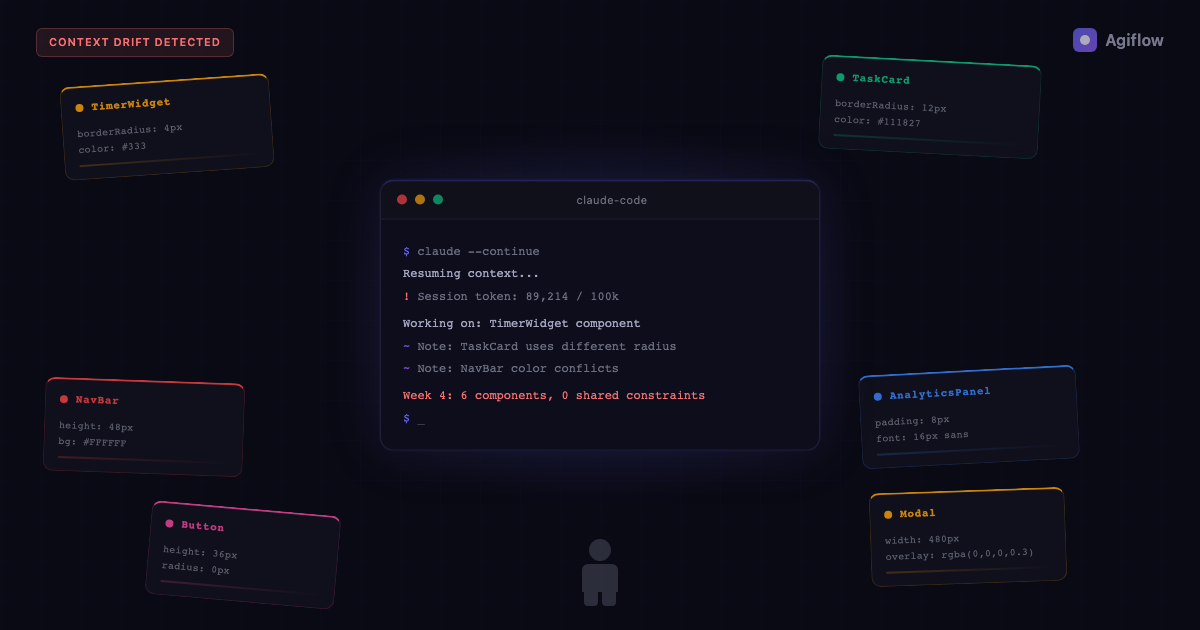
Prompts guide the turn, files help the session, and the board holds the work across sessions.
AI coding work creates state faster than most solo builders can keep in their head. Scope changes. Product decisions harden. A UI pattern gets chosen in one session, then a fresh Claude Code session makes a different but locally reasonable choice two days later.
That is why the useful question is not "How do I write a better prompt?" The better question is: where does Claude Code read authoritative project state from?
A project board for Claude Code is a shared system of record that Claude Code can read and update through MCP, so project scope, tasks, decisions, artifacts, and workflow state survive across sessions. It sits beside local memory, not against it. CLAUDE.md, auto memory, and TASKS.md help one machine remember conventions. A shared MCP board helps the work itself stay consistent when sessions, machines, artifacts, or collaborators multiply.
The pattern matters more now because solo builders are shipping more. Carta reports that new U.S. companies with solo founders rose from 23.7% in 2019 to 36.3% in H1 2025 [5]. AI may be one reason one person can cover more ground, but speed has a cost: project state compounds quickly.
The Flowly story shows the failure mode cleanly. On Indie Hackers, Max described building a productivity SaaS in about a month with AI helping boilerplate, scaffolding, and tests move faster. By week four, he reported a consistency wall: pieces worked alone but started to contradict the larger product direction [6]. Treat that as a practitioner claim, not a universal benchmark. Still, if you have used Claude Code across a real build, the shape is familiar.
This is a state architecture problem. Prompts guide the next turn. Local files help the next session. A board holds the work.
To make Claude Code task progress tracking persist across sessions, keep tasks in an external MCP-connected board rather than in session-local state. Session memory, CLAUDE.md, and a local TASKS.md all reset or drift the moment you switch machines, start a fresh session, or add a collaborator. A board that Claude Code reads and updates over MCP keeps task status, acceptance criteria, and artifacts readable in the next session without anyone re-pasting context.
TL;DR
- A Claude Code project board is a shared MCP-readable system of record for scope, decisions, tasks, artifacts, and workflow state.
- Local memory is useful.
CLAUDE.md, auto memory, and task files help Claude Code remember repo conventions and session notes. - Local memory stops scaling when state needs to survive multiple machines, collaborators, long-lived artifacts, locks, or many sessions.
- MCP changes the read path: Claude Code can connect to external tools and data sources instead of relying only on pasted context or local files.
- Agiflow is a bring-your-own-assistant project board over MCP. It supplies project state to external assistants; it does not run or host Claude Code.
What Is a Claude Code Project Board?
A Claude Code project board is a durable project system that Claude Code can query and update through Model Context Protocol, or MCP. It stores the work state that should outlive a chat: tasks, status, decisions, artifacts, acceptance criteria, vault notes, and sometimes workflow locks.
That makes it different from prompt context. Prompt context is working memory for the current turn. The board is the system of record the assistant can come back to.
Anthropic describes MCP as an open standard for secure two-way connections between data sources and AI tools [1]. Claude Code's MCP docs explain that Claude Code can connect to external tools and data sources through MCP, including systems such as issue trackers [2]. Put those together and the category becomes practical: a project board can be a tool Claude Code reads before work and updates after work.
| State layer | What it stores | Who updates it | Where it starts to fail |
|---|---|---|---|
| Prompt context | Immediate instructions, selected files, current task notes | Human and assistant inside one session | It disappears or gets compacted as the session changes |
CLAUDE.md | Repo conventions, commands, style rules, project notes | Usually the human, sometimes Claude through memory features | It consumes context and can become overloaded |
| Auto memory | Learned project knowledge across sessions | Claude Code on the local machine | Official docs say it is machine-local and not shared across machines or cloud environments [3] |
TASKS.md or local task files | Manual task list and session handoff notes | Mostly the human | It can drift from the real work unless maintained carefully |
| MCP project board | Shared tasks, scope, status, decisions, artifacts, vault entries, locks | Human and assistant through the board | It adds a system boundary and only helps if the board state is kept authoritative |
For the broader category, see MCP project management tools. Agiflow's Claude Code setup guide covers the connection path for a shared board.
If you need to choose between local instructions, skills, hooks, subagents, and external state, use the Claude Code internals layer map.
The Flowly Story Shows Why Speed Makes The State Problem Arrive Earlier
Flowly is a useful story because it was not a failed project. Max shipped a productivity SaaS for freelancers in about a month. His account says AI helped move boilerplate, scaffolding, and tests faster, while product judgment, priorities, and distribution stayed with the human builder [6].
That distinction is the whole point. The assistant can accelerate implementation without owning the product model. When the build is small, the human can carry that model in memory. As the number of sessions grows, the assistant sees fragments of the model: this component, this API, this refactor, this bug.
By week four, the problem was not that every generated piece was bad. It was that individually reasonable pieces were no longer aligned globally. One session's decision did not reliably constrain the next one.
Solo founders are especially exposed to this because they do not have a team process absorbing the drift. Carta's solo-founder data is market context, not proof that AI caused the change. It does support the practical point: more people are building companies alone, and those people need ways to preserve project state when AI lets them move faster than their old process can handle [5].
The lesson from Flowly is not "Claude Code cannot build a product." It is sharper than that. AI speed brings the state problem forward. If the product direction only lives in your head and a few scattered files, the assistant eventually runs out of durable constraints to read.
What Claude Code Local Memory Already Solves
Local memory deserves respect. It is the simplest good answer for many projects.
Claude Code's memory docs say each session starts with a fresh context window. They also describe CLAUDE.md and auto memory as ways to carry project knowledge across sessions [3]. That is exactly what a solo developer needs at the beginning: install commands, testing expectations, naming rules, architectural preferences, and recurring gotchas.
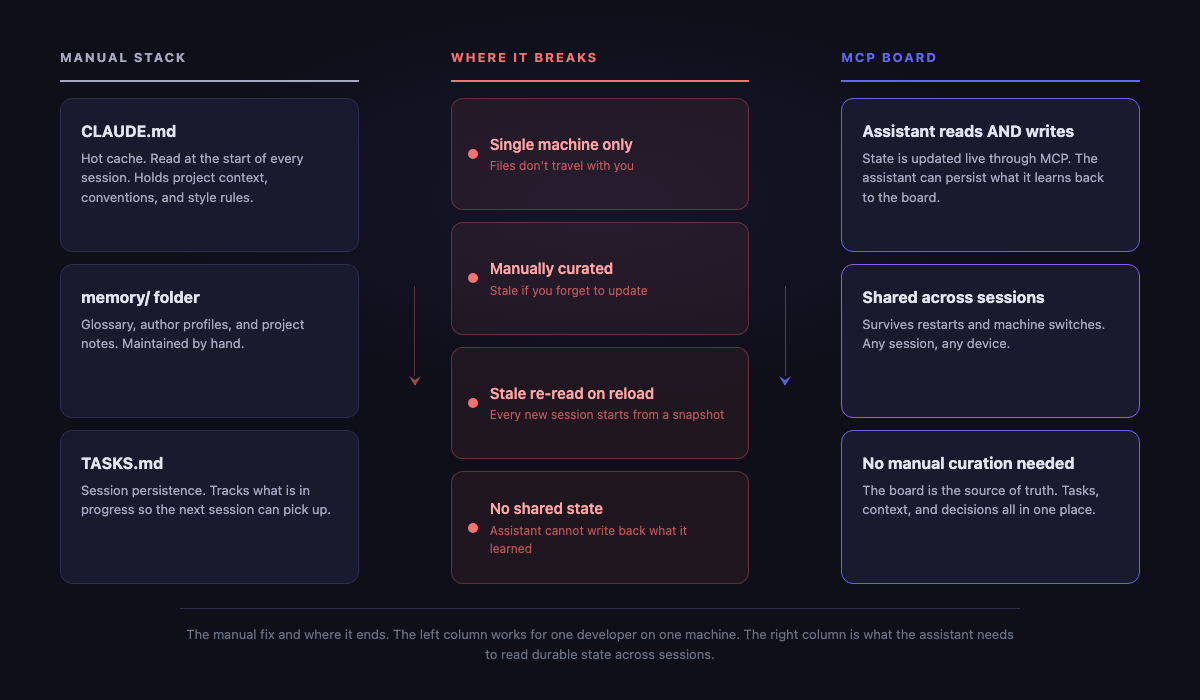
The common file-backed pattern looks like this:
CLAUDE.mdfor repo instructions and stable conventions.- A memory folder for decisions, glossary, product notes, or architecture summaries.
TASKS.mdor a similar file for the next work items and session handoff.
How-To Geek documents a version of this pattern through a Claude productivity workflow that uses TASKS.md, CLAUDE.md, a memory folder, and a local dashboard [7]. That is secondary evidence, but it matches what many practitioners try because it is visible, cheap, and easy to inspect in git.
For one developer, one repo, one machine, and a short-lived feature, local files may be enough. They keep conventions close to the code. They are easy to review. They do not require another tool in the loop.
The trap is expecting them to become a full project system just because they helped the first few sessions.
Where Local Memory Stops Scaling
The first boundary is sharing. Claude Code's memory docs state that auto memory is local to the machine and is not shared across machines or cloud environments [3]. If you move between devices, involve another developer, or use a cloud agent, that matters immediately.
The second boundary is attention. Anthropic's context engineering guidance frames context as finite and describes agents using lightweight references and tools to load the right information just in time [4]. That is not a small detail. A giant local memory file can be technically available while still being a poor working surface for the assistant.
Research points in the same direction. The "Lost in the Middle" paper found that model performance can depend on where relevant information appears inside long context, often dropping when the answer is buried in the middle [8]. Chroma's context-rot work reports that longer inputs and distractors can reduce reliability across tested models and tasks [9]. These do not prove that every large CLAUDE.md will fail. They do support a practical inference: putting more text into the window is not the same as creating better state.
The third boundary is upkeep. A local task file is only as accurate as the last person who updated it. If Claude Code changes an implementation detail but the task file stays stale, the next session reads stale state with confidence.
Practitioner language on Reddit and Hacker News backs up the shape of the pain. Users talk about forgetting context, repeated re-explanation, decision history, memory confusion, and markdown files that stop scaling for larger Claude Code projects [12] [13] [14]. Treat that as voice-of-customer signal, not measured evidence. The value is the vocabulary: people are not only asking for bigger context windows. They are asking for durable state.
For a deeper look at the session-level version of this problem, see why AI coding agents lose the plan. For the specific local task boundary, see Claude Code task persistence limits.
What MCP Changes About Claude Code Project Management
MCP changes the read path.
Without MCP, the assistant usually learns project state from the prompt, local files, repository contents, or whatever the human pastes in. With MCP, Claude Code can connect to an external project system and ask for state directly [2].
A practical session can look like this:
- Claude Code starts with a fresh context window.
- The configured MCP server exposes project and task tools.
- Claude reads the current task, acceptance criteria, linked artifacts, and relevant notes from the board.
- Claude works in the repo.
- Claude writes status, comments, or artifact references back to the board when the work changes.
That is the difference between restating state and retrieving state. Restating state makes the human the sync mechanism. Retrieving and updating state makes the board the sync mechanism.
Anthropic's context engineering article describes a related pattern: agents increasingly use references, tools, and just-in-time loading instead of stuffing everything into context upfront [4]. A project board fits that pattern when it exposes the right state at the right time.
There is a limit. MCP is plumbing, not judgment. It lets Claude Code read and act on external systems. It does not guarantee that the model will reason well, choose the right product trade-off, or understand a vague ticket. The board has to hold concrete scope, acceptance criteria, and evidence.
If you want the category view before picking a tool, start with MCP project management. If you want the product path, use the Claude Code setup guide to connect Claude Code to Agiflow.
What Agiflow Adds As A Claude Code Project Board
Agiflow's claim is intentionally narrow: it is a project board for external AI assistants over MCP. Claude Code, Cursor, Codex, or ChatGPT remains the assistant. Agiflow supplies shared project state [16] [19].
The first-party architecture artifacts behind that claim describe project-management state as projects, work units, tasks, status workflows, artifacts, vault entries, and workflow locks [15]. The MCP integration domain says Agiflow exposes project, task, artifact, vault, and workflow tools to external assistants, and that it does not run or host AI agents [16].
That matters because "project board" can otherwise sound like a visual kanban board. For Claude Code, the important part is not the columns. It is the state surface the assistant can query.
An Agiflow-backed session should be able to answer practical questions:
- What project and work unit am I inside?
- What task is active, and what are its acceptance criteria?
- Which artifacts, screenshots, notes, or decisions are already attached?
- Is another workflow holding a lock for this task or work unit?
- What should be updated when the session finishes?
Workflow locks are a good example of first-party value that a markdown file does not provide. Agiflow's workflow-lock flow says locks can be acquired and released through MCP or REST, and conflicting lock attempts return conflict when the same composition is already locked [17]. That is not needed for every solo session. It becomes useful when multiple sessions, tools, or agents can touch the same work.
Artifacts are another example. The task-artifact flow describes artifacts being attached through MCP, stored, linked to tasks, and returned without exposing signed URLs to model-visible content [18]. For AI coding work, that means screenshots, notes, logs, or generated outputs can belong to the task instead of being rediscovered from chat history.
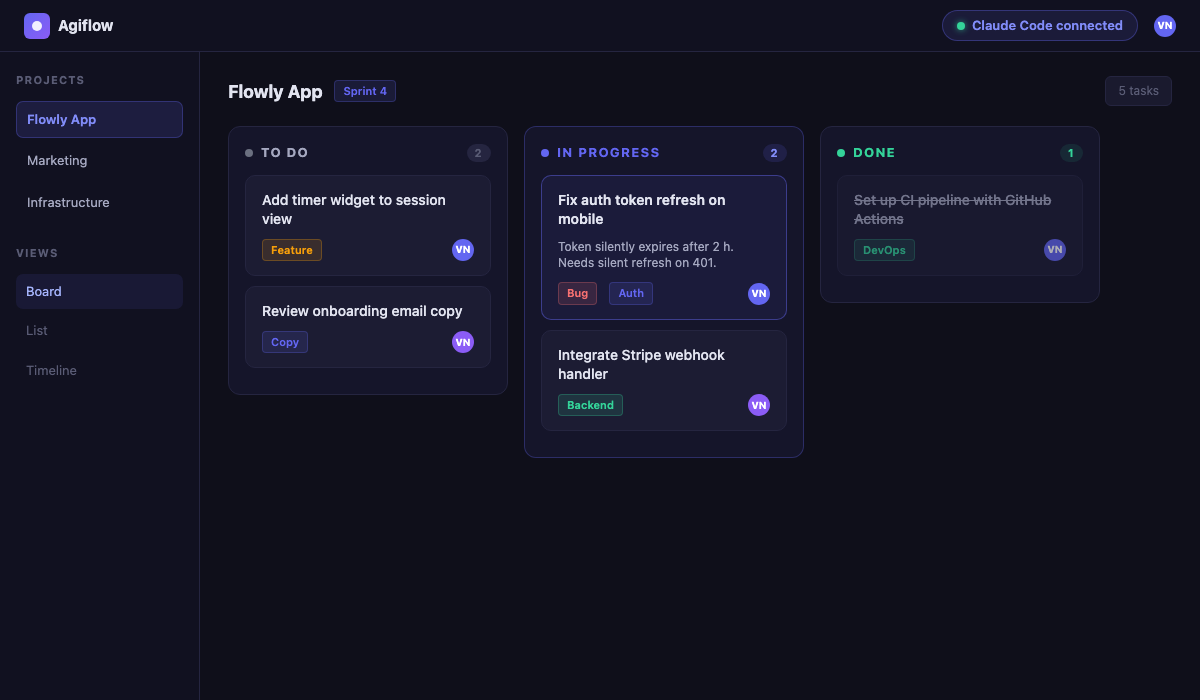
This is also where Agiflow is different from an agent host. It does not replace Claude Code. It gives Claude Code a durable board to read and update. That boundary keeps the value concrete and avoids pretending a board can fix every model-level problem.
For a nearby product concept, see AI project board. For team-level state problems, see shared state for AI coding teams.
When You Do Not Need A Shared Board
You do not need an MCP board for every Claude Code project.
If you are building a small feature in one repo, on one machine, across a few sessions, CLAUDE.md plus a short task file is probably the simplest good answer. The board adds another system, and another system should earn its place.
| Situation | Local files are enough | Use an MCP project board |
|---|---|---|
| One developer, one machine | Usually | Only if you need durable artifacts or board visibility |
| Short-lived feature | Usually | If it belongs to a larger roadmap with shared status |
| Stable repo conventions | CLAUDE.md works well | Use the board only for task state and decisions |
| Multiple machines or cloud environments | Weak fit because memory is not shared | Strong fit because state lives outside the machine |
| Many sessions with changing decisions | Risk of stale markdown | Strong fit if decisions and acceptance criteria live on tasks |
| Multiple assistants or collaborators | Manual coordination | Strong fit if locks, artifacts, and status matter |
The best local setup is still worth doing. Keep repo commands, architecture notes, and style rules close to the code. Use the board for the work state that should survive beyond one local memory layer.
When A Claude Code Project Board Becomes The Better Fit
A shared board becomes the better fit when the assistant needs to answer a question that local context cannot reliably answer.
The usual signals are concrete:
- The project spans many Claude Code sessions, and the assistant keeps re-learning old decisions.
- You move across machines, cloud environments, or external assistants.
- Tasks need acceptance criteria, status, and evidence that humans can inspect outside the terminal.
- Screenshots, logs, documents, or generated files need to stay attached to the task.
- Multiple sessions or agents may touch overlapping work, so conflict visibility matters.
- Product decisions need a durable home that is not buried in chat history.
Agiflow maps those signals to specific state objects: projects and work units for scope, tasks and status workflows for execution, artifacts for evidence, vault entries for reusable knowledge, and workflow locks for coordination [15] [17] [18].
The practical example is not complicated. Suppose Claude Code is refreshing a feature across five sessions. In session one, it changes the data model. In session two, it updates UI state. In session three, it produces a screenshot artifact. In session four, it finds a validation issue and needs to pause. If all of that lives in chat and local files, the human has to keep the story straight. If it lives on the board, the next session can read the task, see the artifact, inspect status, and continue from the current state.
That is the first-party value: not more ceremony, but a better place for work state to live.
For projects that already split work into larger slices, coordinating AI workflows with work units goes deeper on the work-unit pattern.
What A Board Cannot Fix
A Claude Code project board does not make vague work clear. If the task has no acceptance criteria, the assistant still has to infer too much. If the product direction is wrong, the board will preserve the wrong direction efficiently.
It also does not remove the need for context design. LangChain's context-engineering summary groups common strategies as write, select, compress, and isolate [11]. A board mostly helps with write and select: store durable state, then retrieve the slice needed for the current task. You still need good instructions, scoped tasks, and review.
Multi-agent research is a useful warning here. The MAST paper identifies failure modes across system design, inter-agent misalignment, and task verification in multi-agent traces [10]. A board can make state and conflicts more visible. It cannot make poor verification disappear.
So use the board for what it is good at:
- durable task and decision state
- shared visibility
- artifact attachment
- workflow conflict signals
- just-in-time retrieval through MCP
Do not use it as a story about magic memory. The better framing is simpler: Claude Code needs a dependable place to read the work.
The Bottom Line
Claude Code local memory is useful. Keep it. Use CLAUDE.md for repo conventions. Use concise local notes for stable rules. Use task files when the project is small enough that a human can keep them true.
But once the work spans many sessions, machines, artifacts, collaborators, or workflow conflicts, local memory stops being the right state surface. A project board for Claude Code gives the assistant something more durable to read: the current task, decisions, artifacts, status, and locks.
Prompts guide the turn. Files help the session. A board holds the work.
Use the Claude Code setup guide to connect Claude Code to an Agiflow project board over MCP.
References
[1] Anthropic, "Introducing the Model Context Protocol" - https://www.anthropic.com/news/model-context-protocol - Verified fact: MCP is an open standard for secure two-way connections between data sources and AI tools.
[2] Anthropic Claude Code Docs, "Connect Claude Code to tools via MCP" - https://code.claude.com/docs/en/mcp - Verified fact: Claude Code can connect to external tools and data sources through MCP.
[3] Anthropic Claude Code Docs, "How Claude remembers your project" -
https://code.claude.com/docs/en/memory - Verified fact: each Claude Code session starts with a fresh context window;
CLAUDE.md and auto memory can carry knowledge across sessions; auto memory is machine-local and not shared across
machines or cloud environments.
[4] Anthropic Engineering, "Effective context engineering for AI agents" - https://www.anthropic.com/engineering/effective-context-engineering-for-ai-agents - Verified fact: context is finite; agents increasingly use lightweight references and tools to load data just in time instead of placing everything into context upfront.
[5] Carta, "Solo Founders Report 2025" - https://carta.com/data/solo-founders-report/ - Verified fact: new U.S. companies with solo founders rose from 23.7% in 2019 to 36.3% in H1 2025; Carta says AI may be one factor making solo building more feasible.
[6] Indie Hackers, "I shipped a productivity SaaS in 30 days as a solo dev" - https://www.indiehackers.com/post/i-shipped-a-productivity-saas-in-30-days-as-a-solo-dev-heres-what-ai-actually-changed-and-what-it-didn-t-15c8876106- Third-party practitioner claim: Max reports building Flowly in about one month and hitting a week-four consistency
[7] How-To Geek, "How to turn Claude into a project management system" -
https://www.howtogeek.com/claudes-hidden-project-management-system-is-a-game-changer/ - Secondary claim: documents a
Claude productivity workflow that uses TASKS.md, CLAUDE.md, a memory folder, and dashboard.html.
[8] Liu et al., "Lost in the Middle: How Language Models Use Long Contexts" - https://arxiv.org/abs/2307.03172 - Research fact: long-context model performance can degrade depending on where relevant information appears.
[9] Chroma Research, "Context Rot: How Increasing Input Tokens Impacts LLM Performance" - https://www.trychroma.com/research/context-rot - Research claim: Chroma reports performance degradation as input context grows across tested models and tasks.
[10] arXiv, "Why Do Multi-Agent LLM Systems Fail?" - https://arxiv.org/abs/2503.13657 - Research fact: the MAST paper identifies failure modes across system design, inter-agent misalignment, and task verification.
[11] LangChain, "context_engineering" repository - https://github.com/langchain-ai/context_engineering - Verified repository claim: common context-engineering strategies include write, select, compress, and isolate.
[12] Hacker News, "Show HN: Stop Claude Code from forgetting everything" - https://news.ycombinator.com/item?id=46426624 - Community signal: practitioners discuss memory layers, setup decisions, and decision history across Claude Code sessions.
[13] Reddit, "Claude Code is awesome but memory handling still confuses me" -
https://www.reddit.com/r/ClaudeAI/comments/1lcjgtc/claude_code_is_awesome_but_memory_handling_still/ - Community signal:
practitioners discuss compacting, CLAUDE.md size, and MCP-assisted memory patterns.
- https://www.reddit.com/r/ClaudeAI/comments/1n7hwah/absolutely_insane_improvement_for_claude_code_on/ - Community
[15] Agiflow architecture, project-management domain -
docs/architecture/agiflow/domains/project-management.domain.yaml - First-party product fact: Agiflow
project-management state includes projects, work units, tasks, status workflows, artifacts, vault entries, and workflow
locks.
[16] Agiflow architecture, mcp-integration domain -
docs/architecture/agiflow/domains/mcp-integration.domain.yaml - First-party product fact: Agiflow exposes project,
task, artifact, vault, and workflow tools over MCP for external AI assistants and does not run or host AI agents.
[17] Agiflow workflow-lock dataflow -
docs/architecture/agiflow/dataflows/project-management/workflow-lock-flow.flow.yaml - First-party product fact:
workflow locks can be acquired and released through MCP or REST and return conflict when the same composition is already
locked.
[18] Agiflow task-artifact attachment dataflow -
docs/architecture/agiflow/dataflows/mcp-integration/task-artifact-attachment-flow.flow.yaml - First-party product
fact: task artifacts can be attached through MCP, stored, linked to tasks, and returned with signed URLs hidden from
model-visible content.
[19] Agiflow listing kit - docs/submissions/agiflow/listing-kit.md - First-party positioning fact:
Agiflow is positioned as a simple project board for external assistants over MCP.
More to read
Claude Code Tasks Limitations: Where Native Tasks Stop for Teams
Claude Code Tasks is useful local orchestration, but it is not a shared system of record. This refreshed guide maps what Tasks stores, how it differs from sessions, memory, and artifacts, and when teams need an MCP-readable project board.
13 min readHow to Keep One Project Board Across ChatGPT, Claude, Cursor, and Codex
Use MCP to connect ChatGPT, Claude, Cursor, and Codex to the same project board, then keep the board as the narrow source of truth for scope, status, evidence, and next action.
13 min readClaude Code Internals: How Skills, Hooks, MCP, and Subagents Actually Work
A July 2026 refresh of Claude Code internals, separating official docs, first-party network traces, third-party analysis, and practical inference across CLAUDE.md, skills, hooks, subagents, plugins, and MCP.
32 min read