Claude Code Tasks Limitations: Where Native Tasks Stop for Teams
Claude Code Tasks is useful local orchestration, but it is not a shared system of record. This refreshed guide maps what Tasks stores, how it differs from sessions, memory, and artifacts, and when teams need an MCP-readable project board.
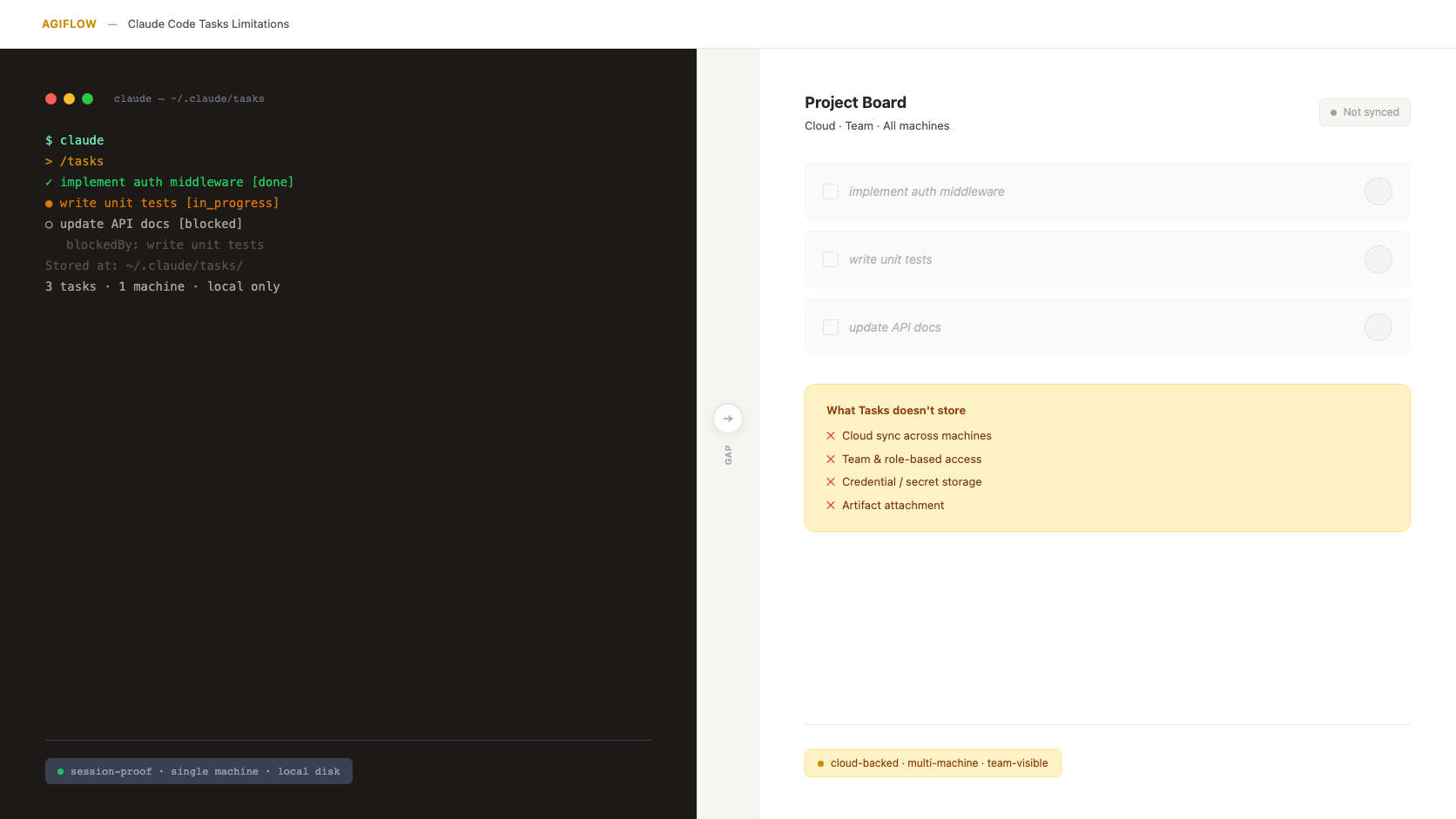
Claude Code Tasks handles local orchestration. A shared MCP board stores team-visible project state.
Claude Code Tasks answers a real problem: a local agent needs a work queue that survives a closed terminal, a crashed session, or a resumed run. That is useful. It is also narrower than the problem most teams mean when they say, "Claude forgot the work."
Short answer: Claude Code Tasks is enough for solo, local task orchestration, but team-scale AI coding still needs a shared system of record for cross-machine state, team visibility, credentials, task evidence, and workflow locks.
The category map matters. Claude Code sessions preserve conversation history tied to a project directory. Auto memory stores project notes locally and, according to Anthropic's docs, is not shared across machines or cloud environments. Claude Code Artifacts publish live pages from a session to a private URL. MCP connects Claude Code to external tools and data sources. None of those is the same thing as a shared project record that teammates and assistants can inspect later. [1] [2] [3] [4]
For the wider extension model behind those boundaries, read how Claude Code skills, hooks, MCP, and subagents work.
That is the distinction this refresh makes. Tasks is not broken. It is a local orchestration layer. The team boundary appears when the work has to survive the machine, the session, the person, and the assistant that started it.
What Changed Since The Original Post
The original version of this article leaned too hard on community-observed Claude Code Tasks internals and an exact launch-date claim that the current research did not verify in official Anthropic docs. This version keeps the useful point, but raises the evidence standard.
As of July 2026, Claude Code has several adjacent state surfaces:
| Surface | What it is for | Evidence status |
|---|---|---|
| Sessions | Saved conversations tied to a project directory, stored locally as work progresses | Official Claude Code docs [1] |
| Auto memory | Local project notes under the Claude Code project memory path, not shared across machines or cloud environments | Official Claude Code docs [2] |
| Artifacts | Live interactive pages published from a session to a private Claude URL | Official Claude Code docs [3] |
| MCP | A protocol path for connecting Claude Code to external tools, APIs, databases, and issue trackers | Official Claude Code and MCP docs [4] [5] |
| Tasks | Local task orchestration details such as task records, dependencies, and task-list IDs | Third-party and community-observed unless independently confirmed [7] [8] |
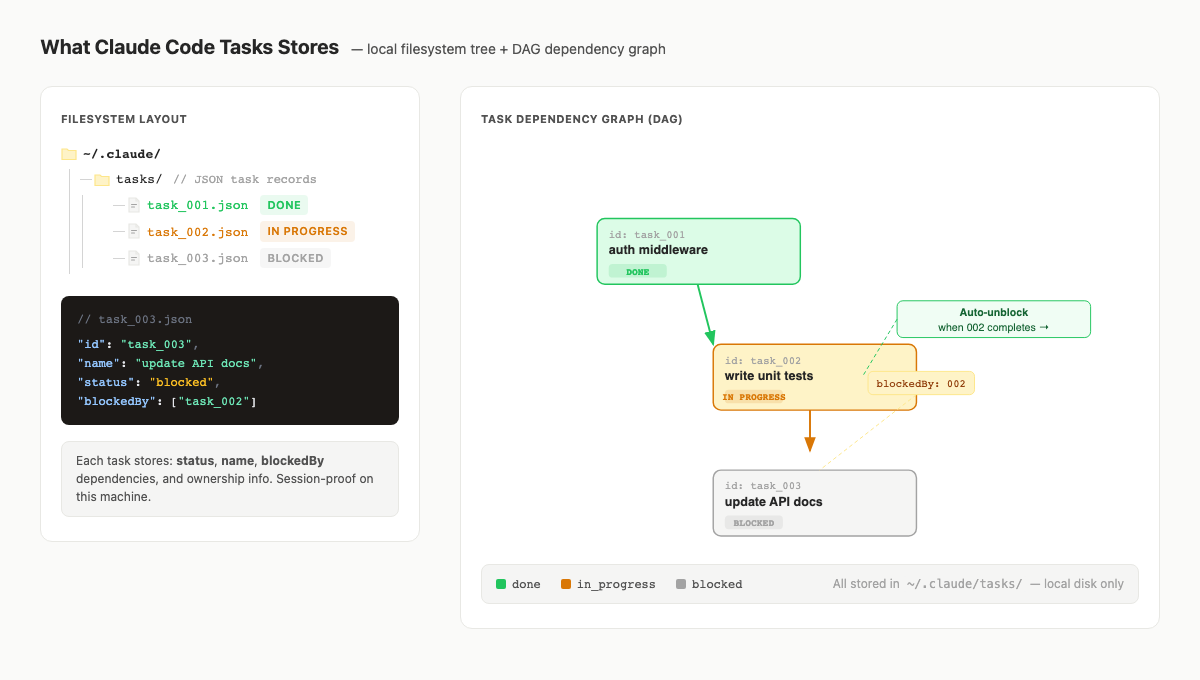
What Claude Code Tasks Stores
The strongest public details about Claude Code Tasks internals still come from third-party and community sources. A dplooy guide describes Tasks as local JSON records under ~/.claude/tasks/, with status fields, dependency relationships such as blockedBy, and task-list sharing through environment configuration. A Reddit thread includes practitioner discussion of task-list IDs, local JSON backup, /clear confusion, and solo-work use. Treat those details as useful field observations, not official product documentation. [7] [8]
That confidence label is important. Teams make bad architecture decisions when a community-observed detail becomes a product guarantee in their heads.
The safe model is simpler:
| Question | Careful answer |
|---|---|
| Does Tasks store local work orchestration? | Yes, based on community and third-party reporting, it is used for task status, dependencies, and task-list continuity. |
| Is the exact local file format an official contract? | Not from the verified sources used for this refresh. Treat paths and fields as implementation details unless Anthropic documents them. |
| Does Tasks replace sessions or memory? | No. Sessions preserve conversation history, and memory preserves local project knowledge. [1] [2] |
| Does Tasks create a shared team board? | Not from the verified evidence. A shared board is a separate system-of-record layer. |
Tasks vs Sessions vs Memory vs Artifacts vs An MCP Board
Here is the category map I would use with a Claude Code team lead before adding any tooling.
| Layer | Scope | What it stores | Best fit | Where it stops |
|---|---|---|---|---|
| Claude Code Tasks | Local orchestration | Task queue and dependency state, based on third-party and community reporting | One developer coordinating local agent work | Team visibility, cloud continuity, task-attached evidence |
| Sessions | Local conversation history | Saved conversation state tied to a project directory | Resuming or branching an earlier Claude Code conversation | Shared project truth across people and machines [1] |
| Auto memory | Local project knowledge | Notes under the Claude Code project memory path | Remembering local project facts across sessions | Official docs say it is not shared across machines or cloud environments [2] |
| Claude Code Artifacts | Session output | Live interactive pages published from a session to a private URL | Sharing or inspecting a generated page | Attaching evidence to a durable task record [3] |
| MCP | Connection protocol | Tool and data access into external systems | Letting Claude Code read and act on external tools | MCP is the bridge, not the project record itself [4] [5] |
| Agiflow | Shared project system of record | Projects, work units, tasks, artifacts, vault entries, comments, and workflow locks | Team-visible AI coding work over MCP | It does not run or host Claude Code [13] |
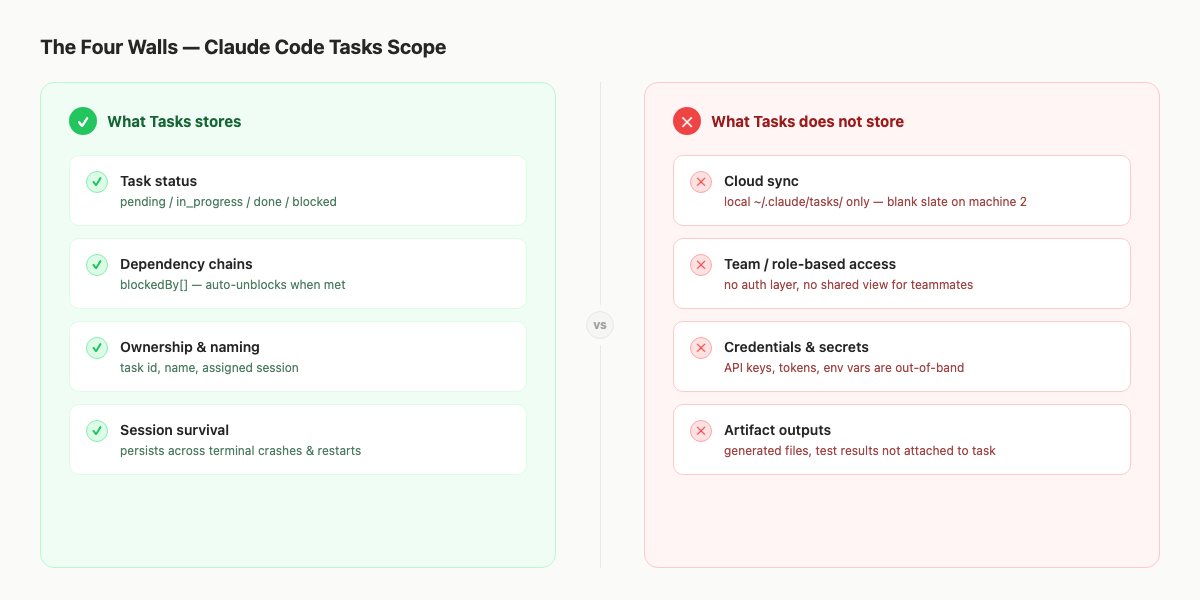
The Four Boundaries Teams Hit
The old version called these "four walls." The refreshed version keeps the four boundaries, but phrases them as category limits instead of product defects.
1. Cross-machine state
Auto memory is officially machine-local. Sessions are local saved conversations. The verified docs do not turn local state into a cloud work record. [1] [2]
That matters the first time a task starts on a workstation and needs to continue on a laptop, a cloud runner, or a teammate's machine. Git may carry code. It does not carry the full live work state unless the team has put that state somewhere durable.
2. Team visibility
Local orchestration is useful to the agent doing the work. It is not automatically useful to the lead asking what is blocked, the reviewer asking what evidence exists, or the second assistant trying to avoid duplicate work.
This is an inference from the source map, not an official Anthropic limitation statement. The verified point is narrower: Claude Code can connect to external systems through MCP, which is exactly why a project board can become a readable and writable shared state layer. [4] [5]
3. Credential context
Tasks should not be treated as a secret store. That is not a criticism of Tasks. It is a separation of responsibilities.
When an assistant needs environment-specific values, the team needs a secret layer with masking, permissions, and clear access rules. Agiflow's public project-vault guide describes environment-scoped secrets, read/write permissions, masking, and assistant access through the project vault. Local architecture docs add that vault entries are encrypted and exposed through scoped MCP tools. [12] [13]
For a deeper version of this boundary, see AI agent secrets management.
4. Task-attached evidence
Claude Code Artifacts are real and useful. They publish live interactive pages from a Claude Code session to a private URL. That is not the same job as attaching screenshots, traces, logs, generated files, or review notes to a project task record that future teammates and assistants can inspect. [3]
Agiflow's project-artifacts guide shows task-generated files appearing on each task, and the product architecture confirms artifacts are stored with relational metadata and object storage. [11] [14]
This is the handoff difference. A session artifact helps show an output. A task artifact helps preserve evidence for the work record.
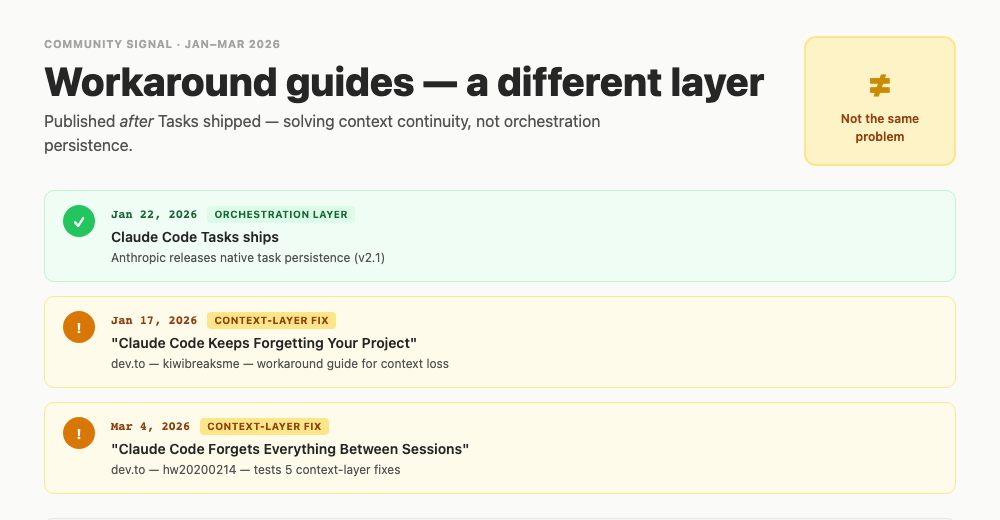
Why Workaround Posts Keep Coming
The workaround posts and community threads are not proof that Claude Code Tasks failed. They are signal that practitioners keep mixing several problems under one phrase: the agent forgot.
One practitioner thread describes task persistence tooling as a response to context loss, hallucinated task references, scope creep, and lack of project lifecycle awareness. Dev.to memory workaround posts frame CLAUDE.md, replay, and MCP memory as attempts to preserve session continuity. Hacker News threads around memory tools use language such as restarting from scratch, decision history, and compaction tradeoffs. [9] [10] [15] [16]
Anthropic's context-engineering guidance is useful here because it treats compaction and context preservation as their own design problem. Long-horizon agent work needs the right details preserved and redundant history discarded. That is not the same problem as making a task visible to a teammate. [6]
The pattern is not "everyone needs a giant memory database." Some teams prefer short task-specific documents, explicit plans, or rediscovery because memory tools can bloat context and go stale. That objection is fair. The practical split is this:
| If the failure is... | Look first at... |
|---|---|
| The agent forgot repo rules | AGENTS.md, CLAUDE.md, local memory, or explicit instructions |
| The agent forgot prior reasoning | Session resume, summaries, context engineering, or memory |
| The agent lost task order | Native Tasks or a task list |
| The team cannot inspect active work | A shared project board |
| A second assistant needs evidence or a lock | A shared system of record with artifacts and workflow locks |
When Native Claude Code Tasks Is Enough
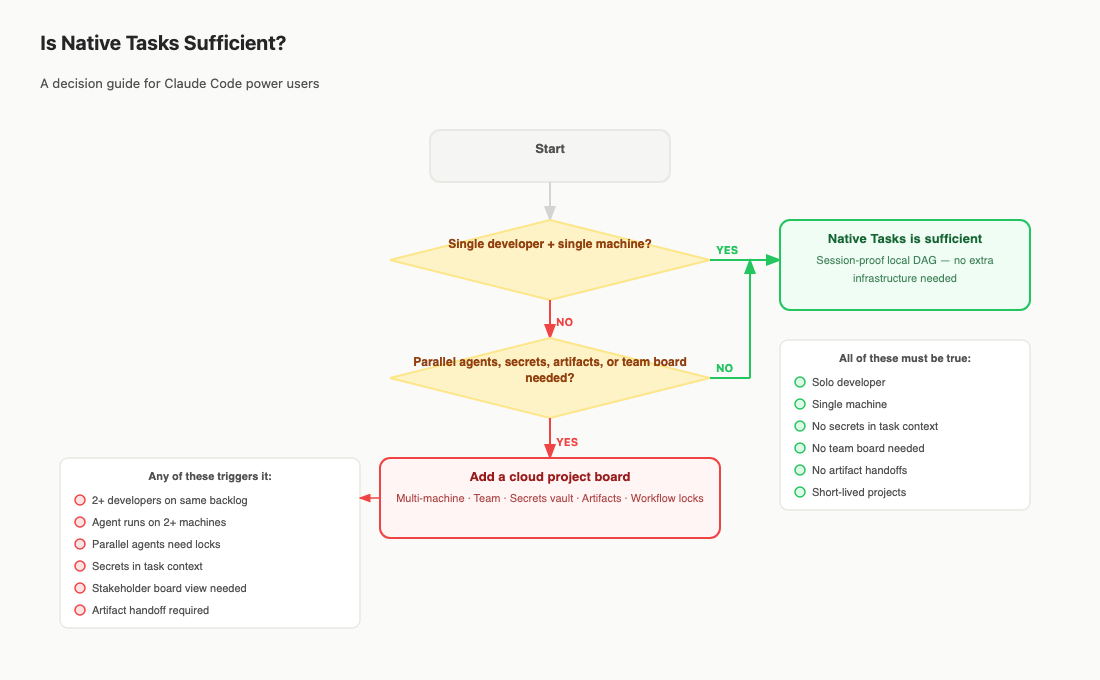
Use native Tasks without extra infrastructure when the work is local, short-lived, and owned by one developer.
That usually means:
- One developer is driving the work.
- One machine owns the active agent run.
- The task list is mostly for the agent's local orchestration.
- The work does not need a stakeholder-readable board.
- Secrets arrive through an existing secure path, not a task record.
- Outputs can be reviewed through the repo, the terminal, or a simple local artifact path.
That setup is not immature. It is appropriately small. Adding a cloud board to a small local loop can create more process than value.
The mistake is waiting too long after the conditions change. Once work crosses people, machines, assistants, or evidence trails, the local queue is no longer the authoritative record. It may still help the session. It should not be asked to carry the team.
When Teams Need A Shared MCP Project Board
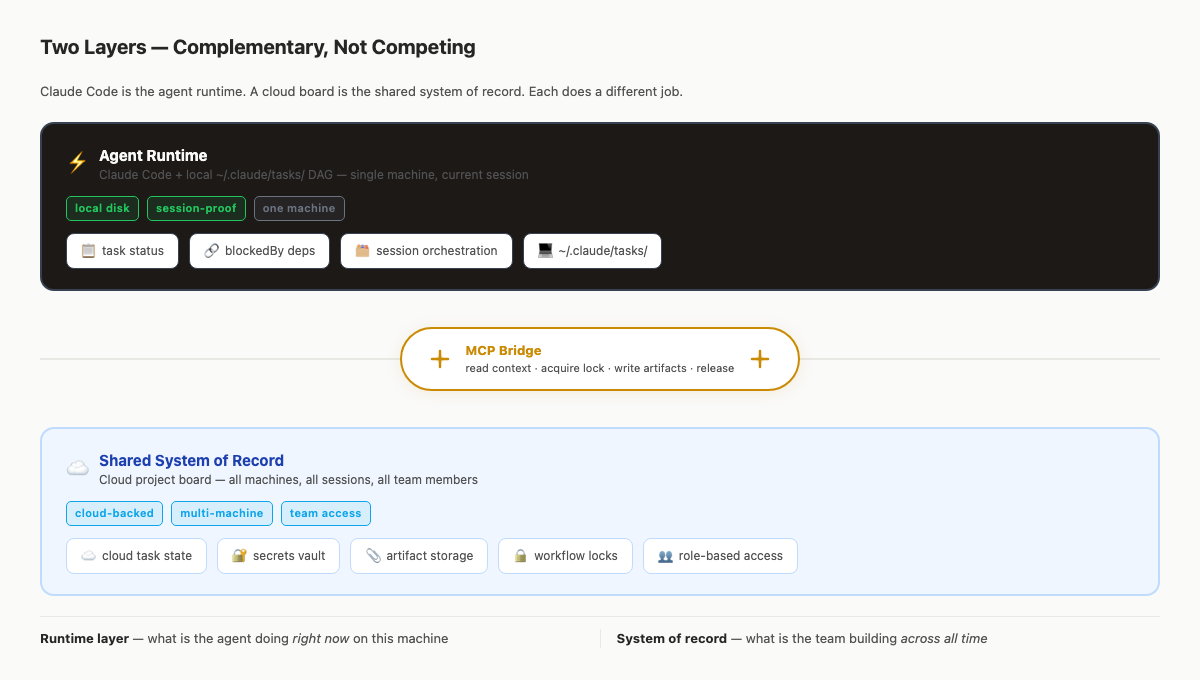
A shared MCP project board becomes useful when the assistant needs to read and write the same work record the team uses.
MCP is the enabling path. Anthropic describes MCP as an open standard for secure two-way connections between data sources and AI-powered tools, and Claude Code's MCP docs describe connections to external tools, databases, APIs, issue trackers, and monitoring systems. [4] [5]
The board is the system of record. MCP is how Claude Code reaches it.
That distinction prevents two bad designs. First, do not make the board pretend to be the runtime. Claude Code still edits files, runs commands, and reasons through the task. Second, do not make the runtime pretend to be the shared project database. A local task queue is not the same thing as team-visible status, acceptance criteria, artifacts, vault entries, and locks.
For related patterns, see shared state for AI coding teams, MCP project management tools, and the Claude Code project board guide.
What Agiflow Adds Without Hosting The Agent
Agiflow is a shared project board for external assistants. It does not run or host Claude Code. It exposes project state to the assistant over MCP, while the agent keeps running wherever your team runs it. [13]
The useful Agiflow layer is concrete:
| Team need | Agiflow surface | Evidence |
|---|---|---|
| A durable work hierarchy | Projects, work units, tasks, statuses, files, vault environments, and workflow state | Public workflows docs [18] |
| Assistant-readable task detail | Tool families for projects, work units, tasks, comments, members, organizations, artifacts, vault entries, and workflow locks | Public AI skills docs [17] |
| Task-attached evidence | Project Artifacts tab and task-generated files visible on each task | Manage project files guide [11] |
| Scoped credential access | Environment-scoped secrets, permissions, masking, and assistant vault access | Store project secrets guide [12] |
| Concurrent assistant coordination | Workflow locks scoped to project, work unit, and task composition | Local architecture evidence [13] [14] |
That is enough of a job. If Claude Code is the runtime, Agiflow is the record the runtime can read before work and update after work.
Follow the Claude Code integration guide to connect Agiflow over MCP, or start from the MCP project management overview if you are still deciding what layer your team is missing.
FAQ
Is Claude Code Tasks enough for team-scale AI coding work?
Not by itself. Claude Code Tasks is useful for local task orchestration, but team-scale work needs a shared record for status, ownership, evidence, credentials, and locks when the work crosses machines or people.
What does Claude Code Tasks actually store?
The verified research found third-party and community-observed claims about local task records, dependency fields, task-list IDs, and task sharing on one machine. Treat exact paths and fields as implementation details unless Anthropic documents them publicly. [7] [8]
How are Tasks different from sessions and memory?
Sessions are saved conversations tied to a project directory. Auto memory stores local project knowledge and is not shared across machines or cloud environments. Tasks, based on available third-party evidence, are for local work orchestration rather than conversation or knowledge storage. [1] [2]
Do Claude Code Artifacts solve task evidence storage?
They solve a different problem. Claude Code Artifacts are live pages published from a session to a private URL. Task evidence storage means attaching outputs such as screenshots, logs, files, and review notes to a durable work record. [3] [11]
Does an MCP board replace Claude Code Tasks?
No. A shared MCP board complements native Tasks. Tasks can help the local runtime coordinate work. The board stores project state that should outlive the runtime and be visible to teammates and future assistants.
TL;DR
| Question | Answer |
|---|---|
| What is the main Claude Code Tasks limitation? | It is local orchestration, not a shared team system of record. |
| When is native Tasks enough? | One developer, one machine, short-lived work, no shared board or task-attached evidence needed. |
| What changed in this refresh? | The article now separates Tasks from sessions, memory, Artifacts, MCP, and Agiflow with clearer evidence labels. |
| What does a shared MCP board add? | Team-visible tasks, acceptance criteria, artifacts, scoped secrets, comments, and workflow locks. |
| Should teams use both? | Often, yes. Use native Tasks for local session orchestration and a board for durable shared state. |
Follow the Claude Code integration guide when you are ready to connect Claude Code to Agiflow over MCP.
References
[1] Claude Code sessions docs, official Anthropic documentation, https://code.claude.com/docs/en/sessions. Supports the definition of sessions as saved conversations tied to a project directory and stored locally as work progresses.
[2] Claude Code memory docs, official Anthropic documentation, https://code.claude.com/docs/en/memory. Supports auto memory as local project knowledge that is not shared across machines or cloud environments.
[3] Claude Code Artifacts docs, official Anthropic documentation, https://code.claude.com/docs/en/artifacts. Supports Artifacts as live interactive pages published from a session to a private URL.
[4] Claude Code MCP docs, official Anthropic documentation, https://code.claude.com/docs/en/mcp. Supports Claude Code connecting to external tools, databases, APIs, issue trackers, and monitoring systems through MCP.
[5] Model Context Protocol introduction, https://modelcontextprotocol.io/docs/getting-started/intro, plus Anthropic MCP announcement, https://www.anthropic.com/news/model-context-protocol. Supports MCP as an open standard for connecting AI applications to external systems.
[6] Anthropic engineering, "Effective context engineering for AI agents," https://www.anthropic.com/engineering/effective-context-engineering-for-ai-agents. Supports the distinction between context preservation and durable shared work state.
[7] dplooy, "Claude Code Tasks: Complete Guide to AI Agent Workflow," https://www.dplooy.com/blog/claude-code-tasks-complete-guide-to-ai-agent-workflow. Third-party source for local task storage, dependency fields, automatic unblocking, and task-list behavior. Not treated as official product documentation.
[8] Reddit, "Are you using Claude Code Tasks?",
https://www.reddit.com/r/ClaudeCode/comments/1qvqqzf/are_you_using_claude_code_tasks/. Community signal for task-list
IDs, local JSON backup, /clear confusion, and solo-work fit.
[9] Reddit, "Tool: Task Persistence for Claude Code Sessions," https://www.reddit.com/r/ClaudeAI/comments/1ptnsz1/tool_task_persistence_for_claude_code_sessions/. Practitioner signal for context loss, hallucinated task references, scope creep, and project lifecycle awareness gaps.
[10] dev.to memory workaround,
https://dev.to/gonewx/i-tried-3-different-ways-to-fix-claude-codes-memory-problem-heres-what-actually-worked-30fk.
Practitioner framing of CLAUDE.md, replay, and MCP memory as session-continuity workarounds.
[11] Agiflow manage project files guide,
apps/agiflow-app/src/routes/_marketing/guides/project-artifacts/manage-files/-ui/components/ManageFilesGuide.tsx and
https://agiflow.io/guides/project-artifacts/manage-files. Supports project artifacts and task-generated files.
[12] Agiflow store project secrets guide,
apps/agiflow-app/src/routes/_marketing/guides/project-vault/store-secrets/-ui/components/StoreSecretsGuide.tsx and
https://agiflow.io/guides/project-vault/store-secrets. Supports environment-scoped secrets, permissions, masking, and
assistant vault access.
[13] Agiflow MCP integration domain, docs/architecture/agiflow/domains/mcp-integration.domain.yaml.
Supports Agiflow as a non-hosting MCP system that exposes project, task, artifact, vault, and workflow tools to
assistants.
[14] Agiflow project-management domain,
docs/architecture/agiflow/domains/project-management.domain.yaml. Supports artifacts in object storage with relational
metadata, encrypted vault entries, and workflow locks scoped to project, work unit, and task.
[15] Hacker News Recall thread, https://news.ycombinator.com/item?id=45516584, and HN memory thread, https://news.ycombinator.com/item?id=46426624. Community signal around restarting from scratch, decision history, skills, plans, compaction, and rediscovery tradeoffs.
[16] HN Meridian thread, https://news.ycombinator.com/item?id=45923973, and Reddit CLAUDE.md project-memory thread, https://www.reddit.com/r/ClaudeCode/comments/1ubr0n4/i_stopped_trying_to_make_claudemd_carry_all_my/. Practitioner signal around long-lived project-state gaps, forgotten decisions, repeated mistakes, and the distinction between repo-local instructions and project memory.
[17] Agiflow AI skills docs,
apps/agiflow-app/src/routes/_marketing/docs/features/ai-skills/index.tsx and
https://agiflow.io/docs/features/ai-skills. Supports public tool families for projects, work units, tasks, comments,
members, organizations, artifacts, vault entries, and workflow locks.
[18] Agiflow workflows docs,
apps/agiflow-app/src/routes/_marketing/docs/features/workflows/index.tsx and
https://agiflow.io/docs/features/workflows. Supports projects containing work units, tasks, statuses, files, vault
environments, and workflow state.
More to read
Project Board for Claude Code: When Local Memory Stops Scaling
A Claude Code project board is a shared MCP-readable system of record for scope, decisions, tasks, artifacts, and workflow locks. Here is when local memory is enough, when it stops scaling, and how Agiflow keeps state durable across sessions.
12 min readClaude Code Internals: How Skills, Hooks, MCP, and Subagents Actually Work
A July 2026 refresh of Claude Code internals, separating official docs, first-party network traces, third-party analysis, and practical inference across CLAUDE.md, skills, hooks, subagents, plugins, and MCP.
32 min readMCP Project Management: Work Units for AI Coding Agents
AI coding agents do not need a longer chat transcript to finish multi-task features. They need a durable work unit that keeps scope, tasks, acceptance criteria, artifacts, decisions, and locks outside the model context window and available through scoped MCP access.
15 min read