AI Agent Secrets Management After the Bitwarden CLI Attack
AI agent secrets management starts by shrinking what the agent host can see, then moving raw values into runtime delivery or workload identity when the task needs stronger boundaries.
As of 2026-07-05, the April 2026 Bitwarden CLI incident gave DevOps teams a cleaner question to ask about AI agents. If an agent can run commands on a host with cloud keys, npm tokens, MCP configs, and populated .env files, then the agent workflow inherits the host's secret sprawl.
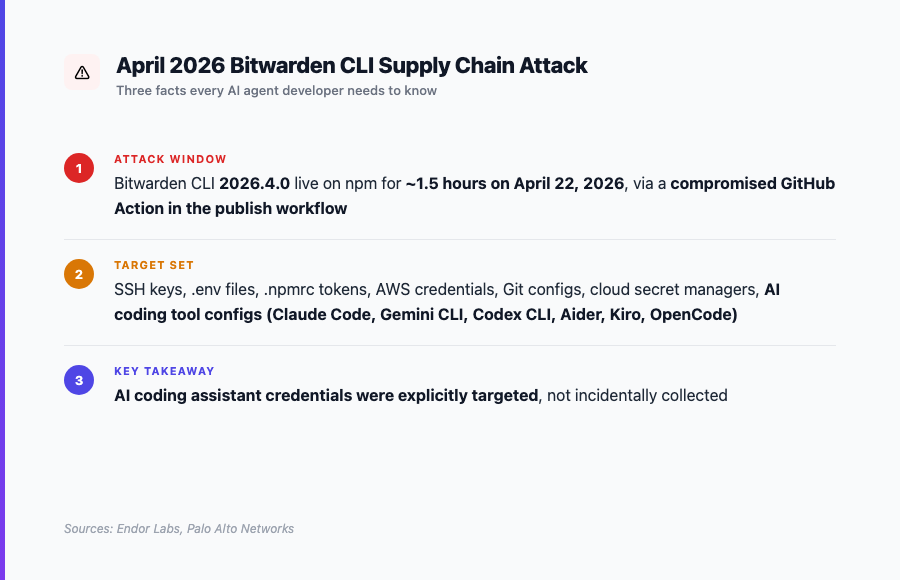
Bitwarden says @bitwarden/cli@2026.4.0 was maliciously distributed by npm from 5:57 PM to 7:30 PM ET on April 22, 2026, and says it found no evidence that end-user vault data was accessed or at risk [1]. Endor Labs and Palo Alto Networks describe the broader security-vendor analysis: the malicious package was available for about 1.5 hours and the payload looked for CI secrets, .env files, cloud credentials, GitHub Actions secrets, cloud secret managers, and AI or MCP configuration paths [2] [3].
That distinction matters. This was not proof that every AI agent deployment is compromised. It was proof that developer hosts and agent-adjacent configuration have become a useful target.
How should teams manage secrets for AI agents?
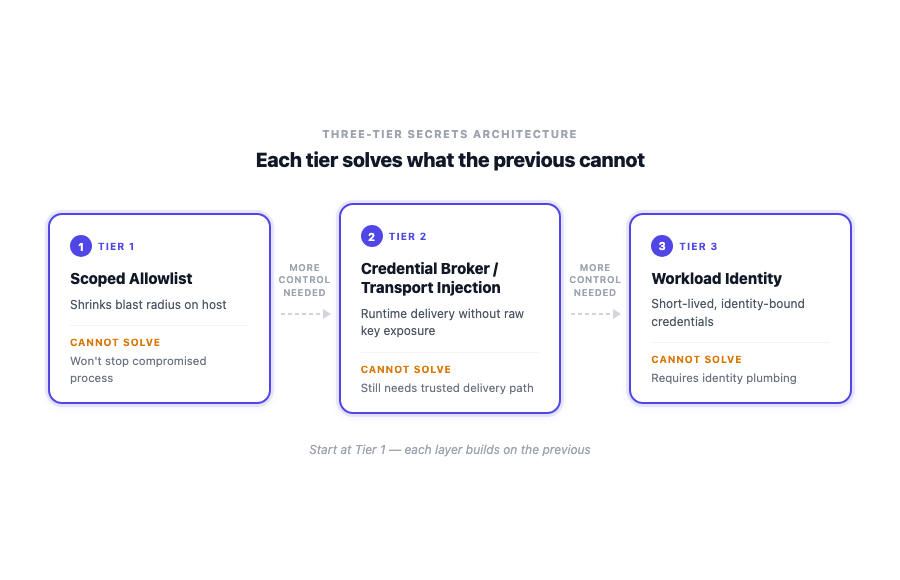
As of 2026-07-05, teams should manage AI agent secrets by shrinking what the agent host can see, then choosing the narrowest delivery tier that lets the work finish: a scoped allowlist, a credential broker or transport injection path, or workload identity with short-lived credentials.
The agent host is the wrong trust boundary. A better boundary is the specific task, environment, runtime, and identity that actually needs access. Agiflow fits at the board and project-context layer: it can organize per-environment vault entries and assistant access for project work, but runtime secret delivery and workload identity remain separate architecture choices [15] [17].
| Tier | Use when | Upgrade when | Failure mode | Agiflow role |
|---|---|---|---|---|
| Scoped allowlist | The agent needs a small set of task-specific values | The task needs several raw keys or broader host access | A compromised process can read anything allowed into its environment | Store and scope board-layer project secrets by environment and role |
| Credential broker or transport injection | The agent needs real API access but should not hold raw keys | The broker cannot prove which workload is calling it | The delivery path becomes the secret boundary | Keep project context and approval state outside the runtime proxy |
| Workload identity | The platform can attest the running workload and issue short-lived credentials | Local or ad hoc agent hosts cannot provide a reliable identity boundary | Identity plumbing is missing or mapped too broadly | Record task context, artifacts, and workflow locks around the work |
What the Bitwarden CLI incident proves
The useful lesson from the Bitwarden CLI incident is narrower than the panic headline and more serious than "rotate one token." Bitwarden's own statement supports the package name, the npm distribution window, and the limit that end-user vault data was not found accessed or at risk [1]. The broader attack-chain detail comes from security vendors, and it should be treated that way.
Endor Labs reports secret collection, npm propagation behavior, and targeting of AI coding assistant paths [2]. Palo Alto Networks reports targeting across developer workstations, CI/CD, .env files, cloud credentials, GitHub Actions secrets, cloud secret managers, and AI/MCP configs [3]. The incident therefore belongs in an AI agent secrets management article because the attacker was interested in the credentials around modern agent work, not because Bitwarden's vault contents were shown to be exposed.
The practical takeaway is blunt: a populated developer host is a poor place to park long-lived credentials. Gitignore protects the repository. It does not protect the process, the shell, the package manager, or the tool configuration on the machine.
Threat model: four boundaries teams confuse
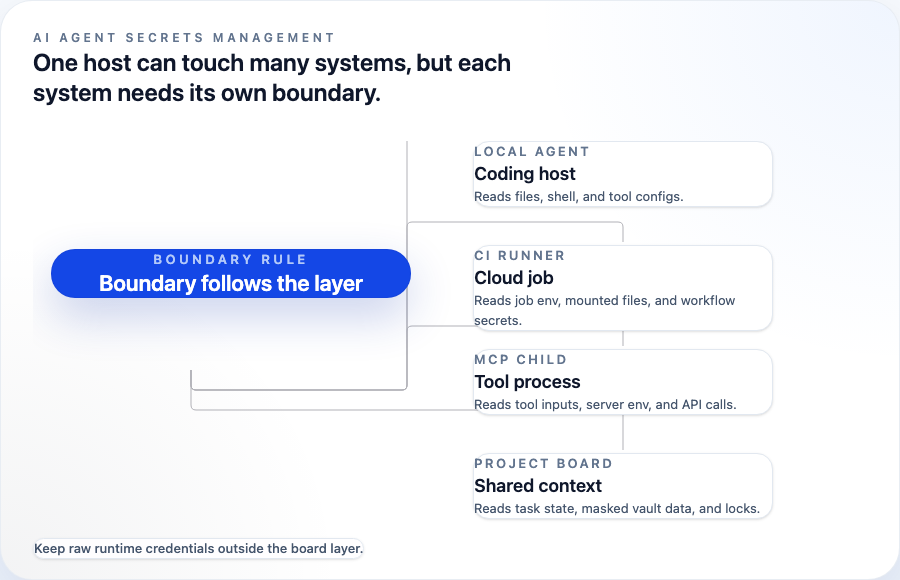
AI agent secrets management gets messy when teams talk about "the agent" as if it were one system. In practice, four boundaries show up in the same workflow.
| Boundary | What can often read secrets | What should be logged | What should stay outside the agent process |
|---|---|---|---|
| Local coding agent | Files, shell environment, tool configs, child processes | Commands requested, files touched, secret grants, rotations after risky runs | Broad developer .env, personal cloud keys, npm publish tokens |
| CI or cloud runner | Job environment, mounted files, workflow secrets | Job identity, token audience, permissions, external calls | Long-lived cloud credentials when OIDC or workload identity is available |
| MCP server child process | MCP config, server environment, tool inputs, outbound API calls | Tool name, permission scope, approval event, response class | Organization-wide API keys and secrets unrelated to the tool |
| Shared project board | Project context, task state, vault metadata, masked values | Who granted access, which environment was used, artifact trail | Raw runtime credentials for systems the board does not execute |
OWASP's AI Agent Security Cheat Sheet names the relevant risk classes: tool abuse, privilege escalation, data exfiltration, sensitive data exposure, and supply-chain attacks. Its controls point toward minimum tool access, per-tool scoping, allowlists, human approval for sensitive actions, and audit trails [5]. GitHub's Copilot agent responsible-use documentation gives an agent-specific version of the same idea: constrained permissions, isolated copilot environment secrets, logs, firewall controls, secret scanning, CodeQL, and dependency analysis [6].
The right control depends on which boundary is doing the work. A local assistant modifying one integration test does not need the same access model as a CI runner deploying to production.
Tier 1: scoped allowlist and clean environment
A scoped allowlist is the first move when the task is narrow and the secret has a low blast radius. The agent receives only the values it needs for one bounded job, ideally per-environment, easy to rotate, and visible in audit records.
OWASP's Secrets Management Cheat Sheet supports the underlying hygiene: centralize and standardize secrets management, use fine-grained access control, automate rotation where possible, audit access, and prefer dynamic secrets when the platform can support them [4]. For AI agents, OWASP adds minimum tool access and per-tool scoping, which matters because a tool call can become the way a secret is used or leaked [5].
Use this tier for a local agent that needs one staging API key to reproduce a bug, an MCP server that needs one read-only token for a project tool, or a short-lived branch task where the secret can be rotated after the run. Do not use it for broad developer .env files, personal cloud credentials, organization-wide GitHub tokens, npm publish tokens, or credentials copied from a human's workstation because setup was faster that way.
This tier is not weak because it is simple. It is weak only when teams pretend it is stronger than it is. A process allowed to read a secret can leak that secret if the process is compromised, instructed poorly, or connected to an unsafe tool chain. The allowlist reduces blast radius. It does not make the runtime secretless.
Tier 2: credential broker or transport injection
Use a credential broker when the agent needs real API access but should not receive raw credentials in its prompt, logs, files, or environment.
Infisical Agent Vault is the concrete pattern in the research base. It describes a broker or proxy where the agent can work with dummy placeholders while the proxy substitutes real authentication details on outbound requests. The repository also recommends deploying the broker separately from agents and using scoped or short-lived agent tokens [7].
That changes where the secret lives. The agent can call the API path it needs, but the raw key does not have to become agent state. It also gives teams a cleaner place to centralize rotation and inspect what was requested.
Akeyless frames a related vendor pattern for MCP-style services: avoid hardcoded .env values, use OIDC or IAM-style identity where available, and retrieve credentials at runtime [8]. Treat that as vendor framing, not a universal standard. The useful idea is the separation of agent instruction from credential possession.
The limitation is important. A broker does not prove who the workload is. It can protect raw values from the agent process and narrow the transport path, but the delivery path still needs its own authentication, approval, rate limits, logging, and rotation. If the broker grants too much to anything that can reach it, the risk has moved rather than disappeared.
Tier 3: workload identity and short-lived credentials
Workload identity is the strongest tier when the execution platform can prove what is running and issue short-lived credentials for that workload. It replaces "this process inherited a secret" with "this workload can authenticate as itself."
SPIFFE defines workloads, SPIFFE IDs, trust domains, and SPIFFE Verifiable Identity Documents, known as SVIDs. SVIDs encode one SPIFFE ID and can use X.509 or JWT form [9]. SPIFFE's SVID documentation also says workloads can retrieve short-lived keys and certificates from the Workload API, and that SPIRE can authenticate callers by inspecting local process metadata rather than requiring explicit client secrets [10].
GitHub Actions OIDC is the CI-friendly version many teams will recognize. GitHub says workflows can request short-lived cloud provider tokens instead of storing long-lived cloud credentials as GitHub secrets [11]. That is the shape teams should prefer for deploy jobs and service infrastructure when their provider supports it.
Local coding agents are harder. A laptop process does not always have a trustworthy platform identity boundary, and agent tooling may cross shells, MCP servers, browser sessions, and package managers during one task. Aembit describes this as an identity risk: agents often traverse multiple authentication protocols, and broad access can look easier than fine-grained permission design [13]. Zylos frames the same practical progression as allowlisted environment, credential broker or proxy, then workload identity [14].
So treat workload identity as the destination for CI, cloud runners, and service workloads first. For local agent work, the honest path is often Tier 1 or Tier 2 with strong audit discipline until the platform boundary is real.
Where Agiflow Vault fits and where it does not
Agiflow Vault belongs at the board and project-context layer. The public project vault guide describes environments, secrets, role permissions, masked secret values, and assistant access from the default environment during tasks [15]. Local architecture evidence says project environments define role-based access and vault entries are encrypted per environment with a per-entry IV [16]. The MCP integration domain says Agiflow provides MCP tools to external assistants, does not run or host the agents, and enforces project-scoped vault tools through session context [17]. The vault ADR describes encrypted values plus IV storage, masked secret read paths, and a separate internal server-side execution context that can retrieve decrypted values [18].
That gives Agiflow a useful role, but not an unlimited one.
| Agiflow can help with | Agiflow should not be described as |
|---|---|
| Per-environment board-layer vault entries | A runtime credential broker |
| Role-scoped project access | A secretless identity platform |
| Masked secret values in assistant-facing contexts | A SIEM or DLP product |
| Shared task state, artifacts, and workflow locks | An agent host |
| A record of why access was granted for project work | A replacement for workload identity |
If board-scoped secret organization is the gap, use the project vault guide to scope one environment secret before broadening agent access. For the wider product security model, the security and governance page is the more accurate product-level reference.
Rollout checklist for DevOps teams
Start with the current agent workflow, not a tool category. The goal is to make the next deployment less broad than the last one.
- Inventory what the agent host can read today:
.env, shell exports, package manager tokens, cloud CLIs, MCP configs, browser profiles, and CI secrets. - Classify each value by blast radius: local-only, staging, production, publish-capable, cloud-admin, or organization-wide.
- Remove secrets the task does not need. A coding agent fixing one test should not inherit the developer's whole workstation.
- Use a scoped allowlist for narrow, low-blast-radius tasks. Record the environment and rotation plan.
- Move to a broker or transport proxy when the agent needs real API access but raw keys should stay out of prompts, logs, files, and process environment.
- Use workload identity for CI, cloud runners, and service infrastructure when the platform can attest the workload and issue short-lived credentials.
- Add approval and audit around sensitive tool calls. OWASP recommends human approval for sensitive actions and audit trails for agent behavior [5].
- Scan changes for accidental secret exposure. GitHub says its MCP Server can scan MCP-enabled developer workflow changes for exposed secrets and return structured secret-scanning results [12].
- Keep board state separate from runtime secret delivery. MCP project management tools explains the board-over-MCP context, and scaling AI agents across machines with Agiflow CLI covers why coordination and execution should not collapse into one layer.
- Preserve the reason for access. Work units, artifacts, and project workflows should make it clear which task needed which environment and what evidence the agent produced.
The companion problem is memory. If the agent keeps losing task context, teams often add more secrets and more local state to the host. That is the wrong fix. Why AI Coding Agents Lose Context is the adjacent piece on durable state versus prompt memory.
Make the next agent deployment less broad
AI agent secrets management is a staged architecture, not a product label. Start by shrinking the agent host's view of the world. Move raw values behind a broker or transport layer when the agent needs real API access. Move to workload identity when the platform can prove which workload is asking.
The Bitwarden CLI incident made the lesson harder to ignore because the targeted credential set included the places agent teams now work: .env files, developer workstations, CI, cloud credentials, GitHub Actions secrets, cloud secret managers, and AI/MCP configs [2] [3]. Treat those as separate boundaries, not one trusted host.
Agiflow's practical contribution is narrower and useful: board-layer project state, per-environment vault entries, role-aware access, artifacts, and workflow locks around assistant work. Use the project vault guide to scope one environment secret, then decide whether the runtime needs an allowlist, a broker, or workload identity.
References
[1] Bitwarden statement on Checkmarx supply-chain incident. https://community.bitwarden.com/t/bitwarden-statement-on-checkmarx-supply-chain-incident/96127. Verified 2026-07-05 for the package name, npm distribution window, and Bitwarden's statement that end-user vault data was not found accessed or at risk.
[2] Endor Labs, "Shai-Hulud: The Third Coming, Inside the Bitwarden CLI 2026.4.0 Supply Chain Attack." https://www.endorlabs.com/learn/shai-hulud-the-third-coming----inside-the-bitwarden-cli-2026-4-0-supply-chain-attack. Verified 2026-07-05 for the reported attack window, CI secret collection, npm propagation, and AI coding assistant targeting.
[3] Palo Alto Networks, "Bitwarden CLI Impersonation Attack Steals Cloud Credentials and Spreads
Across npm Supply Chains." https://www.paloaltonetworks.com/blog/cloud-security/bitwardencli-supply-chain-attack/.
Verified 2026-07-05 for targeted credential categories including .env, cloud credentials, GitHub Actions secrets,
cloud secret managers, and AI/MCP configs.
[4] OWASP Secrets Management Cheat Sheet. https://cheatsheetseries.owasp.org/cheatsheets/Secrets_Management_Cheat_Sheet.html. Verified 2026-07-05 for centralization, fine-grained access, dynamic secrets, rotation, auditing, and lifecycle guidance.
[5] OWASP AI Agent Security Cheat Sheet. https://cheatsheetseries.owasp.org/cheatsheets/AI_Agent_Security_Cheat_Sheet.html. Verified 2026-07-05 for AI agent risks and controls around minimum tool access, per-tool scoping, allowlists, approval, and audit trails.
[6] GitHub Copilot responsible use for agents.
https://docs.github.com/en/copilot/responsible-use/agents. Verified 2026-07-05 for constrained permissions, isolated
copilot environment secrets, logs, firewall controls, secret scanning, CodeQL, and dependency analysis.
[7] Infisical Agent Vault repository. https://github.com/Infisical/agent-vault. Verified 2026-07-05 for the broker/proxy pattern, dummy placeholders, outbound credential substitution, separate broker deployment, and scoped or short-lived agent tokens.
[8] Akeyless, "Architecting Secretless AI Agents."
https://www.akeyless.io/blog/architecting-secretless-ai-agents-akeyless-in-action/. Verified 2026-07-05 as vendor
framing for avoiding hardcoded .env values and retrieving credentials at runtime for MCP-style services.
[9] SPIFFE concepts. https://spiffe.io/docs/latest/spiffe-about/spiffe-concepts/. Verified 2026-07-05 for workloads, SPIFFE IDs, trust domains, and SVID definitions.
[10] SPIFFE SVID documentation. https://spiffe.io/docs/latest/deploying/svids/. Verified 2026-07-05 for short-lived keys and certificates from the Workload API and SPIRE caller authentication through local process metadata.
[11] GitHub Actions OpenID Connect documentation. https://docs.github.com/en/actions/concepts/security/openid-connect. Verified 2026-07-05 for short-lived cloud provider tokens instead of long-lived cloud credentials stored as GitHub secrets.
[12] GitHub changelog, "Secret scanning in AI coding agents via the GitHub MCP Server." https://github.blog/changelog/2026-03-17-secret-scanning-in-ai-coding-agents-via-the-github-mcp-server/. Verified 2026-07-05 for MCP-enabled secret-scanning results in developer workflows.
[13] Aembit, "AI Agent Identity Security." https://aembit.io/blog/ai-agent-identity-security/. Verified 2026-07-05 as vendor analysis of identity risk when agents traverse multiple authentication protocols and teams default to broad access.
[14] Zylos Research, "Secretless AI Agents: Workload Identity." https://zylos.ai/research/2026-05-09-secretless-ai-agents-workload-identity/. Verified 2026-07-05 as vendor thought leadership for the allowlisted environment, broker or proxy, and workload identity progression.
[15] Agiflow vault guide. apps/agiflow-app/src/routes/_marketing/guides/project-vault/store-secrets/-ui/components/StoreSecretsGuide.tsx. Verified 2026-07-05 for environments, secrets, role permissions, masked secret values, and assistant access from the default environment during tasks.
[16] Agiflow project-management domain. docs/architecture/agiflow/domains/project-management.domain.yaml. Verified 2026-07-05 for role-based project environments, encrypted per-environment vault entries, per-entry IV, masked list or get responses, and workflow locks.
[17] Agiflow MCP integration domain. docs/architecture/agiflow/domains/mcp-integration.domain.yaml. Verified 2026-07-05 for external assistant MCP tools, project-scoped vault tools, role permissions from session context, and the boundary that Agiflow does not run or host agents.
[18] Agiflow vault ADR. docs/architecture/agiflow/adrs/010-encrypt-vault-entries-at-rest-with-per-entry-aes-iv-stored-alongside-ciphertext.adr.yaml. Verified 2026-07-05 for encrypted value plus IV storage, masked secret read paths, and internal server-side execution context behavior.
More to read
AI Agent Approvals That Hold Up: 5 Lessons From Meta's Muse
Five lessons from Meta Muse show why agent approvals need an independent authority, readable scope, and recoverable evidence. Apply the five-field receipt.
11 min readTyped Decisions for AI Agent Workflows: Record Before Routing
A typed model answer is an inference result, not a workflow transition. Record it once, pin the policy that consumes it, and replay the same decision without silently asking again.
12 min readGPT-6 Astra Changes the Bottleneck: Five Controls Agents Still Need
GPT-6 Astra raises the operating stakes for computer-using agents. Use five controls to define authority, evidence, approval, and recovery beyond the model.
12 min read