Agiflow for iPhone: AI Project Management at the Decision Point
Agiflow is now on the Apple App Store for iPhone. See how to review agent work against current task evidence without approving every routine update.

The phone shortens access to the project record; it does not transfer accountability to the device.
Consider an illustrative campaign task: MKT-42 reaches Review while its lead is away from a desk. The draft is attached. One public claim remains unresolved. A notification can say the task is ready, but it cannot show whether the claim blocks acceptance.
Agiflow is now on Apple's App Store as an AI project management app for iPhone. [1] Shipping is a starting point, not a finish line: the value shows up when the phone carries the current project record to the person making a decision.
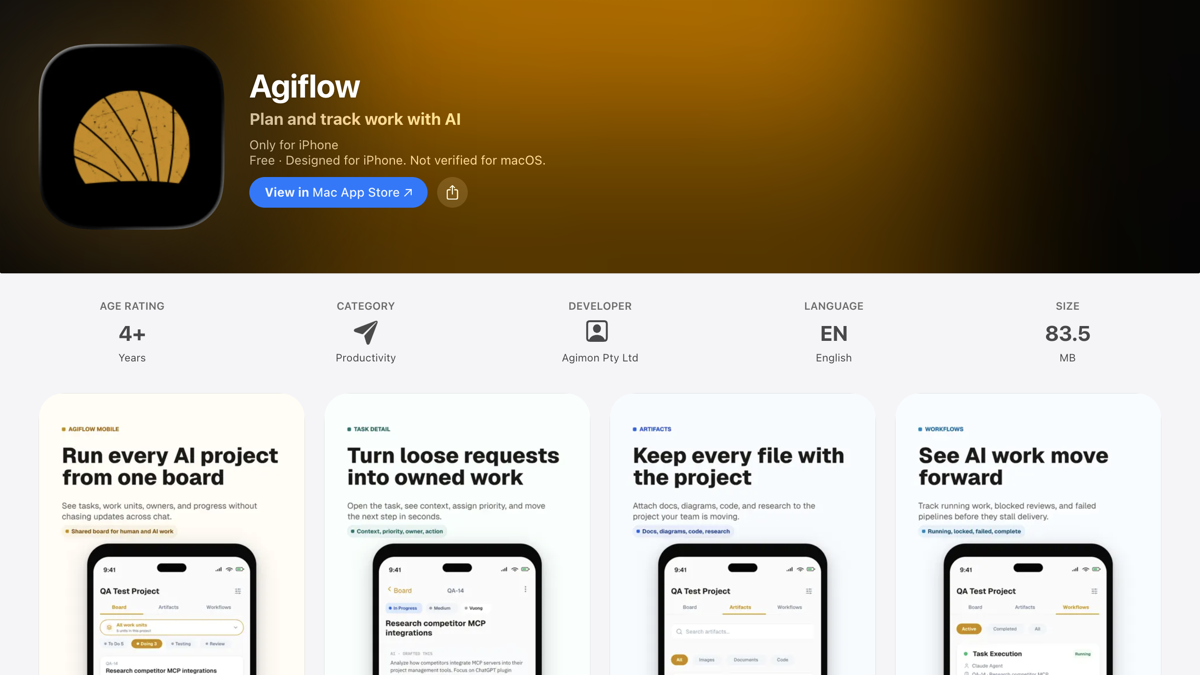
Agiflow for iPhone, now on the Apple App Store.
The useful question is not whether the lead can tap an approval button from a phone. It is whether the phone carries enough current project state to justify accepting the result.
My view is narrow: human authority should attach to commitments, consequential exceptions, and outcome acceptance. Bounded execution can happen elsewhere. The iPhone earns its place when it puts the project record at the moment of judgment.
Quick Answer: Keep Judgment With A Person And Move The Record With The Work
For an AI project management app for iPhone, keep objectives, constraints, consequential exceptions, and outcome acceptance with a named person. Let agents or teammates perform bounded work elsewhere. Use the iPhone board to inspect current task state and evidence, with interruptions scaled to risk.
| Workflow moment | Working rule | MKT-42 example |
|---|---|---|
| Bounded execution | Work proceeds inside approved scope | A draft is attached and the task moves to Review |
| Current evidence | The record travels with the work | The owner, latest comment, artifact, and exception sit on the task |
| Human decision | A named person handles consequences | The lead accepts the draft or returns the unresolved claim |
What The Agiflow iPhone App Does, And What It Does Not Do
Agiflow for iPhone is a project-planning and work-tracking app. It gives you a project board, tasks, comments, artifacts, workflow history, and on-device Agent chat for quick help. Separately, Claude, ChatGPT, Cursor, and Codex connect to Agiflow as external clients over MCP for complex work. [1]
Those are two different surfaces. The Agent chat runs on-device in the iPhone app. The external clients do not run inside it. Agiflow supplies the project board and shared work-state layer they connect to.
Agiflow's mobile project guide makes the board role concrete. A reviewer can open the Board, preserve the correct project and task identity, check fields such as slug, status, priority, assignee, title, description, tags, and comments, then reopen the task after an edit to verify the saved result. [5]
For MKT-42, that means the phone can carry the task identity, owner, attached draft, latest comment, and workflow state into the review. It does not make the model's work correct. It does not guarantee a business outcome, and it is not a substitute for formal enterprise portfolio management. Agiflow for iPhone is iPhone-only today, so this article makes no iPad claim.
Once those surfaces are separated, the phone's job becomes clearer. It brings the durable record to the person making the decision.
Action Approval And Outcome Acceptance Are Different Decisions
Action approval happens before work proceeds. OpenAI's Agents SDK documentation shows a run pausing before a sensitive tool call and exposing the agent, tool, and arguments for approval or rejection. Stored run state can resume after the decision. [2]
Outcome acceptance happens after work returns. It asks whether MKT-42 meets its brief, whether the evidence is sufficient, and whether the unresolved claim has been handled. NIST's AI Risk Management Framework calls for application scope to be documented by capability and context, and for human-oversight processes to be defined, assessed, and documented. [4]
A decision-ready task should carry six fields:
- Task identity and owner.
- The proposed outcome.
- The state that changed.
- Evidence or attached artifacts.
- Unresolved exceptions.
- One named next action.
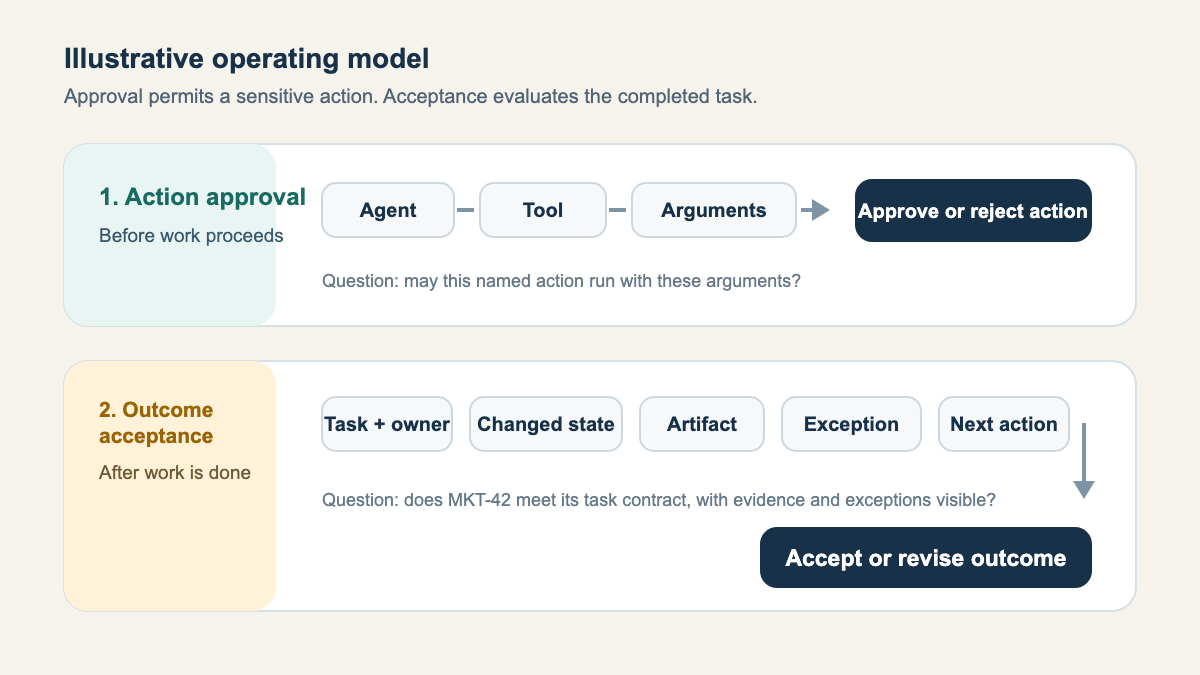
Action approval decides whether work may proceed. Outcome acceptance decides whether the result meets the task contract.
A sensitive tool call may need a person before execution. A completed result needs acceptance when the task contract or consequence warrants it. Putting both events into one universal approval queue weakens the signal and invites rubber-stamping.
The detailed shared project-state model across ChatGPT, Claude, Cursor, and Codex explains why objective, scope, acceptance criteria, comments, artifacts, owner, blocker, and next action should survive the assistant session. For this release, the narrower point is enough: a lead should not have to rebuild the task from several chats before deciding.
MKT-42 shows how the distinction works under ordinary review pressure.
A Decision-Ready Mobile Review Of MKT-42
The lead opens the correct project and its Review lane, then confirms the MKT-42 slug and named owner. She reads the latest comment, opens the attached campaign draft, and checks the exception: one headline still makes a public claim that was not in the approved brief.
That sequence follows the fields in Agiflow's mobile guide. The guide also recommends reopening the task after a change and confirming the saved result rather than trusting a transient success message. [5]
Without a shared record, the lead has to ask for the approved brief, the current owner, the latest file, and the unresolved exception in chat. With a current board, those items already sit on the task. That removes coordination handling from the review, which is the point of keeping the record current rather than a claim about hours saved.
The lead now has two defensible choices. She can return MKT-42 with a named revision such as Remove the unsupported performance claim, or accept the outcome after the exception is cleared. If she changes the status on iPhone, she reopens the task and confirms the stored state.
This is the same context burden described in the guide to AI context switching across chats, files, tasks, and approvals. Mobile access removes one retrieval step only when the board is current. A stale task simply puts old context closer to hand.
Shorter access can help. Permanent access can also turn the project lead into the workflow's busiest queue.
Do Not Turn The Project Lead Into A Permanent Approval Queue
The strongest objection is fair: a fast approve or reject notification costs less attention than opening a project board. For a clearly described sensitive action, that may be the right control. Tool name and arguments can be enough to decide whether the action may proceed.
A consequential outcome carries a different burden. The Australian Government's National AI Centre recommends oversight proportional to autonomy and stakes. Its guidance ranges from automated monitoring for lower-risk uses to mandatory human review for high-stakes uses, with a specific accountable person assigned to the system. [3] NIST likewise asks organisations to define roles and oversight in context. [4]
So I would not send the lead a notification for every harmless status edit. Batch low-risk changes. Delegate a named review lane. Protect quiet periods. Interrupt when a commitment changes, sensitive access is requested, evidence is weak, or an outcome is hard to reverse.
The bounded, inspectable, reversible responsibility test offers a useful threshold. Moving a correctly evidenced task into Review may be bounded and reversible. Accepting an unsupported public claim is neither harmless nor fixed by a quick tap.
Constant mobile access can encourage shallow review and make one person the bottleneck. Accountability still belongs to a named person, wherever that person inspects the work.
With the interruption threshold set, the fit decision becomes practical instead of promotional.
Who Agiflow For iPhone Is For
Agiflow for iPhone is built for small teams already using compatible external AI clients who want the same shared project state on hand when a lead is away from a desk. The iPhone app puts the board in your pocket, and Agiflow's guide walks through direct board review and task verification on mobile. [1] [5]
It is a poor fit for a team expecting the iPhone app to run Claude, ChatGPT, Cursor, or Codex. It also should not replace formal portfolio controls or turn phone-only review into the default for dense, high-stakes evidence.
The alternatives are ordinary and sometimes better. A solo operator with one simple workflow may need only a maintained document. A team with one reliable existing board should keep that board authoritative if it already supports the required review path. A consequential decision with a long contract, complex design file, or security evidence may deserve desktop review.
There is a maintenance tradeoff. The app shortens access only while task identity, ownership, evidence, and exceptions remain current. A second stale board increases reconciliation work because two records can look authoritative at once.
That is where Agiflow for iPhone earns its keep: it moves the record closer to the decision without moving accountability away from the person.
Put The Record At The Decision Point
For an AI project management app for iPhone, MKT-42 is ready for acceptance when its lead can see the task identity, attached draft, cleared exception, and saved state. The words Done or Approve are not substitutes for that evidence.
Open Agiflow for iPhone on the App Store and put its project board behind one bounded review workflow. Let routine work proceed elsewhere, define the exception that must return to a person, and require current evidence before acceptance.
References
- Agiflow for iPhone on the Apple App Store. https://apps.apple.com/au/app/agiflow/id6775743277 . Agiflow's first-party iPhone listing.
- OpenAI Agents SDK, "Human-in-the-loop." https://openai.github.io/openai-agents-python/human_in_the_loop/ . Official technical documentation, captured 21 July 2026.
- Australian Government National AI Centre, "Guidance for AI Adoption: Foundations." https://www.ai.gov.au/staying-safe-and-responsible/essential-ai-practices/guidance-ai-adoption-foundations . Published 5 May 2026, captured 21 July 2026.
- NIST AI Risk Management Framework, "AI RMF Core." https://airc.nist.gov/airmf-resources/airmf/5-sec-core/ . Framework published in 2023, current page captured 21 July 2026.
- Agiflow, "Manage projects and tasks from mobile." https://agiflow.io/guides/mobile/manage-projects . First-party product guide published 27 May 2026, captured 21 July 2026.
More to read
Gemini 4 Argon Overnight Runs: Review Each Proposal in Three Layers
Review each overnight Gemini 4 Argon proposal against repository tests, consumer contracts and a reserved workload before deciding what to merge.
9 min readAI Agent Approvals That Hold Up: 5 Lessons From Meta's Muse
Five lessons from Meta Muse show why agent approvals need an independent authority, readable scope, and recoverable evidence. Apply the five-field receipt.
11 min readOpenAI DevDay 2026: Choose What Your Team Delegates to ChatGPT
Read the September DevDay and October ChatGPT updates through their separate execution, account and usage limits, then choose a bounded draft for review.
11 min read