AI Context Switching for Freelancers: The Hidden Tax
Freelancers do not pay the AI tax because they are bad at prompting. They pay it because multi-client AI work makes one person carry client memory across chats, tools, files, tasks, and approvals.
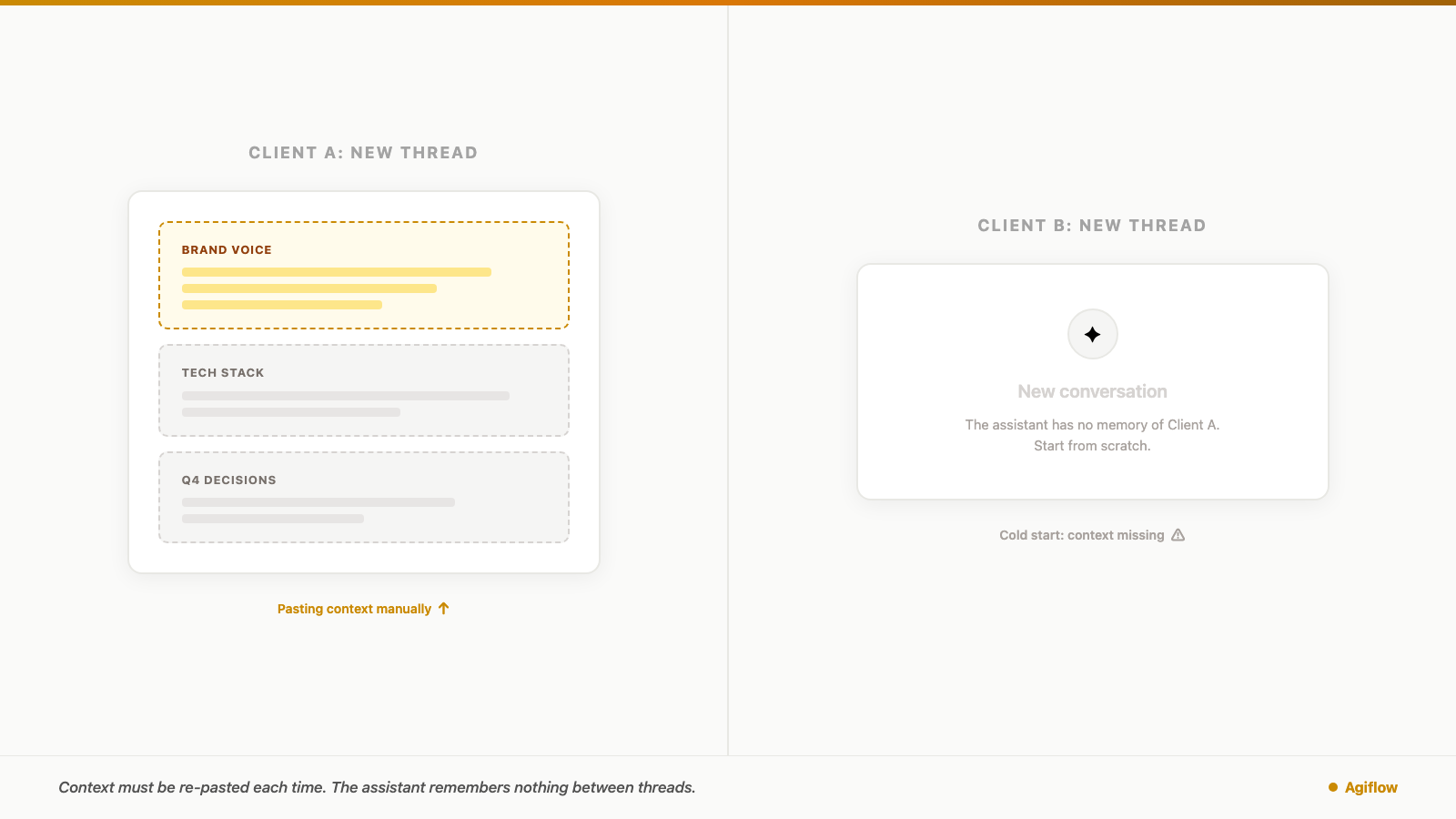
You finish the deliverable for the fintech client, close that thread, and open a new one for the lifestyle brand. First order of business: paste the brand voice doc, the product glossary, the decision from last month's call, and the note about claims legal will not approve.
The assistant reads it. Now it is useful again.
You did that yesterday too. You will do it tomorrow. For freelancers using AI across multiple clients, this routine has a cost. The cost is not only switching tabs or moving between apps. It is rebuilding the client world inside the assistant before the real work can start.
AI context switching for freelancers shows up early because freelancers are early to AI. Upwork's April 2025 Future Workforce Index says 54% of freelancers report advanced AI proficiency, compared with 38% of full-time employees [1]. Upwork's 2023 Freelance Forward report found freelancers were 2.2 times more likely than non-freelance professionals to use generative AI frequently [2]. Those numbers usually get framed as adaptability. They are that. They also mean freelancers are the first group to feel the hidden setup work that appears when every client starts cold.
That setup work is the AI context-switching tax. You do not pay it because you are bad at prompting. You pay it because multi-client AI work asks one person to act as the memory bridge between chats, tools, files, decisions, approvals, and tasks.
Quick Answer: What Is AI Context Switching for Freelancers?
The short answer: stop treating the prompt as the place where client memory lives.
AI context switching for freelancers is the unpaid setup time spent reconstructing client context before an assistant can produce useful work. It grows with client count, tool count, and session count. A prompt template can reduce typing, and product-specific memory can help inside one assistant, but neither is the same as durable client state that a human and an assistant can both re-read.
The practical fix is a scoped client context record: decisions, files, deliverables, constraints, approvals, artifacts, and next actions stored outside the chat. When that record is connected to the assistant with the right permissions, the assistant can retrieve the current client context instead of asking you to paste it back into every new session.
The Old Context-Switching Research Still Matters
The productivity cost of switching work is not new. Researchers were measuring it long before AI assistants became part of freelance workflows.
Gloria Mark, Daniela Gudith, and Ulrich Klocke found that interrupted work can be completed faster, but the speed comes with higher stress, frustration, workload, effort, and pressure [5]. The popular 23-minute refocus claim is often attached to Mark's work, but the refresh here does not need it. The documented finding is enough: interruption changes the mental cost of work, even when the task still gets finished.
Harvard Business Review reported a related workplace pattern in 2022. Research across 20 teams at three Fortune 500 companies found workers toggled between applications and websites roughly 1,200 times per day, adding up to just under four hours per week spent reorienting after those toggles [4].
CIO Dive's coverage of Qatalog's Workgeist research, conducted with the Ellis Idea Lab at Cornell, gives another useful angle. The 1,000-worker survey found that 45% of respondents said context switching across digital tools hampered productivity, 44% said siloed tools made duplicated work hard to see, and nearly half said that inability to track work led to mistakes [6].
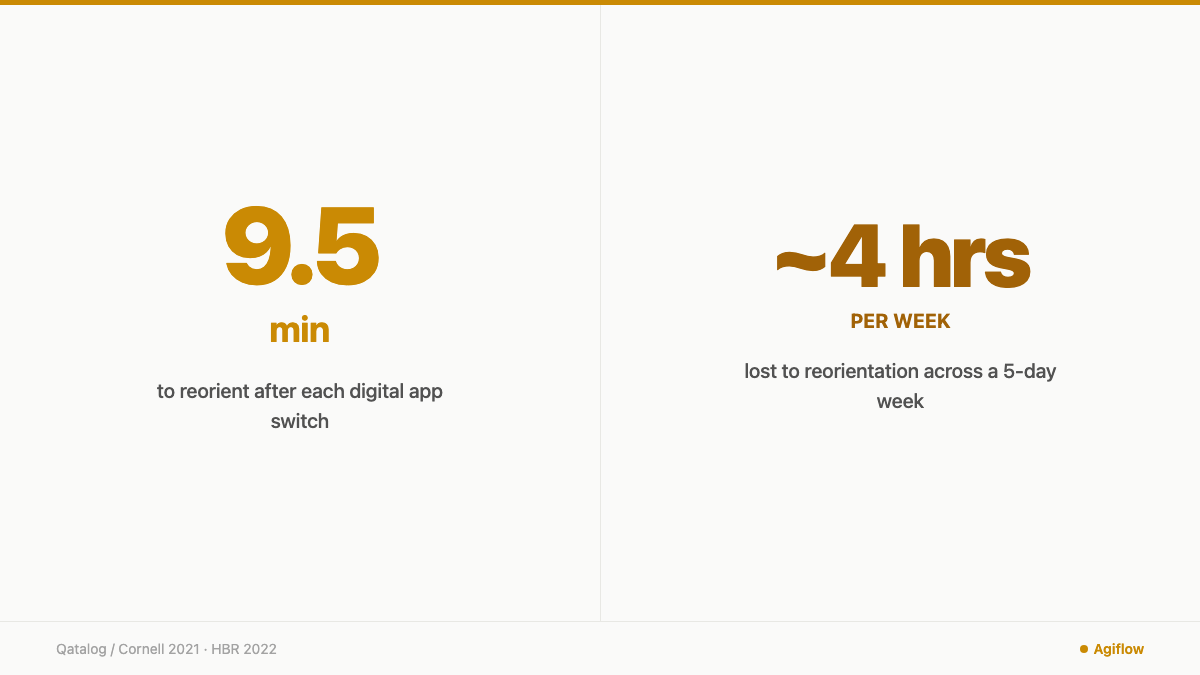
HBR's adjacent evidence makes the setup cost visible: about 4 hours per week lost to reorientation, plus survey signals that 45% of respondents said context switching hurt productivity and 44% said siloed tools hid duplicated work.
That research is about apps, websites, and interruptions. AI re-priming is not identical. The useful comparison is narrower: both costs appear in the gap before useful work resumes. For freelancers, the new gap often happens inside the assistant itself.
The New Switch Happens Inside The AI Workflow
The old switch was "move from one tool to another." The new switch is "rebuild the semantic world the assistant needs before it can help."
That world is not small. A client context can include brand voice, banned claims, pricing logic, customer language, codebase conventions, source files, open deliverables, prior approvals, and the decision everyone agreed not to reopen. If you work with five clients, you are not moving among five versions of the same job. You are moving among five separate operating systems.
Modern assistants do have memory features, so the right claim is not "AI has no memory." The better claim is that memory is product-specific, settings-dependent, and not the same as shared project state. As of July 2026, OpenAI documents project-only memory for ChatGPT Projects, where chats can reference other chats inside the same project and not outside it, with behavior depending on plan and settings [8]. OpenAI also says reference chat history can use information from past chats, but ChatGPT does not remember every detail, and saved memories are the recommended place for facts users want retained [9].
That helps. It does not remove the freelancer's operating problem. A ChatGPT Project can help when one assistant owns one client or project. It does not automatically make the same current state visible to Claude, Cursor, Codex, a teammate, a client approver, and your project board. It also does not decide which client material should be kept separate for confidentiality.
Anthropic's context-engineering guidance points to the architectural fix: keep structured notes, or agentic memory, outside the context window and pull the relevant state back into context when needed [7]. That is the shift freelancers need. The prompt is a working surface. It should not be the only place client memory exists.
Why Freelancers Carry A Heavier AI Context Load
A full-time employee on one product team usually returns to the same product world every morning. The customer, codebase, positioning, internal vocabulary, and approval path may be messy, but they are at least continuous.
A freelance operator often holds several unrelated client worlds at once. Monday morning can mean a fintech compliance review. Monday afternoon can mean sales-page copy for a wellness brand. Tuesday can mean a bug triage for a SaaS founder who uses different vocabulary for the same customer problem. The work is not only different in topic. The acceptable answer changes.
That is why the AI tax scales with the freelance model. More clients means more context boundaries. More tools means more places where memory may or may not exist. More assistant sessions means more moments where the freelancer has to answer the same hidden question: "What does this assistant need to know before I can trust the output?"
Upwork's more recent AI-human relationship research says freelancers report a positive career impact from AI and that productivity gains require work redesign, not only tool adoption [3]. That distinction matters. The issue is not whether freelancers should use AI. They already do. The issue is whether the workflow around AI treats client context as durable work state or as something the freelancer must personally reconstruct.
Confidentiality makes this harder. A freelancer cannot solve the problem by dumping every client note into one giant memory bucket. Client A's roadmap, Client B's legal constraints, and Client C's credentials policy need boundaries. The fix has to preserve separation as well as recall.
Measure The Tax Before Trying To Fix It
The AI context-switching tax is easy to ignore because it shows up in small pieces. Three minutes to find the right file. Four minutes to summarize a decision. Six minutes to correct the assistant after it uses last month's messaging instead of the current positioning. None of those moments feels like a line item.
Use a simple model for one week:
daily AI re-prime time =
  client switches x new AI sessions per client x average minutes to reconstruct context

weekly cost =
  daily AI re-prime time x working days + correction time caused by missing context
Here is a conservative example. Say you actively move among five clients, open one new AI session per client per working day, and spend six minutes reconstructing enough context for each session. That is 30 minutes per day before the assistant is useful, or 2.5 hours across a five-day week. Add one hour of correction time for outputs that missed a constraint, used stale wording, or forgot an approval, and the weekly cost reaches 3.5 hours.
That is a modeled estimate, not a measured study result. It is still close enough to HBR's adjacent four-hour-per-week reorientation benchmark to deserve attention [4]. More importantly, the model uses your own numbers. If your average re-prime is two minutes, the tax is smaller. If you handle complex client work across several tools, it may be larger.
The useful question is not "what is the universal cost?" There is no universal cost. The useful question is "which part of my week disappears before client work begins?"
Decide What Kind Of Memory The Client Work Actually Needs
Not every job needs a project board. Some work is short enough that a prompt template is fine. The mistake is using the same memory pattern for every client workflow.
As of July 2026, a practical decision table looks like this:
| Memory pattern | Best fit | Where it breaks |
|---|---|---|
| Prompt template | One-off, low-risk tasks where the same setup repeats | It reduces typing, but the freelancer still carries freshness and accuracy |
| ChatGPT Project or similar assistant project | One assistant owns one client or one project | Memory is product-specific and depends on plan, settings, and tool behavior [8] |
| Saved memory or chat history | Stable preferences and recurring facts | It is not a complete record of every client decision or file [9] |
| Client docs and files | Source material, briefs, brand rules, contracts, specs | Files can become a pile if tasks, status, approvals, and decisions live elsewhere |
| Shared project memory or board | Humans, files, tasks, artifacts, and multiple assistants need current state | It requires discipline about what gets stored and who can access it |
| Scoped project board | Confidential client work with boundaries by client, project, task, or artifact | Permissions and implementation matter. The protocol alone is not the whole security model |
That is the dividing line: if the client context needs to survive tool switches, human review, file updates, task movement, or assistant handoff, it belongs outside the prompt.
Build A Client Context Record Outside The Prompt
A client context record is the smallest useful source of truth an assistant can re-read before helping with client work. It is not a novel, and it is not a dump of every conversation. It is the working memory that prevents the same re-explanation loop from happening every day.
For most AI-heavy freelance work, the record should include:
| Field | What belongs there | Where it usually shows up |
|---|---|---|
| Client goal | Business model, current priority, success metric | Project overview or client brief |
| Audience language | Customer pains, objections, terms the client uses | Notes, research artifacts, messaging docs |
| Brand voice | Tone rules, approved claims, forbidden claims | Brand guide or vault-safe brief |
| Active deliverables | What is due, by when, and for whom | Tasks or work units |
| Decisions already made | Approved direction, rejected options, client preferences | Comments, decision notes, artifacts |
| Constraints and approvals | Legal, technical, budget, review, or compliance limits | Task notes, status workflow, approval records |
| Source files and artifacts | Briefs, screenshots, exports, specs, drafts | Artifact links or attached files |
| Credential or secret policy | What the assistant can and cannot touch | Vault entry policy, never pasted into chat |
| Open questions and next actions | What needs clarification before work moves | Task comments, blockers, next action list |
The record also gives you a quality check. If the assistant produces a draft that violates a forbidden claim, you can ask whether the forbidden claim was missing from the record or whether the assistant ignored it. That is a better debugging loop than "the AI got confused."
Where Agiflow Fits
Agiflow fits this problem when the freelancer needs client state that is both human-visible and assistant-readable.
Agiflow describes itself as a commercial project board that connects to external AI assistants. It supplies scoped project-board tools, prompt skills, shared state, artifacts, vault entries, and workflow coordination [12]. The architecture boundary matters: Agiflow does not run or host AI agents. Its MCP integration domain describes tools, skills, and widgets for external AI assistants [13].
In practical terms, that means the assistant can remain ChatGPT, Claude, Cursor, Codex, or another compatible client, while the project state lives in a board the freelancer can inspect. The assistant reads the current project, task, comment, artifact, vault, or status context instead of asking the freelancer to paste the same block again [14].
MCP is the connection layer in this pattern. Anthropic introduced Model Context Protocol as an open standard for secure, two-way connections between data sources and AI-powered tools [11]. The current MCP specification describes server features such as resources, prompts, and tools, and it names security principles around user consent, data privacy, and tool safety [10].
Do not read that as "MCP guarantees confidentiality." It does not. A protocol boundary helps define how tools connect, but product implementation, token scope, user consent, and workspace hygiene still matter. For freelance client work, the useful principle is plain: give the assistant the current client project, not your whole business.
If you want the mechanics of this pattern, the MCP project management tools post goes deeper on project-board connections. For the related but different problem of context decay inside long coding sessions, the AI coding agents losing context post explains why longer chats are not a reliable substitute for durable state.
Agiflow's broader AI project memory and AI project memory examples pages show the same idea outside this freelance framing. For freelancer-specific workflows, the freelancer overview and ChatGPT for freelancers pages are the product path.
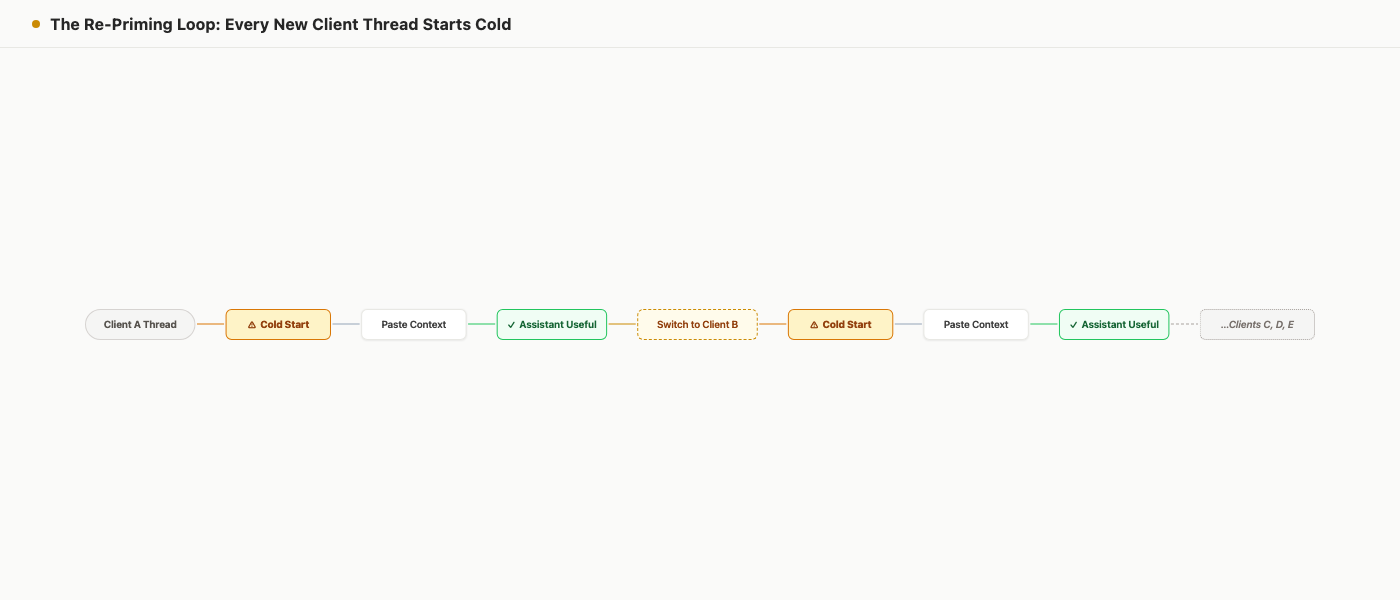
Every new client session starts with a context question. The work gets faster when the answer lives in scoped project state instead of in the freelancer's head.
FAQ
What is AI context switching for freelancers?
AI context switching is the setup work a freelancer does when moving from one client AI session to another: re-explaining the client, finding the right files, restating decisions, and correcting outputs caused by missing or stale context.
Are ChatGPT Projects enough for client work?
They can be enough when one assistant owns one client or project and the memory behavior fits your plan and settings. They are less complete when client state must be visible across humans, tasks, files, approvals, and multiple assistants [8].
What client context should freelancers keep outside the prompt?
Keep anything that should survive the chat: client goals, audience language, brand rules, active deliverables, decisions, constraints, approvals, source files, credential policy, open questions, and next actions.
How do freelancers keep AI context separate for confidential client work?
Use separate client or project scopes, store only the context the assistant needs, avoid all-purpose memory buckets, and check consent, privacy, and tool-safety behavior for any assistant connection [10].
When are prompt templates enough?
Prompt templates are enough for short, repeatable, low-risk work where stale context will not create client damage. Once tasks, files, approvals, decisions, or multiple assistants need current state, the work needs durable project memory outside the prompt.
The Real Fix Is Moving Context To The Right Place
The AI tax feels personal because you are the one paying it. You hunt for the file. You paste the summary. You notice when the assistant uses old positioning. You clean up the answer before the client sees it.
But the root problem is structural. Client context is living in the wrong place. That is the core problem in AI context switching for freelancers: the assistant has no current client state unless you keep handing it over again.
Before your next AI session, use the client context record above to decide what belongs in your project board and what belongs only in the prompt.
Prompt templates reduce the friction. Project memory inside one assistant can help. The durable fix is a client context record that the freelancer can maintain and the assistant can re-read with the right scope. Once that exists, the question changes from "how do I explain this client again?" to "what changed since the assistant last read the project?"
That is the bill the AI tax was hiding.
References
[1] Upwork, "Future Workforce Index," 23 Apr 2025. https://investors.upwork.com/node/11771/pdf. Relevant because it reports that 54% of freelancers describe themselves as having advanced AI proficiency compared with 38% of full-time employees, and describes the survey base as 3,000 U.S.-based skilled knowledge workers surveyed from December 2024 to February 2025.
[2] Upwork, "Freelance Forward 2023." https://www.upwork.com/research/freelance-forward-2023-research-report. Relevant because it reports freelancers were 2.2 times more likely than non-freelance professionals to frequently use generative AI tools, with 20% of freelancers using generative AI multiple times per week compared with 9% of non-freelance professionals.
[3] Upwork, "From Tools to Teammates: Navigating Human-AI Relationships," 9 Jul 2025. https://www.upwork.com/research/navigating-human-ai-relationships. Relevant because it says freelancers report positive AI career impact and that AI productivity gains require work redesign, not only tool adoption.
[4] Murty, Dadlani, and Das, "How Much Time and Energy Do We Waste Toggling Between Applications?" Harvard Business Review, 29 Aug 2022. https://hbr.org/2022/08/how-much-time-and-energy-do-we-waste-toggling-between-applications. Relevant because it reports research across 20 teams at three Fortune 500 companies, roughly 1,200 application or website toggles per day, and just under four hours per week spent reorienting after toggles.
[5] Gloria Mark, Daniela Gudith, and Ulrich Klocke, "The Cost of Interrupted Work: More Speed and Stress," CHI 2008. https://www.ics.uci.edu/~gmark/chi08-mark.pdf. Relevant because it finds interrupted work can be completed faster while increasing stress, frustration, workload, effort, and pressure.
[6] CIO Dive, "Drain of app switching: Why employees lose 5 hours per week," 21 Jun 2021. https://www.ciodive.com/news/app-switching-enterprise-productivity-software-qatalog/602082/. Relevant because it reports Qatalog's Workgeist study with the Ellis Idea Lab at Cornell, including the 1,000-worker survey base and findings about productivity impact, duplicated work, and mistakes from siloed tools.
[7] Anthropic Engineering, "Effective Context Engineering for AI Agents." https://www.anthropic.com/engineering/effective-context-engineering-for-ai-agents. Relevant because it describes structured note-taking, or agentic memory, as notes persisted outside the context window and later pulled back into context to preserve project state across sessions.
[8] OpenAI Help Center, "Projects in ChatGPT." https://help.openai.com/en/articles/10169521-projects-in-chatgpt. Relevant because it documents project-only memory, where chats can reference other chats in the same project and not outside it, with behavior depending on account type, plan, and settings.
[9] OpenAI Help Center, "How does Reference saved memories work?" https://help.openai.com/en/articles/11146739-how-does-reference-saved-memories-work. Relevant because it says reference chat history can use information from past chats, but ChatGPT does not remember every detail, and saved memories are recommended for information users want retained.
[10] Model Context Protocol specification, 2025-06-18. https://modelcontextprotocol.io/specification/2025-06-18. Relevant because it describes server features including resources, prompts, and tools, and states security principles around user consent, data privacy, and tool safety.
[11] Anthropic, "Introducing the Model Context Protocol." https://www.anthropic.com/news/model-context-protocol. Relevant because it describes MCP as an open standard for secure, two-way connections between data sources and AI-powered tools.
[12] Agiflow public llms.txt, local file apps/agiflow-app/public/llms.txt. Relevant because it
describes Agiflow as a commercial project board that connects to external AI assistants and supplies scoped
project-board tools, prompt skills, shared state, artifacts, vault entries, and workflow coordination.
[13] Agiflow MCP integration domain, local file
docs/architecture/agiflow/domains/mcp-integration.domain.yaml. Relevant because it says Agiflow provides MCP tools,
skills, and widgets for external AI assistants and does not run or host AI agents.
[14] Agiflow project-management domain, local file
docs/architecture/agiflow/domains/project-management.domain.yaml. Relevant because it verifies Agiflow
project-management state includes projects, work units, tasks, status workflows, task comments, artifacts, vault secret
storage, and workflow distributed locks.
More to read
GPT-6 Astra Changes the Bottleneck: Five Controls Agents Still Need
GPT-6 Astra raises the operating stakes for computer-using agents. Use five controls to define authority, evidence, approval, and recovery beyond the model.
12 min readClaude Fable 5.1 and Claude Mythos 5.1: 5 Use Cases, Honest Costs
Five practical Claude Fable 5.1 and Claude Mythos 5.1 workflows, plus an honest comparison of prompt caching, Ponytail, Caveman, and RTK token savings.
14 min readDeepSeek Harness vs Pi Coding Agent: Choose Where Runtime Complexity Lives
DeepSeek Harness puts policy inside a composable plugin runtime. Pi keeps the coding-agent core small. Compare the evidence, security boundaries, and operating burden before choosing.
12 min read