Claude Code project management: connect the tracker, test the handoff
Connect Claude Code to Linear or Jira using official MCP instructions, then check permissions, one approved update and a fresh Cursor handoff.

A green Model Context Protocol (MCP) connection does not tell you who owns the next task update. For Claude Code project management, connect the tracker your team already uses through its documented MCP server, authenticate, and check a real task before allowing changes. Linear and Atlassian publish official connections for Linear and Jira; GitHub's official server provides issue tools. [2] [3] [4]
I would keep that tracker unless it cannot meet the team's permission or handoff requirements. Test the connection by what another session can retrieve, not by the connection badge.
The recipes below come from official documentation captured on November 1, 2026. They were not executed against live accounts for this article. The read-back and ownership checks are proposed acceptance tests, not reported results.
Which record will the setup test use?
Choose one disposable task before installing anything. For Claude Code task management, my starting rule is simple: use the smallest record that already carries the team's work. GitHub's server documents issue operations, so a repository-centered team need not adopt another board just to connect an agent. [4]
These are recommended test inputs, not a feature ranking:
| Source of truth | Who assigns the next writer? | Permission boundary to check | Minimum handoff receipt |
|---|---|---|---|
| Markdown file in the repo | One human, sequentially | Access to that file and working copy | Current revision, next action |
| GitHub issue | Named human or verified dispatcher | Repository and exposed issue operations | Issue ID, saved comment, next owner |
| Existing Linear or Jira task | Existing assigning person or workflow | Account, team/project and allowed operation | Task ID, saved update, next owner |
How do you connect Claude Code to Linear and verify a read?
Linear documents https://mcp.linear.app/mcp as its standard read-write endpoint. It also provides https://mcp.linear.app/mcp/readonly, which only exposes read tools. On the standard endpoint, requesting only the read OAuth scope is another option: Linear says that token cannot reach write APIs. Those controls are different from asking the agent to behave as read-only. [2]
For a first read-only evaluation, combine Claude Code's documented HTTP syntax with Linear's documented read-only endpoint:
claude mcp add --transport http linear-read https://mcp.linear.app/mcp/readonlyRun that in the intended repository. Inside an interactive Claude Code session, enter /mcp and authenticate the connection. Linear documents this authentication step; Claude Code documents the server-management command and installation scopes. [1] [2]
The default MCP installation scope is local: private to you in the current project, stored under that project's entry in ~/.claude.json. Project scope uses the repository's .mcp.json; user scope makes the server available across projects. Sharing a project configuration shares the connection definition. It does not narrow the account's access to tracker data. [1]
Use one disposable Linear issue for this read and the later Cursor round trip. In the illustrative prompts below, TASK-17 stands for its real identifier. Substitute that same identifier every time, along with the correct team. The identifier is not a claim that a test issue exists.
Read TASK-17 in the test team. Return its identifier, title and latest comments. Do not change it.
Compare the response with the actual issue in the tracker. The receipt you want is the matching issue ID and team, plus the current title and comments. Stop if the account, team or record is wrong. A successful login to the wrong workspace is still a failed setup test.
Also inventory other enabled connections to the same tracker. The linear-read route cannot establish that the whole session is read-only if a second, write-capable route remains enabled. Keep the first evaluation to the intended read-only route. Do not treat a missing tool or a connection error as proof that the backend would refuse an unauthorized write.
How do you connect Claude Code to Jira and check its boundary?
Atlassian's current official setup guide gives this command:
claude mcp add --transport http atlassian https://mcp.atlassian.com/v2/mcpThen enter /mcp inside Claude Code to authenticate. This is Atlassian's hosted MCP service, not a community Jira bridge. The captured guide uses the HTTP /v2/mcp endpoint; check it before copying an older SSE recipe. [3]
Choose a disposable Jira work item and ask for its stable identifier, project and current status. Compare those fields with the tracker. Do this Jira check separately from the Linear round trip. There is no reason to create matching tickets in both systems just to follow a tutorial.
Atlassian says actions respect the user's existing access controls. That is the relevant boundary to inspect. A locally scoped Claude Code configuration does not turn a broadly privileged Jira account into a project-limited account. [1] [3]
Before enabling a change, ask the administrator which project and operation the connected identity may access. If your organization authorizes a negative test, use a harmless read of a deliberately restricted sandbox record and retain the refusal. Do not probe production records outside your authority. Without an approved test or sufficient policy evidence, record the permission boundary as unverified and keep writes disabled.
If the server refuses access, investigate the account or policy with its owner. Do not switch credentials to make the refusal disappear. An authentication failure, an unavailable tool and an access denial are different observations.
Community or self-hosted Jira adapters are a separate decision. Inspect who maintains the implementation, where it sends data and how it handles credentials. This article did not audit one, verify Data Center coverage or establish parity with Atlassian's service.
Is GitHub Issues enough instead?
Yes, I would start there when the task belongs beside the code and the team already assigns work through issues. GitHub's official MCP server documents issue tools and the hosted endpoint https://api.githubcopilot.com/mcp/. Follow its host-specific installation instructions rather than assuming every client has the same OAuth setup. [4]
The official server also documents toolset selection and a local-server read-only mode that skips write tools. That mode controls exposed operations; it does not prove the credential has narrow rights everywhere else. Restrict the credential too. Retrieve the chosen issue, inspect the available actions, and use the same single-update test below if writes are needed. [4]
Can one approved change be read back from Cursor?
Return to the same disposable Linear issue used in the first read. This is a controlled transition from reading to writing, not permission for the agent to run the board.
Linear's published standard Claude Code command is:
claude mcp add --transport http linear-server https://mcp.linear.app/mcpAuthenticate through /mcp. Use this write-capable route only after its account permissions and allowed actions have been reviewed. The earlier linear-read endpoint cannot post the test comment; keep the two roles explicit. [2]
There are separate checks here. The account determines which records are reachable. The server determines which operations it exposes. Client approval controls whether a particular call may run. Claude Code's installation scope only says where the connection definition applies. Cursor likewise documents tool approval, configuration locations and minimum-permission guidance. None of those facts, alone, assigns the task's next writer. [1] [2] [3] [5]
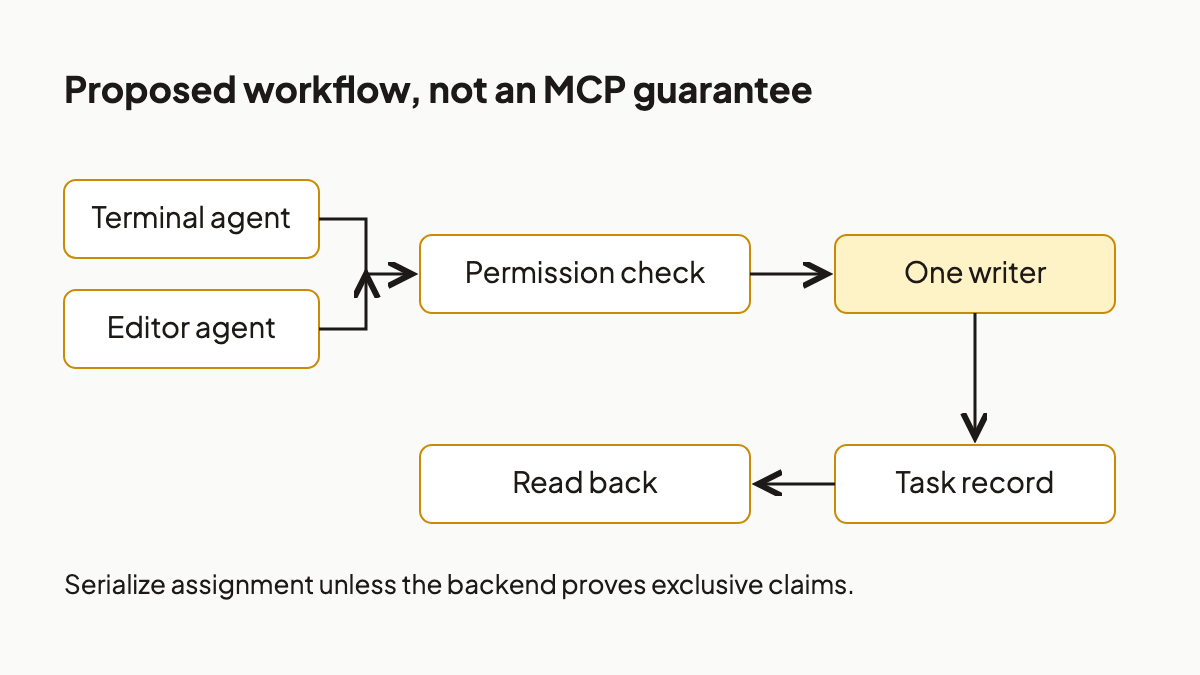
Proposed operating workflow: check access, assign one writer, then verify the stored result. MCP connection settings do not prove these gates.
Have the assigning person name the test writer. Ask that writer to prepare one comment on the existing issue, without posting yet:
On TASK-17, propose this comment only: “Handoff check: no implementation change. Next owner: the assigning person. Next action: verify this comment from a fresh client.” Do not post it until I approve the exact action and issue.
Inspect the proposed target, operation and text. If they match, approve only that comment. Do not approve a status change, ticket creation or code edit as part of the test. Read the issue again after posting and retain the stored comment's identifier or link if returned, its exact text, and the issue ID. Confirm it in the tracker too. These are expected receipt fields, not fabricated test output.
If a write times out, read the issue before trying again. A missing response is not proof that nothing was stored. Stop for human reconciliation if you cannot tell whether the comment exists; a duplicate would make the test less useful.
Now configure Cursor separately. Cursor documents project configuration at .cursor/mcp.json and global configuration at ~/.cursor/mcp.json; neither is Claude Code's .mcp.json. For this Linear cold-read, the following uses Cursor's documented remote-server JSON shape and Linear's read-only endpoint. [1] [2] [5]
{
  "mcpServers": {
    "linear-read": {
      "url": "https://mcp.linear.app/mcp/readonly"
    }
  }
}
Review the server configuration, enable it and authenticate to the same Linear workspace. Cursor supports remote HTTP connections and OAuth; its documentation says it asks for MCP tool approval by default. Do not put tokens in the repository file. [5]
Open a fresh Cursor conversation. Give it the actual issue identifier, not the earlier transcript:
Read TASK-17 from Linear. Quote the saved handoff-check comment and identify the next owner and next action. Do not change anything.
Compare the retrieved comment with the receipt from Claude Code. Passing means the second client found the stored update on the same record. It does not mean the two clients share conversation history, unsaved reasoning or local files. For Cursor project management, this distinction matters more than whether the agent can produce a convincing recap. The separate client configurations and external task operations support the round trip; its success in your environment still needs testing. [1] [2] [5]
For the wider rationale, see what to save outside the conversation. The check here is narrower: can the next client retrieve the one update you actually stored?
What changes when two agents claim the test task?
The connection recipes above document access, not exclusive work ownership. I did not verify provider-specific atomic claim semantics. That gap is a reason to ask for evidence before parallel rollout, not to claim that every tracker lacks locking.
Consider this hypothetical sequence: agent A reads an available task. Agent B reads it before A writes. A sets it to in progress; B does the same. Both may now believe they own the work. An assignee or status field is useful, but two successful status updates would not prove that only one claimant won.
For overlapping agents, ask whoever owns the backend integration for a documented conditional claim or equivalent arbitration mechanism. Then, in an authorized disposable sandbox, test whether two contenders produce exactly one winner and whether the loser is prevented from writing. If ownership can expire or be reassigned, test that the old owner cannot write after reassignment. Save the actual results rather than accepting an agent's summary of them.
These are proposed design checks, not MCP guarantees or features attributed to Linear, Jira or GitHub. If the mechanism is unavailable or unverified, have one human or dispatcher serialize assignments. Separate working directories can keep file edits apart; they do not establish who owns a tracker record.
There is a reasonable objection: this is too much machinery for one person assigning one task at a time. I agree. A named owner and a status change may be enough for sequential work. Stop after the permitted-write and fresh-client checks if concurrency is not a requirement. Add arbitration only when work can overlap.
For Claude Code project management, require a matching read, one approved stored update and a fresh-client read-back before expanding access. Parallel execution needs its own ownership evidence. A screenshot of a green connection supplies none of those receipts.
Share the handoff test with the person who assigns your next agent task.
References
- Claude Code, Connect Claude Code to tools via MCP . Captured November 1, 2026; resolves to code.claude.com. Source for HTTP command syntax, installation scopes, configuration files and
/mcp. Documentation inspected, not a live setup test. - Linear, MCP server . Captured November 1, 2026. Source for official endpoints, read-only distinctions, object operations, Claude Code command and authentication.
- Atlassian, Get started with the Atlassian MCP server . Captured November 1, 2026. Source for the current hosted HTTP endpoint, Claude Code setup, authentication and existing-user access controls.
- GitHub, GitHub MCP Server, official README . Captured November 1, 2026. Source for hosted server address, issue tools, host-specific authentication caveats, toolsets and local read-only operation filtering. These are documented capabilities, not an independent security audit.
- Cursor, Model Context Protocol . Captured November 1, 2026; resolves to cursor.com/docs/mcp. Source for remote HTTP/OAuth, JSON shape, project/global configuration paths, tool approval and restricted credential guidance.
More to read
Inverse text normalization: define what your parser gets
A readable transcript can still be the wrong input for code. Choose its number representation before treating a schema check as evidence of correctness.
7 min readAI Agent Approvals That Hold Up: 5 Lessons From Meta's Muse
Five lessons from Meta Muse show why agent approvals need an independent authority, readable scope, and recoverable evidence. Apply the five-field receipt.
11 min readTyped Decisions for AI Agent Workflows: Record Before Routing
A typed model answer is an inference result, not a workflow transition. Record it once, pin the policy that consumes it, and replay the same decision without silently asking again.
12 min read