Tutorial
Run product development with your coding agent
By the end of this tutorial you will have taken one feature from a sentence to shipped work, with Claude Code or Codex doing the work and Agiflow holding the state. Five prompts, one board, nothing kept in a chat thread.
01 : What you will have at the end
A board where every task carries acceptance criteria, your agent moved each one through the status flow, and the review verdict is recorded against the criteria it was measured on. You can close your terminal, come back tomorrow, and the agent picks up exactly where it left off.
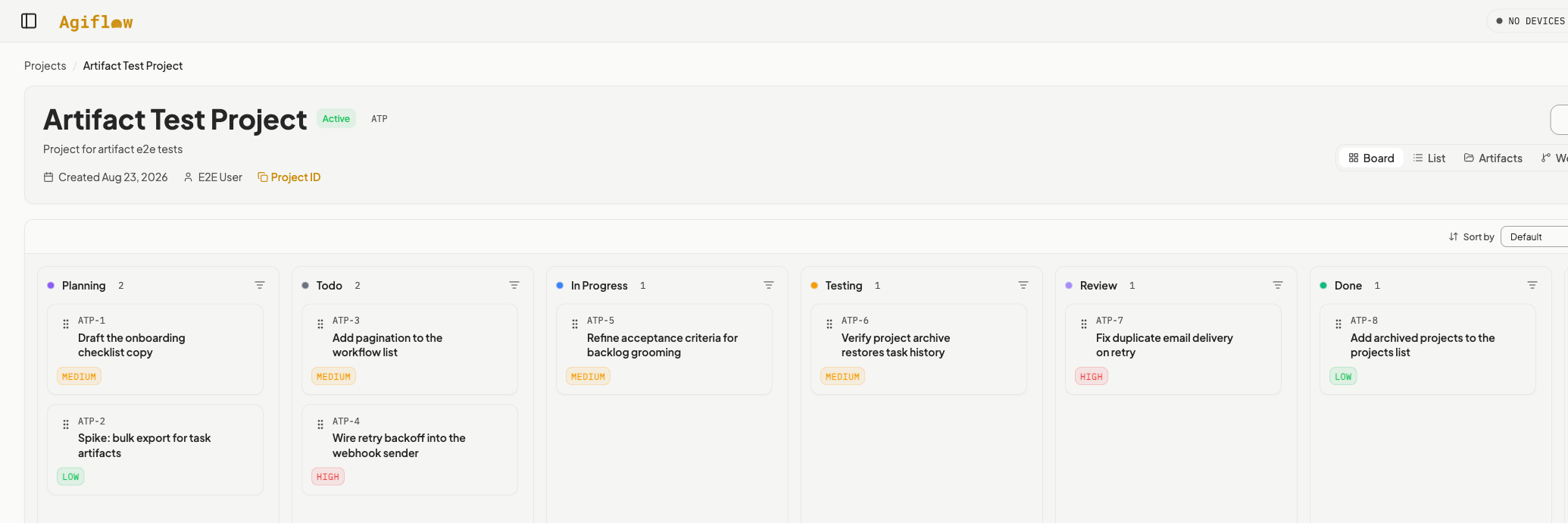
PlanningTodoIn ProgressTestingReviewDoneTwo exception paths exist: Blocked when a human has to step in, and Cancelled when work is dropped.
02 : Before you start
An Agiflow project
Free plan is enough. You need one project you are willing to put real work into.
Claude Code, Codex, or ChatGPT
Any one of them. The board is the same; only the setup command differs.
The AgiFlow AI Plugin
The bundle that gives your agent the five workflows below. Installed in the next section.
03 : Install the plugin
The AgiFlow AI Plugin is a single bundle that wires the MCP connection and adds the workflows this tutorial uses. Pick your runtime. Everything after this section is identical across all three.
git clone https://github.com/AgiFlow/ai-plugin.git agiflow-ai-plugin
claude --plugin-dir ./agiflow-ai-plugin- Config lives in
- .mcp.json
- Check it worked
- /mcp
- Run a workflow
- /agiflow:run-task
The bundle points at the coding-agent MCP endpoint. The versioned widget endpoint serves the ChatGPT app surface and will not expose these workflows to a terminal agent. If you configured Agiflow by hand before, check the URL in your config before continuing. Full connection detail is in supported AI tools.

04 : The loop
Five workflows, run in order. Each one owns a specific transition, and none of them skip ahead: a task cannot be executed until grooming has promoted it, and it cannot be closed until review has judged it.
project-plan
Turns a goal into small, testable tasks with acceptance criteria.
creates tasks in Planning
refine-task
Makes one vague task unambiguous without widening its scope.
stays in Planning
backlog-grooming
Checks readiness, groups tasks into work units, and orders what is next.
Planning to Todo
run-task
Executes one task against its acceptance criteria, with tests.
Todo to In Progress to Testing to Review
review-work
Gives every acceptance criterion a verdict and files follow-up tasks.
Review to Done, or back to In Progress
Step 1 : Turn a goal into tasks
Send this
Plan the work for adding passwordless email sign-in to our web app. Keep tasks small enough to finish in one session.
You should see
Your agent reads the project, checks for overlapping tasks, asks the few questions it genuinely needs, then proposes a task list and waits for your approval before writing anything.

- Each task carries at least two acceptance criteria that can be checked objectively.
- Work units are not created here. Grouping happens during grooming, once readiness is known.
- If the agent proposes a task that bundles two unrelated outcomes, ask it to split them before you approve.
Step 2 : Make one task unambiguous
Send this
Refine the passwordless sign-in token expiry task. I want the acceptance criteria to be measurable.
You should see
Your agent reads the task and its comments, names the ambiguities, asks about the ones it cannot resolve, and rewrites the criteria. Vague phrasing such as "handles errors correctly" is replaced with observable behaviour.

- Refinement never adds new requirements. If the agent starts inventing scope, that is a bug in the prompt, not a feature.
- The task stays in Planning. Only grooming promotes it.
Step 3 : Decide what is actually ready
Send this
Groom the backlog. Promote what is ready and group the sign-in work into a work unit.
You should see
Your agent classifies every Planning task as ready, needs refinement, blocked, or duplicate. It proposes a priority order with the tradeoffs, suggests work units, and asks for approval before it writes.

- A task missing testable acceptance criteria is never promoted. Send it back through refine-task.
- A work unit holds three to eight tasks that deliver one shared capability. One or two related tasks stay standalone.
- Downstream tasks whose upstream work is incomplete stay in Planning, gated on the dependency.
Step 4 : Execute
Send this
Run task DXX-2.
You should see
Your agent moves the task to In Progress, works through the acceptance criteria one at a time, records which files changed and what the tests returned, then moves it to Testing and finally to Review with a draft commit message and PR body attached.

- A task still in Planning is refused. That guard is the reason grooming exists.
- When tests fail twice, the task goes to Blocked with a comment explaining what a human needs to do. It does not loop forever.
- The board holds the state, so you can stop the session at any point and pick it up on another machine.
Step 5 : Judge the work
Send this
Review work unit DXX-WU-1.
You should see
Your agent gives every acceptance criterion a pass, fail, or partial verdict with the evidence it used, flags issues by severity, and either approves the work or sends it back with specific instructions.
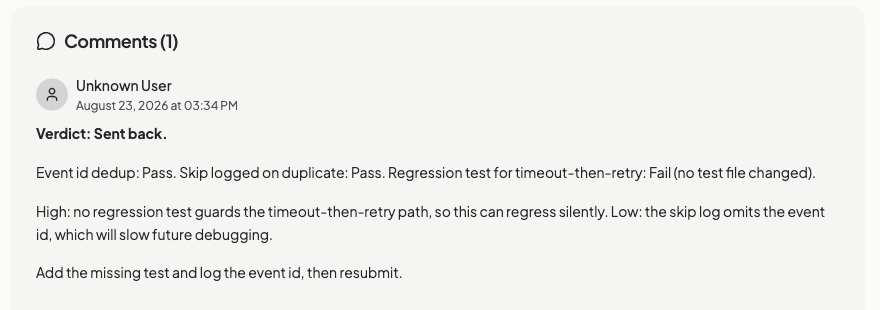
- Review does not fix anything. Gaps become follow-up tasks so the record of what shipped stays honest.
- A pass with known gaps is worse than a clear needs-rework. Expect the agent to say so.
05 : When it goes wrong
Almost always the MCP URL. Coding agents need the plugin endpoint, not the versioned widget endpoint. Re-run the check command for your runtime from section 03, then re-authenticate.
Your board may use custom columns. The workflows read the real status names before writing, so if you see invented ones, the agent skipped that read. Ask it to list the project statuses and try again.
Close stale Agiflow sign-in tabs and start again. More detail in troubleshooting connections.
06 : Where to go next
The same bundle carries workflows for the parts of the week that are not writing code.
Share this with your team
The same walkthrough as a deck, with a PDF you can attach to an email.
The bundle is open source at github.com/AgiFlow/ai-plugin. Clone it as agiflow-ai-plugin and read the skills directly if you want to see exactly what your agent is being asked to do.