AI Memory Management for Freelancers: Which Approval Counts?
Your AI remembering the client's last message is not the same as knowing which approval still counts. Keep a client approval register with sources and what each decision replaces, and treat a broken chain as unresolved.
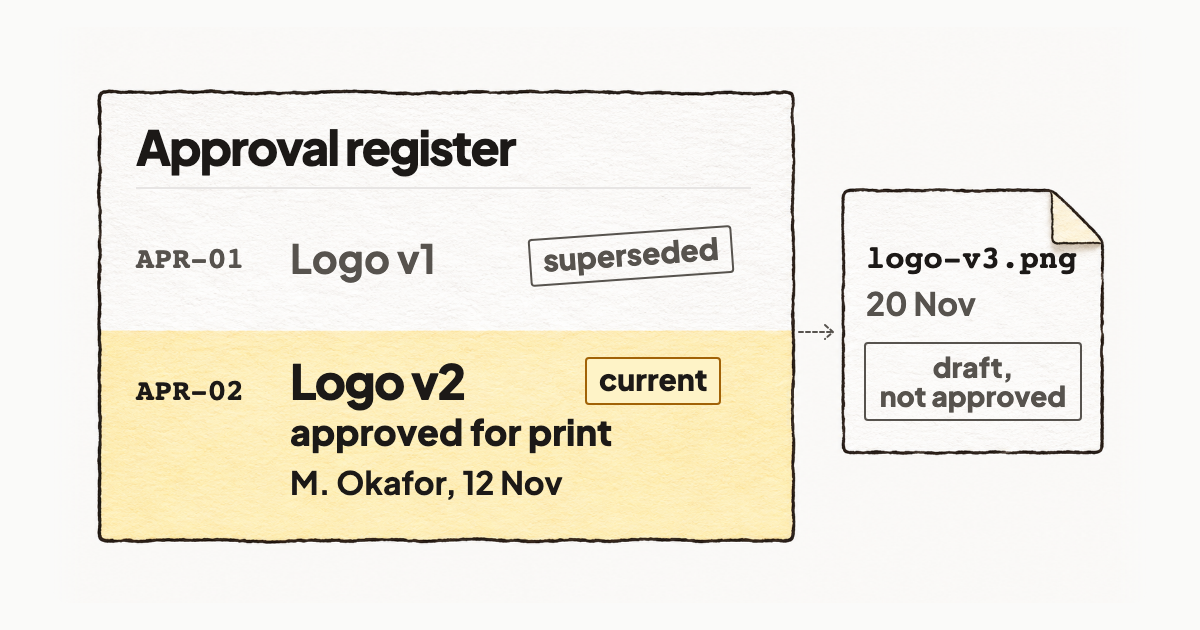
Your AI remembering the client's last message is not the same as knowing which approval still counts.
Don't rely on what the assistant remembers. Keep an approval register per client: what was approved, who approved it, when, where the source lives and which earlier decision it replaces. When you reopen the work in Claude or ChatGPT, ask it to name the current approval and the superseded ones, with a source for each. A newer draft can still be unapproved. If two entries both look current, or a source won't open, the answer is "unresolved", and you ask the client.
Below is a made-up logo job where the newest file in the project is the one nobody approved, and the assistant's recap points straight at it.
What Claude and ChatGPT actually keep
Both assistants can bring earlier client material into a new chat. They do it through different paths, and how much comes along depends on your plan and settings.
In ChatGPT, a project can hold reference files and pasted material, and you can save a chat response, such as a decision note, as a project source. Other chats in the same project can inform later answers, and how far memory reaches outside the project depends on your settings and plan 1. So ChatGPT project memory can draw on the project's sources and its other chats, within whatever your plan and settings allow. ChatGPT's general memory is a separate layer: saved memories are stored apart from chats, and chat-history reference draws on earlier conversations without being a verbatim archive 2.
The precedence rule on the Projects help page is about instructions: "Project instructions apply only within that project and override your global custom instructions" 1. That rule governs instructions. The page says nothing about choosing between two client emails.
Claude projects have a similar shape. Anthropic calls them "self-contained workspaces with their own chat histories and knowledge bases" 3. Project instructions apply to every chat in the project, and anything you add to project knowledge is available across the project's chats 4. Claude project memory and chat search are separate paths on top of that: Anthropic's chat search and memory article says a search started inside a project stays inside that project, each project has its own memory, and a "Use account memory" setting decides whether memory from outside projects comes along 5. The only explicit ranking in Claude's help pages, as of 27 November 2026, sits between two kinds of instructions on Team and Enterprise plans: "When both are set, organization instructions take precedence" 6.
So Projects in both tools can supply context. ChatGPT lets you save a decision note as a project source, but the help page doesn't promise it will pick the current approval for you. Claude's pages don't either. Nothing in them ranks a newer file against an older sign-off. Treat whatever the assistant surfaces as material to check.
Why more remembered context can make this harder
More context feels safer. In practice it also means stale material sits right next to the approval that counts, and the research suggests that can cut against you. In Lost in the Middle, Liu and colleagues found that language models used relevant information best when it sat near the start or end of a long input, and noticeably worse when it was buried in the middle 7. They tested multi-document question answering and key-value retrieval. ChatGPT Projects and client approvals were outside the study, so take it as a general reason for caution with long, mixed context.
Developers using memory features describe the same itch. In a Hacker News thread titled "Memorizing session transcripts isn't useful", one commenter said Claude Code memory can pull in "obsolete info that muddies the waters about current tasks" 8. Another commenter found remembered context useful. It's an anecdote from coding work, but the complaint travels.
An assistant that can see every version of the logo and every "love this" has a big pile to choose from, and nothing in the pile says which one the client signed. Authority sits in three details: who approved, in writing, and what that approval replaced. You have to hand the assistant that shape, because its memory has no field for it.
A worked example: v3 is newer, v2 is approved
This client is invented. Fernhill Cider hires you for a logo, and their contract names Maya Okafor, the marketing lead, as the person who approves deliverables.
- 3 October: Maya approves logo v1 by email.
- 12 November: after a round of feedback, Maya emails: "Approved v2 for print. This replaces v1."
- 20 November: you export v3, trying a darker green, and drop it in the shared folder for comment. Fernhill's co-founder replies in the project channel: "love this."
Three weeks later you reopen the project. Say the assistant's recap leads with v3: it's the newest file and has the freshest chatter around it. Nothing in the project marks v3 as unapproved, so nothing stops the recap from treating it as the plan.
Now trace it. v2 has a source you can open (Maya's 12 November email), an approver the contract names, and an explicit link to what it replaces. v3 has a date and a compliment. It replaces nothing, because nobody with authority said it does. The current approval is v2. The darker green stays a draft, and the co-founder's enthusiasm is worth a quick question to Maya before anything changes.
Change one fact. Say your notes mention that Maya told you on a call "let's go with the green", but there's no email, and the call notes live in a doc you can no longer open. Now two versions claim to be current and one of them has no source you can check. That's unresolved, and neither file goes to the printer yet.
AIGA's standard agreement for design services draws the same line in contract language: a client asking for a change and an authorized change order are separate things, and its model terms tie substantial changes to written approval 9. Plenty of logo tweaks never need a change order. The habit worth borrowing is the bookkeeping: when a client asks for something, you note the request, and when the authorized person approves it, that goes in as its own entry.
The register: one row per decision, and old rows stay
Here's Fernhill's register after 20 November. Keep one per client, in whatever you already use for client notes. Each decision gets a row, and the row points at the proof: where to open it, in words you can search for.
| ID | Decision | Approved by | Date | Source | Status | Supersedes |
|---|---|---|---|---|---|---|
| APR-01 | Logo v1 | Maya Okafor, marketing lead | 3 Oct 2026 | Email: "Approved v1" | Superseded by APR-02 | none |
| APR-02 | Logo v2, print | Maya Okafor, marketing lead | 12 Nov 2026 | Email: "Approved v2 for print. This replaces v1." | Current | APR-01 |
| D-03 | Logo v3, darker green | Not approved | 20 Nov 2026 | Shared folder, logo-v3.png; co-founder comment "love this" | Draft, not an approval | none |
Two columns do most of the work. Supersedes makes the chain explicit, so "current" means the last link in an unbroken line of approvals, traced back from the most recent sign-off. Source is a pointer you can open, like an email subject and date, so you can check the assistant's answer against the original.
Keep the superseded rows. Deleting APR-01 feels tidy, but APR-02's claim partly rests on it: "This replaces v1" only means something while v1 is still on the record. An old approval stays citable after it's replaced. Only its status changes.
Your contract still decides what counts as approval; the register is an index of the evidence, and it only helps if you add the row when the approval arrives. If you already keep a per-client context record, the kind the AI context-switching tax piece argues for, this is one more section of it. That piece covers where client context lives. This one picks out the part that governs.
The reopen check: what to paste into the next chat
Put the register where the assistant can see it. In ChatGPT that can be a project source 1; in Claude, project knowledge 4. Or paste the relevant rows at the top of the new chat. Then ask for the trace before you ask for any work:
Client: Fernhill Cider. Scope: primary logo, print.
Using only the approval register above:
1. Name the current approval for this scope, with its source.
2. List every approval it supersedes, with sources.
3. Flag any file or message newer than the current approval that is not itself an approval.
4. If two entries both claim to be current for this scope, or a source is missing,
   answer "unresolved" and say what is missing. Do not choose.
Then verify the original yourself. The register row is your summary of Maya's email, and the assistant is reading your summary, so open the email and check that it says what the row says. If the source sits in a shared doc or a client-owned folder, make sure you can still reach it and that it hasn't moved; checking who controls each file is its own small job, and a link that opens today can still belong to someone else.
Put the method in your project instructions and keep the decisions in the register. An instruction like "for approvals, use the register and cite the source" ages well. One that says "the approved logo is v2" goes stale the day v4 is approved, and nothing in either vendor's documentation says the assistant will prefer the newer register row over the older instruction.
If you work across several assistants, keep one register in one place and point every tool at it. Copies drift, and then you have two registers disagreeing about the same approval. Keeping one shared work record across ChatGPT, Claude and the rest covers that setup.
When the answer is unresolved
Unresolved covers a few cases. Two entries claim to be current for the same scope. The person who approved something isn't the person the contract names. Or the source behind the current entry won't open, so the row is a claim you can't check.
Two approvals with different scopes can both be current. If Maya approved v2 for print and the green v3 for a social avatar, give them separate rows and name the scope when you ask.
When it really is unresolved, send the authorized contact one specific question that quotes both candidates. For Fernhill, something like:
Hi Maya, before I send files to print: I have your 12 Nov email approving v2 for print, and a note that the darker green v3 might now be preferred. Which one should go to print?
That's a quick reply for her, and a lot cheaper than a reprint.
Objections and limits
"I'll just ask the client every time." After a real conflict, yes. On a routine reopen with a clean chain, asking again spends the client's attention and hints that you lost track. The register is what lets you skip that question with confidence.
"I'll pin the approval in the project instructions." Fast, and fine for a tiny job with one approval and no revisions. Once revisions pile up, the pinned copy is the first thing to go stale.
The register only works if you update it when approvals arrive. Store only the client details your agreement allows, and leave out what the assistant doesn't need. Assistant features change fast and vary by plan and setting; the behaviour described above was checked against the vendors' help pages on 27 November 2026.
This is also a check inside one client. Whether client B's material can leak into client A's work is a separate question, and the two-client test for context leakage is built for that one.
References
- OpenAI Help Center, "Projects in ChatGPT". https://help.openai.com/en/articles/10169521-projects-in-chatgpt. Checked 27 November 2026. Describes project sources, saved chat responses as sources, same-project chat context and the instruction precedence rule quoted above; no rule for conflicting approvals.
- OpenAI Help Center, "Memory in ChatGPT". https://help.openai.com/en/articles/8590148-memory-in-chatgpt. Checked 27 November 2026. Saved memories versus chat-history reference; controls vary by plan.
- Anthropic, Claude Help Center, "What are projects?". https://support.claude.com/en/articles/9517075-what-are-projects. Checked 27 November 2026. Ordinary Claude projects, not the Claude Code projects beta.
- Anthropic, Claude Help Center, "How can I create and manage projects?". https://support.claude.com/en/articles/9519177-how-can-i-create-and-manage-projects. Checked 27 November 2026. Project knowledge and instructions; chats share context only through project knowledge.
- Anthropic, Claude Help Center, "Use Claude's chat search and memory to build on previous context". https://support.claude.com/en/articles/11817273-use-claude-s-chat-search-and-memory-to-build-on-previous-context. Checked 27 November 2026. Project-scoped chat search, project memory and the "Use account memory" setting; no ranking of conflicting sources.
- Anthropic, Claude Help Center, "Set organization instructions". https://support.claude.com/en/articles/14546867-set-organization-instructions. Checked 27 November 2026. Precedence between organization and individual instructions only.
- Nelson F. Liu et al., "Lost in the Middle: How Language Models Use Long Contexts", Transactions of the Association for Computational Linguistics, 2024. https://aclanthology.org/2024.tacl-1.9/. Checked 27 November 2026. Two task types; not a test of ChatGPT or Claude projects.
- Hacker News, "Memorizing session transcripts isn't useful" (discussion). https://news.ycombinator.com/item?id=48776232. Checked 27 November 2026. Individual comments about Claude Code memory; anecdotal.
- AIGA, "Standard Form of Agreement for Design Services". https://www.aiga.org/resources/aiga-standard-form-of-agreement-for-design-services. Checked 27 November 2026. Model terms and practice guidance on change orders and written approval; not legal advice.
Put this project board inside ChatGPT
Open Agiflow in ChatGPT to plan campaigns, create tasks, and check what needs attention. Create a free Agiflow account when you are ready to keep the board for your team.
More to read
AI Tools for Freelance Project Management: Run the Two-Client Test
Before you trust an AI tool with client work, give it two fictional clients and one late revision. It should flag the clash to you privately and keep every trace of client B out of anything client A will see.
5 min readFreelance client file handover: check who controls each file
A working delivery link does not establish a retained copy. Check file-level control separately from the hosting deadline, without imposing indefinite storage.
5 min readMultilingual AI research: check the baseline before claiming an update
In multilingual AI research, a sourced proposal need not prove an update. One Farsi workbook shows why the relevant portal baseline still matters.
5 min read