Antigravity integration
Connect Antigravity to your Agiflow board
Install the Agiflow plugin for Google Antigravity so the coding agent can read and update your projects, work units, tasks, comments, artifacts, and workflow context through Agiflow's MCP tools.
Antigravity plans and writes code from live Agiflow context; Agiflow stays the system of record and only exposes the resource you authorize.
Last updated May 31, 2026. Based on Agiflow product knowledge, the first-party AgiFlow/ai-plugin repository, and public Antigravity MCP documentation.


Keep Antigravity grounded in the work board
Google Antigravity is an agentic development platform where coding agents plan, execute, and verify work across the editor, terminal, and browser. Agiflow gives that agent a live project-management surface through a first-party plugin that connects Antigravity to Agiflow's remote MCP endpoint.
Use this connection when an Antigravity session needs to understand what is assigned, what belongs to a feature, which comments carry implementation context, or where task updates should land after coding work. Agiflow remains the system of record; Antigravity consumes only the tools and resource context you approve during the connection flow.
Install the Agiflow plugin rather than hand-authoring Antigravity MCP JSON. The plugin bundles the correct serverUrl, consumer header, workflow skills, and MCP config shape for Antigravity.
Give Antigravity the context coding work depends on
- Inspect Agiflow project structure and the feature or work-unit context behind the coding task.
- Read task details, update task records, and use task comments as implementation context.
- Load Agiflow workflow skills bundled with the plugin for planning and scrum-style guidance.
- Coordinate workflow locks for long-running or multi-agent work when the authorized scope allows it.
- Act only on the board context available to the connected user and the resource you select at connect time.
Antigravity can act only through the Agiflow MCP tools exposed to the connected user and selected resource. Agiflow uses resource-bound consent rather than broad named scopes, so vault and workflow actions stay governed by the connected user's permissions and the selected resource. Agiflow does not run or host Antigravity agents.
Connect Agiflow to Antigravity
Antigravity can load local plugins. Install the Agiflow plugin folder, restart Antigravity, and let the bundled MCP config connect to Agiflow's remote HTTP endpoint.
Antigravity and other coding agents use https://agiflow.io/api/v1/mcp. Do not use /api/v1/mcp-app/0.0.3 — that endpoint serves the ChatGPT app/widget MCP surface.
Get the Agiflow plugin folder
git clone https://github.com/AgiFlow/ai-plugin.git agiflow-ai-pluginKeep the local folder path handy as /path/to/agiflow-ai-plugin.
Choose a workspace or global install
Workspace install — Agiflow is available only in the current project:
mkdir -p .agents/plugins
cp -R /path/to/agiflow-ai-plugin .agents/plugins/
If your workspace uses the alternate plugin folder, use _agents/plugins/ instead. Global install — Agiflow is available across Antigravity workspaces:
mkdir -p ~/.gemini/config/plugins
cp -R /path/to/agiflow-ai-plugin ~/.gemini/config/plugins/Restart Antigravity
Close and reopen Antigravity. It auto-reads the plugin's root plugin.json marker, bundled skills/, and bundled mcp_config.json.
Approve the Agiflow connection
When prompted, sign in to Agiflow and approve the resource the coding agent should use. Agiflow resolves the organization, project, work-unit, or task scope at connection time.
Try a board prompt
What projects are in my Agiflow workspace?Turn this implementation plan into Agiflow tasks.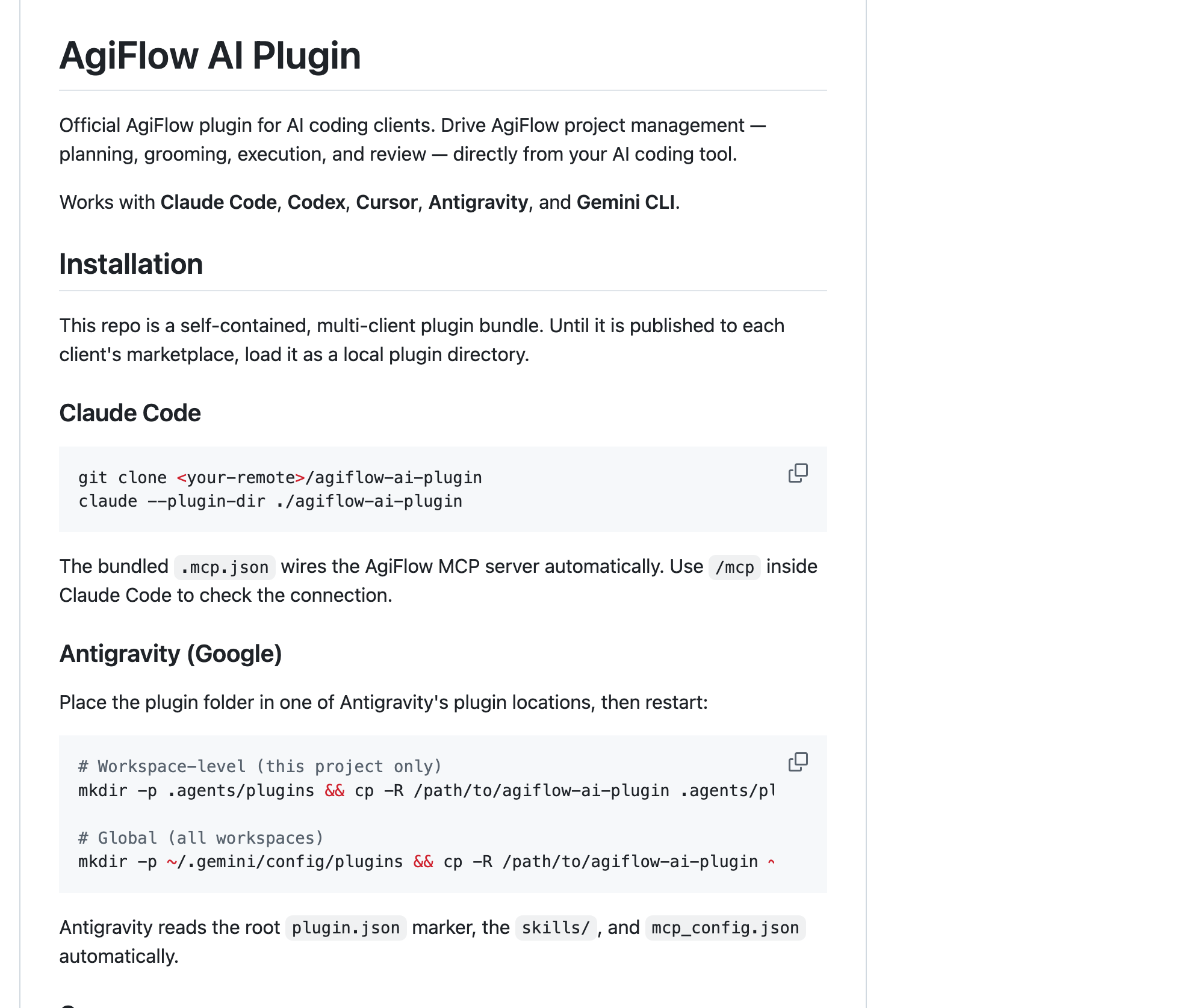
What the plugin configures
You should not need to edit this by hand — the plugin ships the remote MCP wiring for Antigravity:
{
  "mcpServers": {
    "agiflow": {
      "serverUrl": "https://agiflow.io/api/v1/mcp",
      "headers": {
        "x-agiflow-mcp-consumer": "plugin"
      }
    }
  }
}- The remote key is
serverUrl; do not useurlfor Antigravity. - The endpoint is the fixed Agiflow plugin endpoint, not a per-workspace connection URL.
- Antigravity's manual MCP config file is
~/.gemini/config/mcp_config.json, but the plugin path does not require editing it.
If your deployment uses a different Agiflow MCP endpoint, override the plugin endpoint before launching Antigravity:
export AGIFLOW_AI_PLUGIN_MCP_URL="https://mcp.your-agiflow-instance.com/api/v1/mcp"Try Antigravity with your board
Once Agiflow is connected, ask Antigravity to work from the board:
- “What projects are in my Agiflow workspace?”
- “Summarize the active work units for this project.”
- “Turn this implementation plan into Agiflow tasks.”
- “Add a comment with the decision we just made.”
If Antigravity does not show Agiflow
- The plugin folder is in the wrong place
- Confirm whether you meant a workspace install (
.agents/plugins/or_agents/plugins/) or a global install (~/.gemini/config/plugins/), then restart Antigravity. - Antigravity has not restarted
- Antigravity reads plugin folders on startup. Close and reopen the app after copying the plugin folder.
- The server key is wrong in a manual config
- Antigravity remote HTTP servers use
serverUrl. Other clients may useurl, but that is not the Antigravity key. - The wrong board appears
- Disconnect and reconnect Agiflow, then approve the intended organization, project, work unit, or task. Scope is governed by the connected user and selected resource, not by a per-workspace URL.
Frequently asked questions
- Does Antigravity connect to Agiflow over remote HTTP MCP?
- Yes. The Agiflow plugin bundles an Antigravity-compatible mcp_config.json with serverUrl https://agiflow.io/api/v1/mcp and the x-agiflow-mcp-consumer: plugin header.
- Where does Antigravity load the Agiflow plugin from?
- For workspace use, copy the plugin folder to .agents/plugins/ or _agents/plugins/. For global use, copy it to ~/.gemini/config/plugins/, then restart Antigravity.
- Can I limit what Antigravity can see in Agiflow?
- Yes. Agiflow resolves resource scope during the connection flow. Antigravity only receives the context available to the connected user and the organization, project, work unit, or task you select.
- Do I need to edit ~/.gemini/config/mcp_config.json by hand?
- Not for the recommended plugin path. Antigravity’s manual MCP config file is ~/.gemini/config/mcp_config.json and remote servers use serverUrl, but the Agiflow plugin ships the config for you.
- Do I need client credentials for Agiflow?
- No. There is no manual client ID, client secret, or Google credential setup for the plugin path. Install the plugin, restart Antigravity, then approve the Agiflow connection when prompted.
- Is Agiflow listed in an Antigravity marketplace?
- Not from current public sources. Install the Agiflow plugin as a local plugin directory. This page does not claim a marketplace listing, Google partnership, certification, or endorsement.
You might also use
Build your own integration
Agiflow speaks the Model Context Protocol, so any MCP-compatible client can read and update your board.
Read the docs