ChatGPT outdated business information: who can correct the source?
A former client reports outdated business information in ChatGPT. Verify the public record, identify its authorised owner, and scope the next action before promising a correction.
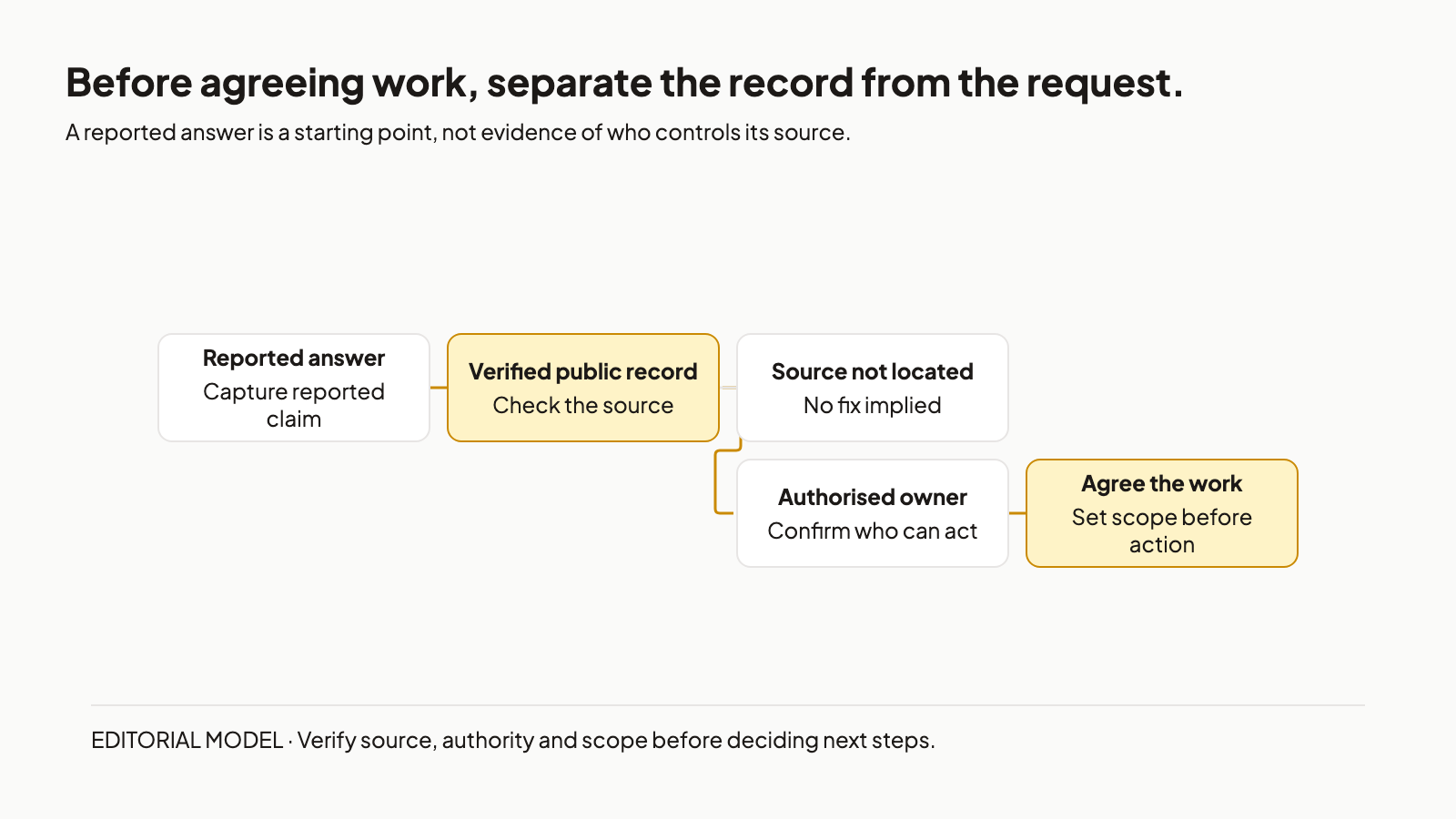
Suppose a former client sends a screenshot: ChatGPT has outdated business information. The project is closed. What are you being asked to repair?
Request the exact answer and visible sources, verify the current public record, identify its authorised owner and edit access, then check the original scope before agreeing further work. If the source is unlocated, record that uncertainty. This is practical routing advice, not a legal verdict or guaranteed answer change. OpenAI says responses that use web search may include citations; the screenshot is a lead, not proof that any cited page is still wrong. [1]
1. Verify the sources behind a reported ChatGPT answer
Start with the reported answer. OpenAI warns that search results and citations can be incomplete, outdated or incorrect. [1] Even a visible citation needs checking before it becomes the basis for a correction request.
Ask for the exact prompt, full response, capture date and any visible citations. A cropped screenshot showing an old detail without the original response or a cited URL leaves a specific gap: you cannot yet name a public record to correct.
Label that source unlocated. Ask for the missing material or agree a limited investigation. Do not infer that the answer came from training data because no citation is visible. OpenAI's guidance does not establish that explanation. [1]
I would keep the request at this evidence stage until there is somewhere to look. Agreeing to “correct business information in ChatGPT” before locating a source leaves the action undefined. A cited URL gives you a lead; the next check decides whether it contains an error now.
2. Verify the source of outdated business information reported in ChatGPT
Open the cited page and inspect the disputed detail. OpenAI recommends checking whether a source supports the answer, reviewing its publication or update date, and using an authoritative source when accuracy matters. [1]
Record the URL, your check date and what the page currently says. Ask the client for the current approved fact if it is missing. A page about the right business is not necessarily evidence for the particular detail in dispute. Nor does a citation prove that the page caused the reported answer.
If the record is still wrong, there is a correction target. If it is already correct, missing or unlocated, document that finding. The remaining answer complaint needs an agreed investigation rather than an assumed page edit.
Be careful with the word “outdated.” Google's Refresh Outdated Content tool concerns qualifying Google Search results for pages or images that disappeared or changed significantly. Google says it is not for a live page where the disputed information is still present. [3] It is not a ChatGPT correction channel. A wrong live listing and a changed page's old Google result require different routes.
Once you have a still-wrong record, find the person who can act on it.
3. Route an outdated business listing to its authorised owner
Do not use historic setup work as confirmation of current permission. Google Business Profile provides a concrete distinction: editing your profile requires signing into its linked Google Account. Someone who does not own or manage the profile can suggest an edit, and Google reviews edits before publishing them. [2]
Yelp describes its own update path: claim the business page, sign in and use the Business Information controls. [4] These are named platform procedures, not a universal directory rule. Check the guidance for the actual listing involved.
For a client-controlled website, ask the client to identify the authorised editor and confirm current access. Confirm permission to resume work rather than relying on the earlier engagement.
For a third-party listing, establish who controls the account and which owner, suggestion or request path that platform permits. A permitted suggestion is different from an owner edit. On Google Business Profile, either route is subject to Google's review. [2]
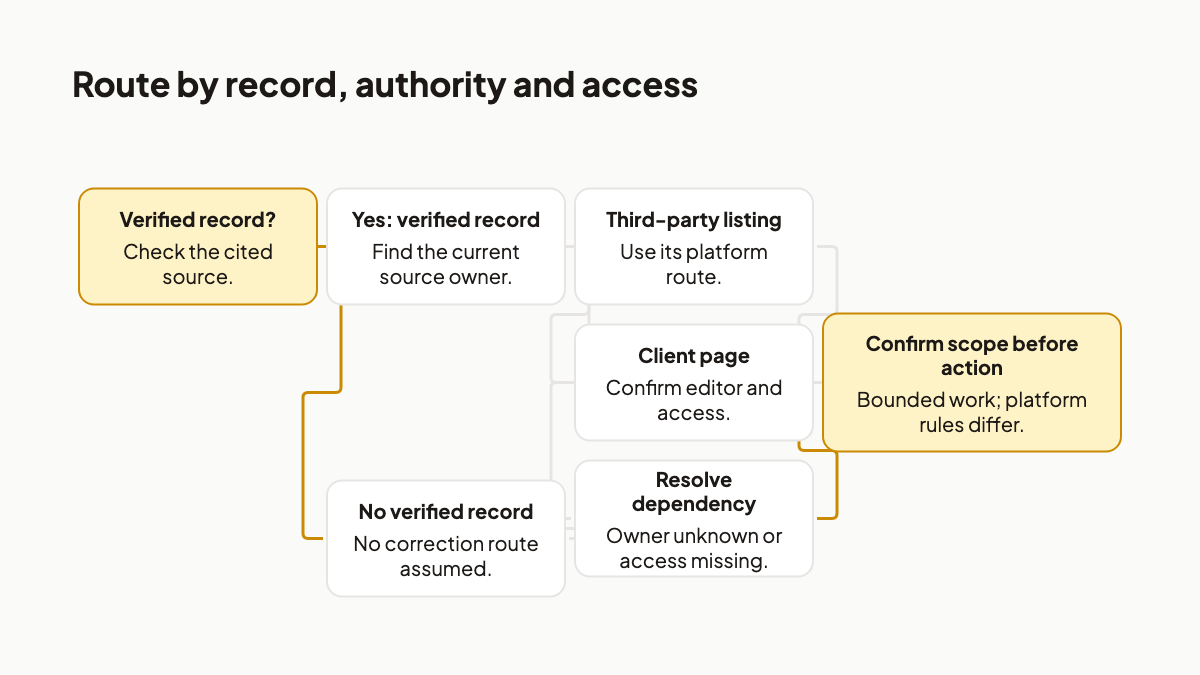
Leave an unknown owner or missing access visible in the finding. “Client must identify the account holder” is an actionable dependency. “Correction underway” would conceal it.
This routing step can end without an edit. That is useful: you have identified what blocks the action. With an actor and route established, you can decide which part of the work the former freelancer is being asked to do.
4. Scope the next action, not a changed AI answer
Consider a hypothetical complaint about a ChatGPT answer showing an incorrect product price. A cited third-party listing still shows an old monthly price. The client supplies the current approved fact and controls the listing account; the former freelancer has no current edit access. This is an editorial example, not a completed correction.
The proposed correction actor is the client's authorised account holder, following that platform's instructions. The freelancer might document the finding, prepare a request or assist an authorised edit. Each is a different deliverable.
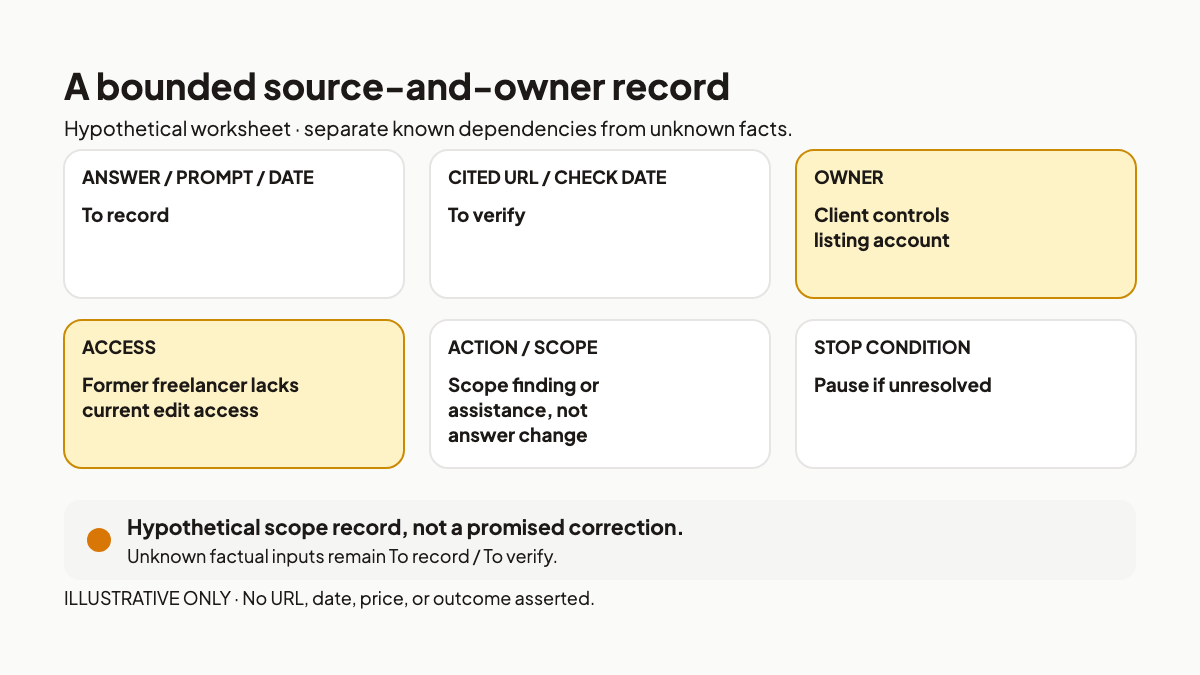
Use a six-field source-and-owner record:
- Reported answer, prompt and capture date.
- Cited record URL and check date.
- Disputed detail and current approved fact.
- Authorised owner and current edit access.
- Proposed action and original-scope check.
- Agreed stop condition and unresolved dependency.
Before proposing new work, read the original brief and handover. The client's strongest objection may be fair: continuing visibility or maintenance support could have been part of the arrangement. If the agreed scope covers the identified action, handle it there. Otherwise, describe the bounded work you propose. Project close alone does not settle that question.
Keeping those commitments retrievable is the adjacent lesson in AI context switching for freelancers. Preserving client context is different from establishing who can edit a public record after close.
For the hypothetical request, an investigation could stop at a documented source-owner finding, including missing access. Correction assistance needs approval and access. Neither acceptance criterion should be “ChatGPT now says the right thing.” OpenAI's cited guidance supplies no timetable or guarantee that a source edit will change a later answer. [1] A separately agreed retest records another observation; the complaint may remain unresolved.
If a former client reports outdated business information in ChatGPT, use the source-and-owner record above to define the next action before agreeing to more work.
References
[1] OpenAI Help Center, "Searching the web with ChatGPT." https://help.openai.com/en/articles/9237897-searching-the-web-with-chatgpt. Relevant because it explains that web-search responses may include citations, warns that results and citations can be incomplete, outdated or incorrect, and recommends inspecting source support, dates and authority. Guidance checked during research on 30 September 2026.
[2] Google Business Profile Help, "Edit your Business Profile." https://support.google.com/business/answer/3039617?hl=en. Relevant because it distinguishes editing through the linked account from suggesting an edit to someone else's profile and says Google reviews edits before publishing them. Guidance checked during research on 30 September 2026.
[3] Google Search Console Help, "Refresh Outdated Content tool." https://support.google.com/webmasters/answer/7041154?hl=en. Relevant because it limits the tool to qualifying Google Search page or image states, rather than correcting disputed information still present on a live page. Guidance checked during research on 30 September 2026.
[4] Yelp for Business, "The business information you should update on Yelp," 17 June 2024. https://business.yelp.com/resources/articles/updating-your-business-information-on-yelp/?domain=local-business. Relevant because Yelp's documented update path starts with claiming the business page and signing in before using Business Information controls. Guidance checked during research on 30 September 2026.
More to read
AI Context Switching for Freelancers: The Hidden Tax
Freelancers do not pay the AI tax because they are bad at prompting. They pay it because multi-client AI work makes one person carry client memory across chats, tools, files, tasks, and approvals.
13 min readTyped Decisions for AI Agent Workflows: Record Before Routing
A typed model answer is an inference result, not a workflow transition. Record it once, pin the policy that consumes it, and replay the same decision without silently asking again.
12 min readGPT-6 Astra Changes the Bottleneck: Five Controls Agents Still Need
GPT-6 Astra raises the operating stakes for computer-using agents. Use five controls to define authority, evidence, approval, and recovery beyond the model.
12 min read