Plan Limits and Usage
As of May 2026, Agiflow enforces usage limits per organization based on the current billing plan. This page lists the limits for each resource category, explains how enforcement works, and describes what happens when a limit is reached.
Last updated
01 — Quick answer
Agiflow's Free plan limits organizations to 3 Projects, 2 API Keys, 3 MCP Servers, and 2 Seats. Paid plans offer unlimited usage, and blocked actions show an upgrade dialog. Limits are checked at creation time. If the count has already reached the plan cap, the action is blocked and an Upgrade Required dialog is shown with an option to navigate to the billing subscription page.
02 — Usage Categories
The dashboard tracks usage across four categories. On the Billing settings page, each category shows a progress bar with the current count and plan limit.
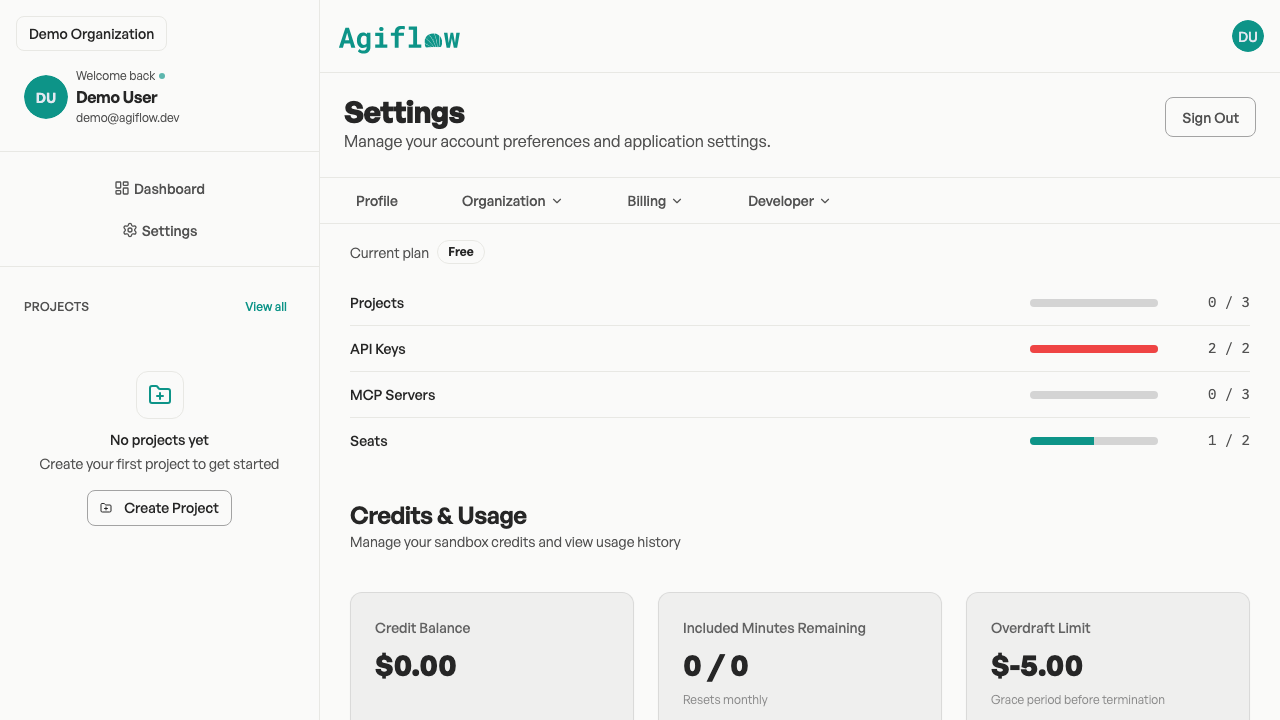
| Category | Description |
|---|---|
| Projects | The number of projects created in the organization. |
| API Keys | The number of API keys generated for assistant connections and programmatic access. |
| MCP Servers | The number of MCP server connections configured for the organization. |
| Seats | The number of members invited to the organization. |
03 — Plan Limits
Limits are checked at the time a resource is created. Paid plans offer unlimited usage across all categories.
| Plan | Projects | API Keys | MCP Servers | Seats |
|---|---|---|---|---|
free | 3 | 2 | 3 | 2 |
basic_monthly | Unlimited | Unlimited | Unlimited | Unlimited |
basic_yearly | Unlimited | Unlimited | Unlimited | Unlimited |
Unlimited is represented internally as -1. The Free plan has hard limits for every category.
04 — How Limits Are Enforced
When you attempt to create a project, generate an API key, add an MCP server, or invite a member, Agiflow resolves the organization's current plan and counts existing usage for that category. If the organization is on the Free plan and the count has already reached the limit, the action is blocked and an upgrade dialog is shown.
Paid plans (basic_monthly and basic_yearly) do not enforce numeric limits, so creation requests proceed without quota checks.
05 — What Happens at the Limit
If a Free-plan organization reaches a category limit:
- An Upgrade Required dialog appears with a message describing the blocked action (for example, "You have reached your project limit on the Free plan").
- You can dismiss the dialog to continue working within the current limits.
- Selecting Upgrade Plan navigates to the billing subscription page where you can change plans.
Usage data is cached for 60 seconds, so recent changes may take a moment to reflect on the dashboard.